ToolMage
Sign in

Best 1 Utility Directory AI tools for Software

Popular Utility Directory AI tools in Software include AIGOSEARCH, helping you work more efficiently.

AIGOSEARCH
Free

AIGOSEARCH

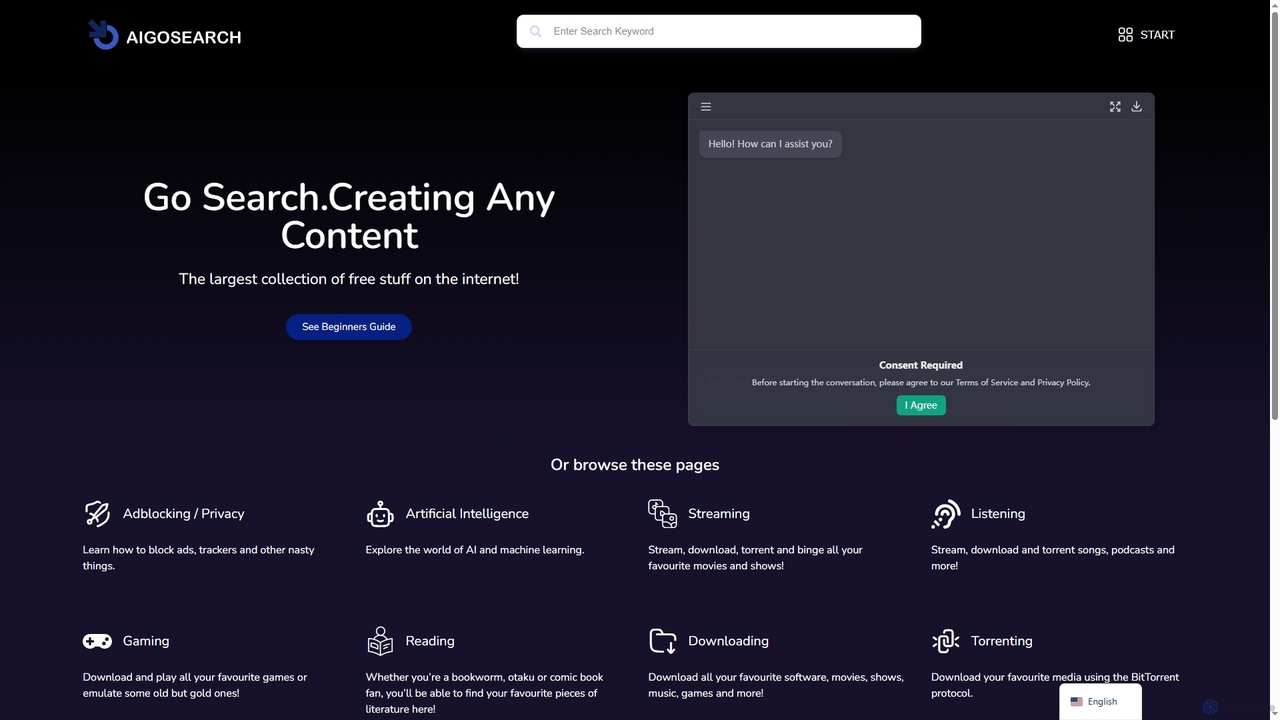
AIGOSEARCH is a comprehensive online hub providing access to a vast collection of free tools, utilities, and digital resources. It serves as an all-in-one platform for discovering guides, software, media, and educational content across various categories, designed for students, developers, designers, and curious internet users alike.

Ai Resource Hub
Visits 3.4KFavorites 100Likes 101

About Utility Directory

Utility Directory refers to a collection of AI-powered software tools designed to perform specific, often supplementary, tasks that enhance system functionality, data management, or overall digital operations. These intelligent utilities leverage AI algorithms to automate routine processes, optimize resource usage, and provide advanced analytical capabilities beyond standard applications. They serve to streamline workflows, improve efficiency, and offer smart solutions for tasks ranging from data organization to system maintenance, making complex operations more accessible and less time-consuming.

Core Features

  • Intelligent Automation: Automate repetitive tasks like data sorting, file organization, or system clean-up using AI.
  • Predictive Maintenance: Analyze system performance data to predict potential issues and recommend preventative actions.
  • Advanced Data Processing: Utilize AI for smart data extraction, transformation, and loading (ETL), enhancing data quality and accessibility.
  • Resource Optimization: Dynamically manage system resources, such as memory or CPU, to improve application performance.
  • Smart File Management: Categorize, tag, and search files more efficiently with AI-driven content analysis.

Applicable Scenarios

These AI utility tools are invaluable across various sectors. IT administrators use them for proactive system monitoring and maintenance, ensuring stable operations. Data analysts leverage them for intelligent data preparation and cleansing, improving the accuracy of their insights. Content creators can automate file organization and metadata tagging, streamlining their asset management workflows. Businesses integrate them to automate backend processes, reduce manual errors, and free up human resources for more strategic tasks.

How to Choose

When selecting an AI utility tool, consider its specific functionality and how well it aligns with your operational needs. Evaluate its integration capabilities with existing software ecosystems to ensure seamless workflow. Assess the level of AI sophistication, looking for features like machine learning adaptability and natural language processing if relevant. Finally, review the pricing model, user interface, and customer support to ensure it offers both value and ease of use for your team.

Featured tool rankings

Utility Directory use cases

1

Automating Data Cleansing and Transformation

Data analysts and scientists often spend significant time cleaning and transforming raw data before analysis. AI utility tools can automatically identify and correct inconsistencies, fill missing values, and standardize formats across large datasets. This drastically reduces manual effort, ensures higher data quality, and accelerates the preparation phase for machine learning models or business intelligence reports, saving hours of tedious work.

2

Proactive System Monitoring and Anomaly Detection

IT administrators can deploy AI utility tools to continuously monitor server performance, network traffic, and application logs. These tools use machine learning to establish baseline behaviors and detect unusual patterns or anomalies that might indicate a security breach, hardware failure, or performance bottleneck. This enables proactive intervention, preventing downtime and maintaining system integrity before issues escalate.

3

Intelligent File Organization and Archiving

For individuals and teams dealing with vast amounts of digital assets (documents, images, videos), AI utilities can automatically categorize, tag, and organize files based on their content, context, and usage patterns. This eliminates manual sorting, makes files easily searchable, and streamlines archiving processes. For example, a marketing team can automatically tag campaign assets by product, date, and channel, significantly improving asset retrieval and management.

4

Optimizing Cloud Resource Allocation

Cloud engineers and DevOps teams can utilize AI utility tools to dynamically manage and optimize cloud infrastructure resources. These tools analyze usage patterns, predict future demands, and automatically scale resources up or down, ensuring optimal performance while minimizing costs. This prevents over-provisioning during low demand and ensures sufficient capacity during peak loads, leading to significant cost savings and improved service reliability.

5

Automating Routine Administrative Tasks

Office managers and administrative staff frequently handle repetitive tasks such as scheduling, email sorting, and document processing. AI utility tools can automate these tasks by understanding context, prioritizing communications, and even drafting responses or generating reports. This frees up administrative personnel to focus on more complex, human-centric tasks, boosting overall office productivity and reducing operational overhead.

6

Smart Content Summarization and Extraction

Researchers, journalists, and content creators often need to quickly grasp the essence of lengthy documents or extract key information. AI utility tools can process large volumes of text, summarize key points, identify entities, and extract relevant data. This capability is invaluable for literature reviews, competitive analysis, or quickly understanding complex reports, significantly accelerating information gathering and content creation workflows.

Utility Directory FAQ

What are AI Utility Directory tools?

AI Utility Directory tools are specialized software applications that leverage artificial intelligence to perform practical, often supplementary, tasks for system management, data processing, and operational enhancement. Unlike core applications, they focus on automating, optimizing, and intelligentizing specific functions, such as smart file organization, predictive system maintenance, or advanced data cleansing, to improve efficiency and reduce manual effort.

How do AI utility tools differ from standard software applications?

Standard software applications typically provide core functionalities for a specific domain (e.g., word processing, graphic design). AI utility tools, while also software, are designed to enhance or manage these core applications or the underlying system. Their key differentiator is the integration of AI, enabling them to learn, adapt, automate complex tasks, and make intelligent decisions, going beyond rule-based automation to offer predictive and adaptive capabilities.

Who benefits most from using AI Utility Directory tools?

A wide range of users benefits from AI Utility Directory tools. IT professionals gain from automated system monitoring and maintenance. Data analysts and scientists use them for intelligent data preparation. Content creators and marketers leverage them for smart asset management. Businesses of all sizes can improve operational efficiency by automating administrative tasks, optimizing resource allocation, and enhancing overall productivity across various departments.

What should I consider when integrating AI utility tools into my workflow?

When integrating AI utility tools, first assess your specific pain points and identify which tasks could benefit most from automation or intelligence. Consider the tool's compatibility with your existing software and infrastructure, its scalability, and the learning curve for your team. Data privacy and security features are also crucial, especially when dealing with sensitive information. Start with a pilot project to evaluate its real-world impact before full deployment.

Can AI utility tools help with cybersecurity?

Yes, AI utility tools play a significant role in enhancing cybersecurity. They can be used for advanced threat detection by analyzing network traffic and user behavior for anomalies that indicate potential attacks. They also assist in vulnerability management by identifying weaknesses in systems and applications. Furthermore, AI-powered utilities can automate incident response, helping to contain and mitigate security breaches more rapidly and effectively than manual processes.