
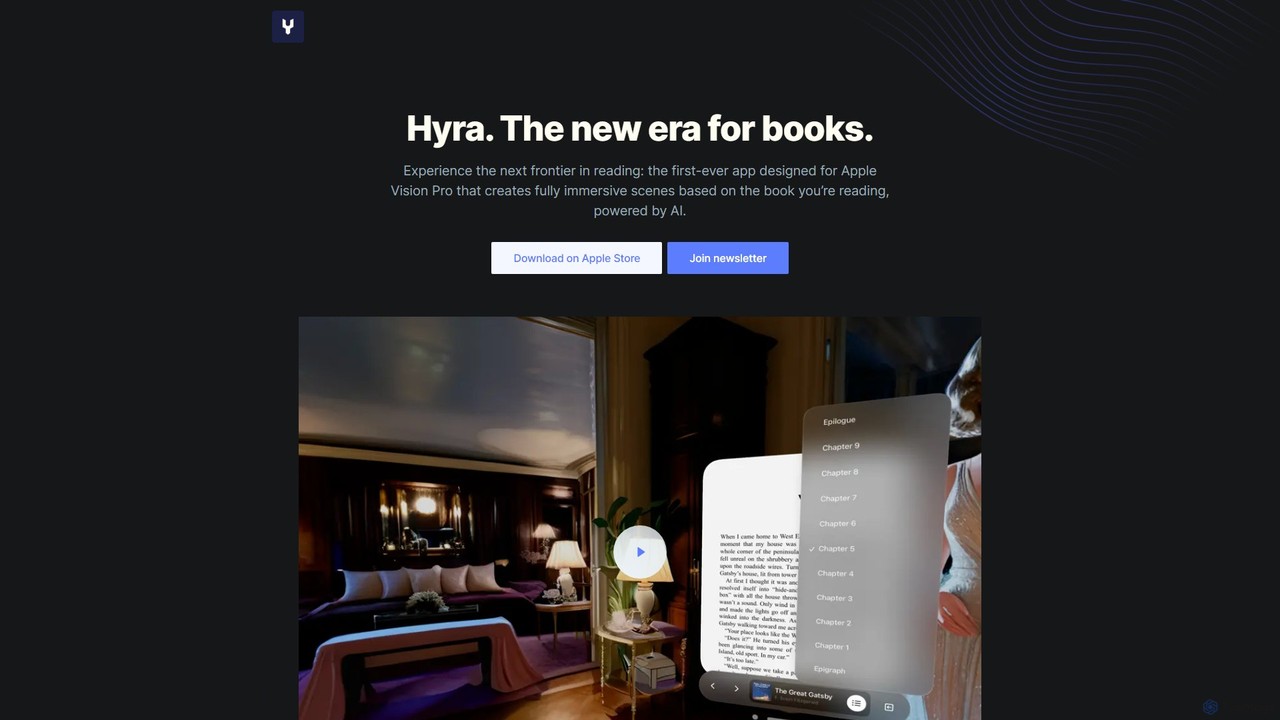
Hyravision
Hyravision is a revolutionary AI-powered app for Apple Vision Pro that transforms reading into a fully immersive experience. …
Hyravision is a revolutionary AI-powered app for Apple Vision Pro that transforms reading into a fully immersive experience. As you read, it generates dynamic, 360-degree visual scenes based on the book's text, bringing literary worlds to life around you. Explore classic novels like never before through the new era of spatial reading.
About Applications
Virtual & Augmented Reality Applications are complete, ready-to-use software programs designed to deliver immersive experiences on VR/AR hardware. These tools leverage spatial computing and 3D rendering to create interactive digital environments or overlay information onto the physical world. Their primary value lies in transforming training, design, collaboration, and entertainment by offering realistic simulations and intuitive spatial interactions. Unlike development kits, these are end-user products focused on specific tasks and industries.
Core Features
- Immersive Environment Simulation: Creates fully interactive and realistic 3D virtual worlds for training or exploration.
- Real-time 3D Interaction: Allows users to manipulate virtual objects with natural hand movements or controllers.
- Multi-user Collaboration Spaces: Provides shared virtual environments where teams can interact and work together regardless of location.
- Contextual Data Overlay (AR): Augments the user's view of the real world with relevant digital information, instructions, or graphics.
- Haptic Feedback Integration: Connects with compatible hardware to provide tactile sensations, enhancing realism and immersion.
Use Cases
These applications are widely used in sectors requiring hands-on training and complex visualization. For example, in healthcare for surgical simulations, in manufacturing for assembly line training, and in architecture for immersive building walkthroughs. They also enable remote collaboration for design reviews and virtual meetings.
How to Choose
When selecting a VR/AR application, consider hardware compatibility (e.g., Meta Quest, HoloLens, Vive). Evaluate its focus on your specific industry and the depth of its features. Assess whether it supports single-user or multi-user experiences, and check for integration capabilities with your existing software systems and workflows.
ApplicationsUse Cases
Surgical Training Simulation
A medical school uses a VR application to train aspiring surgeons. Students wear VR headsets and use haptic controllers to perform complex surgical procedures on realistic virtual patients. The application simulates blood flow, tissue response, and potential complications, providing a risk-free environment to practice and refine skills. This allows trainees to gain hands-on experience and muscle memory before entering a real operating room, significantly improving patient safety and learning outcomes.
Architectural Design Walkthrough
An architecture firm allows clients to experience a building design before construction begins. Using a VR application, clients and architects can walk through a full-scale, photorealistic virtual model of the proposed structure. They can assess spatial relationships, lighting, and material finishes in an immersive way that 2D drawings cannot convey. This process helps identify design issues early, facilitates clearer communication, and ensures the final building meets the client's vision, saving time and reducing costly changes during construction.
Remote Assistance for Field Technicians (AR)
A field technician uses an AR application on smart glasses to repair complex machinery. The application overlays digital instructions, diagrams, and 3D models directly onto the technician's view of the equipment. If needed, they can initiate a video call with a remote expert who can see what the technician sees and provide real-time guidance by drawing annotations that appear locked onto the physical object. This reduces repair times, minimizes errors, and avoids the cost of sending an expert to the site.
Collaborative Virtual Whiteboarding Session
A globally distributed product team uses a VR collaboration application for a brainstorming session. Each team member, represented by an avatar, meets in a shared virtual room equipped with infinite whiteboards, sticky notes, and 3D model importers. They can talk, gesture, and interact with content as if they were in the same physical space. This immersive co-presence fosters more natural communication and creative flow compared to traditional video conferencing, leading to more effective ideation and planning.
Immersive Retail Product Visualization (AR)
A furniture retailer provides an AR application that allows customers to visualize products in their own homes before buying. Using their smartphone camera, a customer can select a sofa from the catalog and place a true-to-scale 3D model of it in their living room. They can walk around the virtual sofa, check its dimensions, and see how different colors and fabrics look with their existing decor. This 'try before you buy' experience increases purchase confidence, reduces product returns, and enhances customer engagement.
High-Risk Job Safety Training
A manufacturing company uses a VR application to train employees on emergency shutdown procedures for heavy machinery. In the virtual environment, workers can face simulated equipment malfunctions, fires, or chemical spills. They must follow correct safety protocols to resolve the crisis. This allows them to practice critical, high-stakes procedures repeatedly in a safe setting, ensuring they can react calmly and correctly in a real emergency, thereby reducing workplace accidents and improving overall safety compliance.