ToolMage
Sign in

Best 1 No Code Builder AI tools for Website & App Building

Popular No Code Builder AI tools in Website & App Building include SpreadSimple, helping you work more efficiently.

SpreadSimple
Freemium

SpreadSimple

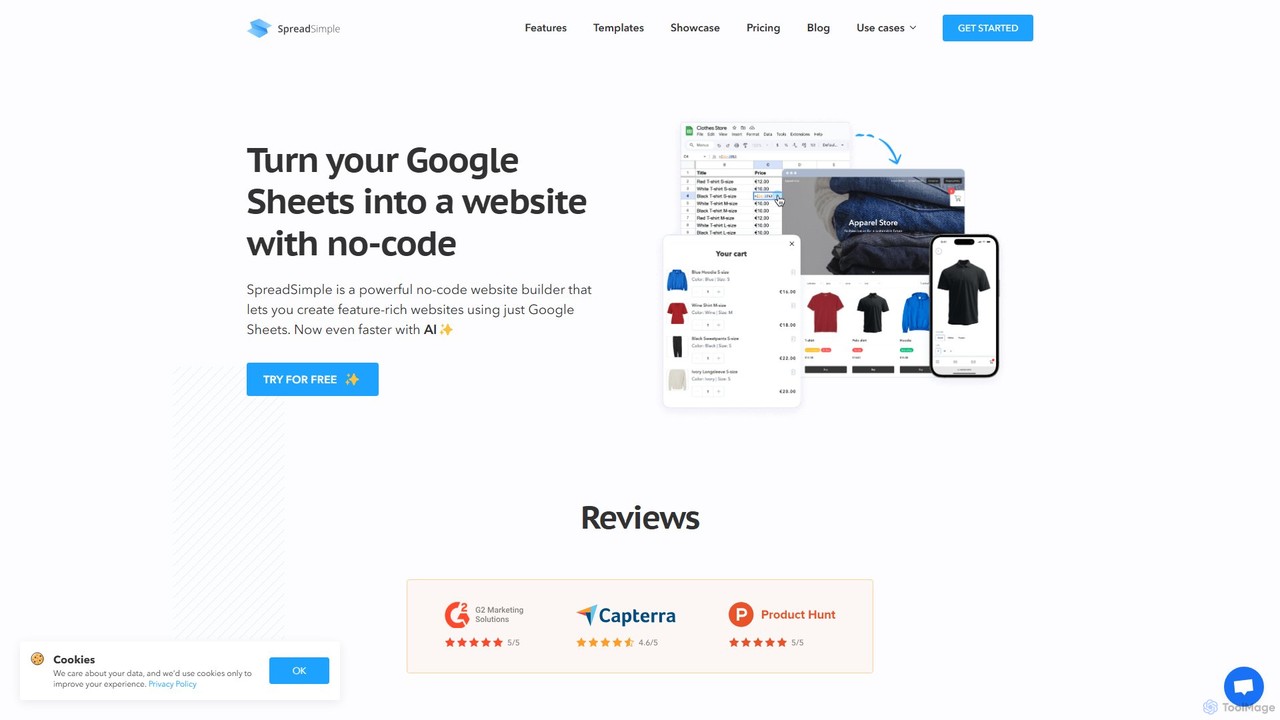
SpreadSimple is a powerful no-code website builder that transforms Google Sheets into modern, feature-rich websites. With its AI Creator, you can generate a complete website structure, logo, and color scheme just by describing your idea. It's perfect for e-commerce, directories, and real estate listings, allowing you to manage all content effortlessly from a familiar spreadsheet interface.

Store Builder
Visits 23.1KFavorites 144Likes 140

About No Code Builder

No Code Builders are visual development platforms that enable users to create fully functional applications and websites without writing a single line of code. These tools operate on principles of visual modeling, utilizing drag-and-drop interfaces, pre-built components, and logic workflows to assemble software. This approach dramatically lowers the technical barrier, empowering entrepreneurs, marketers, and business professionals to build, test, and launch digital products with unprecedented speed. Unlike traditional development, No Code Builders accelerate prototyping and iteration, significantly reducing the time and cost associated with bringing an idea to life.

Core Features

  • Visual Drag-and-Drop Editor: Build user interfaces and layouts by arranging pre-made elements on a visual canvas.
  • Workflow and Logic Automation: Define application behavior and business processes by visually connecting triggers and actions.
  • Integrated Database Management: Create, manage, and connect application data through a user-friendly, often spreadsheet-like, interface.
  • Third-Party API Integration: Easily connect to other services and data sources through pre-built connectors and visual API configuration.
  • One-Click Deployment: Publish web applications, progressive web apps (PWAs), or internal tools directly to the web with minimal configuration.

Use Cases

No Code Builders are exceptionally well-suited for creating Minimum Viable Products (MVPs) to validate business ideas quickly. They are also widely used by operations teams to build custom internal tools, such as project management dashboards, inventory trackers, or approval workflows, without relying on IT resources. Additionally, agencies and freelancers use them to develop client portals and simple e-commerce sites.

How to Choose

When selecting a No Code Builder, first consider the primary application type you intend to build—web, mobile, or internal tool—as platforms often specialize. Evaluate the platform's scalability limits regarding database size, user traffic, and performance. Assess its integration ecosystem to ensure it connects with your existing software stack. Finally, review the pricing model and policies on data ownership and export capabilities to avoid future vendor lock-in.

Featured tool rankings

No Code Builder use cases

1

Build a Minimum Viable Product (MVP)

An entrepreneur with a business idea but no coding skills needs to validate their concept with real users. Using a No Code Builder, they can visually design the user interface, set up a database for user accounts and listings, and create the core logic for features like booking or matching. This allows them to launch a functional prototype in weeks instead of months, gather crucial user feedback, and demonstrate traction to potential investors without hiring an expensive development team.

2

Create a Custom Internal Tool

An operations manager in a mid-sized company needs a custom tool to track equipment rentals and maintenance schedules. Instead of waiting in a long IT queue, they use a No Code Builder to create an application. They build forms for new rental requests, a database to log equipment status, and automated email reminders for upcoming maintenance. The resulting tool is perfectly tailored to their team's workflow, improves efficiency, and is deployed and ready for use in just a few days.

3

Develop a Client Portal

A design agency wants to provide a better experience for its clients. They use a No Code Builder to create a secure portal where clients can log in to view project timelines, access shared files, provide feedback directly on mockups, and see invoice statuses. This centralizes communication, reduces back-and-forth emails, and provides a professional, transparent experience for clients. The agency builds and customizes this portal without writing code, integrating it with their existing project management and billing software via APIs.

4

Automate a Marketing Workflow

A marketing team needs to streamline their lead generation process. Using a No Code Builder with automation features, they create a workflow. When a new lead submits a form on their website, the workflow automatically enriches the contact data using a third-party API (like Clearbit), adds the lead to their CRM with the correct tags, and then triggers a personalized welcome email sequence. This entire process is built visually, saving hours of manual data entry each week and ensuring leads are followed up with instantly.

5

Launch a Niche Marketplace Website

A community organizer wants to create an online marketplace for local artisans to sell their crafts. Using a No Code Builder, they design a platform with profiles for sellers, product listing pages, a shopping cart, and an integrated payment system (like Stripe). They can set up the data structure for products, orders, and user reviews without database expertise. This enables them to launch a fully functional, two-sided marketplace that serves their community's specific needs, a task that would typically require a significant budget and technical team.

6

Build a Community Membership Site

A content creator wants to build a private community for their followers with exclusive content and forums. They use a No Code Builder to create a membership site. The platform handles user registration and logins, manages different subscription tiers with varying access levels, and hosts a forum or discussion board. They can integrate with a payment provider to handle recurring subscriptions. This empowers the creator to monetize their audience and build a deeper connection without needing to know how to manage servers, databases, or user authentication code.

No Code Builder FAQ

What is a No Code Builder?

A No Code Builder is a type of software that allows users to create applications through a visual, graphical user interface instead of traditional computer programming. The core principle is to empower non-technical users to build and deploy functional software without writing any code. They typically feature a drag-and-drop editor for designing interfaces, visual workflow builders for defining logic, and integrated databases for managing data. Common examples include building internal tools, client portals, and mobile apps.

What is the difference between No Code and Low Code?

The primary difference lies in the target user and the need for coding. No Code platforms are designed for business users and non-developers, requiring zero coding knowledge. They use purely visual interfaces. Low Code platforms are designed for developers to accelerate their work. They provide visual development tools but also allow and often require developers to write custom code for specific logic, integrations, or UI components. In short, No Code is about empowerment for non-tech users, while Low Code is about efficiency for developers.

Who should use No Code Builders?

No Code Builders are ideal for a wide range of non-technical users who need to create digital solutions. This includes:

  • Entrepreneurs: To quickly build and test Minimum Viable Products (MVPs) for their startups.
  • Business Analysts & Operations Managers: To create custom internal tools and automate workflows without relying on IT departments.
  • Marketers: To build landing pages, simple apps, and automated campaigns.
  • Small Business Owners: To create their own websites, client portals, or simple e-commerce platforms.
  • Product Managers: To prototype and iterate on new product ideas with functional models.

Essentially, anyone with a clear idea of what they want to build, but without the time or skills for traditional coding, can benefit from these tools.

What are the limitations of No Code Builders?

While powerful, No Code Builders have limitations. The most common is a lack of deep customization; you are often confined to the components and logic options provided by the platform. Scalability can be a concern for applications expecting very high traffic or complex database queries. There is also a risk of 'vendor lock-in,' where it can be difficult to migrate your application and data to another platform or a custom-coded solution. Finally, for highly specialized or computationally intensive tasks, traditional code still offers more power and flexibility.

How do I choose the right No Code Builder?

Choosing the right No Code Builder depends on your specific project needs. Consider these factors:

  • Application Type: Does the platform specialize in web apps, mobile apps, internal tools, or websites? Choose one that aligns with your goal.
  • Scalability: Assess the platform's limits on database records, user traffic, and workflows. Ensure it can support your project's potential growth.
  • Integration Capabilities: Check if it offers pre-built integrations with the other tools you use (like CRMs, payment gateways, or marketing automation software).
  • Pricing Model: Understand how the platform charges—per user, per app, based on usage, or a flat fee. Choose a model that fits your budget and expected scale.
  • Learning Curve: While all are 'no-code,' some platforms are more complex than others. Try out a few to see which interface feels most intuitive to you.