HelpKit
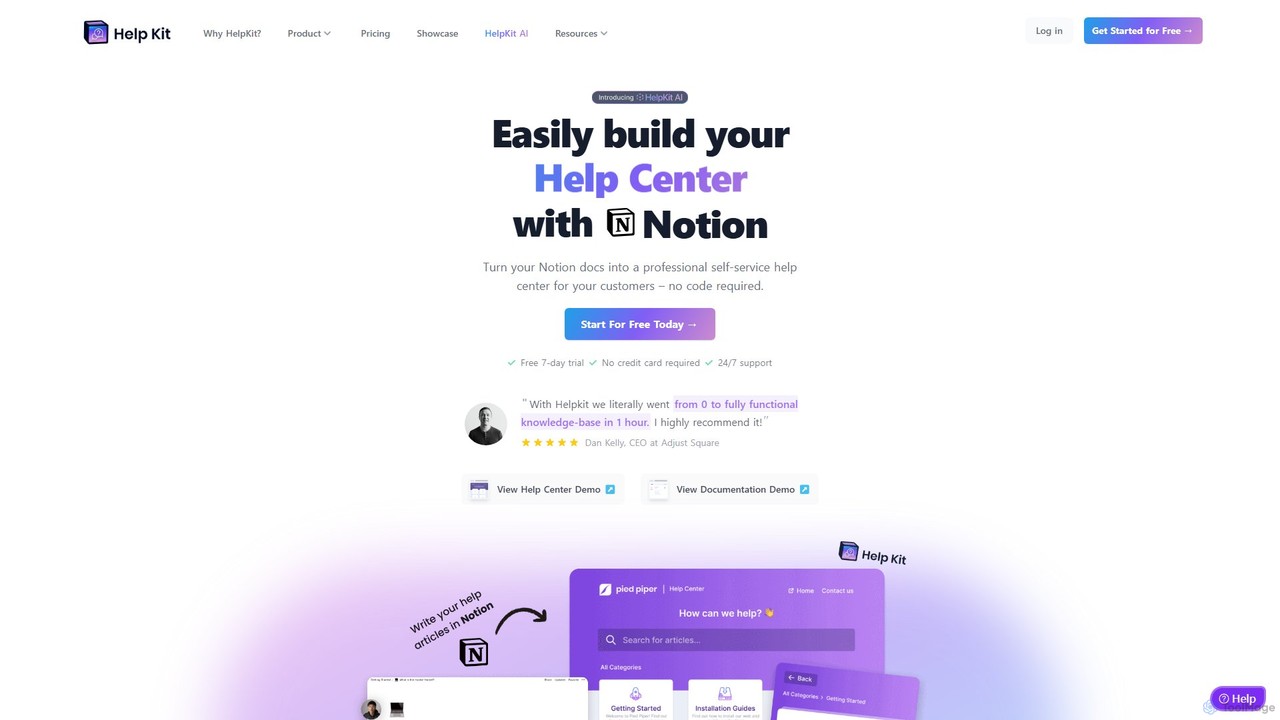
HelpKit is a no-code platform that transforms your Notion documents into a professional, fast, and SEO-optimized knowledge base, …
HelpKit is a no-code platform that transforms your Notion documents into a professional, fast, and SEO-optimized knowledge base, help center, or documentation site. It helps reduce support tickets by enabling customers to find answers themselves, 24/7.
About No Code
No Code tools are platforms that enable users to build websites, web applications, and mobile applications without writing a single line of code. These innovative tools leverage visual development environments, drag-and-drop interfaces, and pre-built components to simplify the entire development process. They empower individuals and businesses to rapidly prototype, launch, and iterate on digital products, significantly reducing development time and costs.
Core Features
- Visual Editor: Provides an intuitive drag-and-drop interface for designing user interfaces and arranging components.
- Pre-built Templates: Offers a library of ready-to-use templates for various app types, accelerating project kick-off.
- Workflow Automation: Allows users to define custom logic and automate processes without coding, using visual flowcharts.
- Database Management: Integrates visual tools for creating and managing databases, handling data storage and retrieval.
- Integrations: Supports connections with popular third-party services like payment gateways, CRMs, and marketing tools.
Applicable Scenarios
No Code platforms are ideal for entrepreneurs launching startups, small businesses creating internal tools, and marketers building landing pages or campaign sites. They are also widely adopted by product managers for rapid prototyping and by content creators for developing interactive portfolios or community platforms, enabling quick deployment without relying on extensive technical resources.
How to Choose
When selecting a No Code platform, consider its specific application type support (web, mobile, internal tools), the flexibility and customization options offered by its visual editor, and the range of pre-built integrations available. Evaluate the platform's scalability for future growth, its pricing model, and the community support or learning resources provided to ensure it aligns with your project's technical requirements and budget.

No CodeUse Cases
Rapid MVP Development for Startups
An entrepreneur with a new business idea can use a No Code platform to quickly build a Minimum Viable Product (MVP) for a web or mobile application. By leveraging visual builders and pre-built components, they can launch a functional prototype to gather user feedback and validate their concept within weeks, significantly reducing initial investment in development resources.
Creating Internal Tools for Small Businesses
A small business owner can develop custom internal tools, such as a CRM, project management system, or inventory tracker, using No Code. This allows them to streamline operations and automate repetitive tasks without hiring a dedicated development team, tailoring solutions precisely to their unique business processes and improving efficiency.
Building Marketing Landing Pages and Campaign Sites
Marketing teams can utilize No Code tools to design and deploy high-converting landing pages, promotional microsites, or event registration forms. This enables them to quickly respond to campaign needs, A/B test different designs, and integrate with analytics and CRM systems, all without requiring developer intervention for each update.
Developing Online Portfolios or Community Platforms
Content creators, artists, or educators can build interactive online portfolios, membership sites, or community forums using No Code platforms. This provides a professional online presence and fosters direct engagement with their audience, offering custom functionalities like content sharing, user profiles, and event listings without complex coding.
Automating Business Workflows and Data Management
Operations managers can implement automated workflows for tasks like lead qualification, customer onboarding, or data synchronization across different applications. No Code platforms allow them to visually design these processes, connecting various services and databases to ensure smooth data flow and reduce manual errors, enhancing overall operational efficiency.
Prototyping and Testing User Interfaces
Product designers and UX/UI specialists can rapidly prototype and test user interfaces for new features or applications. No Code tools enable them to create interactive mockups and gather user feedback quickly, iterating on designs without the need for front-end coding, thereby accelerating the design and development cycle.