ToolMage
Sign in

AI TOOL COMPARISON

Aide vs CodePal

What is the difference, and which fits your workflow? Compare features, usage, pricing models and traffic side by side.

Jump to key differences

Product overview

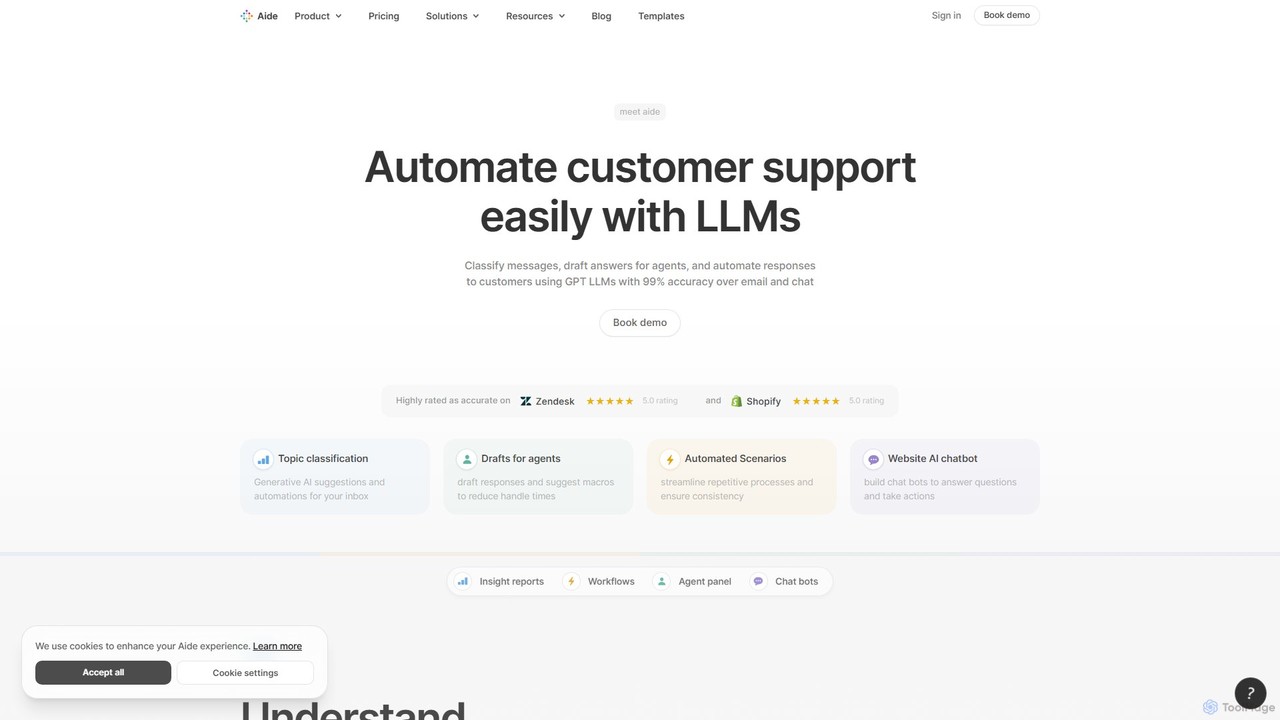
Aide Product overview

Aide is an AI-powered multi-agent coding assistant that automates software development directly within your GitHub workflow. It interprets GitHub issues, autonomously generates code, creates pull requests, and iterates based on your feedback, effectively acting as a team of AI engineers on your codebase.

Preview

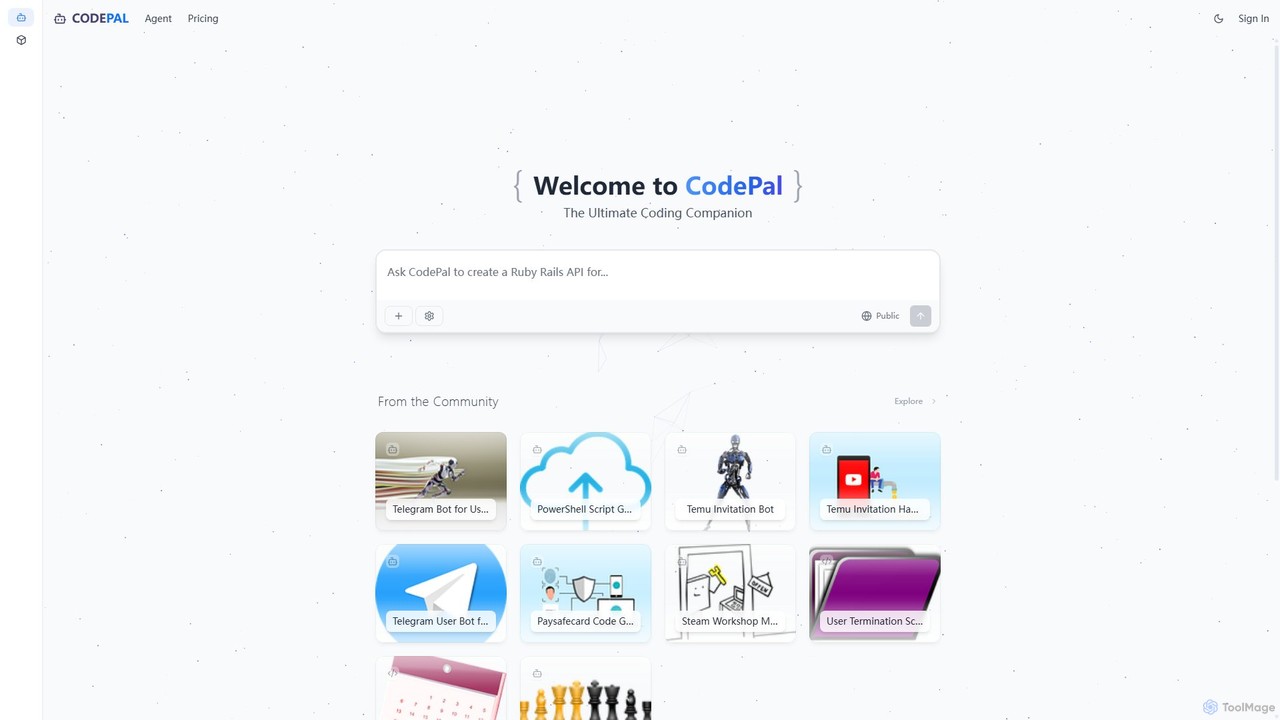
CodePal Product overview

A powerful AI coding companion and autonomous engineer that integrates directly into GitHub. Automate code reviews, generate documentation, resolve issues, and write unit tests with simple commands to accelerate your development workflow.

Preview

Quick facts

Compare product focus, pricing models and audiences. Highlighted rows indicate different listed information; unknown pricing does not mean free.

Aide VS CodePal — Quick facts
Quick factsAideCodePal
Pricing modelFreemiumFreemium
Product typeWebWeb
Primary focusCode GenerationCode Assistant
Audience and rolesNo data availableNo data available
CategoriesCode Generation · Code Assistant · AutomationCode Assistant · Code Review · Testing · Automation
AddedAug 9, 2025Aug 5, 2025
UpdatedNov 19, 2026Nov 19, 2026

Features, usage and use cases

Explore the listed product descriptions, features and workflows. Taxonomy labels alone are not feature evaluations.

Aide

Aide introduces AgentFarm, a state-of-the-art multi-agent system designed to revolutionize the software development lifecycle. Positioned as a powerful AI coding partner, Aide excels at understanding complex tasks and autonomously executing them within your existing GitHub environment. By leveraging parallel AI agents, it can handle development tasks you would typically assign to a mid-level engineer, from creating new features to fixing bugs and refactoring code. The platform has demonstrated top-tier performance, ranking #1 on the SWE-Bench benchmark, showcasing its advanced capabilities in real-world software engineering challenges.

The core philosophy of Aide is to seamlessly integrate into a developer's natural workflow, eliminating the need for context switching or complex setups. It operates directly through GitHub issues and pull requests, allowing developers to collaborate with AI agents just as they would with human colleagues. This approach not only accelerates development cycles but also frees up engineering teams to focus on high-level architectural decisions, product strategy, and mission-critical problems, leaving the routine coding tasks to a reliable and efficient AI workforce.

How to use Aide

The process of using Aide is designed to be intuitive and deeply integrated with GitHub:

  1. Create a GitHub Issue: Simply open a new issue in your repository and describe the task you need done. You can write a simple request without needing to provide exhaustive detail.
  2. AI Agent Takes Over: An AI agent will automatically pick up the issue, analyze the request, and begin working on the code.
  3. Receive a Pull Request: The agent will open a Pull Request (PR) with the proposed code changes for you to review.
  4. Iterate and Collaborate: You can review the PR and provide feedback by commenting directly on it. The agent will understand your comments and push new commits to address your feedback.
  5. Merge When Ready: Once you are satisfied with the agent's work, you can merge the PR into your main branch, completing the task.

Core Features of Aide

  • Parallel Multi-Agent System: Deploys multiple AI agents that can work on different tasks in your codebase simultaneously, dramatically increasing throughput.
  • GitHub-Native Integration: Works seamlessly within your existing GitHub workflow with a one-click setup. No external tools or platforms are needed.
  • Autonomous Task Execution: Agents can independently handle tasks like feature implementation, bug fixing, and code refactoring based on simple issue descriptions.
  • Automated PR Workflow: Automates the entire process from issue creation to PR submission, including smart suggestions and iterative improvements based on feedback.
  • Automatic Code Reviews: The AI agents can perform preliminary code reviews, ensuring code quality and adherence to best practices.
  • Continuous Operation: Agents continue to work in the background on your repository, even when you are not actively monitoring them.

Use Cases for Aide

Aide is versatile and can be applied to a wide range of software development scenarios:

  • Feature Development: Describe a new feature in a GitHub issue and let Aide's agents build it for you.
  • Bug Squashing: Assign bug reports to Aide for quick analysis and automated fixes.
  • Code Refactoring & Modernization: Modernize legacy code or refactor complex sections of your application for better performance and maintainability.
  • Automating Repetitive Tasks: Handle routine tasks like updating dependencies, writing boilerplate code, or generating documentation.
  • Scaling Engineering Teams: Augment your human team with AI agents to handle a larger volume of development tasks without increasing headcount.

Advantages of Aide

Integrating Aide into your development process offers significant benefits:

  • Massive Productivity Boost: Automates time-consuming coding tasks, allowing developers to ship features faster.
  • Enhanced Focus: Frees up engineers to concentrate on creative, strategic, and architectural aspects of a project.
  • Scalability: Effortlessly scale your development capacity by deploying more agents as needed.
  • Improved Code Quality: Leverages AI for smart suggestions and automated reviews, leading to more robust and maintainable code.
  • Streamlined Workflow: The native GitHub integration ensures a smooth, frictionless experience without disrupting existing processes.

Pricing and Plans

Aide offers a straightforward pricing model to get started:

  • Free Trial: You can try Aide for free to see its capabilities. The free trial allows you to open up to 3 Pull Requests without requiring a credit card.
  • Paid Plan: For continued use, the standard plan is priced at $49 per month, which includes up to 1,000 Pull Requests. This provides a cost-effective way to integrate a powerful AI engineering team into your workflow. To upgrade, you can purchase a plan, and the app will be upgraded within 24 hours.

CodePal

CodePal is an advanced AI-powered platform designed to be the ultimate coding companion for developers. It functions as an autonomous AI engineer that integrates seamlessly into your existing development workflow, primarily through GitHub. By automating tedious and time-consuming tasks, CodePal allows developers to focus on building high-quality software faster and more efficiently.

The core of the platform is the CodePal Agent, an intelligent entity that lives within your GitHub repositories. It can be triggered manually via simple chat-like commands or configured to run automatically on specific events, such as pull request creation or scheduled intervals. This agent is capable of understanding context, analyzing code, and performing complex actions like writing new code, reviewing changes, and identifying potential issues.

Beyond the agent, CodePal offers a collaborative environment where developers can explore, remix, and share code projects. This community-driven aspect provides a valuable resource for learning and inspiration, showcasing practical applications of AI in software development across a multitude of programming languages.

How to use CodePal

Using CodePal is designed to be intuitive and fit naturally into a developer's routine:

  1. Sign Up & Connect: Create an account on the CodePal website and connect it to your GitHub account.
  2. Integrate the Agent: Install the CodePal Agent into your desired GitHub repositories. You can configure its settings and permissions on an organization-wide or per-repository basis.
  3. Use AI Commands: Interact with the agent directly within GitHub comments on issues and pull requests. Simply use the .cp prefix followed by a command. For example:
    • In a GitHub issue, type .cp assign to have the AI generate a pull request that resolves the issue.
    • On a pull request, type .cp review to receive a comprehensive code review with inline comments and a summary.
    • To generate documentation, use .cp document.
    • To create unit tests for the changes, use .cp tests.
  4. Automate Workflows: In the CodePal dashboard, configure the agent to run automatically. Set it to review all new pull requests, patrol for issues on a nightly basis, or auto-assign specific types of issues to itself.
  5. Explore & Build: Use the CodePal platform to browse community projects for inspiration or to get started with new technologies.

Core Features of CodePal

  • Autonomous AI Agent for GitHub: An AI engineer that writes, reviews, documents, and triages code directly within your repositories.
  • Intelligent Command System: Simple .cp commands (e.g., assign, review, document, tests, patrol) make it easy to delegate tasks to the AI.
  • Automated Code Reviews: Get full code reviews on pull requests, identifying bugs, suggesting improvements, and ensuring code quality.
  • Automated Issue Resolution: The agent can take a GitHub issue, understand the requirements, and generate a complete, high-quality pull request to fix it.
  • Automatic Documentation Generation: Improve code maintainability by automatically adding comprehensive docstrings and comments.
  • Unit Test Generation: Automatically create extensive test coverage for your code to ensure reliability and prevent regressions.
  • Proactive Issue Patrolling: Configure the agent to regularly scan your codebase for potential issues and automatically create tickets for them.
  • Customizable Workflows: Tailor the agent's behavior, effort level, and triggers to perfectly match your team's processes.
  • Community Project Hub: Explore and remix a wide range of AI-assisted projects shared by the community.

Use Cases for CodePal

CodePal is versatile and can be applied in various scenarios:

  • Development Teams: Offload routine tasks like code reviews and documentation to the AI, freeing up senior developers to focus on complex architectural problems.
  • Open Source Projects: Maintain high code quality and responsiveness by using the AI agent to review contributions and fix reported bugs.
  • Individual Developers & Hobbyists: Accelerate personal projects, learn best practices from AI-generated code, and ensure robust test coverage without the overhead.
  • Legacy Codebases: Quickly add documentation and test coverage to old, poorly-documented code to make it easier to maintain and modernize.
  • Enterprise Solutions: Scale development efforts with enterprise-level support and tailored AI tooling to enforce organizational coding standards and security practices.

Advantages of CodePal

CodePal offers significant advantages over traditional development methods:

  • Massive Productivity Boost: Automates tasks that typically consume a large portion of a developer's day.
  • Seamless Integration: Works within the familiar GitHub environment, requiring no context switching.
  • Improved Code Quality & Consistency: The AI acts as an impartial reviewer, enforcing best practices and catching errors consistently.
  • Faster Development Cycles: By accelerating reviews and issue resolution, teams can ship features faster.
  • Scalable and Flexible: With plans ranging from a free starter tier to a full enterprise solution, it can support any team size and need.

Pricing and Plans

CodePal offers a freemium model with several tiers to suit different needs. Annual subscriptions provide a 20% discount.

  • Starter Plan: Free. Includes access to all tools, 25 messages/month, up to 50 projects, and public projects. Ideal for trying out the platform.
  • Standard Plan: $20/month. Includes everything in Starter, plus 100 messages/month, unlimited projects, and in-app code edits. Perfect for hobbyists and regular users.
  • Pro Plan: $50/month. Includes everything in Standard, plus 300 messages/month, premium support, and early access to beta features. Designed for professionals.
  • Enterprise Plan: Custom pricing. Includes everything in Pro, plus unlimited messages, enterprise-level support, and tailored tooling and configuration for businesses.

A 14-day money-back guarantee is offered on all paid plans.

Positioning

Their taxonomy shows where the products overlap and where each one has a more distinct focus. Unknown fields are shown explicitly and are never filled with assumptions.

Categories

Shared
Code AssistantAutomation
Only Aide
Code Generation
Only CodePal
Code ReviewTesting

Tags

Shared
automationcode reviewdeveloper toolsgithubsoftware development
Only Aide
ai pair programmercode generationmulti-agent systempull requestsswe-bench
Only CodePal
ai engineercode assistantdocumentationprogrammingunit testing

Audience and roles

Shared
No listed items
Only Aide
No listed items
Only CodePal
No listed items

Traffic comparison

Traffic is shown on the same scale so differences in market visibility are not visually understated.

How to interpret the traffic data

Both charts share the same months and vertical scale. Each tool identifies its latest reporting month; missing months are left blank, not counted as zero. Regional and source visit counts are estimates calculated from the reported shares.

Aide monthly traffic:

Latest traffic · 2026-05

Monthly visits
7.6K
Avg. visit duration
0:04
Pages per visit
1.5
Bounce rate
38.77%
Data updated 2026-06-15

Monthly traffic trend

  • 2025-09: 28.9K
  • 2026-01: 7.9K
  • 2026-02: 3.8K
  • 2026-03: 1.8K
  • 2026-04: 3.7K
  • 2026-05: 7.6K

Top regions

Top 5 countries/regions
Country/regionPercentageEstimated visits
🇬🇧United Kingdom28.41%2.2K
🇺🇸United States28.05%2.1K
🇮🇳India19.11%1.4K
🇮🇩Indonesia13.39%1K
🇵🇰Pakistan11.04%837

Search keywords

aideaide ai downloadaide.devaide dev download for pcaide.dv

CodePal monthly traffic:

Latest traffic · 2026-05

Monthly visits
54.8K
Avg. visit duration
3:30
Pages per visit
5.33
Bounce rate
41.44%
Data updated 2026-06-15

Monthly traffic trend

  • 2025-09: 145.6K
  • 2026-01: 38.5K
  • 2026-02: 43K
  • 2026-03: 52.9K
  • 2026-04: 61.5K
  • 2026-05: 54.8K

Top regions

Top 5 countries/regions
Country/regionPercentageEstimated visits
🇺🇸United States75.15%41.2K
🇩🇪Germany17.28%9.5K
🇬🇧United Kingdom2.94%1.6K
🇻🇳Vietnam2.61%1.4K
🇷🇺Russia2.02%1.1K

Traffic sources

Source typePercentageEstimated visits
Direct80.64%44.2K
Referral17.45%9.6K
Email1.91%1K

Search keywords

alecks github hackshow to copy a game with place id roblox githubiready hackskahoot botterminecradft redeem codegenerator

Community signals

Ratings, comments, favorites, and likes are community signals—not a substitute for product fit.

Aide

Rating
No data available
Comments
0
Favorites
171
Likes
210

CodePal

Rating
No data available
Comments
0
Favorites
170
Likes
159

Aide vs CodePal · Comparison FAQ

What do Aide and CodePal have in common?
Both tools are listed under Code Assistant、Automation. These categories indicate overlapping use cases; compare their detailed descriptions for workflows, capabilities and limitations.
Are Aide and CodePal free?
Listed pricing models: Aide — Freemium; CodePal — Freemium. Missing pricing is not proof of a free plan, and freemium does not mean every feature is free. Check official sites for current plans, limits and trials.
How should I choose between Aide and CodePal?
The primary listed category is Code Generation for Aide, and Code Assistant for CodePal. Compare features, steps and use cases, then verify pricing, data permissions and deployment needs. This page does not include hands-on testing and does not declare a winner from traffic or tags.

Sources and comparison methodology

This page is assembled from ToolMage product listings, taxonomy, traffic statistics and on-site user feedback. It is not a hands-on test or an independent review.

  • Feature and plan descriptions reflect information in the listings, not real-time guarantees. Verify pricing, quotas, availability and privacy terms on the official sites.
  • Traffic uses the reporting months shown. Missing statistics do not mean zero visits, and different periods do not establish growth or superiority. Regional and source visit counts are estimates based on shares.
  • Different tags indicate differences in the listings, not proof that the other product lacks a capability. Ratings, favorites and visits are not used to declare a winner.

Related comparisons