ToolMage
Sign in

AI TOOL COMPARISON

Codegen vs Cosine

What is the difference, and which fits your workflow? Compare features, usage, pricing models and traffic side by side.

Jump to key differences

Product overview

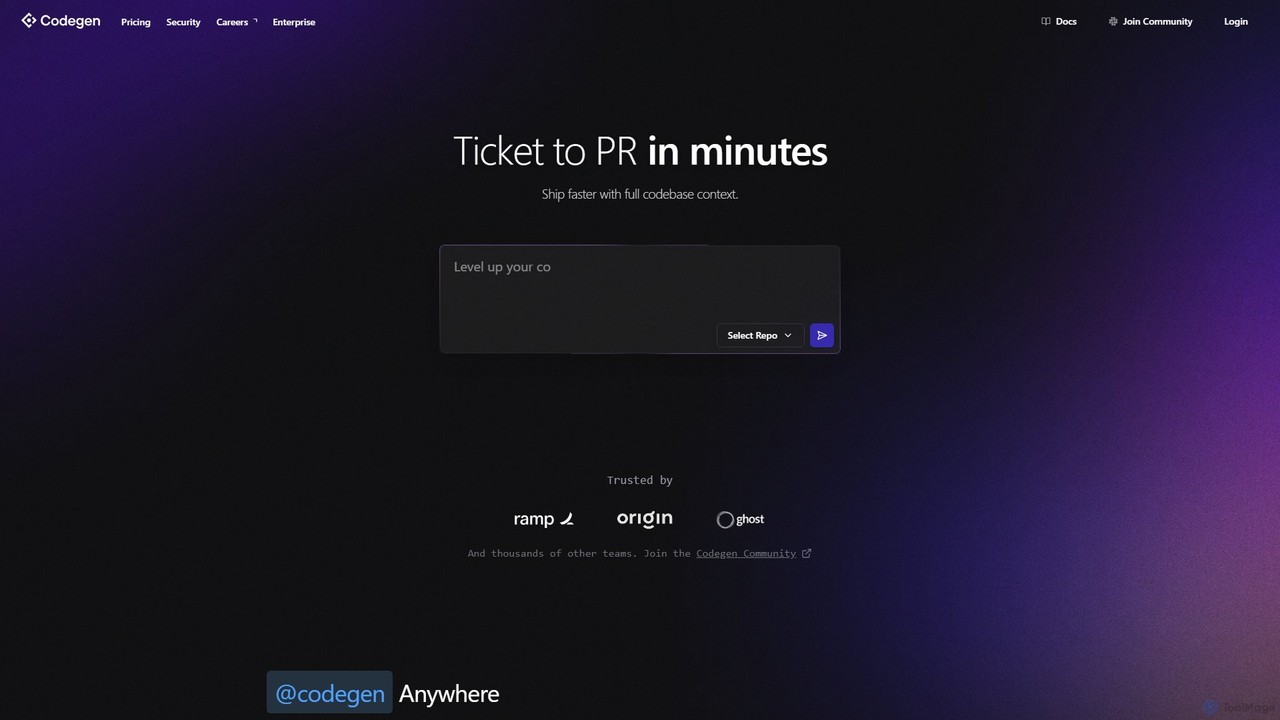
Codegen Product overview

Codegen is an AI software engineering agent that accelerates development by transforming tickets into pull requests in minutes. It integrates with your existing tools like GitHub, Slack, and JIRA, using full codebase context to automate coding, fix bugs, and review code, effectively 10x-ing your team's productivity.

Preview

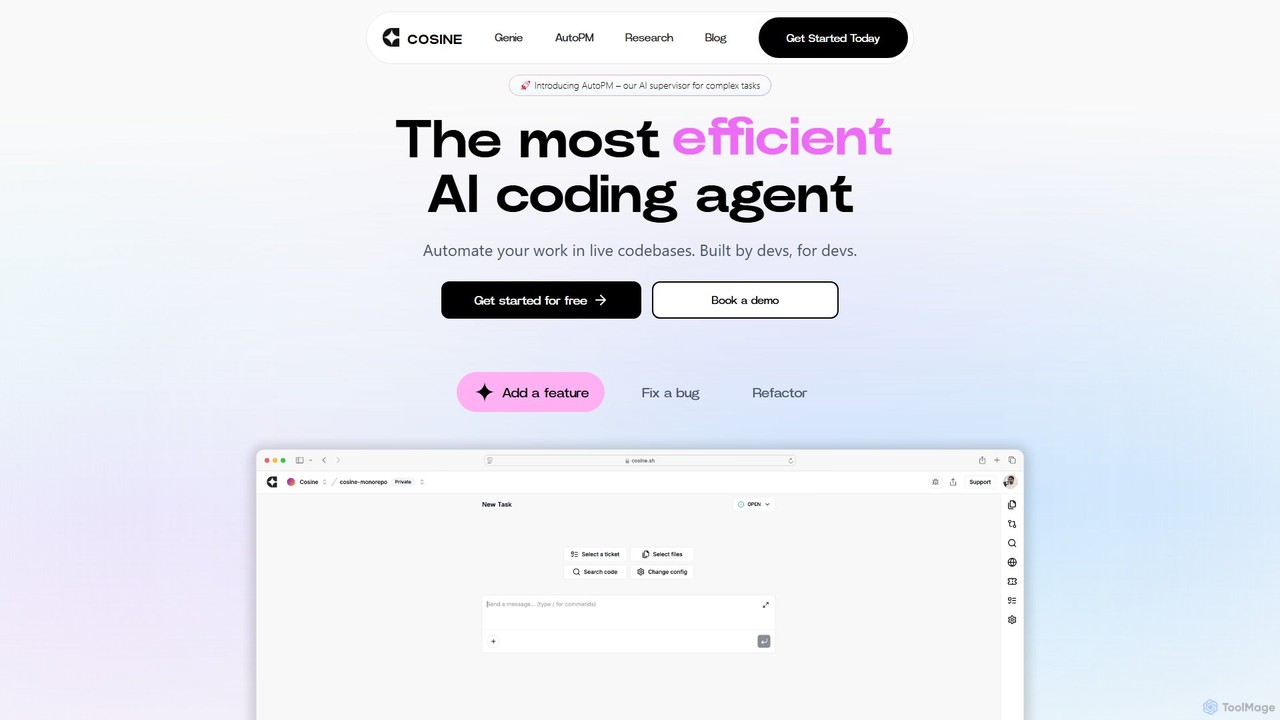
Cosine Product overview

Cosine is an agentic AI software engineer designed to automate complex coding tasks. It operates directly within live codebases to handle tickets, from feature development to bug fixes, and seamlessly integrates into your development workflow through tools like Jira, Slack, and Linear.

Preview

Quick facts

Compare product focus, pricing models and audiences. Highlighted rows indicate different listed information; unknown pricing does not mean free.

Codegen VS Cosine — Quick facts
Quick factsCodegenCosine
Pricing modelFreemiumFreemium
Product typeWebWeb
Primary focusVersion ControlSoftware Engineering
Audience and rolesNo data availableNo data available
CategoriesVersion Control · Code Assistant · AutomationSoftware Engineering · Code Assistant · Automation
AddedAug 13, 2025Aug 3, 2025
UpdatedNov 19, 2026Nov 19, 2026

Features, usage and use cases

Explore the listed product descriptions, features and workflows. Taxonomy labels alone are not feature evaluations.

Codegen

Codegen is an expert AI software engineering agent designed to revolutionize the software development lifecycle. It acts as an autonomous partner for development teams, capable of understanding the entire context of a codebase to build software more efficiently. By integrating seamlessly into existing workflows, Codegen empowers developers to focus on high-impact problems while it handles the repetitive and time-consuming tasks. The platform's core mission is to make software development more accessible, efficient, and enjoyable by bridging the gap between human creativity and AI-powered automation.

From a simple ticket in a project management tool to a fully-fledged pull request ready for review, Codegen streamlines the entire process. It can be tasked with implementing new features, fixing complex bugs, or refactoring existing code. This allows teams to ship in parallel, significantly reducing development cycles and crushing backlogs with astonishing speed. The platform is trusted by thousands of teams, from solo developers to large enterprises, to enhance productivity and transparency.

How to use Codegen

Getting started with Codegen is designed to be intuitive and fit directly into your current processes. The primary interaction model is through the tools your team already uses:

  1. Assign Tasks: Simply tag Codegen in a ticket on platforms like JIRA, Linear, or ClickUp. You can ask for a full implementation plan or a complete Pull Request.
  2. Collaborate in Slack: Add the Codegen bot to any Slack channel. You can tag it to ask technical questions, get help with bug reports, or research the feasibility of a new feature.
  3. Integrate with GitHub: Use Codegen directly within your GitHub workflow. Ask it to perform code reviews, automatically fix linting errors, or resolve a failed build.
  4. Use the API: For custom integrations, Codegen provides a Python SDK (`pip install codegen`). This allows you to invoke its agentic capabilities programmatically within your own tools and workflows.
  5. Monitor Progress: The Codegen web application provides detailed traces of the agent's work, offering full transparency into its process, from environment setup to the final PR.

Core Features of Codegen

  • Autonomous Agentic Development: Converts tasks and tickets directly into code and pull requests, operating as an autonomous team member.
  • Full Codebase Context: Analyzes your entire repository to provide context-aware, accurate, and relevant code solutions.
  • Seamless Workflow Integrations: Natively integrates with hundreds of developer tools, including GitHub, Slack, Linear, JIRA, and ClickUp.
  • Natural Language Interface: Allows both technical and non-technical users to interact with the codebase, ask questions, and request changes using plain English.
  • Code Generation, Refactoring & Bug Fixing: Capable of writing new features from scratch, improving existing code quality, and automatically resolving bugs.
  • Enterprise-Grade Security: SOC 2 Type II certified, offering end-to-end encryption, role-based access controls, audit trails, and the option to deploy in your own VPC for maximum data control.
  • Scalable Architecture: Supports unlimited concurrent agents, automatically scaling to meet the demands of your team without creating bottlenecks.
  • Developer API & SDK: A powerful Python SDK allows for deep integration of Codegen's AI capabilities into your custom development environment.

Use Cases for Codegen

Accelerating Feature Delivery: A product manager creates a feature request in JIRA. By assigning it to Codegen, a complete PR with the new feature is generated within minutes, ready for human review.

Rapid Bug Resolution: A QA engineer files a bug report. A developer assigns the ticket to Codegen, which analyzes the codebase, identifies the root cause, and submits a PR with the fix.

Empowering Non-Technical Staff: A designer can request a minor UI fix or a text change via Slack. Codegen understands the request and ships a production fix without requiring an engineer's time.

Codebase Knowledge Base: A new engineer can ask Codegen questions like "How does our authentication system work?" to get detailed, context-aware answers, speeding up their onboarding process.

Improving Code Quality: During a code review, a senior developer can ask Codegen to refactor a specific function for better performance or readability, automating code maintenance tasks.

Advantages of Codegen

Codegen offers a significant competitive edge by transforming the development workflow. Its primary advantage is a dramatic increase in engineering velocity, enabling teams to ship features and fixes at an unprecedented rate. It enhances collaboration by meeting developers where they work—in Slack, GitHub, and their project management tools. For businesses, this translates into lower development costs, as smaller teams can achieve the output of much larger ones. Furthermore, its enterprise-ready security and scalability provide confidence for organizations of any size to adopt AI in their development process safely.

Pricing and Plans

Codegen offers a flexible pricing structure to suit individuals, teams, and large enterprises.

  • Free Plan: Get started with 10 total runs to evaluate the platform. Includes full codebase context and integrations with GitHub, Slack, and Linear.
  • Individual Plan: For $9.99/month (or $99.90/year), this plan offers unlimited runs for a personal GitHub account, perfect for solo developers and freelancers.
  • Teams Plan: At $199/month (or $1,990/year), this plan provides unlimited runs for an organization's GitHub account, team collaboration features, and priority support.
  • Enterprise Plan: Offers custom pricing for large organizations. It includes everything in the Teams plan plus custom deployment options (including VPC), SLAs, SSO, advanced security features, and dedicated support.

All paid plans come with a 30-day money-back guarantee.

Cosine

Cosine introduces a paradigm shift in software development by offering a self-sufficient, agentic AI software engineer. Built by developers for developers, Cosine is engineered to handle the entire lifecycle of a development task, from understanding the requirements to submitting a pull request, all without direct human supervision. It's designed to function like a human engineer, capable of navigating and operating within complex, real-world production codebases.

At the heart of Cosine is its AI supervisor, AutoPM, which excels at managing complex and abstract tasks. AutoPM deconstructs large assignments into structured, actionable subtasks. It then autonomously researches, plans, and executes the best approach, deploying and managing multiple AI agents simultaneously. This allows human developers to offload significant portions of their backlog and focus on higher-level strategic work. The entire process is asynchronous, enabling teams to assign multiple tickets at once and review the completed pull requests later, dramatically increasing efficiency.

How to use Cosine

Integrating Cosine into your workflow is designed to be seamless. The process typically follows these steps:

  1. Assign a Task: Hand off your development tasks to Cosine directly from your existing project management tools. It offers native integrations with Jira, Linear, and Slack. You can assign a ticket or describe a task just as you would to a human colleague.
  2. AI Planning & Execution: Once a task is assigned, the AutoPM supervisor takes over. It analyzes the request, breaks it down into manageable steps, and plans the implementation strategy. It understands the context of your codebase to ensure the changes are relevant and effective.
  3. Autonomous Coding: Cosine's AI agents then get to work. They write, modify, and refactor code directly in your repository. They can add new features, fix complex bugs, or improve code quality based on the initial request.
  4. Review Pull Request: After completing the task, Cosine submits a pull request (PR) for your team to review. The PR includes all the code changes and often a summary of the work done. Your team performs the final review and merges the code, maintaining full control over the codebase.

Core Features of Cosine

  • AutoPM - AI Supervisor: Breaks down large, abstract tasks into structured subtasks, and manages multiple agents to complete the work asynchronously.
  • Agentic End-to-End Automation: Designed to complete software development tasks from start to finish without needing constant human intervention.
  • Complex Codebase Proficiency: Trained specifically to understand and work within large, real-world production codebases, just like a senior engineer.
  • Asynchronous Workflow: Capable of handling multiple assigned tickets simultaneously, allowing development teams to clear their backlogs faster.
  • Seamless Workflow Integrations: Natively connects with popular development tools including Slack, Jira, and Linear, meeting developers where they already work.
  • Powered by Genie 2: Utilizes a proprietary model, Genie 2, which has demonstrated state-of-the-art performance, outperforming models like GPT-4o on agentic coding benchmarks like SWE-Lancer.
  • Fine-Tuning Capabilities: Offers fine-tuning for advanced models like GPT-4o, allowing for customization to mirror how specific engineering teams reason and operate.

Use Cases for Cosine

Cosine is versatile and can be applied to a wide range of software development tasks, including:

  • Feature Implementation: Assign new feature requests and let Cosine build them from the ground up.
  • Bug Fixing: Isolate and resolve bugs in your code, from simple fixes to more complex, elusive issues.
  • Code Refactoring: Improve the structure, readability, and maintainability of your existing code without changing its external behavior.
  • Automating Backlog: Tackle the long list of low-priority tasks and technical debt that often accumulates, freeing up your team for more critical projects.
  • Writing Unit Tests: Generate comprehensive tests for new or existing code to ensure quality and prevent regressions.

Advantages of Cosine

The primary advantage of Cosine is its ability to function as a force multiplier for engineering teams. By automating a significant portion of the coding workload, it allows developers to focus on architecture, design, and complex problem-solving. Its high pass rate on production-grade benchmarks like SWE-Lancer (72%) showcases its reliability and effectiveness in real-world scenarios. The asynchronous nature of its work means that progress is being made around the clock, accelerating development cycles and time-to-market.

Pricing and Plans

Cosine operates on a freemium model. There is a free plan to get started and explore the tool's capabilities. For teams and enterprises requiring more advanced features, higher usage limits, and dedicated support, there are paid plans available. You can book a demo or visit the official website for detailed and up-to-date pricing information.

Positioning

Their taxonomy shows where the products overlap and where each one has a more distinct focus. Unknown fields are shown explicitly and are never filled with assumptions.

Categories

Shared
Code AssistantAutomation
Only Codegen
Version Control
Only Cosine
Software Engineering

Tags

Shared
agentic AIautomationbug fixingcode generationjiraSlacksoftware development
Only Codegen
ai pair programmercode reviewdeveloper toolgithub
Only Cosine
ai engineerdeveloper toolsLinear integrationrefactoring

Audience and roles

Shared
No listed items
Only Codegen
No listed items
Only Cosine
No listed items

Traffic comparison

Traffic is shown on the same scale so differences in market visibility are not visually understated.

How to interpret the traffic data

Both charts share the same months and vertical scale. Each tool identifies its latest reporting month; missing months are left blank, not counted as zero. Regional and source visit counts are estimates calculated from the reported shares.

Codegen monthly traffic:

Latest traffic · 2026-05

Monthly visits
67.9K
Avg. visit duration
0:18
Pages per visit
1.64
Bounce rate
43.27%
Data updated 2026-06-15

Monthly traffic trend

  • 2025-09: 31.7K
  • 2026-01: 50.3K
  • 2026-02: 28.8K
  • 2026-03: 31.5K
  • 2026-04: 61.8K
  • 2026-05: 67.9K

Top regions

Top 5 countries/regions
Country/regionPercentageEstimated visits
🇺🇸United States44.41%30.2K
🇳🇬Nigeria15.72%10.7K
🇮🇳India14.37%9.8K
🇻🇳Vietnam12.78%8.7K
🇰🇭Cambodia12.72%8.6K

Traffic sources

Source typePercentageEstimated visits
Direct50.21%34.1K
Referral49.6%33.7K
Email0.19%129

Search keywords

codegencode review agentcoding agentsgithub copilot vs claude codewhatgs the best $10 ai coding agent

Cosine monthly traffic:

Latest traffic · 2026-05

Monthly visits
30.8K
Avg. visit duration
0:45
Pages per visit
2.23
Bounce rate
39.24%
Data updated 2026-06-15

Monthly traffic trend

  • 2025-09: 154.1K
  • 2026-01: 59.3K
  • 2026-02: 41.5K
  • 2026-03: 41.5K
  • 2026-04: 31.2K
  • 2026-05: 30.8K

Top regions

Top 5 countries/regions
Country/regionPercentageEstimated visits
🇺🇸United States37.91%11.7K
🇬🇧United Kingdom24.67%7.6K
🇮🇹Italy14.94%4.6K
🇮🇳India11.44%3.5K
🇻🇳Vietnam11.04%3.4K

Traffic sources

Source typePercentageEstimated visits
Direct83.68%25.7K
Referral12.33%3.8K
Email3.99%1.2K

Search keywords

cosinecosine aicosine ai freecosine companycosine desktop

Community signals

Ratings, comments, favorites, and likes are community signals—not a substitute for product fit.

Codegen

Rating
No data available
Comments
0
Favorites
193
Likes
181

Cosine

Rating
No data available
Comments
0
Favorites
161
Likes
165

Codegen vs Cosine · Comparison FAQ

What do Codegen and Cosine have in common?
Both tools are listed under Code Assistant、Automation. These categories indicate overlapping use cases; compare their detailed descriptions for workflows, capabilities and limitations.
Are Codegen and Cosine free?
Listed pricing models: Codegen — Freemium; Cosine — Freemium. Missing pricing is not proof of a free plan, and freemium does not mean every feature is free. Check official sites for current plans, limits and trials.
How should I choose between Codegen and Cosine?
The primary listed category is Version Control for Codegen, and Software Engineering for Cosine. Compare features, steps and use cases, then verify pricing, data permissions and deployment needs. This page does not include hands-on testing and does not declare a winner from traffic or tags.

Sources and comparison methodology

This page is assembled from ToolMage product listings, taxonomy, traffic statistics and on-site user feedback. It is not a hands-on test or an independent review.

  • Feature and plan descriptions reflect information in the listings, not real-time guarantees. Verify pricing, quotas, availability and privacy terms on the official sites.
  • Traffic uses the reporting months shown. Missing statistics do not mean zero visits, and different periods do not establish growth or superiority. Regional and source visit counts are estimates based on shares.
  • Different tags indicate differences in the listings, not proof that the other product lacks a capability. Ratings, favorites and visits are not used to declare a winner.

Related comparisons