ToolMage
Sign in

AI TOOL COMPARISON

CodeGPT vs Safurai

What is the difference, and which fits your workflow? Compare features, usage, pricing models and traffic side by side.

Jump to key differences

Product overview

CodeGPT Product overview

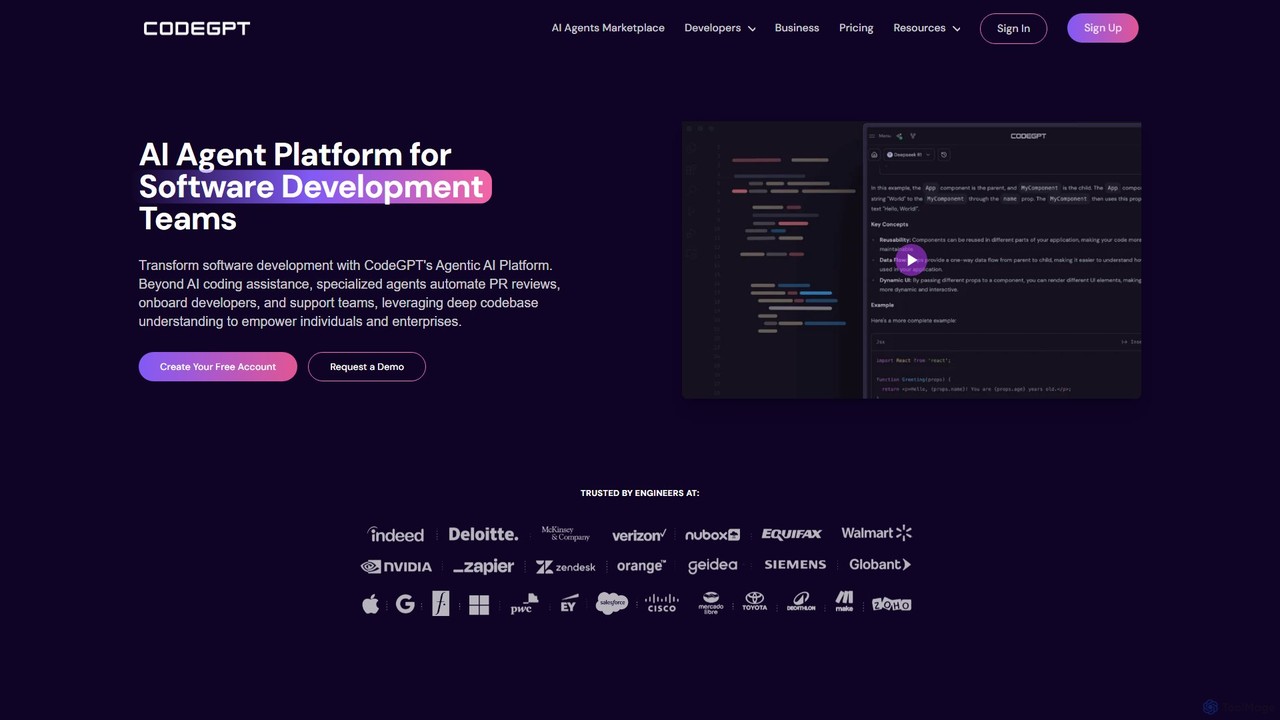
CodeGPT is an agentic AI platform for software development teams, moving beyond simple code assistance. It offers specialized AI agents that automate PR reviews, onboard developers, and support teams by deeply understanding your entire codebase. It integrates with popular IDEs and supports leading AI models, with a strong focus on enterprise-grade security and flexible deployment options.

Preview

Safurai Product overview

Safurai is an AI-powered IDE extension that acts as a virtual assistant for software developers. It helps with coding, debugging, and refactoring, aiming to streamline the development process and improve code quality directly within your favorite IDE like VS Code and JetBrains.

Preview

Quick facts

Compare product focus, pricing models and audiences. Highlighted rows indicate different listed information; unknown pricing does not mean free.

CodeGPT VS Safurai — Quick facts
Quick factsCodeGPTSafurai
Pricing modelFreemiumFreemium
Product typeWebExtensions
Primary focusSoftware DevelopmentCode Generation
Audience and rolesNo data availableNo data available
CategoriesSoftware Development · Code Assistant · Developer ToolsCode Generation · Code Assistant · Developer Tools
AddedAug 6, 2025Aug 8, 2025
UpdatedNov 19, 2026Nov 19, 2026

Features, usage and use cases

Explore the listed product descriptions, features and workflows. Taxonomy labels alone are not feature evaluations.

CodeGPT

CodeGPT is a revolutionary agentic AI platform designed to transform the entire software development lifecycle (SDLC). Unlike traditional AI coding assistants that merely autocomplete code, CodeGPT provides a suite of specialized, context-aware AI agents that collaborate with developers. These agents possess a deep, holistic understanding of your entire codebase, including classes, functions, and dependencies, enabling them to automate complex tasks, improve code quality, and significantly boost productivity. Trusted by over 1.6 million developers and enterprise teams, CodeGPT integrates seamlessly into your existing workflow, empowering both individuals and large organizations to build better software, faster.

How to use CodeGPT

Getting started with CodeGPT is a straightforward process designed for quick integration into your development environment:

  1. Sign Up & Install: Create a free account on the CodeGPT website. Then, install the CodeGPT extension for your preferred IDE, such as Visual Studio Code, JetBrains IDEs, or Cursor.
  2. Connect Your Codebase: Securely connect your repositories to allow CodeGPT to index and understand your project's context. Your code remains private and is never used for model training.
  3. Interact with AI Agents: Use the AI Chat within your IDE to ask questions, debug issues, or generate code snippets. Leverage the intelligent autocomplete for faster coding.
  4. Automate Tasks: Invoke specialized agents for specific tasks. For instance, use the Code Review Agent to automatically analyze pull requests, identify potential bugs, and suggest improvements.
  5. Create Custom Agents: Use the no-code AI Playground to build and train custom agents on your own documentation, APIs, and best practices. This creates a personalized assistant tailored to your team's unique needs.
  6. Manage & Analyze: Utilize the web UI to navigate your codebase, manage large-scale refactoring, and access detailed analytics on AI usage to measure productivity gains.

Core Features of CodeGPT

  • Agentic AI Platform: Go beyond coding with specialized agents for code reviews, onboarding, documentation, and more. Access a marketplace of over 200 pre-built AI experts for various languages and frameworks.
  • Deep Codebase Understanding: Utilizes proprietary technology and Knowledge Graphs to build a comprehensive understanding of your entire repository, ensuring highly accurate and context-aware assistance.
  • AI Coding Assistant: Features intelligent code autocompletion, an interactive AI chat, natural language-to-code translation, and AI-powered code refactoring suggestions.
  • Automated Code Review: The Code Review Agent analyzes pull requests, provides concise summaries of changes, identifies potential bugs and security vulnerabilities, and cuts review time significantly.
  • Enterprise-Ready Solutions: Offers one-click unit test generation, automated code documentation, and tools to modernize legacy systems, all while ensuring top-tier security.
  • Flexible Deployment & Multi-Model Support: Deploy on the cloud (SOC 2 Type II certified SaaS) or on-premise with the self-hosted option. It supports leading AI models like GPT-4o, Claude 3.5, Gemini, and open-source models like Llama.
  • Seamless IDE Integration: Natively integrates with Visual Studio Code, the entire JetBrains suite (IntelliJ, PyCharm, etc.), and other popular editors.
  • No-Code Customization: Easily create custom AI agents trained on your internal documentation and code standards without writing a single line of code.

Use Cases for CodeGPT

CodeGPT is versatile and can be applied across various scenarios in software development:

  • Accelerated Development: Developers can write, debug, and test code faster using intelligent suggestions and automated generation.
  • Improved Code Quality: Automated PR reviews catch bugs, security flaws, and style inconsistencies early, reducing technical debt and improving maintainability.
  • Streamlined Developer Onboarding: New team members can quickly get up to speed by querying a custom AI agent that has mastered the project's codebase and documentation.
  • Legacy System Modernization: Enterprises can automate the process of understanding, documenting, refactoring, and generating tests for complex legacy codebases.
  • Enhanced Knowledge Sharing: Create a centralized, AI-powered knowledge base from your documentation, allowing developers to find answers instantly without leaving their IDE.

Advantages of CodeGPT

CodeGPT stands out from other AI coding tools with several key advantages:

  • Holistic SDLC Automation: It addresses the entire development process, not just code writing.
  • Superior Context Awareness: Its deep understanding of the entire codebase results in more relevant and accurate AI assistance compared to tools with limited context windows.
  • Unmatched Customization: The ability to create no-code, custom AI agents provides a tailored experience that aligns with specific project needs and company standards.
  • Enterprise-Grade Security & Flexibility: With options for self-hosting, a strict zero-data-retention policy, and SOC 2 Type II certification, it meets the stringent security requirements of large organizations.
  • Model Agnostic: Avoid vendor lock-in by using the best AI models for the job, including proprietary and open-source options.

Pricing and Plans

CodeGPT offers a range of plans to suit different needs:

  • Free Plan: Perfect for individuals and beginners, offering access to default models, limited interactions (30/month), 200 autocompletions, and 2 custom AI assistants.
  • Professional Plan ($13.5/mo/seat, billed annually): Aimed at professional developers, this plan includes all Free features plus access to premium models, 500 interactions, unlimited autocomplete, 10 custom AI assistants, and a 24-hour agent history.
  • Teams Plan ($27/mo/seat, billed annually): Designed for teams, this plan includes all Professional features plus unlimited custom AI assistants, graphs management, the ability to add unlimited team members, and unlimited agent history.
  • For Business (Custom Pricing): An enterprise-grade solution offering SSO, advanced security, flexible deployment (including self-hosted and BYO API Key), implementation support, and custom-built AI agents for specific business challenges.

Safurai

Safurai is an advanced AI code assistant designed to integrate seamlessly into your Integrated Development Environment (IDE), serving as a powerful partner for software developers. It leverages state-of-the-art artificial intelligence to understand code context, provide intelligent suggestions, and automate repetitive tasks. The primary goal of Safurai is to significantly boost developer productivity, reduce the time spent on debugging, and enhance overall code quality. By functioning as an extension for popular IDEs such as Visual Studio Code and the entire JetBrains suite, Safurai ensures that developers don't need to switch contexts or leave their familiar coding environment to access powerful AI capabilities.

How to use Safurai

Using Safurai is straightforward and designed to be intuitive for any developer. First, you need to install the Safurai extension from the marketplace of your preferred IDE (e.g., VS Code Marketplace or JetBrains Marketplace). Once installed, you can interact with the AI assistant in several ways. You can highlight a block of code and use a right-click context menu or keyboard shortcuts to access Safurai's features. For instance, you can ask Safurai to explain the selected code, find potential bugs, suggest refactoring improvements, or generate documentation. You can also open a dedicated Safurai chat panel to ask programming questions, request new code snippets from a natural language prompt, or get help with complex algorithms, all without ever leaving your editor.

Core Features of Safurai

  • AI Code Completion & Generation: Generates code snippets, functions, or even entire classes based on natural language descriptions, significantly speeding up the development process.
  • Intelligent Code Refactoring: Analyzes your code and suggests improvements for readability, performance, and maintainability. It can automatically apply changes to clean up complex code.
  • Advanced Debugging Assistant: Helps identify and fix bugs by analyzing code blocks and providing step-by-step explanations and potential solutions for errors.
  • Code Explanation: Breaks down complex code segments or algorithms into simple, easy-to-understand explanations, which is ideal for learning new codebases or for junior developers.
  • Automated Documentation & Test Generation: Automatically creates documentation (like docstrings) for your functions and methods. It can also generate unit tests to ensure code reliability and coverage.
  • Seamless IDE Integration: Works as a native extension within Visual Studio Code, IntelliJ IDEA, PyCharm, and other JetBrains IDEs, providing a smooth and integrated user experience.

Use Cases for Safurai

Safurai is versatile and benefits a wide range of users. For senior developers, it acts as a productivity multiplier, automating mundane tasks like writing boilerplate code and documentation, allowing them to focus on complex problem-solving. For junior developers and students, it serves as an invaluable learning tool, offering explanations for unfamiliar code and guiding them toward best practices. Development teams use Safurai to maintain a consistent code style and quality across projects. DevOps engineers can use it to quickly write and debug scripts for automation and infrastructure management.

Advantages of Safurai

The main advantage of Safurai is its focus on a streamlined, in-IDE workflow. Unlike other tools that may require switching to a web browser, Safurai keeps everything within the editor, preserving the developer's focus and flow state. It is context-aware, meaning its suggestions are highly relevant to the specific project and code you are working on. This leads to more accurate code generation and more effective debugging. By simplifying complex tasks and providing instant support, Safurai not only boosts efficiency but also reduces developer frustration and burnout.

Pricing and Plans

Safurai operates on a freemium model. It offers a free tier that provides access to core features with certain usage limits, making it accessible for individual developers, students, and small projects. For professional developers and teams requiring more extensive capabilities, higher usage limits, and priority support, there is a Pro plan available through a monthly or annual subscription. The specific details of the pricing and features included in each plan are available on the official Safurai website.

Positioning

Their taxonomy shows where the products overlap and where each one has a more distinct focus. Unknown fields are shown explicitly and are never filled with assumptions.

Categories

Shared
Code AssistantDeveloper Tools
Only CodeGPT
Software Development
Only Safurai
Code Generation

Tags

Shared
code assistantcode generationide extensionjetbrainssoftware developmentVS Code
Only CodeGPT
AI agentcode reviewdeveloper toolsenterprise AIlegacy code
Only Safurai
ai pair programmerdebuggingdeveloper toolrefactoring

Audience and roles

Shared
No listed items
Only CodeGPT
No listed items
Only Safurai
No listed items

Traffic comparison

Traffic is shown on the same scale so differences in market visibility are not visually understated.

How to interpret the traffic data

Both charts share the same months and vertical scale. Each tool identifies its latest reporting month; missing months are left blank, not counted as zero. Regional and source visit counts are estimates calculated from the reported shares.

CodeGPT monthly traffic:

Latest traffic · 2026-05

Monthly visits
262.2K
Avg. visit duration
0:36
Pages per visit
1.82
Bounce rate
44.66%
Data updated 2026-06-15

Monthly traffic trend

  • 2025-09: 291.1K
  • 2026-01: 284.1K
  • 2026-02: 233.4K
  • 2026-03: 299.7K
  • 2026-04: 277.1K
  • 2026-05: 262.2K

Top regions

Top 5 countries/regions
Country/regionPercentageEstimated visits
🇮🇳India27.45%72K
🇮🇩Indonesia22.59%59.2K
🇺🇸United States22.34%58.6K
🇧🇷Brazil15.64%41K
🇸🇳Senegal11.98%31.4K

Traffic sources

Source typePercentageEstimated visits
Direct55.23%144.8K
Referral44.36%116.3K
Email0.41%1.1K

Search keywords

ai code with expertcodegptgrokgrok ailm studio

Safurai

No data available

Community signals

Ratings, comments, favorites, and likes are community signals—not a substitute for product fit.

CodeGPT

Rating
No data available
Comments
0
Favorites
217
Likes
233

Safurai

Rating
No data available
Comments
0
Favorites
174
Likes
165

CodeGPT vs Safurai · Comparison FAQ

What do CodeGPT and Safurai have in common?
Both tools are listed under Code Assistant、Developer Tools. These categories indicate overlapping use cases; compare their detailed descriptions for workflows, capabilities and limitations.
Are CodeGPT and Safurai free?
Listed pricing models: CodeGPT — Freemium; Safurai — Freemium. Missing pricing is not proof of a free plan, and freemium does not mean every feature is free. Check official sites for current plans, limits and trials.
How should I choose between CodeGPT and Safurai?
The primary listed category is Software Development for CodeGPT, and Code Generation for Safurai. Compare features, steps and use cases, then verify pricing, data permissions and deployment needs. This page does not include hands-on testing and does not declare a winner from traffic or tags.

Sources and comparison methodology

This page is assembled from ToolMage product listings, taxonomy, traffic statistics and on-site user feedback. It is not a hands-on test or an independent review.

  • Feature and plan descriptions reflect information in the listings, not real-time guarantees. Verify pricing, quotas, availability and privacy terms on the official sites.
  • Traffic uses the reporting months shown. Missing statistics do not mean zero visits, and different periods do not establish growth or superiority. Regional and source visit counts are estimates based on shares.
  • Different tags indicate differences in the listings, not proof that the other product lacks a capability. Ratings, favorites and visits are not used to declare a winner.

Related comparisons