ToolMage
Sign in

AI TOOL COMPARISON

Crawly vs SingleAPI

What is the difference, and which fits your workflow? Compare features, usage, pricing models and traffic side by side.

Jump to key differences

Product overview

Crawly Product overview

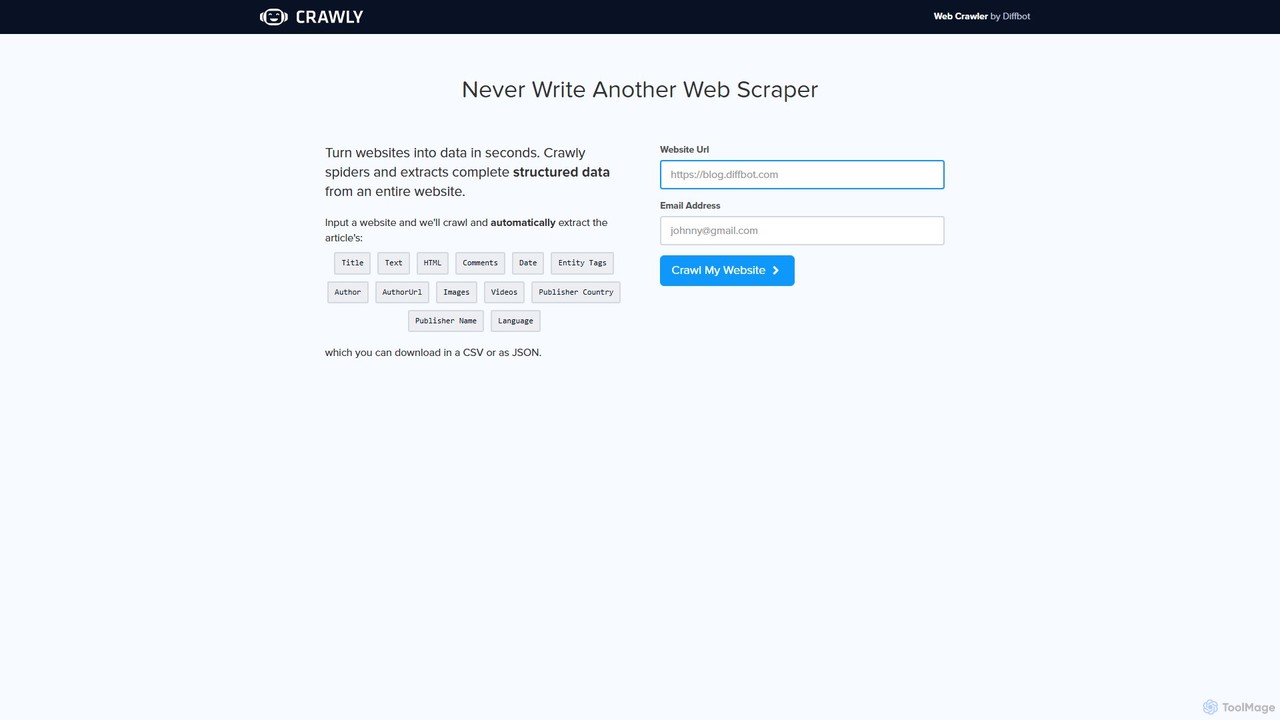
Crawly is an AI-powered web crawler by Diffbot that automatically extracts structured data from entire websites. Simply input a URL, and Crawly spiders the site to pull key information like articles, products, and discussions, converting it into clean JSON or CSV data without any coding required.

Preview

SingleAPI Product overview

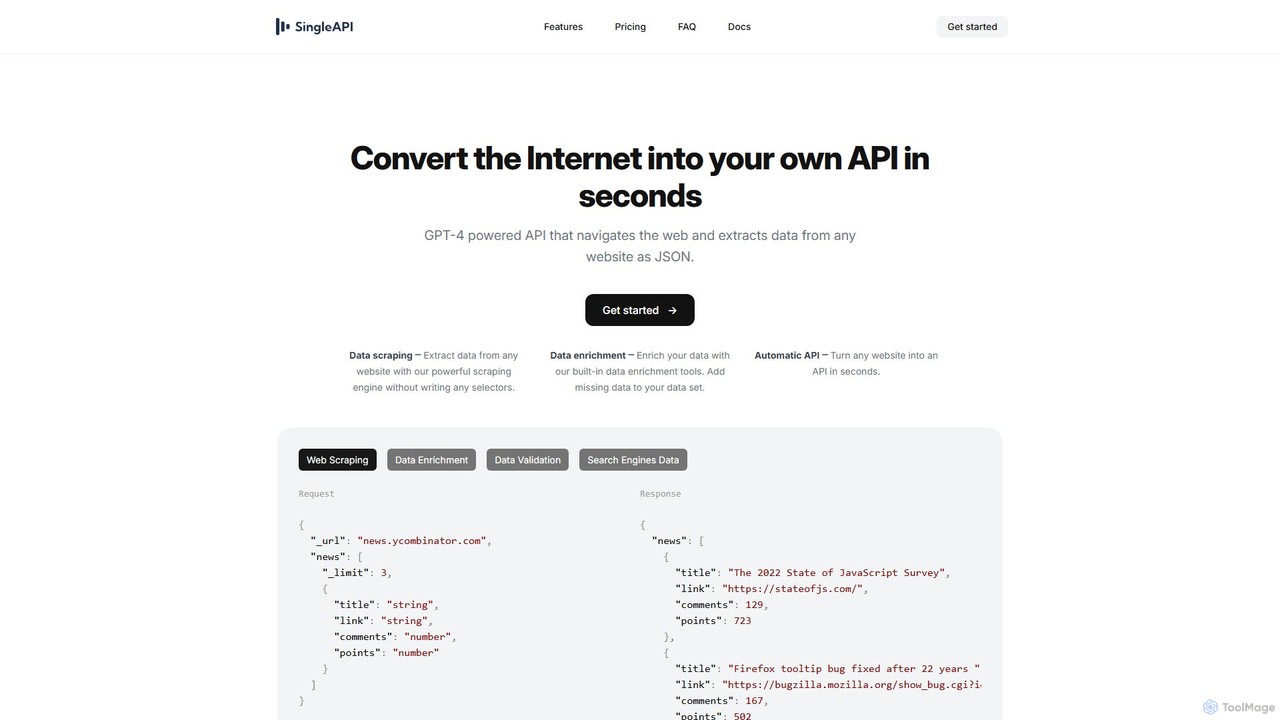
SingleAPI is a GPT-4 powered tool that instantly converts any website into a structured JSON API. It simplifies web scraping, data extraction, and data enrichment without writing any code or selectors, allowing users to effortlessly access web data for various applications.

Preview

Quick facts

Compare product focus, pricing models and audiences. Highlighted rows indicate different listed information; unknown pricing does not mean free.

Crawly VS SingleAPI — Quick facts
Quick factsCrawlySingleAPI
Pricing modelFreemiumFreemium
Product typeWebWeb
Primary focusWeb ScrapingWeb Scraping
Audience and rolesNo data availableNo data available
CategoriesWeb Scraping · Api · Market Research · AutomationWeb Scraping · Api · Data Extraction · Automation
AddedAug 10, 2025Aug 10, 2025
UpdatedNov 19, 2026Nov 19, 2026

Features, usage and use cases

Explore the listed product descriptions, features and workflows. Taxonomy labels alone are not feature evaluations.

Crawly

Crawly is a powerful and intelligent web crawler developed by Diffbot, a leader in AI-powered data extraction. It is designed to completely eliminate the manual and technical challenges of web scraping. Instead of writing complex code or using fragile selectors that break with website updates, Crawly leverages advanced artificial intelligence, including computer vision and natural language processing, to understand and interpret web pages like a human. This allows it to automatically identify and extract complete, structured data from an entire website with just a single URL as input.

The core promise of Crawly is to 'turn websites into data in seconds.' It navigates through a website, following links and analyzing the structure of each page to differentiate between various content types such as articles, products, discussions, and image galleries. The extracted data is then organized into a clean, structured format, ready for immediate use in applications, data analysis, or machine learning models.

How to use Crawly

Using Crawly is designed to be incredibly simple and accessible to everyone, regardless of technical skill. The process involves just a few steps:

  1. Input URL: Navigate to the Crawly website. In the provided input field, enter the full URL of the website you wish to crawl.
  2. Provide Email: Enter your email address. This is used to notify you and deliver the results once the crawl is complete.
  3. Initiate Crawl: Click the 'Crawl My Website' button. Crawly's AI engine will then begin to spider the entire site, analyzing pages and extracting information.
  4. Download Data: Once the process is finished, you will receive the extracted data. You can download it in convenient, structured formats like JSON or CSV, making it easy to import into databases, spreadsheets, or other software.

Core Features of Crawly

  • AI-Powered Automatic Extraction: Utilizes Diffbot's advanced AI to automatically recognize and extract data from articles, products, discussions, and more without any manual configuration.
  • Comprehensive Data Fields: Extracts a rich set of data points, including Title, Text, HTML, Comments, Date, Author, Author URL, Images, Videos, Publisher Information (Country, Name), and Language.
  • Entity Recognition: Automatically identifies and tags entities within the text, such as people, organizations, and locations, adding another layer of valuable metadata.
  • Full Site Crawling: Unlike single-page scrapers, Crawly navigates an entire website to gather data comprehensively.
  • Structured Data Output: Delivers clean, well-structured data in JSON or CSV formats, eliminating the need for post-processing and data cleaning.
  • No-Code Solution: Requires no programming skills or knowledge of web scraping technologies, making it accessible to marketers, researchers, and business analysts.
  • Robust and Resilient: Because it understands the content's semantic structure, it is not easily broken by website layout changes, a common problem with traditional scrapers.

Use Cases for Crawly

Crawly is a versatile tool suitable for a wide range of applications:

  • Market Research: Automatically gather competitor product information, pricing, customer reviews, and news mentions to gain a competitive edge.
  • Lead Generation: Extract contact details, company information, and key personnel from corporate websites and online directories.
  • Content Aggregation: Build a custom news feed or content platform by aggregating articles, blog posts, and videos from multiple sources.
  • Data for Machine Learning: Create large, high-quality datasets for training machine learning models, such as sentiment analysis on product reviews or trend analysis from news articles.
  • Brand Monitoring: Keep track of how your brand, products, or executives are mentioned across the web in real-time.

Advantages of Crawly

The primary advantage of Crawly is its simplicity and power. It democratizes web data extraction, allowing non-developers to perform tasks that would typically require a team of engineers. It saves immense amounts of time and resources by automating the entire scraping process. Furthermore, its AI-driven approach ensures higher accuracy and greater resilience than traditional methods, providing a reliable stream of high-quality data. By being a product of Diffbot, it is backed by enterprise-grade technology trusted by major corporations worldwide.

Pricing and Plans

Crawly offers a free trial crawl directly from its homepage, allowing users to test its capabilities by entering a URL and an email address. This is designed to provide a sample of the structured data that the tool can produce. For more extensive needs, such as large-scale crawling, frequent data extraction, or API access for programmatic use, users would typically subscribe to the full suite of tools offered by its parent company, Diffbot. Diffbot's pricing is tiered, with plans available for startups, businesses, and large enterprises, offering different levels of API calls and features.

SingleAPI

SingleAPI is a revolutionary tool designed to transform the entire internet into a developer-friendly, structured data source. Powered by GPT-4, it provides an intelligent API that can navigate any website, understand its structure, and extract the desired information into a clean JSON format, all within seconds. This eliminates the tedious and complex process of traditional web scraping, where developers would need to write and maintain fragile selectors (like CSS selectors or XPaths) to target specific data points. With SingleAPI, you simply describe the data you need, and the AI handles the rest.

The platform is built for simplicity and power, catering to a wide range of users from individual hobbyists to large enterprises. Whether you need to monitor competitor pricing, aggregate news, generate leads, or enrich your existing datasets, SingleAPI provides a robust and reliable solution that saves significant time and resources.

How to use SingleAPI

Using SingleAPI is remarkably straightforward. The process involves sending a simple HTTP request with a JSON body that specifies the target website and the data schema you want to extract. The AI engine then visits the URL, interprets your request, finds the relevant data on the page, and returns it in a perfectly structured JSON response.

For example, to extract the top 3 articles from Hacker News, your request would look like this:

Request:
{
  "_url": "news.ycombinator.com",
  "news": [
    {
      "_limit": 3,
      "title": "string",
      "link": "string",
      "comments": "number",
      "points": "number"
    }
  ]
}

SingleAPI's AI understands this structure, navigates to Hacker News, identifies the list of articles, and extracts the title, link, comment count, and points for the first three entries, returning a clean JSON object.

Core Features of SingleAPI

  • AI-Powered Web Scraping: Leverages GPT-4 to understand web page layouts and extract data without requiring users to write or manage any selectors.
  • Automatic API Creation: Instantly turns any public website into a functional, queryable API.
  • Data Enrichment: Automatically enhances your extracted data. For example, it can find social media profiles from a list of company names or add other relevant information to your dataset.
  • Flexible Data Delivery: Delivers data in multiple formats, including JSON, CSV, XML, and Excel, to fit various workflows.
  • Real-time Data with Webhooks: Configure webhooks to receive data instantly as it's scraped, enabling real-time applications.
  • Managed Proxy Rotation: Automatically handles proxy management to prevent IP blocks and ensure successful data retrieval, with options for dedicated proxy pools.
  • Search Engine Scraping: Capable of scraping data directly from search engine results pages, such as Google, for SEO analysis or market research.
  • 24/7 Monitoring: Provides constant monitoring of crawlers and a user dashboard to track usage and ensure service uptime and reliability.

Use Cases for SingleAPI

SingleAPI's versatility makes it suitable for a wide array of applications:

  • Market Research: Track competitor pricing, product details, and customer reviews from e-commerce sites.
  • Lead Generation: Extract contact information, company details, and job listings from corporate websites and professional networks.
  • Content Aggregation: Build custom news feeds, blog aggregators, or social media monitors.
  • Financial Analysis: Scrape stock prices, market data, and financial news for analysis and modeling.
  • AI Model Training: Gather large, structured datasets from across the web to train machine learning models.

Advantages of SingleAPI

The primary advantage of SingleAPI is its simplicity and efficiency. It abstracts away the complexities of web scraping, such as handling dynamic JavaScript-heavy sites, managing proxies, and parsing HTML. This allows developers and non-developers alike to focus on using the data rather than acquiring it. The AI-driven approach makes it more resilient to website layout changes compared to traditional scrapers. Its flexibility in data formats and real-time delivery via webhooks makes it a powerful tool for modern data-driven businesses.

Pricing and Plans

SingleAPI offers a tiered pricing structure to suit different needs:

  • Hobby Plan: $0/month. Includes 100 requests, 3 API endpoints, and 24-hour data retention. Ideal for individuals and testing purposes.
  • Professional Plan: $75/month. Includes 5,000 requests, with additional requests at $10 per 1,000. Offers unlimited API endpoints, 30-day data retention, priority support, and Zapier integration. Designed for businesses.
  • Enterprise Plan: Custom pricing. Tailored for large companies with high-volume needs. Includes custom API diagnostics, a 99.99% uptime SLA, premium 24/7 chat support, and SAML-based SSO.

Positioning

Their taxonomy shows where the products overlap and where each one has a more distinct focus. Unknown fields are shown explicitly and are never filled with assumptions.

Categories

Shared
Web ScrapingApiAutomation
Only Crawly
Market Research
Only SingleAPI
Data Extraction

Tags

Shared
APIautomationdata extractionJSONno-codeweb scraping
Only Crawly
Diffbotlead generationmarket researchstructured dataweb crawler
Only SingleAPI
data enrichmentdata scrapingdeveloper toolsgpt-4

Audience and roles

Shared
No listed items
Only Crawly
No listed items
Only SingleAPI
No listed items

Traffic comparison

Traffic is shown on the same scale so differences in market visibility are not visually understated.

How to interpret the traffic data

Both charts share the same months and vertical scale. Each tool identifies its latest reporting month; missing months are left blank, not counted as zero. Regional and source visit counts are estimates calculated from the reported shares.

Crawly monthly traffic:

Latest traffic · 2026-05

Monthly visits
1.8K
Avg. visit duration
0:31
Pages per visit
1.15
Bounce rate
93.85%
Data updated 2026-06-15

Monthly traffic trend

  • 2025-09: 2.6K
  • 2026-01: 784
  • 2026-02: 640
  • 2026-03: 1K
  • 2026-04: 475
  • 2026-05: 1.8K

Top regions

Top 5 countries/regions
Country/regionPercentageEstimated visits
🇳🇬Nigeria82.43%1.5K
🇩🇪Germany9.9%177
🇨🇦Canada7.67%137

Search keywords

crawl urlcrawlyonline web crawlerwebsite crawlerwebsite crawler online

SingleAPI monthly traffic:

Latest traffic · 2026-05

Monthly visits
438
Avg. visit duration
0:00
Pages per visit
1.01
Bounce rate
40.53%
Data updated 2026-06-15

Monthly traffic trend

  • 2025-09: 737
  • 2026-01: 0
  • 2026-02: 135
  • 2026-03: 156
  • 2026-04: 0
  • 2026-05: 438

Top regions

Top 5 countries/regions
Country/regionPercentageEstimated visits
🇮🇶Iraq100%438

Search keywords

any site to apiturn website to api

Community signals

Ratings, comments, favorites, and likes are community signals—not a substitute for product fit.

Crawly

Rating
No data available
Comments
0
Favorites
162
Likes
160

SingleAPI

Rating
No data available
Comments
0
Favorites
208
Likes
202

Crawly vs SingleAPI · Comparison FAQ

What do Crawly and SingleAPI have in common?
Both tools are listed under Web Scraping、Api、Automation. These categories indicate overlapping use cases; compare their detailed descriptions for workflows, capabilities and limitations.
Are Crawly and SingleAPI free?
Listed pricing models: Crawly — Freemium; SingleAPI — Freemium. Missing pricing is not proof of a free plan, and freemium does not mean every feature is free. Check official sites for current plans, limits and trials.
How should I choose between Crawly and SingleAPI?
The primary listed category is Web Scraping for Crawly, and Web Scraping for SingleAPI. Compare features, steps and use cases, then verify pricing, data permissions and deployment needs. This page does not include hands-on testing and does not declare a winner from traffic or tags.

Sources and comparison methodology

This page is assembled from ToolMage product listings, taxonomy, traffic statistics and on-site user feedback. It is not a hands-on test or an independent review.

  • Feature and plan descriptions reflect information in the listings, not real-time guarantees. Verify pricing, quotas, availability and privacy terms on the official sites.
  • Traffic uses the reporting months shown. Missing statistics do not mean zero visits, and different periods do not establish growth or superiority. Regional and source visit counts are estimates based on shares.
  • Different tags indicate differences in the listings, not proof that the other product lacks a capability. Ratings, favorites and visits are not used to declare a winner.

Related comparisons