ToolMage
Sign in

AI TOOL COMPARISON

GitFluence vs runyoyo

What is the difference, and which fits your workflow? Compare features, usage, pricing models and traffic side by side.

Jump to key differences

Product overview

GitFluence Product overview

GitFluence is an AI-powered tool that translates natural language descriptions into the correct Git commands. Simply describe what you want to do, and GitFluence provides the precise command, saving you time and reducing errors. Ideal for both beginners learning Git and experts needing a quick syntax reminder.

Preview

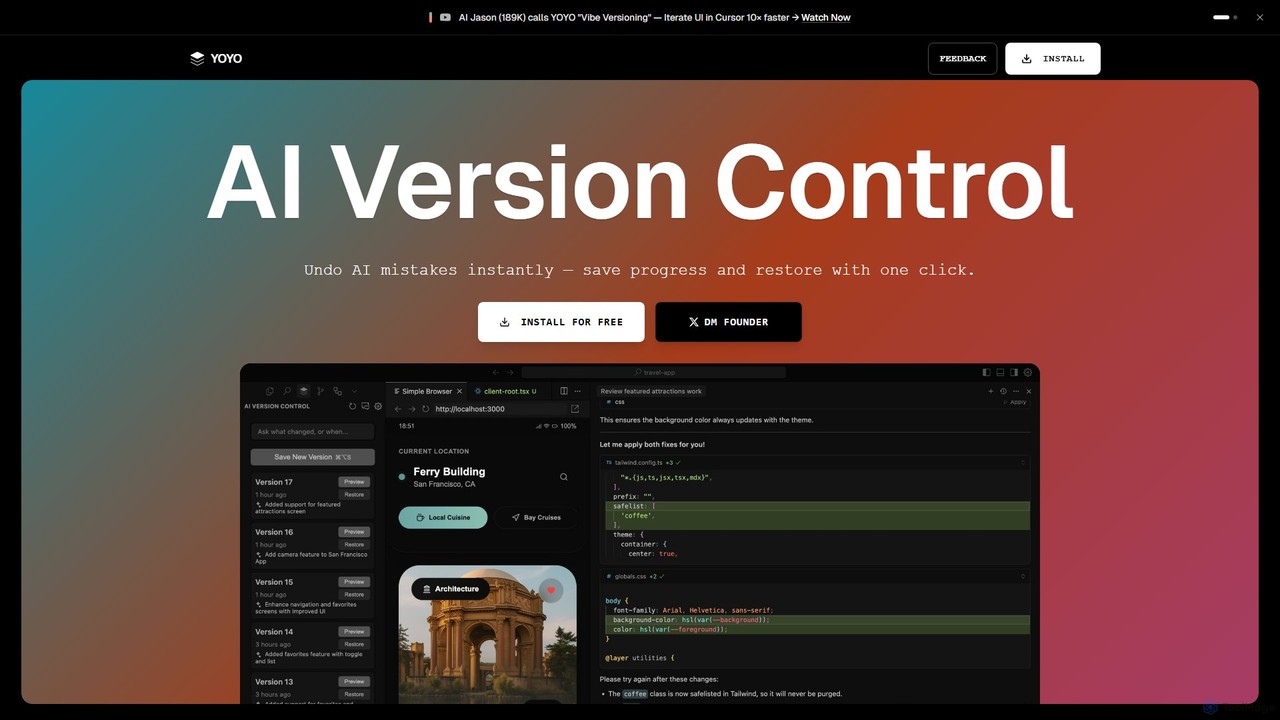
runyoyo Product overview

runyoyo is an AI-native version control system designed for the era of 'Vibe Coding'. It allows developers to instantly save progress, undo AI-generated mistakes with a single click, and search their entire coding timeline. It works alongside Git to keep your main repository clean while you experiment freely with AI assistants in IDEs like VS Code and Cursor.

Preview

Quick facts

Compare product focus, pricing models and audiences. Highlighted rows indicate different listed information; unknown pricing does not mean free.

GitFluence VS runyoyo — Quick facts
Quick factsGitFluencerunyoyo
Pricing modelFreeFreemium
Product typeWebExtensions
Primary focusVersion ControlIde Extension
Audience and rolesNo data availableNo data available
CategoriesVersion Control · Learning · Code AssistantIde Extension · Version Control · Code Assistant
AddedAug 4, 2025Aug 4, 2025
UpdatedNov 19, 2026Nov 19, 2026

Features, usage and use cases

Explore the listed product descriptions, features and workflows. Taxonomy labels alone are not feature evaluations.

GitFluence

GitFluence is an innovative, AI-driven web application designed to simplify the complexities of Git, the world's most popular version control system. For many developers, from novices to seasoned professionals, remembering the specific syntax for the vast array of Git commands can be a challenge. GitFluence addresses this pain point directly by acting as an intelligent translator between natural human language and the Git command line.

The tool provides a clean, intuitive interface where users can describe a task they want to accomplish in plain English. The underlying AI model then processes this request and instantly generates the most appropriate Git command. This not only boosts productivity by eliminating the need to search through documentation or online forums but also serves as a powerful learning tool, helping users understand the connection between their intent and the required command.

How to use GitFluence

Using GitFluence is a straightforward, three-step process designed for maximum efficiency:

  1. Describe the command: Start by navigating to the GitFluence website. In the prominent input field, type a clear description of what you want to achieve. For example, you could type "undo my last commit but keep the changes", "merge the 'dev' branch into 'main'", or "find the commit that introduced a specific bug".
  2. Receive AI-generated suggestions: Once you enter your description, the AI engine analyzes your request. Within seconds, it suggests the most relevant Git command to accomplish your task. Often, it may provide a brief explanation of what the command does and how its flags or parameters work.
  3. Copy and execute the command: Review the suggested command for accuracy. If it matches your needs, simply click the copy button to add it to your clipboard. You can then paste it directly into your terminal or command-line interface and execute it in your project repository.

Core Features of GitFluence

  • Natural Language to Command Translation: At its core, GitFluence uses a sophisticated AI model to understand user intent from plain English and convert it into accurate Git syntax.
  • Comprehensive Command Coverage: The tool supports a wide spectrum of Git operations, from basic commands like `git add`, `git commit`, and `git push` to more advanced and complex ones like `git rebase`, `git cherry-pick`, `git bisect`, and `git stash`.
  • Instantaneous Results: The AI-driven solution provides command suggestions almost instantly, ensuring your development workflow is not interrupted.
  • One-Click Copy to Clipboard: A convenient copy button allows you to transfer the generated command to your terminal without the risk of manual typing errors.
  • Educational Explanations: Many generated commands come with concise explanations, helping users learn the purpose of different commands and their options, thereby improving their overall Git fluency over time.
  • Minimalist and Focused UI: The web interface is clean, free of clutter, and focuses on its primary function, providing a seamless and distraction-free user experience.

Use Cases for GitFluence

GitFluence is a versatile tool that caters to a broad range of users:

  • Beginners and Students: Individuals new to Git can use GitFluence as a learning aid to find the right commands without feeling overwhelmed by the steep learning curve.
  • Experienced Developers: Senior developers can leverage it as a quick reference to recall syntax for less frequently used commands, saving valuable time and mental energy.
  • Development Teams: Teams can use it to ensure consistency in their version control practices and to help new members get up to speed with complex workflows more quickly.
  • Occasional Git Users: Professionals like designers, technical writers, or project managers who only interact with Git sporadically can perform necessary tasks without needing to memorize commands.

Advantages of GitFluence

The primary advantages of using GitFluence include:

  • Increased Productivity: It significantly reduces the time spent searching for Git commands, allowing developers to stay focused on coding.
  • Reduced Error Rate: By generating syntactically correct commands, it minimizes the risk of typos or incorrect usage that could lead to repository issues.
  • Lowered Barrier to Entry: It makes the powerful features of Git more accessible to a wider audience, regardless of their command-line proficiency.
  • Enhanced Learning: It acts as an interactive tutor, reinforcing learning by connecting practical needs with concrete commands.

Pricing and Plans

GitFluence is currently available as a free tool. Users can access its full functionality without any cost or subscription. The service is supported by unobtrusive advertisements, ensuring it remains accessible to the entire developer community.

runyoyo

runyoyo is a revolutionary version control tool built specifically for developers who leverage AI in their coding workflow, a practice known as 'Vibe Coding'. In this new paradigm of software development, AI assistants like Gemini, Claude, and Codex can generate, refactor, and modify code at an incredible speed. However, this speed comes with a risk: a single misplaced prompt can introduce subtle bugs or break your application entirely. runyoyo addresses this challenge head-on by providing a safety net for AI-assisted development.

Unlike traditional version control systems like Git, which are designed for structured, deliberate commits intended for shipping, runyoyo is built for exploration and experimentation. It allows you to capture the messy, creative, and often chaotic process of figuring things out with AI. You can instantly save a 'checkpoint' of your code before trying a risky AI prompt, and if the result isn't what you wanted, you can restore your previous state with a single click, completely eliminating the fear of breaking your work.

How to use runyoyo

Using runyoyo is designed to be an intuitive part of your development flow. First, you install the runyoyo extension into your preferred Integrated Development Environment (IDE), such as VS Code, Cursor, or Windsurf. The tool seamlessly integrates into your editor.

The core workflow is simple:

  1. Save a Checkpoint: Before you ask an AI to perform a task (e.g., 'refactor this function', 'add dark mode'), you create a YOYO save point. This is a one-click action that instantly captures the current state of your code.
  2. Experiment with AI: Proceed with your AI prompt and let the assistant modify your code.
  3. Preview and Decide: Review the changes made by the AI.
  4. Restore if Needed: If the AI's changes are incorrect, buggy, or simply not what you wanted, you can instantly revert to your saved checkpoint with another click. There's no need for complex `git reset` or `stash` commands.
  5. Search Your History: Use the Agentic AI Search to ask questions about your coding history in plain English, like "Show me the changes I made for the dark mode feature" or "What did I do in version 9?", even across different IDEs.

Core Features of runyoyo

  • Instant AI Mistake Undo: The flagship feature. One-click restoration to a previous state, making AI experimentation fearless and fast.
  • Lightweight Checkpoints: Save your progress at any moment without the overhead of creating a formal Git commit. These checkpoints are for your experimental timeline.
  • Agentic AI Search: A powerful search engine that understands your entire coding history. You can query your timeline using natural language to find specific changes, refactors, or versions.
  • Cross-IDE Versioning: Maintain a unified coding timeline even when you switch between different editors like VS Code, Cursor, and Windsurf. Your YOYO history follows you.
  • Git Independence: runyoyo saves your experimental history separately, preventing your official Git repository from being polluted with dozens of small, temporary, or broken commits. Your Git log stays clean and professional.

Use Cases for runyoyo

runyoyo is ideal for any developer, designer, or creator who uses AI in their workflow:

  • Rapid Prototyping: Quickly build and iterate on new features with AI, saving checkpoints at each major step.
  • Safe Code Refactoring: Undertake large-scale refactoring with an AI assistant, knowing you can easily roll back any part of the process.
  • AI Prompt Engineering: Experiment with different prompts to see which one yields the best code, saving each attempt as a distinct version.
  • Learning and Education: New developers can learn to code with AI without the fear of irreversible mistakes or the complexity of Git.
  • Creative Coding & Design: For 'vibe designers' and coders who are exploring creative possibilities and need a fluid way to save and revisit ideas.

Advantages of runyoyo

The primary advantage of runyoyo is that it empowers developers to use AI assistants with confidence. It removes the friction and fear associated with AI-driven code generation. By separating the exploratory phase from the final product, it promotes a more creative and efficient workflow. It keeps your Git history clean for collaboration and deployment, while providing a detailed, searchable, and personal timeline of your creative process. It's not a replacement for Git; it's the essential companion for it in the age of AI.

Pricing and Plans

runyoyo is currently available to install for free. The focus is on building a strong community of 'vibe coders' and developers. For the most current information on pricing and any potential future premium plans, please visit the official runyoyo website.

Positioning

Their taxonomy shows where the products overlap and where each one has a more distinct focus. Unknown fields are shown explicitly and are never filled with assumptions.

Categories

Shared
Version ControlCode Assistant
Only GitFluence
Learning
Only runyoyo
Ide Extension

Tags

Shared
AI assistantGitversion control
Only GitFluence
code generatorcommand linedeveloper productivitydeveloper toolsnatural language processing
Only runyoyo
Claudecode undoCursordeveloper toolgeminisoftware developmentvibe codingVS Code

Audience and roles

Shared
No listed items
Only GitFluence
No listed items
Only runyoyo
No listed items

Traffic comparison

Traffic is shown on the same scale so differences in market visibility are not visually understated.

How to interpret the traffic data

Both charts share the same months and vertical scale. Each tool identifies its latest reporting month; missing months are left blank, not counted as zero. Regional and source visit counts are estimates calculated from the reported shares.

GitFluence monthly traffic:

Latest traffic · 2026-05

Monthly visits
248
Avg. visit duration
0:16
Pages per visit
3.72
Bounce rate
49.96%
Data updated 2026-06-15

Monthly traffic trend

  • 2025-07: 677
  • 2025-08: 114
  • 2025-09: 842
  • 2026-03: 0
  • 2026-04: 0
  • 2026-05: 248

Top regions

Top 5 countries/regions
Country/regionPercentageEstimated visits
🇺🇸United States100%248

Search keywords

git aigitbash with ai

runyoyo

No data available

Community signals

Ratings, comments, favorites, and likes are community signals—not a substitute for product fit.

GitFluence

Rating
No data available
Comments
0
Favorites
171
Likes
184

runyoyo

Rating
No data available
Comments
0
Favorites
173
Likes
147

GitFluence vs runyoyo · Comparison FAQ

What do GitFluence and runyoyo have in common?
Both tools are listed under Version Control、Code Assistant. These categories indicate overlapping use cases; compare their detailed descriptions for workflows, capabilities and limitations.
Are GitFluence and runyoyo free?
Listed pricing models: GitFluence — Free; runyoyo — Freemium. Missing pricing is not proof of a free plan, and freemium does not mean every feature is free. Check official sites for current plans, limits and trials.
How should I choose between GitFluence and runyoyo?
The primary listed category is Version Control for GitFluence, and Ide Extension for runyoyo. Compare features, steps and use cases, then verify pricing, data permissions and deployment needs. This page does not include hands-on testing and does not declare a winner from traffic or tags.

Sources and comparison methodology

This page is assembled from ToolMage product listings, taxonomy, traffic statistics and on-site user feedback. It is not a hands-on test or an independent review.


  • Feature and plan descriptions reflect information in the listings, not real-time guarantees. Verify pricing, quotas, availability and privacy terms on the official sites.
  • Traffic uses the reporting months shown. Missing statistics do not mean zero visits, and different periods do not establish growth or superiority. Regional and source visit counts are estimates based on shares.
  • Different tags indicate differences in the listings, not proof that the other product lacks a capability. Ratings, favorites and visits are not used to declare a winner.

Related comparisons