ToolMage
Sign in

AI TOOL COMPARISON

OFFLIGHT vs Twilight

What is the difference, and which fits your workflow? Compare features, usage, pricing models and traffic side by side.

Jump to key differences

Product overview

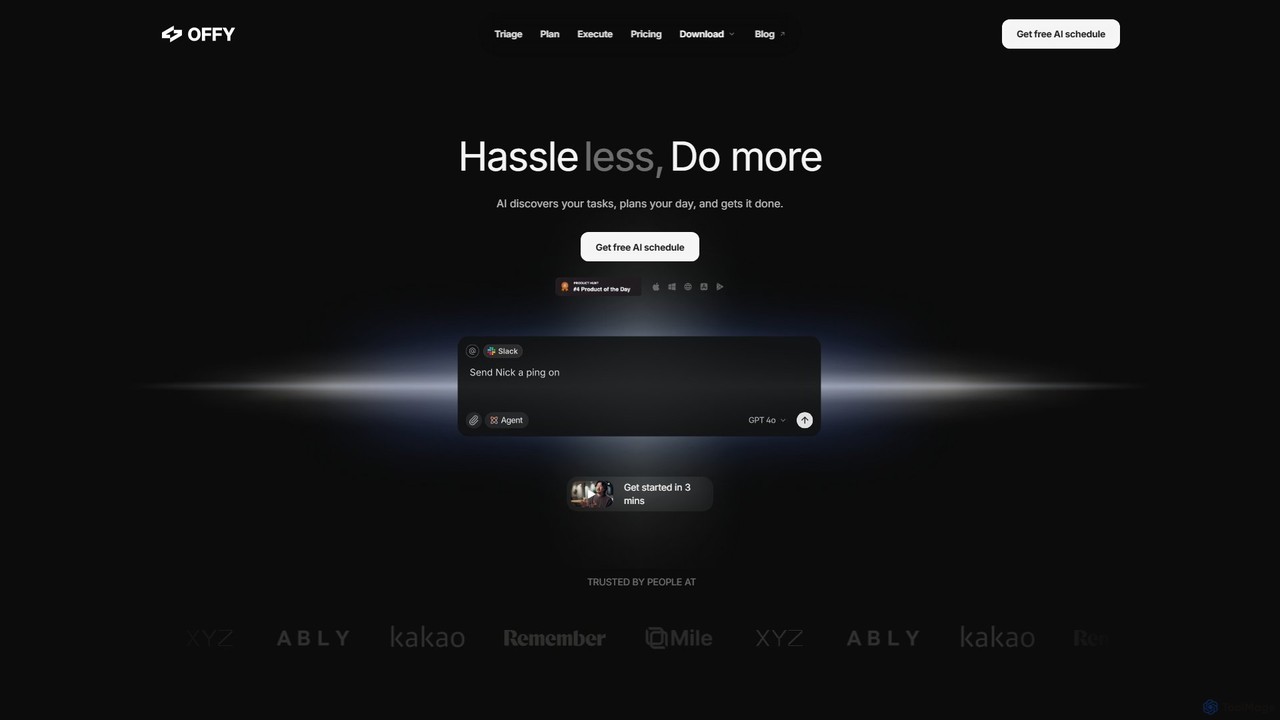
OFFLIGHT Product overview

OFFLIGHT is an AI-powered task management tool that automatically discovers tasks from your apps like Gmail and Slack, creates intelligent, time-based plans, and helps you execute them. Centralize your workflow and boost productivity with your personal AI assistant, Offy.

Preview

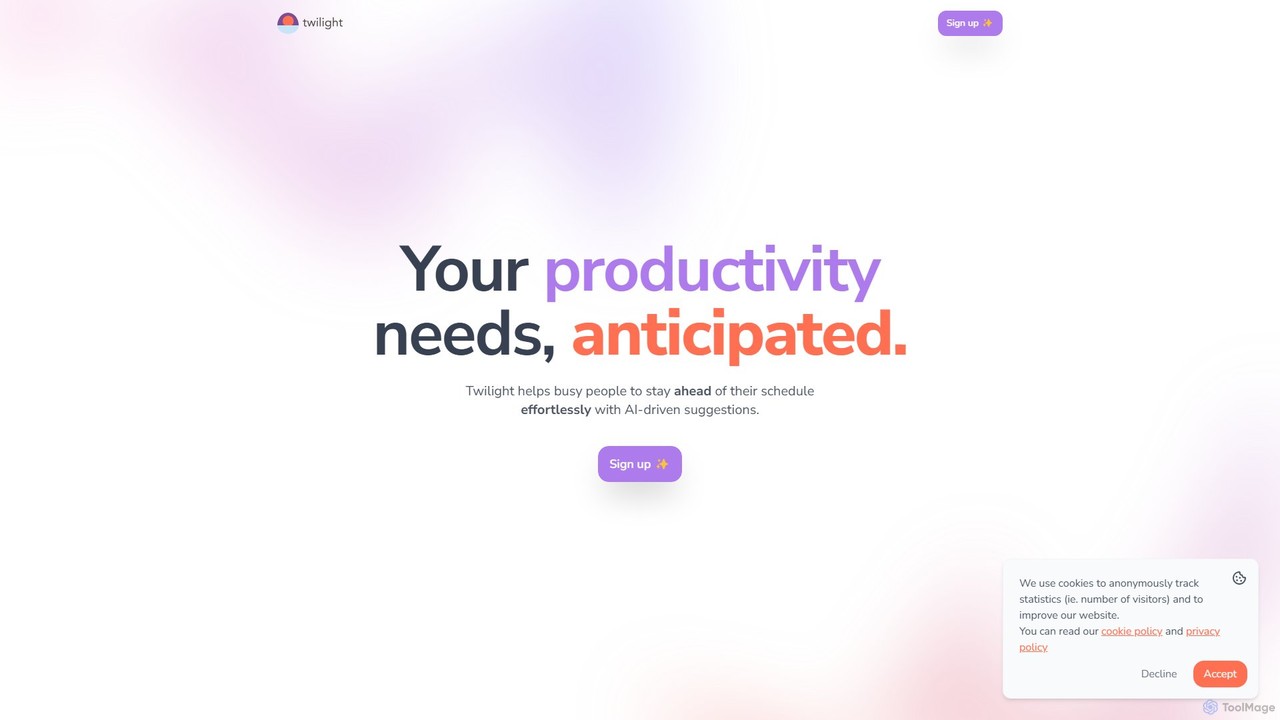
Twilight Product overview

Twilight is an AI-driven personal assistant that anticipates your productivity needs. It intelligently manages your schedule with proactive suggestions, automates rescheduling, prevents overbooking, and helps you focus on what truly matters by organizing your workflow.

Preview

Quick facts

Compare product focus, pricing models and audiences. Highlighted rows indicate different listed information; unknown pricing does not mean free.

OFFLIGHT VS Twilight — Quick facts
Quick factsOFFLIGHTTwilight
Pricing modelFreemiumFreemium
Product typeWebWeb
Primary focusPersonal AssistantCalendar Management
Audience and rolesNo data availableNo data available
CategoriesPersonal Assistant · Scheduling · Task ManagementCalendar Management · Personal Assistant · Scheduling Automation · Task Management
AddedAug 5, 2025Aug 5, 2025
UpdatedNov 19, 2026Nov 19, 2026

Features, usage and use cases

Explore the listed product descriptions, features and workflows. Taxonomy labels alone are not feature evaluations.

OFFLIGHT

OFFLIGHT is a revolutionary AI-powered task management and productivity platform designed to help busy individuals and teams reclaim their time and focus. With its intelligent assistant, Offy, OFFLIGHT transforms the way you handle your daily responsibilities by automating the most tedious parts of task management. It seamlessly integrates with your existing tools to discover, prioritize, and plan your tasks, allowing you to spend less time organizing and more time doing. By centralizing information from scattered sources like emails, chat messages, and project management tools, OFFLIGHT provides a single, unified view of your workload, preventing anything from slipping through the cracks.

The core philosophy of OFFLIGHT is "Hassle less, Do more." It achieves this by creating a dynamic, personalized schedule that adapts to your unique workflow and priorities. The AI doesn't just list your tasks; it understands their context, suggests the next best action, and even helps you execute them, such as by drafting email replies directly within the interface. This proactive approach reduces cognitive load and decision fatigue, empowering users to achieve a better work-life balance.

How to use OFFLIGHT

Getting started with OFFLIGHT is designed to be quick and intuitive, taking just a few minutes to set up.

  1. Connect Your Tools: Begin by linking your everyday applications like Gmail, Google Calendar, Slack, Linear, and more. This allows Offy to access your work context and start discovering tasks automatically.
  2. Triage with Offy: Once connected, Offy scans your integrated apps for action items, requests, and deadlines. It presents these discovered tasks in a centralized dashboard, where you can easily review and prioritize them with AI-powered suggestions.
  3. Plan Your Day: Interact with Offy through a simple chat interface. Tell it your goals for the day, and the AI will generate a time-based, optimized schedule. It intelligently breaks down larger tasks into manageable sub-tasks and fits them into your calendar.
  4. Execute and Collaborate: Follow the plan laid out by Offy. The tool will guide you on what to do next. For tasks like responding to emails, Offy can generate draft responses, which you can quickly edit and send. This seamless execution flow keeps you in a state of productivity without constant context switching.

Core Features of OFFLIGHT

  • AI Task Discovery: Automatically identifies and captures tasks from various sources, including emails, chat messages (Slack), and project tools (Linear), consolidating them in one place.
  • Intelligent Planning & Scheduling: The AI creates personalized, time-based task plans tailored to your schedule and priorities. It automatically splits large tasks into smaller, actionable steps.
  • Contextual Execution Assistant: Offy provides proactive support by suggesting the next task and assisting in its completion, such as drafting email responses from Gmail.
  • Unified Task Hub: Manages all your assigned tasks from different platforms in a single, intuitive interface, eliminating the need to switch between multiple apps.
  • Chat-Based Interface: A conversational UI allows you to manage your entire workflow, from planning to execution, by simply chatting with your AI assistant, Offy.
  • Cross-Platform Availability: Access and manage your tasks on Web, PC, iOS, and Android, ensuring your schedule is always in sync.
  • Google Workspace Integration: Deeply connects with your Google email and calendar for seamless task and schedule management.
  • Web Search Capability: The AI can search the web to gather information needed to complete tasks.

Use Cases for OFFLIGHT

OFFLIGHT is versatile and benefits a wide range of users:

  • CEOs and Executives: Manage high-level workflows, from organizing thoughts from meeting notes to delegating tasks discussed in team chats, ensuring strategic focus.
  • Product Managers: Juggle multiple meetings, reports, and team communications. OFFLIGHT helps prioritize a hectic schedule and keep projects on track.
  • Parents: Balance personal and professional life by managing schedules during fragmented moments, like a child's nap, ensuring no appointment or task is forgotten.
  • Students and Freelancers: Organize client requests from various channels, clarify priorities, and manage deadlines effectively to maintain a steady workflow and client satisfaction.
  • Teams: Improve overall workflow efficiency by providing a centralized platform where tasks are automatically triaged and planned, reducing manual coordination.

Advantages of OFFLIGHT

The primary advantage of OFFLIGHT is its ability to significantly reduce the mental overhead associated with modern work. By automating discovery and planning, it frees up valuable cognitive resources. Its proactive nature means it doesn't just wait for your input; it anticipates your needs. The unified hub streamlines workflows, boosts productivity, and helps users maintain focus. The personalized planning ensures that your schedule is realistic and tailored to you, promoting a sustainable and balanced lifestyle.

Pricing and Plans

OFFLIGHT operates on a freemium model, allowing users to get started for free.

  • Free Plan: A free tier is available, perfect for trying out the core features and getting a feel for AI-powered scheduling.
  • Pro Beta Plan: For users who need more power and features for everyday productivity. The plan includes more credits, chat with Offy on all platforms (web, PC, mobile), auto-planning calendar, full task and calendar management, web search ability, and integration with Google Workspace and other tools.
  • Pricing: The Pro Beta plan is offered at $9 per month when billed annually (a 20% discount). A monthly billing option is also available.

Twilight

Twilight is an intelligent, AI-driven platform designed to anticipate and manage the productivity needs of busy individuals. It goes beyond a standard calendar by acting as a proactive personal assistant, helping you stay ahead of your schedule effortlessly. By analyzing your tasks, meetings, and priorities, Twilight provides smart suggestions to optimize your day, ensuring your schedule remains clean, organized, and free from conflicts.

The core philosophy of Twilight is simplicity and reliability. It avoids overcomplicated features and unnecessary settings, focusing instead on a streamlined user experience that empowers your workflow. Whether it's scheduling new meetings, rescheduling existing ones, or summarizing informational content to save you time, Twilight handles the administrative overhead so you can concentrate on high-impact work. With a strong commitment to privacy, your data is used solely to enhance your productivity, never for monetization.

How to use Twilight

Using Twilight is designed to be an intuitive process that integrates seamlessly into your existing workflow. Here’s a typical user journey:

  1. Sign Up and Connect Accounts: Begin by creating a Twilight account. To unlock its full potential, connect your primary calendar (e.g., Google Calendar, Outlook) and other relevant applications. This allows the AI to get a complete picture of your commitments.
  2. Set Your Preferences: Define your work hours, meeting preferences, and general priorities. This helps the AI understand what's important to you and when you prefer to focus.
  3. Receive AI-Driven Suggestions: As new events, tasks, or emails arrive, Twilight's AI analyzes them in context. It will then proactively send you suggestions, such as proposing a new meeting time to avoid a conflict, or suggesting you delay a non-urgent task to protect a block of deep work time.
  4. Accept or Adjust with One Click: You have full control. Accept a suggestion with a single click, or easily adjust it to better fit your needs. The interface is designed for quick decisions.
  5. Enjoy an Automated Workflow: Let Twilight work in the background to keep your schedule optimized. It will automatically guard against double-bookings, reschedule tasks based on your availability, and help you maintain focus throughout the day.

Core Features of Twilight

  • AI-Powered Scheduling: Proactively suggests optimal times for meetings and tasks based on your availability and priorities.
  • Automatic Rescheduling: Intelligently reorganizes your schedule when conflicts arise or priorities change, based on your predefined rules.
  • Overbooking Protection: Actively monitors your calendar to prevent double-bookings and overlapping appointments, ensuring your time is well-managed.
  • Task Prioritization and Deferral: Identifies and suggests delaying low-priority tasks or informational content (like newsletters) to keep your focus on what's truly important.
  • Content Summarization: Saves you time by providing quick summaries of informational content, allowing you to grasp key points without the full read.
  • Third-Party Integrations: Designed to be the bridge between your favorite apps and services, creating a unified and intelligent workflow.
  • Privacy First: A core commitment that your data is used exclusively to empower you and is never sold or monetized.
  • Simplified User Experience: A clean, intuitive interface without unnecessary features, making productivity management effortless.

Use Cases for Twilight

Twilight is ideal for anyone looking to reclaim their time and enhance their focus:

  • Executives and Managers: Juggle a packed schedule of meetings and strategic work by letting Twilight automate calendar management and protect valuable focus time.
  • Freelancers and Consultants: Manage multiple clients and projects seamlessly, avoiding scheduling conflicts and ensuring deadlines are met.
  • Sales Professionals: Efficiently schedule a high volume of client calls and demos without the risk of double-booking.
  • Students and Researchers: Organize study sessions, project deadlines, and group meetings to maintain a balanced and productive academic life.

Advantages of Twilight

The primary advantage of Twilight is its proactive, anticipatory nature. Instead of being a passive tool, it actively works to optimize your schedule. This reduces the cognitive load of constant planning and decision-making. It enhances focus by intelligently filtering out distractions and protects your most valuable asset—your time. Its simplicity and strong privacy stance make it a trustworthy assistant for modern professionals.

Pricing and Plans

While a specific pricing page is not available on the website, Twilight appears to operate on a freemium model. Users can likely sign up for a free version with core functionalities to experience the benefits firsthand. A premium or paid plan would likely offer advanced features such as unlimited AI suggestions, a wider range of third-party integrations, and priority support. Users are encouraged to sign up on the website to get started and explore the available options.

Positioning

Their taxonomy shows where the products overlap and where each one has a more distinct focus. Unknown fields are shown explicitly and are never filled with assumptions.

Categories

Shared
Personal AssistantTask Management
Only OFFLIGHT
Scheduling
Only Twilight
Calendar ManagementScheduling Automation

Tags

Shared
AI assistantautomationproductivityschedulingtask management
Only OFFLIGHT
gmailpersonal productivitySlackto-do listworkflow
Only Twilight
calendarmeeting schedulerpersonal assistanttime managementworkflow optimization

Audience and roles

Shared
No listed items
Only OFFLIGHT
No listed items
Only Twilight
No listed items

Traffic comparison

Traffic is shown on the same scale so differences in market visibility are not visually understated.

How to interpret the traffic data

Both charts share the same months and vertical scale. Each tool identifies its latest reporting month; missing months are left blank, not counted as zero. Regional and source visit counts are estimates calculated from the reported shares.

OFFLIGHT monthly traffic:

Latest traffic · 2026-05

Monthly visits
3.7K
Avg. visit duration
0:03
Pages per visit
1.29
Bounce rate
36.06%
Data updated 2026-06-15

Monthly traffic trend

  • 2025-09: 15K
  • 2026-01: 13.8K
  • 2026-02: 7.8K
  • 2026-03: 4.7K
  • 2026-04: 5K
  • 2026-05: 3.7K

Top regions

Top 5 countries/regions
Country/regionPercentageEstimated visits
🇰🇷Korea, Republic of49.18%1.8K
🇺🇸United States45.81%1.7K
🇮🇳India5.01%187

Search keywords

재피어스와이프offlighttodoist alternatives캘린더 ui 일정 등록

Twilight

No data available

Community signals

Ratings, comments, favorites, and likes are community signals—not a substitute for product fit.

OFFLIGHT

Rating
No data available
Comments
0
Favorites
142
Likes
152

Twilight

Rating
No data available
Comments
0
Favorites
164
Likes
162

OFFLIGHT vs Twilight · Comparison FAQ

What do OFFLIGHT and Twilight have in common?
Both tools are listed under Personal Assistant、Task Management. These categories indicate overlapping use cases; compare their detailed descriptions for workflows, capabilities and limitations.
Are OFFLIGHT and Twilight free?
Listed pricing models: OFFLIGHT — Freemium; Twilight — Freemium. Missing pricing is not proof of a free plan, and freemium does not mean every feature is free. Check official sites for current plans, limits and trials.
How should I choose between OFFLIGHT and Twilight?
The primary listed category is Personal Assistant for OFFLIGHT, and Calendar Management for Twilight. Compare features, steps and use cases, then verify pricing, data permissions and deployment needs. This page does not include hands-on testing and does not declare a winner from traffic or tags.

Sources and comparison methodology

This page is assembled from ToolMage product listings, taxonomy, traffic statistics and on-site user feedback. It is not a hands-on test or an independent review.

  • Feature and plan descriptions reflect information in the listings, not real-time guarantees. Verify pricing, quotas, availability and privacy terms on the official sites.
  • Traffic uses the reporting months shown. Missing statistics do not mean zero visits, and different periods do not establish growth or superiority. Regional and source visit counts are estimates based on shares.
  • Different tags indicate differences in the listings, not proof that the other product lacks a capability. Ratings, favorites and visits are not used to declare a winner.

Related comparisons