ToolMage
Sign in

Best 1 Design Generation AI tools for Architecture

Popular Design Generation AI tools in Architecture include AI Architectures, helping you work more efficiently.

AI Architectures
Paid

AI Architectures

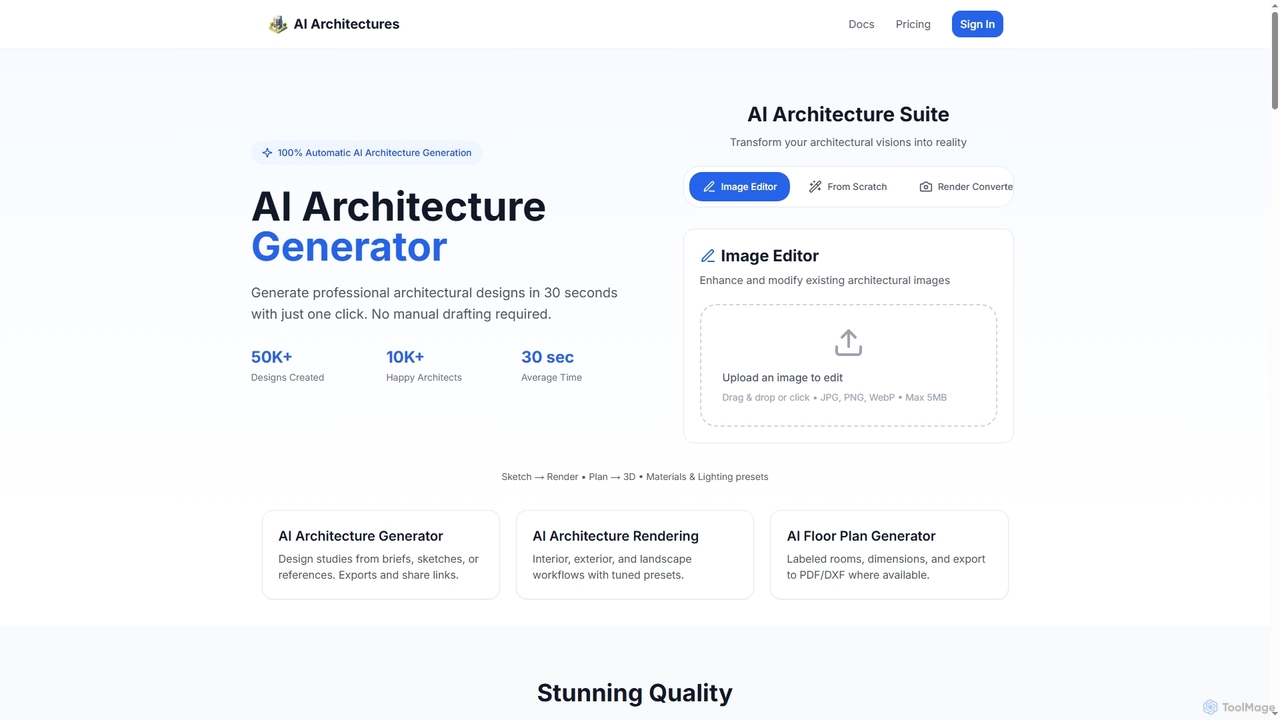
AI Architectures is an advanced AI platform designed for architects and designers, enabling 100% automatic generation of professional architectural designs, floor plans, and photorealistic renders in seconds. It transforms sketches, briefs, or existing images into stunning visualizations for various architectural scenarios.

Rendering
Visits 11.8KFavorites 117Likes 121

About Design Generation

Design Generation tools are a class of AI that autonomously create architectural and spatial designs from a set of rules and constraints. These platforms use generative algorithms to explore thousands of design possibilities, producing floor plans, 3D models, and site layouts that meet specific criteria like budget, materials, and performance metrics. Their primary value lies in accelerating the conceptual design phase, allowing architects and planners to evaluate a vast range of optimized solutions far beyond human capacity. This data-driven approach helps in making more informed decisions early in the architectural process.

Core Features

  • Constraint-Based Modeling: Generates designs that automatically adhere to user-defined rules such as building codes, site boundaries, and structural requirements.
  • Multi-Option Exploration: Produces a wide array of design variations based on the same set of inputs for comparative analysis.
  • Performance Simulation: Integrates analysis for factors like energy efficiency, daylight exposure, and pedestrian flow directly into the design process.
  • Automated Space Planning: Optimizes the layout of rooms, furniture, or entire building floors to maximize efficiency and functionality.
  • Style & Form Adaptation: Applies specific aesthetic styles or formal languages to generated outputs, ensuring creative control.

Use Cases

Within the field of architecture, these tools are primarily used in the early stages of a project. They are ideal for conceptual design, feasibility studies, and optimizing complex layouts. Architects use them to generate initial massing models for buildings, urban planners for developing neighborhood layouts, and interior designers for creating efficient office or residential floor plans.

How to Choose

When selecting a Design Generation tool, consider its integration capabilities with your existing BIM or CAD software (e.g., Revit, ArchiCAD). Evaluate the complexity of constraints it can handle and the level of control you have over the generative process. Also, assess the quality of its output formats, its built-in analysis features, and whether its user interface aligns with your team's technical skill level.

Design Generation use cases

1

Generate Conceptual Massing Models for Urban Planning

An urban planner is tasked with developing a new mixed-use district. Instead of manually sketching dozens of massing options, they use an AI Design Generation tool. They input constraints such as maximum building height, required green space percentage, floor area ratios, and solar access requirements for residential units. The AI then generates hundreds of viable 3D massing models in minutes, each optimized for the given parameters. This allows the planning team to quickly visualize and compare diverse development scenarios, analyze their impact on the urban environment, and select the most promising concepts for further refinement, reducing the initial planning phase from weeks to days.

2

Automate Residential Floor Plan Generation

An architectural firm needs to design a multi-family residential building with a specific mix of studio, one-bedroom, and two-bedroom units. Using a generative design tool, the architect defines the building's structural grid, core location, and the required area and adjacency for each unit type. The AI explores thousands of possible layouts, generating floor plans that optimize circulation paths, maximize window access for each unit, and comply with accessibility regulations. The architect can then filter the results based on performance metrics like construction cost or layout efficiency, selecting a few high-performing options to present to the client, drastically accelerating the schematic design process.

3

Optimize Façade Designs for Performance

A façade designer is working on a high-rise office building and needs to balance aesthetics with energy performance. They use a generative design tool to explore façade patterns. The inputs include performance goals like minimizing solar heat gain in summer and maximizing daylight, along with aesthetic constraints such as material choices and pattern styles. The AI generates a portfolio of façade options, each with a corresponding performance analysis. The designer can visually compare the options and their data, identifying designs that are both visually compelling and highly energy-efficient. This process allows for data-driven aesthetic decisions and avoids lengthy manual iterations of analysis and redesign.

4

Conduct Rapid Site Feasibility Studies

A real estate developer is evaluating several potential sites for a new hotel. To quickly assess the viability of each site, they use an AI design tool. For each plot, they input zoning regulations, desired room count, and amenity requirements. The tool rapidly generates multiple massing and layout options that maximize the buildable area while respecting all constraints. It also provides preliminary data on construction costs and potential revenue based on the generated designs. This allows the developer to compare the development potential of different sites in a matter of hours, rather than weeks, enabling faster and more data-informed investment decisions.

5

Generate Efficient Office Interior Layouts

An interior designer is tasked with planning a new corporate office. The client's brief includes requirements for departmental adjacencies, a specific number of private offices and open workstations, and collaborative zones. The designer inputs these spatial and relational constraints into a generative design tool. The AI algorithm then produces multiple layout options, optimizing for factors like travel distance between related departments, access to natural light for all employees, and adherence to fire safety codes. The designer can review these data-backed layouts with the client, facilitating a more objective discussion and leading to a final design that enhances both productivity and employee well-being.

6

Develop Sustainable Landscape Architecture Plans

A landscape architect is designing a large public park. Their goals are to maximize biodiversity, manage stormwater runoff effectively, and create engaging pedestrian pathways. They use a generative design tool, inputting topographical data, soil types, desired plant species zones, and pathway connectivity points. The AI generates various landscape layouts, each optimized for different priorities—one might maximize rainwater absorption, while another might create the most efficient trail network. By comparing these algorithmically generated options, the architect can synthesize a final plan that holistically balances ecological function with human experience, achieving a more resilient and thoughtful design.

Design Generation FAQ

What is AI Design Generation in architecture?

AI Design Generation refers to tools that use artificial intelligence to autonomously create architectural designs based on a set of parameters and constraints provided by a user. Unlike traditional software that simply documents a designer's ideas, these tools actively participate in the creative process. They explore a vast solution space of potential designs—such as floor plans, building forms, or site layouts—and present optimized options that satisfy predefined goals like cost, energy efficiency, or spatial requirements. This technology primarily serves to augment the architect's capabilities in the early conceptual stages of a project.

How does AI Design Generation differ from traditional CAD or BIM software?

The core difference lies in their purpose. Traditional CAD (Computer-Aided Design) and BIM (Building Information Modeling) software are primarily tools for documentation and refinement. An architect first conceives a design, then uses CAD/BIM to draw and model it precisely. In contrast, AI Design Generation tools are partners in creation. They don't wait for a complete idea; instead, they take goals and constraints as input and *generate* a multitude of design options for the architect to review, analyze, and select from. Essentially, CAD/BIM helps you detail a known solution, while AI Design Generation helps you discover new, optimized solutions.

How do I choose the right AI Design Generation tool for architecture?

Choosing the right tool depends on your specific needs and workflow. Consider these key factors:

  • Integration: Does the tool integrate smoothly with your primary CAD or BIM software (like Revit, Rhino, or ArchiCAD)? Seamless data transfer is crucial for an efficient workflow.
  • Constraint Complexity: Evaluate the tool's ability to handle complex, multi-layered constraints. Can it process zoning laws, structural rules, and client preferences simultaneously?
  • Output & Analysis: Assess the quality and type of outputs it generates (2D plans, 3D models). Does it provide built-in performance analysis (e.g., energy, daylighting) to help you compare options?
  • User Interface & Learning Curve: Is the interface intuitive for your team? Some tools require coding or scripting skills, while others offer a more visual, node-based interface.
What are the main benefits of using AI for design generation?

Using AI for design generation offers several significant benefits for architects and designers. The primary advantage is a massive acceleration of the conceptual design phase, allowing for the exploration of hundreds or thousands of options in the time it would take to manually draw a few. This leads to a wider exploration of the solution space, often revealing innovative and high-performing designs that might have been overlooked. It also facilitates data-driven decision-making by embedding performance metrics (like cost, energy use, or structural efficiency) directly into the design options, allowing for objective comparisons. Finally, it can help reduce human bias in the design process, leading to more objective and optimized outcomes.

Who can benefit from using Design Generation tools in architecture?

A wide range of professionals in the architecture, engineering, and construction (AEC) industry can benefit from these tools. This includes:

  • Architects: For rapidly exploring conceptual designs, generating optimized floor plans, and creating performance-driven building forms.
  • Urban Planners: For developing and analyzing large-scale masterplans, testing different zoning scenarios, and optimizing public space layouts.
  • Interior Designers: For creating efficient and functional space plans for offices, retail, or residential interiors based on specific client needs.
  • Real Estate Developers: For conducting quick feasibility studies to assess the development potential and financial viability of a site.
  • Landscape Architects: For generating site layouts that balance ecological systems, pedestrian flow, and aesthetic goals.