ToolMage
Sign in

Best 1 Code Assistant for Artificial Intelligence

Popular Code Assistant in Artificial Intelligence include SnapCommit, helping you work more efficiently.

Paid

SnapCommit

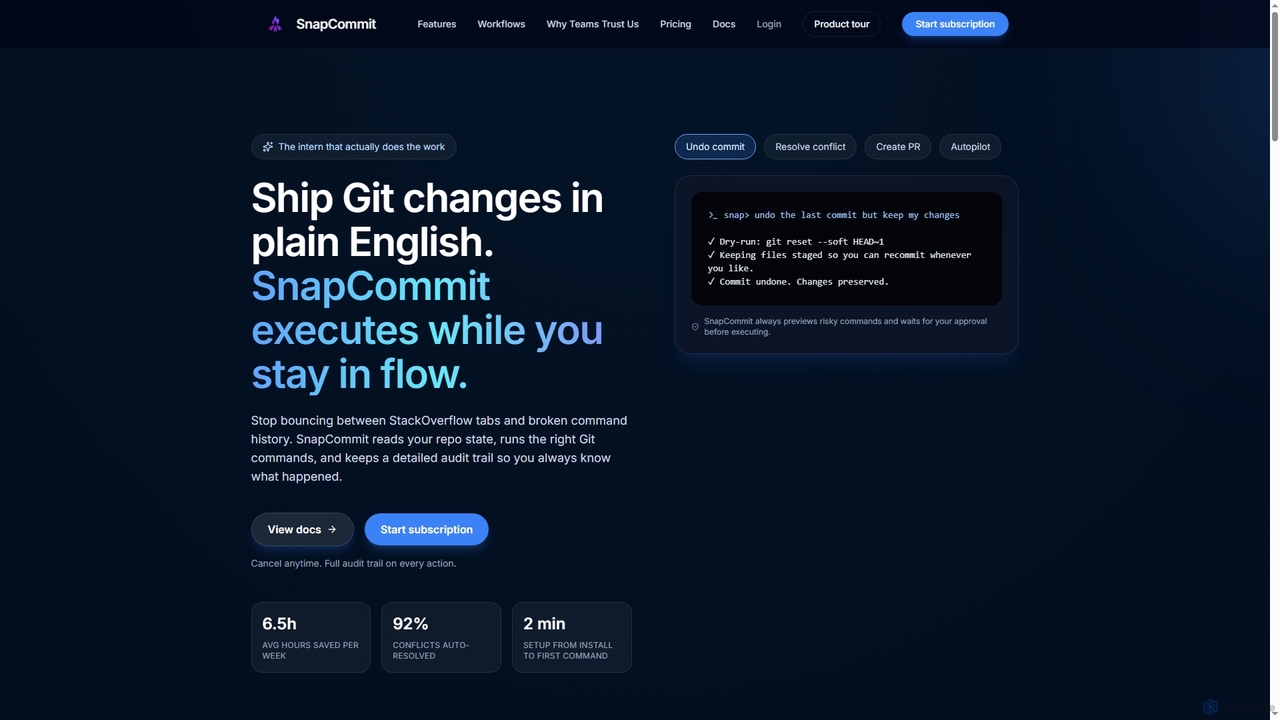
SnapCommit is an AI-powered terminal Git assistant that allows developers to manage Git operations using plain English commands. It automates complex workflows like committing, resolving conflicts, and creating pull requests, enhancing productivity and ensuring code integrity with dry-run previews and a detailed audit trail.

Code Assistant
Visits 3.5KFavorites 98Likes 98

About Code Assistant

Code Assistants are AI-powered tools designed to enhance the software development process by automating repetitive tasks, suggesting code, and identifying errors. Leveraging advanced machine learning models, these tools analyze context, understand programming languages, and provide real-time assistance. They significantly boost developer productivity and code quality, serving as a specialized application within the broader field of Artificial Intelligence.

Core Features

  • Intelligent Code Completion: Predicts and suggests relevant code snippets, functions, and variables based on context.
  • Real-time Error Detection: Identifies potential bugs, syntax errors, and logical flaws as code is written.
  • Code Refactoring Suggestions: Recommends improvements for code structure, readability, and performance.
  • Automated Documentation Generation: Creates comments, docstrings, or API documentation from existing code.
  • Test Case Generation: Automatically generates unit tests or integration tests for functions and modules.

Applicable Scenarios

Software developers, data scientists, and DevOps engineers utilize Code Assistants to streamline their daily coding tasks. They are invaluable in accelerating feature development, maintaining code quality in large projects, and onboarding new team members by providing consistent coding standards.

How to Choose

When selecting a Code Assistant, consider its compatibility with your preferred IDE and programming languages. Evaluate the accuracy and relevance of its suggestions, its data privacy policies, and whether it offers features like customizability or integration with version control systems. Pricing models and community support are also important factors.

Featured tool rankings

Code Assistant use cases

1

Rapid Prototyping and Boilerplate Generation

A startup developer needs to quickly build a minimum viable product (MVP). By using a Code Assistant, they can input high-level requirements in natural language, and the tool generates initial code structures, database schemas, and API endpoints, significantly reducing the time spent on repetitive boilerplate code and allowing them to focus on core logic and unique features.

2

Accelerating Feature Development

Software engineers working on new features can use AI Code Assistants to quickly generate boilerplate code, common functions, or API integrations. By providing a natural language description of the desired functionality, the assistant can produce initial code drafts, allowing developers to focus on refining logic and complex problem-solving rather than repetitive setup. This significantly reduces development time for new modules.

3

Accelerating Feature Development

Software engineers can use Code Assistants to rapidly generate new functions, classes, or entire modules based on high-level descriptions. By simply providing a natural language prompt like "create a Python function to parse JSON data," the assistant can generate the initial code structure, allowing developers to focus on refining logic rather than writing boilerplate, significantly speeding up the development cycle for new features.

4

Accelerating Feature Development

A software developer working on a new application module needs to implement several standard CRUD (Create, Read, Update, Delete) operations. Using a Code Assistant, they can automatically generate the boilerplate code for these operations, including database interactions and API endpoints, by simply providing a high-level description. This saves hours of manual coding, reduces the chance of trivial errors, and allows the developer to focus on the unique business logic of the feature.

5

Improving Code Quality and Maintainability

During a code review process, a team lead uses a Code Assistant to automatically scan a junior developer's pull request for common anti-patterns, potential security vulnerabilities, and style guide violations. The assistant provides actionable suggestions for refactoring complex functions into smaller, more manageable units and standardizing variable naming conventions. This proactive approach helps maintain a high standard of code quality across the codebase and reduces technical debt over time.

6

Automated Unit Test Generation

A quality assurance engineer is responsible for ensuring code reliability. Instead of manually writing numerous unit tests for new functions, they can use a Code Assistant to analyze the function's logic and automatically generate comprehensive test cases, including edge cases, saving hours of manual effort and improving test coverage.

7

Automating Code Review & Refactoring

Development teams can leverage Code Assistants to automatically identify areas for code improvement, such as redundant code, potential performance bottlenecks, or non-adherence to coding standards. The assistant can suggest refactoring options, optimize algorithms, and even apply common design patterns, leading to cleaner, more maintainable, and efficient codebases without extensive manual review.

8

Automating Unit Test Generation

Quality assurance teams and developers can leverage Code Assistants to automatically generate unit tests for existing code functions. The AI analyzes the function's logic and potential edge cases, then creates comprehensive test suites. This ensures higher code coverage, reduces the manual effort of writing tests, and helps catch regressions early in the development cycle, improving overall software reliability.

9

Legacy Code Understanding and Modernization

An experienced developer joins a project with a large, undocumented legacy codebase. The Code Assistant can analyze complex functions, provide explanations of their purpose, suggest refactoring opportunities for better readability, and even propose modern equivalents for outdated syntax or libraries, accelerating their onboarding and modernization efforts.

10

Refactoring Legacy Codebases

Teams maintaining large, older codebases often face challenges with readability and maintainability. Code Assistants can analyze legacy code, identify areas for improvement, and suggest refactoring strategies to modernize the code structure, improve performance, or adhere to current best practices. This helps extend the lifespan of existing systems and makes them easier for new developers to understand and contribute to.

11

Generating Comprehensive Test Cases

A QA engineer is tasked with ensuring robust test coverage for a critical new API endpoint. Instead of manually writing numerous unit tests, they leverage a Code Assistant to analyze the API's function signature and existing implementation. The assistant then generates a suite of diverse test cases, including edge cases and error conditions, significantly accelerating the testing phase and ensuring higher reliability of the API before deployment.

12

Onboarding New Developers

For new team members, Code Assistants act as an intelligent guide, providing context-aware suggestions and explanations for unfamiliar codebases. When encountering a new function or module, the assistant can generate summaries, suggest relevant usage examples, or even help write tests, enabling faster ramp-up time and ensuring new developers quickly contribute effectively while adhering to project conventions.

13

Automating Code Documentation

A lead developer needs to ensure that all new functions and classes in a large open-source project are properly documented for community contributors. By integrating a Code Assistant, they can automatically generate docstrings and comments based on the function's purpose, parameters, and return types. This not only saves significant time but also enforces a consistent documentation style across the entire project, making it easier for new contributors to understand and contribute.

14

Generating Unit Tests & Test Cases

Quality assurance engineers and developers can utilize Code Assistants to automatically generate comprehensive unit tests for existing code functions. By analyzing the function's logic and potential edge cases, the assistant can propose various test inputs and expected outputs, drastically reducing the manual effort involved in test creation and improving overall code reliability and robustness.

15

Cross-Language Code Translation

A full-stack developer needs to port a backend service written in Python to Node.js for better integration with their frontend. They can feed the Python code into a Code Assistant, which then translates the logic into equivalent Node.js code, handling syntax and common library differences, drastically speeding up the migration process.

16

Learning New Programming Languages/Frameworks

Developers transitioning to a new programming language or framework can use Code Assistants as an interactive learning tool. By asking the assistant to generate examples for specific syntax, data structures, or framework components, they can quickly grasp concepts and see practical implementations. This accelerates the onboarding process and reduces the learning curve, enabling faster productivity in unfamiliar environments.

17

Migrating Legacy Code & Language Translation

Enterprises undertaking modernization projects can employ Code Assistants to assist in migrating legacy codebases to newer languages or frameworks. While not fully autonomous, these tools can help translate syntax, identify equivalent libraries, and suggest structural changes, significantly reducing the complexity and time required for large-scale code migrations and ensuring a smoother transition.

18

Personalized Learning and Skill Development

A junior developer is learning a new programming language or framework. They can use a Code Assistant to get instant explanations for unfamiliar code snippets, understand best practices, and receive suggestions for improving their own code, acting as a personalized tutor and accelerating their learning curve.

19

Learning New Programming Languages or Frameworks

A seasoned developer is transitioning to a new project that uses a programming language and framework they are unfamiliar with. By using a Code Assistant, they can quickly get up to speed. The assistant provides intelligent suggestions for syntax, common idioms, and framework-specific patterns, reducing the learning curve. It acts as an interactive tutor, helping the developer write correct and idiomatic code from day one, significantly accelerating their onboarding process.

20

Enhancing Code Review Efficiency

Development leads and senior engineers can integrate Code Assistants into their code review process. The AI can pre-analyze pull requests for common errors, style violations, potential security vulnerabilities, or performance bottlenecks, providing an initial layer of feedback. This allows human reviewers to focus on architectural decisions, complex logic, and business requirements, making the review process more efficient and thorough.

21

Enhancing Scripting and Automation for DevOps

DevOps engineers can use Code Assistants to quickly write, debug, and optimize scripts for infrastructure automation, CI/CD pipelines, and deployment processes. Whether it's generating a shell script for server provisioning or a Python script for cloud resource management, the assistant provides immediate suggestions and error checks, ensuring robust and efficient automation workflows.

22

Refactoring Legacy Codebases

An engineering team is tasked with modernizing an old, complex codebase that lacks consistent patterns and has accumulated technical debt. A Code Assistant is deployed to analyze the existing code, identify redundant or inefficient sections, and suggest refactoring opportunities. It helps developers systematically improve code readability, modularity, and performance, making the legacy system easier to maintain and extend without introducing new bugs.

23

Generating Database Queries and Schemas

Data engineers and backend developers frequently interact with databases. Code Assistants can generate complex SQL queries, define database schemas, or even create ORM (Object-Relational Mapping) models based on natural language descriptions of data requirements. This streamlines database interaction, reduces the likelihood of syntax errors in queries, and accelerates the development of data-driven applications.

24

Security Vulnerability Detection and Remediation

A security-conscious development team wants to proactively identify and fix vulnerabilities. A Code Assistant can scan code for common security flaws (e.g., SQL injection, cross-site scripting), highlight potential risks, and suggest secure coding patterns or direct fixes, enhancing the overall security posture of their applications.

Code Assistant FAQ

What are Code Assistant tools?

Code Assistant tools are AI-powered software applications that help developers write, debug, and optimize code more efficiently. They leverage large language models to understand natural language prompts and code context, providing intelligent suggestions, generating code snippets, and identifying potential errors. These tools aim to streamline the entire software development lifecycle.

What are Code Assistants?

Code Assistants are AI-powered tools that help developers write, debug, and optimize code more efficiently. They leverage machine learning to understand code context and provide intelligent suggestions, automate repetitive tasks, and identify potential errors. Their core purpose is to augment human developers, not replace them, by streamlining various stages of the software development lifecycle.

What are Code Assistants and how do they work?

Code Assistants are AI-powered tools that help developers write, debug, and optimize code. They work by using advanced machine learning models, often trained on vast datasets of public code, to understand programming languages and context. When a developer types, the assistant analyzes the input and surrounding code to predict the next logical piece of code, suggest fixes, or generate new code snippets, acting as an intelligent coding partner.

What are Code Assistants?

Code Assistants are AI-powered tools that help developers write, debug, and optimize code more efficiently. They leverage machine learning to understand programming contexts and provide intelligent suggestions, automate repetitive tasks, and identify potential issues. Their primary goal is to augment human coding capabilities, not replace them, by streamlining various stages of the software development lifecycle.

How do Code Assistants differ from traditional IDE auto-completion?

While traditional IDE auto-completion relies on syntax rules and predefined libraries to suggest code, Code Assistants go further by leveraging AI to understand the semantic meaning and context of the code. They can suggest entire lines or blocks of code, identify logical errors, and even generate code from natural language prompts, offering a much deeper level of intelligence and assistance beyond simple keyword matching.

How do Code Assistants differ from traditional IDE auto-completion?

Traditional IDE auto-completion typically relies on syntax rules, defined libraries, and basic pattern matching. Code Assistants, however, use advanced AI models to understand the semantic meaning and context of your code, offering more intelligent, context-aware suggestions, generating entire functions, and even suggesting code based on natural language descriptions, going far beyond simple keyword matching.

How do Code Assistants differ from traditional IDE features?

Traditional IDE features like basic auto-completion or syntax highlighting are typically rule-based and rely on predefined patterns. Code Assistants, however, use advanced AI models (like large language models) to understand the semantic context of your code, learn from vast datasets, and generate more intelligent, context-aware suggestions, refactoring ideas, and even entire code blocks. They go beyond simple pattern matching to offer truly predictive and generative capabilities.

How do AI Code Assistants work?

AI Code Assistants typically work by using large language models (LLMs) trained on vast datasets of code and natural language. When a developer types, the assistant analyzes the current code context, project files, and comments to predict the most relevant next piece of code, suggest completions, or generate new code snippets. They often employ techniques like natural language processing (NLP) and machine learning to understand developer intent and provide accurate, context-aware assistance.

What are the main benefits of using a Code Assistant?

The primary benefits include significantly increased developer productivity by automating repetitive tasks and generating boilerplate code. They also help reduce errors through intelligent debugging suggestions and code quality checks. Furthermore, Code Assistants can accelerate learning for new developers, improve code consistency, and free up experienced developers to focus on more complex problem-solving and innovative features.

What are the main benefits of using a Code Assistant?

The main benefits include significantly increased developer productivity by automating boilerplate code and repetitive tasks, improved code quality through intelligent error detection and refactoring suggestions, and faster learning for new languages or frameworks. They also help reduce the cognitive load on developers, allowing them to focus on more complex problem-solving and innovative design.

What are the key benefits of using a Code Assistant?

The primary benefits of using a Code Assistant include significant increases in developer productivity by automating boilerplate code and providing quick suggestions. They also enhance code quality through real-time error detection, refactoring recommendations, and adherence to best practices. Furthermore, they can accelerate the learning curve for new languages or frameworks and improve overall code consistency across teams, leading to faster development cycles and reduced debugging time.

What programming languages do Code Assistants typically support?

Most modern Code Assistants offer broad language support, covering popular languages like Python, JavaScript, Java, C++, Go, Ruby, and TypeScript. Many also support markup languages (HTML, CSS) and configuration languages (YAML, JSON). The specific range of supported languages can vary between tools, with some specializing in certain ecosystems while others aim for comprehensive coverage.

How do Code Assistants differ from traditional IDE auto-completion?

While traditional IDE auto-completion relies on syntax rules and predefined libraries to suggest completions, AI Code Assistants go beyond this by understanding the semantic context and intent. They use machine learning to predict code based on patterns learned from millions of lines of code, offering more intelligent, context-aware, and often multi-line suggestions, including generating entirely new functions or classes from natural language prompts.

Are Code Assistants secure for proprietary code?

Security is a critical concern. Many enterprise-grade Code Assistants offer robust security features, including on-premise deployment options, strict data privacy policies, and assurances that proprietary code is not used for training public models. It's crucial to choose tools from reputable vendors that explicitly outline their data handling and security protocols to protect sensitive intellectual property.

Can Code Assistants replace human developers?

No, Code Assistants are designed to augment, not replace, human developers. They excel at automating repetitive tasks, providing suggestions, and catching errors, thereby increasing efficiency and allowing developers to focus on higher-level design, complex problem-solving, and creative innovation. Human oversight, critical thinking, and understanding of business logic remain indispensable for software development.

What security considerations should I have when using Code Assistants?

When using Code Assistants, especially those that send your code to external servers for processing, security is paramount. Key considerations include data privacy (ensuring your code isn't used for training or shared without consent), intellectual property protection, and potential code leakage. Opt for tools with strong encryption, clear data handling policies, and features that allow you to keep sensitive code local or within your private network. Always review the terms of service and privacy policies carefully.

Can Code Assistants replace human developers?

No, Code Assistants are designed to augment, not replace, human developers. They excel at automating repetitive, predictable tasks and providing intelligent suggestions, but they lack the creativity, critical thinking, complex problem-solving abilities, and deep understanding of business logic that human developers possess. They are powerful tools that enhance a developer's capabilities, allowing them to be more efficient and focus on higher-level design and innovation.

What are the key benefits of using an AI Code Assistant in a development workflow?

Integrating an AI Code Assistant offers several key benefits: it significantly boosts productivity by accelerating code writing and reducing manual effort; it improves code quality through intelligent error detection and optimization suggestions; it reduces debugging time by proactively identifying issues; and it enhances learning for new developers by providing context-aware guidance. Ultimately, it streamlines the entire software development lifecycle.

Can Code Assistants generate code in any programming language?

While many Code Assistants support a wide range of popular programming languages like Python, JavaScript, Java, C, and Go, their proficiency can vary. The ability to generate code effectively in a specific language depends on the training data they were exposed to. Some tools are optimized for certain ecosystems or languages, while others aim for broader, albeit sometimes less specialized, coverage. Always check the tool's documentation for a list of supported languages and their respective levels of support.

What should I consider when integrating a Code Assistant into my workflow?

When integrating a Code Assistant, consider its compatibility with your existing IDEs and tech stack, the security and privacy policies regarding your code data, and its performance impact on your development environment. Also, evaluate its accuracy, the breadth of languages it supports, and whether its features align with your team's specific needs, such as code generation, debugging, or refactoring capabilities.