
ToolMage
Sign in

Best 1 Animation AI tools for Entertainment

Popular Animation AI tools in Entertainment include Labubuwallpaper, helping you work more efficiently.

Labubuwallpaper
Free

Labubuwallpaper

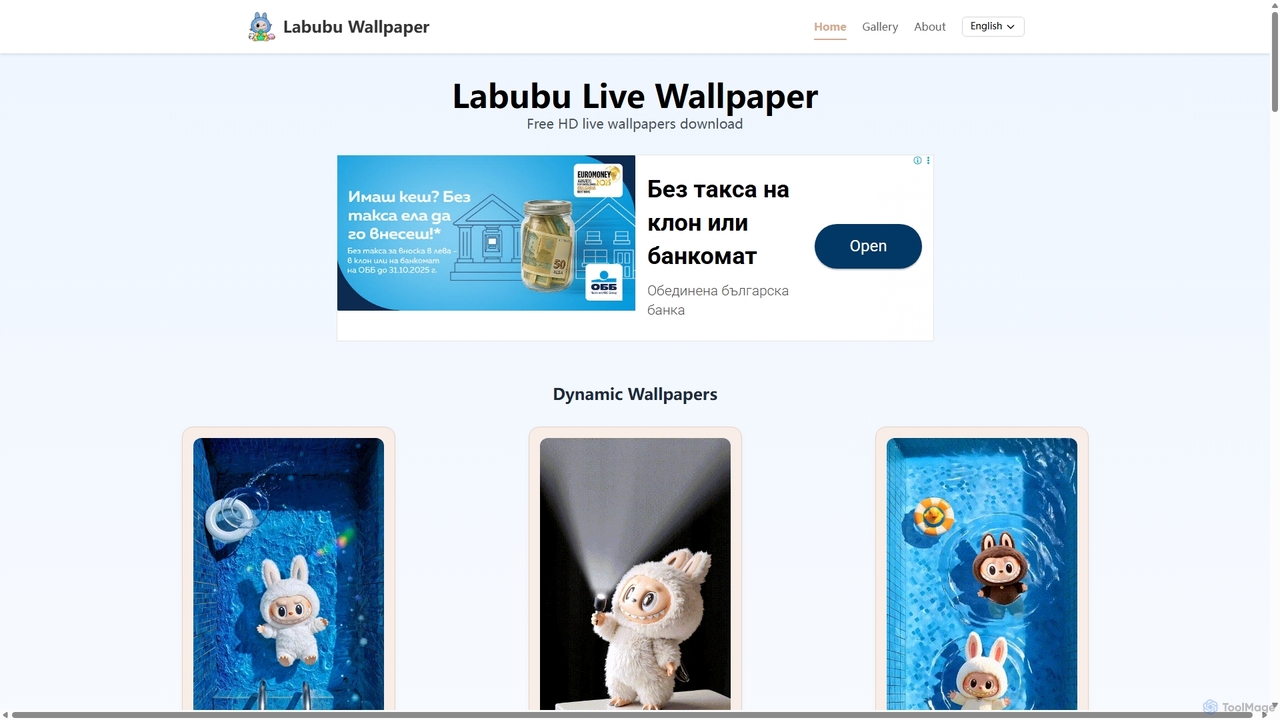
Labubuwallpaper offers a vast collection of free, high-definition static, dynamic, and video wallpapers featuring the popular Labubu character. Personalize your iPhone or Android device with vibrant, watermark-free designs. The gallery is regularly updated, providing fresh and playful backgrounds to bring your screen to life.

Graphics
Visits 5.1KFavorites 134Likes 140

About Animation

AI Animation tools are specialized software leveraging artificial intelligence to automate and enhance the creation of animated content. These tools utilize advanced algorithms for tasks like character rigging, motion generation, and facial expression synchronization, significantly streamlining the animation pipeline. They empower creators to produce high-quality animations faster and more efficiently, from simple explainer videos to complex character sequences, making animation more accessible within the broader entertainment and content creation landscape.

Core Features

  • Automated Rigging: Automatically generates skeletal structures and controls for 2D/3D characters, simplifying the setup process.
  • Motion Generation: Creates realistic or stylized character movements from text descriptions, audio input, or reference videos.
  • Facial Animation & Lip-Sync: Synchronizes character mouth movements and expressions precisely with spoken dialogue or audio tracks.
  • Scene Composition & Layout: Assists in arranging elements, camera angles, and lighting within an animated scene for optimal visual storytelling.
  • Style Transfer: Applies specific artistic styles or visual aesthetics to existing animations or generated content.

Use Cases

AI Animation tools are invaluable for various professionals. Game developers use them for rapid prototyping of character movements and cutscenes, significantly accelerating the design iteration process. Marketing teams leverage these tools to create engaging animated advertisements and explainer videos quickly, without needing extensive animation expertise. Independent content creators can produce professional-looking animated shorts or social media content, expanding their creative output.

How to Choose

When selecting an AI Animation tool, consider the specific animation style you need (2D or 3D) and its compatibility with your existing workflow. Evaluate the range and quality of AI-powered features, such as automated rigging, motion generation capabilities, and facial animation accuracy. Assess the learning curve, pricing model, and the tool's ability to integrate with other creative software to ensure it meets your project requirements and skill level.

Animation use cases

1

Rapid Prototyping for Game Character Animations

Game developers can utilize AI animation tools to quickly generate diverse character walk cycles, idle animations, and combat moves. By inputting basic parameters or reference videos, the AI creates multiple animation variations, allowing for faster iteration and concept testing in the early stages of game development. This significantly reduces the time spent on manual keyframing, enabling designers to focus more on gameplay mechanics and creative direction.

2

Creating Engaging Marketing & Explainer Videos

Marketing professionals and small businesses can leverage AI animation tools to produce high-quality, engaging explainer videos and animated advertisements. By simply providing scripts or voiceovers, the AI can generate corresponding character movements, scene transitions, and visual effects. This capability allows for the creation of compelling visual content quickly and cost-effectively, without the need for a dedicated animation studio or extensive manual labor, significantly boosting audience engagement.

3

Automating Lip-Sync and Facial Expressions for Dialogue

Content creators, animators, and educators often need to synchronize character dialogue with precise lip movements and facial expressions. AI animation tools automate this complex and time-consuming task. By feeding audio files into the system, the AI analyzes speech patterns and automatically generates accurate lip-sync and corresponding emotional expressions, saving countless hours of manual adjustment. This ensures characters convey emotions authentically and dialogue is perfectly matched, enhancing the overall quality of animated storytelling.

4

Generating Animated Explainer Videos from Text

Businesses and educators can use AI animation tools to transform written scripts into fully animated explainer videos. By simply pasting text, the AI can interpret the content, select appropriate visual assets, generate character actions, and even add voiceovers. This capability is ideal for creating educational content, product demonstrations, or internal training materials quickly and efficiently, making complex information more digestible and engaging for the audience without requiring extensive animation skills.

5

Enhancing Existing Animations with AI-Powered Effects

Professional animators and studios can utilize AI animation tools to enhance their existing projects with advanced effects and optimizations. AI can be used for tasks like intelligent in-betweening, motion smoothing, automatic colorization of line art, or even upscaling low-resolution animations. This allows artists to refine their work, add sophisticated visual elements, and improve overall production quality more efficiently, freeing up time for creative direction rather than tedious manual adjustments.

6

Personalized Animated Content for Social Media

Social media managers and individual content creators can leverage AI animation tools to generate personalized and trending animated content for various platforms. By inputting trending audio, text prompts, or user data, the AI can quickly create short, engaging animated clips, GIFs, or stickers tailored to specific audiences or current trends. This enables rapid content production and customization, helping to maintain a dynamic online presence and increase audience interaction without requiring extensive animation skills or resources.

Animation FAQ

What are AI Animation tools?

AI Animation tools are software applications that use artificial intelligence to automate and assist in various stages of animation production. They leverage machine learning to streamline tasks such as character rigging, motion generation, facial animation, and scene layout. These tools help animators, designers, and content creators produce high-quality animated content more efficiently, reducing manual effort and accelerating workflows for everything from explainer videos to complex 3D character performances.

How do AI Animation tools differ from traditional animation software?

Traditional animation software relies heavily on manual keyframing, rigging, and frame-by-frame adjustments by skilled animators. AI Animation tools, conversely, automate many of these labor-intensive processes using algorithms to generate movements, expressions, and even entire scenes from simpler inputs like text, audio, or reference images. While traditional tools offer granular control, AI tools prioritize speed and efficiency, making animation more accessible and faster for iterative design or high-volume content creation within the entertainment industry.

Who can benefit most from using AI Animation tools?

A wide range of professionals and enthusiasts can benefit from AI Animation tools. This includes independent content creators and YouTubers looking to produce engaging animated videos without extensive training, marketing teams needing to quickly generate animated ads or explainer content, and game developers seeking to accelerate character animation prototyping. Even professional animators can leverage these tools to automate tedious tasks, allowing them to focus on more creative aspects of their projects and enhance overall productivity.

What are the key considerations when choosing an AI Animation tool?

When selecting an AI Animation tool, several factors are crucial. First, consider the specific animation style (2D or 3D) and the types of content you plan to create. Evaluate the tool's core AI features, such as automated rigging, motion generation quality, and facial animation accuracy. Assess its ease of use and learning curve, especially if you have limited animation experience. Finally, examine its integration capabilities with other software in your workflow, pricing models, and the availability of support and community resources to ensure it aligns with your project needs and budget.

Can AI Animation tools be used for professional film and TV production?

While AI Animation tools are rapidly advancing, their primary role in professional film and TV production is often as an assistant or accelerator rather than a complete replacement for traditional methods. They excel at automating repetitive tasks like initial rigging, generating background character movements, or creating quick previz animations. For high-fidelity, nuanced character performances and complex visual effects, human animators still provide the artistic direction and fine-tuning. However, AI tools are increasingly integrated into professional pipelines to boost efficiency and reduce production costs, especially for large-scale projects.