
ToolMage
Sign in

Best 1 Image AI tools for Fun Tools

Popular Image AI tools in Fun Tools include Fusion Art AI, helping you work more efficiently.

Fusion Art AI
Freemium

Fusion Art AI

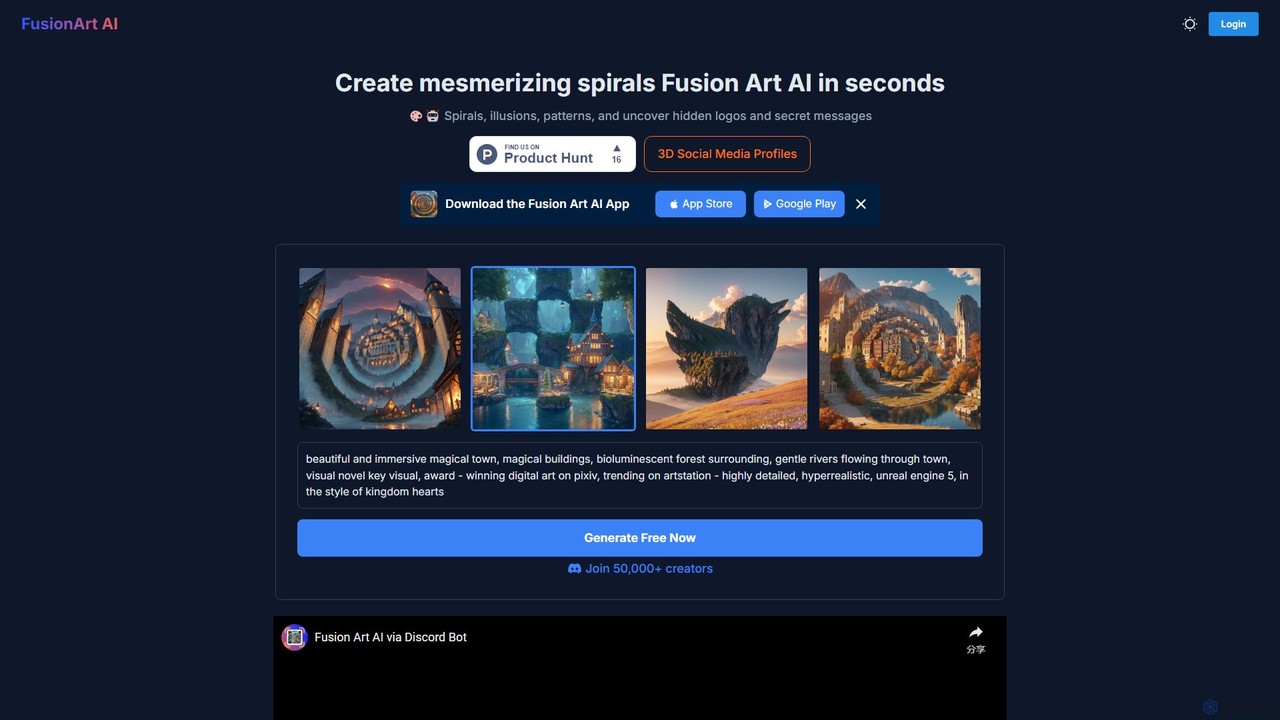
Fusion Art AI is a specialized AI art generator that creates mesmerizing spiral art, optical illusions, and intricate patterns. It allows users to embed hidden logos, secret messages, or QR codes within images, making it perfect for viral marketing and unique social media content.

Ai Art Generator
Visits 5KFavorites 130Likes 137

About Image

AI Image Fun Tools are applications designed to creatively alter, stylize, or generate amusing images for entertainment and social sharing. These tools leverage artificial intelligence to apply a wide range of effects, from artistic style transfers to humorous face manipulations, in just a few clicks. Their primary value lies in providing an accessible way for anyone to create unique, eye-catching, and funny visual content without needing any design skills. They are part of the broader Fun Tools category, focusing specifically on playful and experimental image transformation.

Core Features

  • Artistic Style Transfer: Apply the styles of famous paintings or artistic movements to your photos.
  • Face Manipulation & Swapping: Alter facial features, apply aging effects, or swap faces with others in an image.
  • Cartoonization & Avatar Creation: Transform portraits into cartoons, anime characters, or stylized digital avatars.
  • Meme & GIF Generation: Quickly create humorous memes or animated GIFs using templates and custom images.
  • Surreal & Abstract Effects: Generate unusual or dreamlike visuals by applying complex AI-driven filters.

Use Cases

These tools are widely used by social media users to create unique profile pictures and engaging posts. Content creators use them to produce humorous content for blogs and video channels. They are also popular among casual users for making personalized digital greeting cards, stickers for messaging apps, and funny images to share with friends and family.

How to Choose

When selecting an AI Image Fun Tool, consider the variety and quality of the available effects and filters. Evaluate the user interface for simplicity and ease of use, as the goal is quick entertainment. Check the output resolution and whether the tool adds watermarks to the final image. Finally, review the privacy policy to understand how your uploaded photos are handled and stored.

Image use cases

1

Create a Unique Social Media Avatar

A social media user wants their profile picture to stand out from the crowd. Instead of using a standard photo, they upload their selfie to an AI fun image tool. Within seconds, they can apply various effects, such as transforming their portrait into a Pixar-style character, a classical oil painting, or an anime hero. They choose their favorite transformation, download the high-resolution image, and update their profile. This process allows them to express their personality creatively and grab attention on platforms like Instagram, Twitter, or TikTok without any artistic skills.

2

Generate Humorous Memes for Sharing

A content creator or casual user wants to quickly react to a trending topic with a funny meme. They use an AI fun image tool that offers meme templates or face-swapping features. They can upload a relevant image, add witty text in a classic meme format, or even swap their friend's face onto a famous movie scene. The tool automates the editing process, allowing them to generate a high-quality, shareable meme in under a minute. This is far more efficient than using complex photo editing software, enabling rapid content creation for social media engagement.

3

Design Personalized Digital Greeting Cards

For a friend's birthday, a user wants to create a unique and personal e-card instead of buying a generic one. They take a funny photo of their friend and upload it to an AI image tool. Using the tool's features, they might place their friend's face on an astronaut's body, apply a caricature effect, or transform the photo into a pop-art style. They then add a birthday message and download the final image. This creates a highly personalized and memorable greeting that feels more special and thoughtful than a standard digital card, all accomplished in just a few minutes.

4

Visualize Yourself as a Fictional Character

A fan of a popular fantasy series wants to see what they would look like as a character from that world. They upload their portrait to an AI tool specializing in character and avatar creation. By selecting a 'fantasy elf' or 'cyberpunk warrior' style, the AI transforms their facial features to match the aesthetic, adding pointed ears, futuristic tattoos, or stylized armor. The result is a high-quality character portrait they can share with fellow fans online, use in role-playing games, or simply keep for fun. This allows for creative self-expression and deeper engagement with their favorite fictional universes.

5

Explore Artistic Styles Without Drawing Skills

An individual curious about art history wants to understand different styles like Impressionism, Cubism, or Surrealism in an interactive way. They upload a simple photograph—perhaps of a landscape or a pet—to an AI style transfer tool. With single clicks, they can re-render the image in the style of Van Gogh, Picasso, or Dalí. This provides immediate visual feedback on how these artists might have interpreted the same scene. It's an engaging and educational way to explore complex artistic concepts, making art more accessible and fun for those without formal training.

6

Create Funny Stickers and GIFs for Chats

A user wants to add a personal and humorous touch to their group chats on platforms like WhatsApp or Telegram. Instead of using a standard emoji or GIF, they take a photo of a friend making a funny face and upload it to an AI tool. The tool can automatically remove the background and turn the person into a sticker. Alternatively, they can apply a looping animation effect, like exaggerated eye-rolling, to create a custom reaction GIF. This allows for more dynamic and personalized communication, making conversations more engaging and fun for everyone involved.

Image FAQ

What are AI Fun Image Tools?

AI Fun Image Tools are software applications that use artificial intelligence to apply entertaining and creative effects to photographs. Their primary purpose is not professional editing, but rather amusement and social sharing. Key features often include turning photos into cartoons (cartoonization), applying the style of famous artists (style transfer), swapping faces, and creating memes. They are designed to be easy to use, allowing anyone to generate unique and funny images in seconds without technical skills.

How to choose the right AI Fun Image tool?

When selecting a fun image tool, consider these factors:

  • Variety of Effects: Look for a tool with a wide and diverse library of filters, styles, and effects that match your creative interests.
  • Ease of Use: The best fun tools have a simple, intuitive interface. You should be able to upload a photo and apply effects in just a few taps.
  • Output Quality: Check the resolution of the final image. Some free tools may provide low-resolution outputs or add a prominent watermark.
  • Privacy Policy: Since you'll be uploading personal photos, review the tool's privacy policy to understand how your data is stored, used, and protected.
What's the difference between fun image tools and professional image editors?

The main difference is their purpose and complexity. Fun Image Tools are designed for quick, automated, and entertaining transformations. They use AI to apply complex effects with a single click, prioritizing speed and amusement over precision. Professional Image Editors like Adobe Photoshop offer granular control over every aspect of an image. They are built for detailed tasks like retouching, color correction, and graphic design, requiring significant skill and time to master. In short, fun tools are for play, while professional editors are for work.

What kind of effects can I create with these tools?

These tools offer a wide range of creative and often humorous effects. Some of the most popular types include:

  • Artistic Filters: Transforming your photo into a painting in the style of artists like Van Gogh or Monet.
  • Cartoon & Anime Styles: Converting your portrait into a cartoon character, an anime hero, or a 3D avatar.
  • Face Effects: Applying aging filters to see an older version of yourself, swapping faces with a friend, or adding funny accessories like glasses and hats.
  • Meme Creation: Placing your image or text onto popular meme templates.
Are my uploaded photos safe with these tools?

Privacy is an important consideration. The safety of your photos depends on the specific tool's privacy policy and security measures. Reputable tools will clearly state how they handle your data. Some process images directly on your device, while others upload them to a server for processing. It is always recommended to read the privacy policy before use, especially if you are concerned about your data. As a general rule, avoid uploading highly sensitive or private images to any online service you are not completely familiar with.