
ToolMage
Sign in

Best 1 Image Effects AI tools for Image And Video

Popular Image Effects AI tools in Image And Video include glitchyimage, helping you work more efficiently.

glitchyimage
Free

glitchyimage

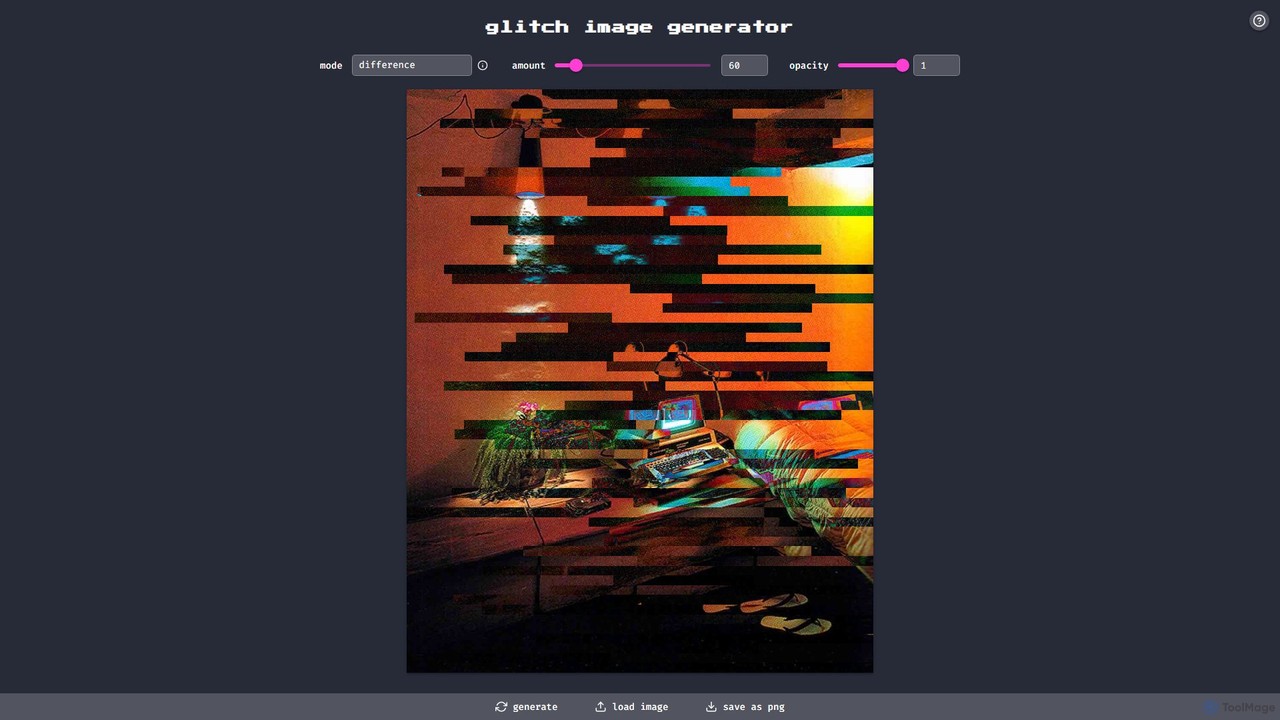
glitchyimage is a free, web-based tool that allows users to create unique glitch art by applying various effects and blend modes to their own images. With an intuitive interface, you can upload a photo, adjust parameters like opacity and effect amount, and generate stunning, high-quality glitch visuals instantly. It's perfect for artists, designers, and social media creators looking to add a modern, edgy aesthetic to their work.

Generative Art
Visits 17.5KFavorites 141Likes 107

About Image Effects

Image Effects are AI-powered tools designed to transform the visual appearance of images, adding artistic styles, enhancing aesthetics, or creating specific moods. These tools leverage advanced algorithms like neural networks to analyze image content and apply sophisticated filters, textures, and stylistic modifications. They enable users to achieve professional-grade visual enhancements and creative transformations with unprecedented ease and speed. From artistic filters to cinematic color grading, Image Effects tools empower creators to elevate their visual storytelling and produce captivating imagery.

Core Features

  • Artistic Style Transfer: Apply the artistic style of one image (e.g., a famous painting) to another photo.
  • Advanced Filters & Presets: Offer a wide range of AI-generated filters for various aesthetics, from vintage to futuristic.
  • Color Grading & Enhancement: Intelligently adjust color balance, saturation, contrast, and tone to achieve specific visual moods.
  • Depth & Lighting Effects: Simulate depth of field, add volumetric lighting, or change light sources for dramatic impact.
  • Object & Background Stylization: Apply effects selectively to specific objects or transform entire backgrounds with AI.

Use Cases

Graphic designers use these tools to quickly generate multiple stylistic variations for client projects. Social media managers leverage AI image effects to create eye-catching, branded content that stands out in feeds. Photographers apply sophisticated filters to their portfolios, achieving consistent artistic styles across their work without extensive manual editing.

How to Choose

When selecting an AI Image Effects tool, consider the variety and quality of available effects, the level of customization offered for each effect, and the processing speed. Evaluate its integration capabilities with existing design workflows and the output resolution it supports. Also, assess the user interface for ease of use and the pricing model based on your usage frequency and budget.

Image Effects use cases

1

Applying Artistic Styles to Photos

A content creator wants to transform a standard photograph into a painting-like image for a social media campaign. Using an AI Image Effects tool, they can select from various artistic styles (e.g., impressionist, cubist) and apply them with a single click. This allows them to quickly generate unique, eye-catching visuals that resonate with their audience, saving hours of manual artistic rendering and ensuring a consistent aesthetic across their posts.

2

Enhancing Product Photography for E-commerce

An e-commerce business needs to make its product images more appealing and consistent across its online store. AI Image Effects tools can automatically apply cinematic color grading, adjust lighting to highlight product features, or add subtle depth effects to make products pop. This leads to higher engagement and conversion rates by presenting products in a visually stunning and professional manner, without requiring a professional photographer for every shoot.

3

Creating Thematic Visuals for Marketing Campaigns

A marketing team is launching a seasonal campaign and needs to quickly generate a large volume of images with a consistent thematic look. Instead of manually editing each image, they use an AI Image Effects tool to apply a specific filter (e.g., 'winter wonderland' or 'summer vibrant') across all their campaign assets. This ensures brand consistency, significantly reduces production time, and allows for rapid iteration on visual concepts, leading to more impactful and timely campaigns.

4

Generating Depth Effects for 2D Images

A game developer or 3D artist wants to add a sense of depth to existing 2D concept art or character designs without rebuilding them in 3D. AI Image Effects tools can analyze the image and intelligently generate depth maps, allowing for effects like realistic bokeh, volumetric fog, or even pseudo-3D parallax scrolling. This significantly enhances the visual immersion and dynamic feel of 2D assets, making them more engaging for players or viewers, while saving extensive modeling and rendering time.

5

Transforming Portraits with AI Stylization

Photographers or individuals want to give their portraits a unique, stylized look beyond traditional retouching. AI Image Effects tools can apply sophisticated stylization, such as turning a photo into a cartoon, a watercolor painting, or even a futuristic cyberpunk aesthetic. This offers creative freedom and allows for personalized artistic expression, making portraits stand out for personal use, social media profiles, or artistic projects, without requiring advanced drawing or painting skills.

6

Automating Visual Storytelling for Bloggers

A blogger or online publisher needs to create engaging header images and in-post visuals for daily articles. Instead of spending hours on graphic design, they use AI Image Effects tools to quickly apply consistent filters, overlays, or artistic touches to stock photos or their own images. This streamlines their content creation workflow, ensures visual coherence across their blog, and helps capture reader attention, allowing them to focus more on writing quality content.

Image Effects FAQ

What are AI Image Effects tools?

AI Image Effects tools are software applications that use artificial intelligence, particularly deep learning and neural networks, to automatically apply various visual transformations and enhancements to images. They go beyond basic filters by intelligently analyzing image content to generate sophisticated artistic styles, modify lighting, adjust colors, or create depth effects. Their core purpose is to enable users to achieve complex visual aesthetics and creative alterations with minimal manual effort, making advanced image stylization accessible to a wider audience.

How to choose the right AI Image Effects tool?

Choosing the right AI Image Effects tool involves considering several factors. First, evaluate the variety and quality of effects offered, ensuring they align with your creative needs (e.g., artistic styles, color grading, depth effects). Second, check the level of customization available for each effect, as some tools offer more granular control than others. Third, assess the processing speed and output resolution to ensure it meets your workflow demands. Finally, consider the user interface's ease of use, integration capabilities with other software, and the pricing model that best fits your budget and usage frequency.

What is the difference between AI Image Effects and general AI Image Editing?

AI Image Effects primarily focus on transforming the aesthetic or style of an image, applying artistic filters, color grading, or depth effects to create a specific mood or look. They are about creative stylization. In contrast, general AI Image Editing tools are broader, focusing on correcting, manipulating, or enhancing specific elements within an image, such as removing objects, adjusting exposure, sharpening details, or retouching portraits. While both use AI, effects tools emphasize artistic transformation, whereas editing tools prioritize precision, correction, and manipulation for realism or specific adjustments.

What types of effects can AI Image Effects tools create?

AI Image Effects tools can create a diverse range of visual transformations. Common types include artistic style transfer (e.g., turning photos into paintings by famous artists), cinematic color grading (applying film-like color palettes), and stylized filters (vintage, futuristic, cartoonish). They can also generate depth effects like realistic bokeh or volumetric lighting, apply texture overlays, and perform intelligent object or background stylization. Some advanced tools even offer effects that simulate different weather conditions or time of day, providing extensive creative possibilities for visual content.

Who can benefit from using AI Image Effects tools?

A wide range of users can benefit from AI Image Effects tools. Graphic designers and digital artists can quickly experiment with styles and generate unique visuals. Photographers can enhance their portfolios with artistic filters and consistent color grading. Social media managers and content creators can produce eye-catching, branded content efficiently. E-commerce businesses can make product images more appealing. Even casual users looking to add a creative touch to personal photos will find these tools valuable. Essentially, anyone seeking to elevate the aesthetic quality or artistic expression of their images with ease and speed can benefit.

How do AI Image Effects tools achieve artistic style transfer?

AI Image Effects tools achieve artistic style transfer primarily through a technique called neural style transfer. This involves using deep neural networks, typically convolutional neural networks (CNNs), to separate the content of one image from the style of another. The network then recombines them, applying the artistic textures, colors, and brushstrokes of the style image onto the content image, while preserving its original structure. This process often involves training the AI on vast datasets of artworks and photographs, allowing it to learn and replicate complex artistic patterns and aesthetics intelligently.