IntelliBar
IntelliBar is a native AI assistant for Mac, providing a unified interface to access the latest large language …
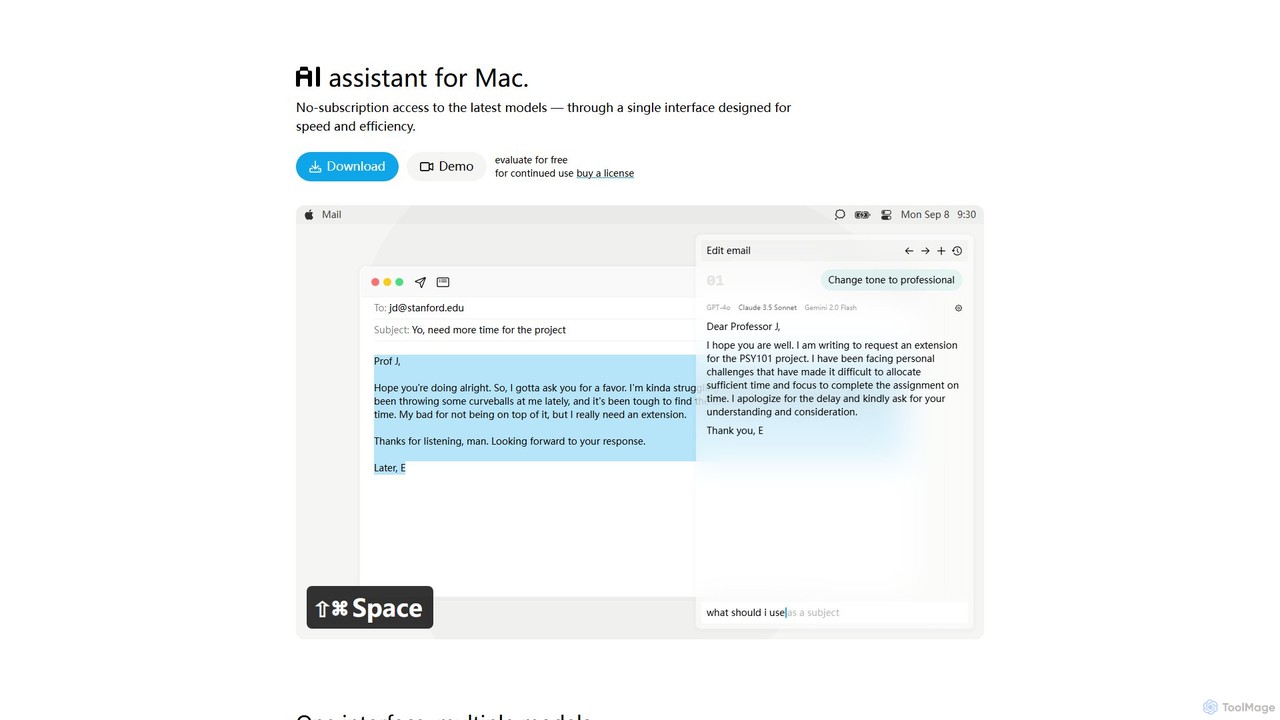
IntelliBar is a native AI assistant for Mac, providing a unified interface to access the latest large language models like GPT-4o, Claude 3.5, and Gemini, plus local models via Ollama. It focuses on speed, efficiency, and privacy, with a one-time purchase model instead of recurring subscriptions. Compare models, use powerful shortcuts, and keep your data secure on your device.
About Macos
macOS AI tools are applications leveraging artificial intelligence specifically designed for Apple's macOS operating system. These tools integrate deeply with the macOS environment, utilizing its robust architecture and often optimizing for Apple Silicon, to deliver enhanced productivity and creative capabilities. They empower users to automate complex tasks, generate content, analyze data, and personalize their digital experience directly on their Mac devices.
Core Features
- Native Integration: Seamlessly blends with macOS UI/UX, offering familiar gestures and shortcuts.
- Apple Silicon Optimization: Leverages the M-series chips for superior performance and energy efficiency in AI computations.
- System-Level Automation: Automates tasks across macOS applications, enhancing workflows.
- Offline AI Processing: Many tools can perform AI tasks locally, ensuring data privacy and speed.
- Cross-Device Sync: Integrates with iCloud and other Apple services for a cohesive ecosystem experience.
Applicable Scenarios
Content creators use macOS AI tools for generating text, images, and video edits directly within their preferred Mac applications like Final Cut Pro or Logic Pro. Developers leverage them for code generation, debugging, and intelligent automation of development environments. Business professionals utilize these tools for data analysis, report generation, and smart task management, all optimized for their Mac workflows.
How to Choose
When selecting macOS AI tools, prioritize native macOS integration and Apple Silicon optimization for best performance. Evaluate the specific AI capabilities against your workflow needs, such as natural language processing, image generation, or data analysis. Consider data privacy features, especially for local processing, and check for compatibility with other macOS applications you frequently use. Finally, assess the pricing model and community support.
MacosUse Cases
Automating Creative Workflows on Mac
Content creators, designers, and marketers on macOS can significantly enhance their efficiency by using AI tools to automate repetitive and time-consuming tasks. This includes automatically resizing images for various platforms, transcribing audio from video clips, or generating multiple variations of social media captions and ad copy. By integrating seamlessly with native macOS applications like Pages, Keynote, or even professional design software, these AI-powered assistants streamline the entire creative process. Users can then dedicate more time to conceptual design, strategic planning, and refining their artistic vision, rather than getting bogged down by manual adjustments, ultimately speeding up content production cycles and increasing output quality.
Enhanced Code Generation & Debugging for Developers
macOS developers can leverage specialized AI tools to dramatically improve their coding efficiency and accuracy. These intelligent assistants offer advanced code completion that goes beyond basic suggestions, providing context-aware recommendations for entire functions or code blocks directly within integrated development environments like Xcode, VS Code, or Sublime Text. They can also perform real-time error detection, identify potential bugs, and even suggest fixes, significantly reducing debugging time. Furthermore, some tools can generate boilerplate code or convert code between languages (e.g., Python to Swift), accelerating development cycles for applications optimized for the Mac platform and ensuring higher code quality.
Intelligent Document Processing & Summarization
Business professionals, academics, and researchers on macOS can utilize AI tools to efficiently manage and extract insights from vast amounts of textual data. These tools are adept at quickly processing large volumes of documents, including PDFs, research papers, legal contracts, and web articles. They can automatically extract key information such as names, dates, and entities, summarize lengthy reports into concise overviews, or translate content while preserving original formatting and context. This capability drastically reduces the manual effort and time traditionally spent on information gathering, comprehension, and content synthesis, allowing users to focus on analysis and decision-making.
Personalized Productivity & Task Management
macOS AI tools can revolutionize personal and team productivity by offering highly personalized assistance. These intelligent systems learn user habits, preferences, and work patterns to proactively prioritize tasks, suggest optimal times for deep work sessions, and automate routine communications like email responses or meeting scheduling. By integrating seamlessly with core macOS applications such as Calendar, Reminders, and Mail, these tools create a cohesive and highly efficient work environment. They help users manage their daily schedules more effectively, minimize distractions, and ensure that critical tasks are addressed promptly, leading to improved overall time management and focus.
Advanced Photo & Video Editing Assistance
Photographers and videographers using macOS can significantly enhance their post-production workflows with AI-powered editing tools. These advanced applications offer capabilities such as intelligent object removal, allowing users to effortlessly erase unwanted elements from photos or video frames. They can perform automatic color grading to achieve consistent visual styles, reduce noise in low-light footage, and even generate missing frames to smooth out slow-motion videos. Integrating with professional applications like Photos, Lightroom, Final Cut Pro, or DaVinci Resolve, these AI tools provide powerful, time-saving enhancements that elevate the quality and efficiency of visual content creation on Mac devices.
Secure Local Data Analysis & Reporting
Data analysts, researchers, and business intelligence professionals on macOS can leverage AI tools to perform complex data analysis and generate insightful reports directly on their local machines. This approach ensures maximum data privacy and security, as sensitive information never needs to leave the device or be uploaded to cloud servers. These tools can identify intricate patterns, forecast future trends with higher accuracy, and visualize complex datasets in intuitive ways. By offering powerful analytical capabilities without cloud dependency, they provide robust insights for decision-making while adhering to strict data governance requirements, making them ideal for sensitive projects on Mac.