ToolMage
Sign in

Best 1 Slideshow AI tools for Presentation

Popular Slideshow AI tools in Presentation include Animiz, helping you work more efficiently.

Animiz
Freemium

Animiz

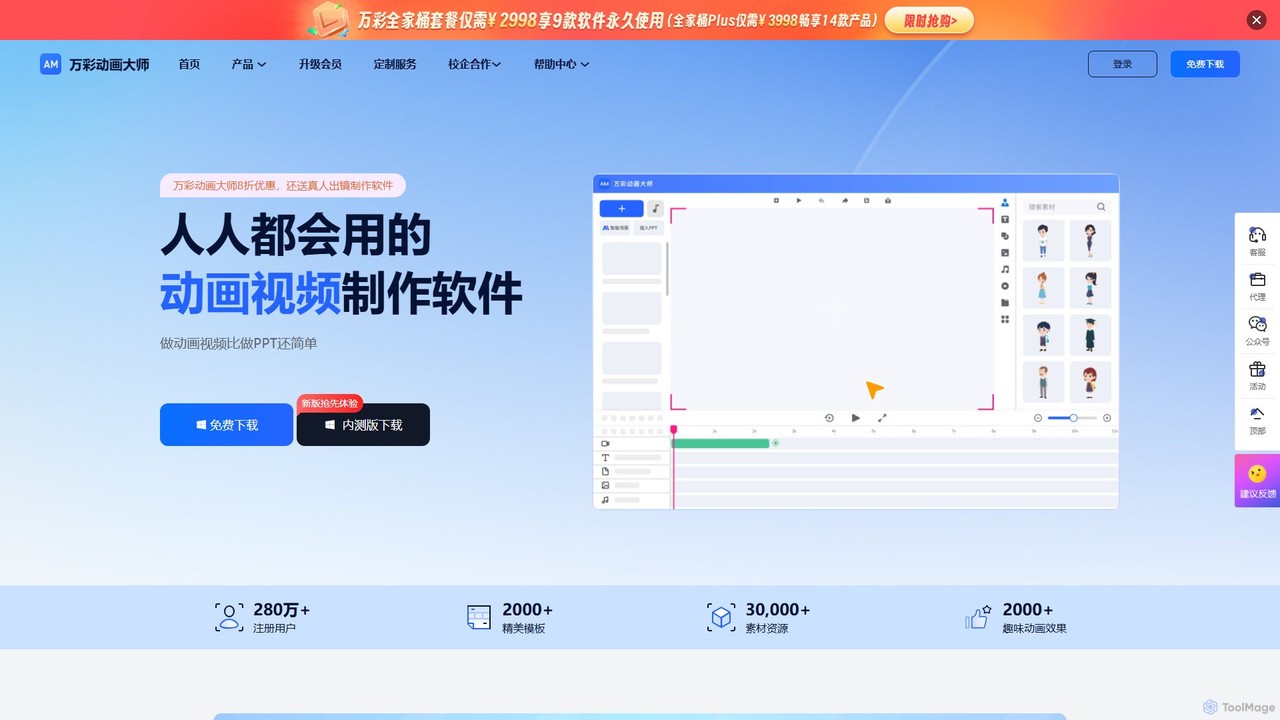
Animiz is a user-friendly animation video software designed for creating professional MG animations, explainer videos, and presentations. It simplifies the animation process with a drag-and-drop interface, vast libraries of templates and assets, and powerful timeline editing. Integrated with AI for scriptwriting, it's ideal for marketing, education, and corporate communication, making animation accessible to everyone, regardless of skill level.

E Learning
Visits 52.1KFavorites 155Likes 143

About Slideshow

AI Slideshow tools are applications that automatically generate dynamic video presentations from inputs like text, images, or video clips. They leverage artificial intelligence to analyze content, select relevant visuals, apply transitions, and often synthesize voiceovers. This automates the entire creation process, enabling users to produce professional-looking video slideshows for marketing, education, or personal use in minutes instead of hours.

Core Features

  • Text-to-Video Slideshow: Automatically converts scripts, articles, or prompts into a sequence of visually supported slides.
  • AI Media Matching: Intelligently searches and selects stock photos, video clips, and icons that correspond to the text on each slide.
  • Automated Voiceover Generation: Creates a natural-sounding narration in various languages and voices using text-to-speech technology.
  • Smart Transitions & Animation: Applies dynamic and context-aware animations and transitions between slides for a polished look.
  • Brand Kit Integration: Automatically applies a brand's logos, colors, and fonts across the entire slideshow for consistency.

Use Cases

These tools are widely used by content marketers to repurpose blog posts into social media videos, educators creating engaging lesson materials from notes, and businesses producing quick product demos or internal training videos. They are also popular for personal use, such as creating event montages or travel diaries.

How to Choose

When selecting an AI Slideshow tool, consider the quality and size of its stock media library, the naturalness of the AI voices, the level of customization available for templates and branding, and the supported export formats (e.g., MP4, MOV) and resolutions.

Slideshow use cases

1

Repurpose Blog Posts into Social Media Videos

A content marketer needs to increase engagement on platforms like YouTube and Instagram. Instead of manually creating a video, they input a blog post URL into an AI slideshow tool. The AI summarizes the key points, finds relevant stock footage and images for each point, adds kinetic typography, and generates a voiceover. The result is a 1-2 minute engaging video slideshow, ready for social media, created in under 15 minutes, saving hours of video editing work.

2

Create Engaging Educational Video Lessons

An educator wants to create a flipped classroom module on a complex historical topic. They provide the AI tool with their lecture notes or a detailed script. The tool structures the content into a logical slide sequence, sourcing historical images, maps, and relevant B-roll footage. It then generates a clear, audible narration, transforming dense text into a visually stimulating lesson that students can watch before class, improving comprehension and retention.

3

Generate Automated Real Estate Property Tours

A real estate agent needs to quickly create compelling video tours for multiple listings. They upload property photos and a descriptive text for each home. The AI tool automatically arranges the photos in a logical flow (e.g., exterior, living room, kitchen), applies elegant transitions like Ken Burns effects to add motion, and overlays key features as text on screen. This produces a professional virtual tour video for each listing in minutes, ready to be shared on websites and social media.

4

Produce Corporate Training and Onboarding Videos

An HR manager is tasked with creating standardized onboarding materials for new hires. They feed internal policy documents or process guides into the AI slideshow creator. The AI breaks down the information into digestible slides, incorporates company branding from a pre-set kit, and uses a professional AI voice for narration. This ensures all new employees receive consistent, high-quality training, and the content can be easily updated as policies change.

5

Craft Personal Event and Travel Montages

A user wants to share memories from a recent vacation or a family wedding without learning complex video editing software. They upload a folder of photos and video clips to the AI tool. The AI analyzes the media, selects the best shots, arranges them chronologically or thematically, and sets them to royalty-free background music with appropriate pacing and transitions. The final output is a heartfelt video montage, perfect for sharing with friends and family.

6

Develop Quick Product Feature Explainer Videos

A startup's marketing team needs to create short videos explaining new software features. They write a simple script outlining the feature's benefits and upload corresponding screen recordings or screenshots. The AI tool assembles these assets into a concise slideshow, highlighting key UI elements with zooms and callouts, adding a clear voiceover, and finishing with a call-to-action slide. This allows for the rapid production of a library of feature videos for marketing and customer support.

Slideshow FAQ

What are AI Slideshow tools?

AI Slideshow tools are applications that automate the creation of video presentations from text, images, or other media. Unlike manual presentation software, they use AI to handle design, media selection, narration, and timing. Key features include text-to-video conversion, automatic stock media sourcing, and AI-generated voiceovers, making them ideal for quickly producing engaging video content.

How do AI Slideshow tools differ from traditional presentation software like PowerPoint?

The main difference lies in automation and output. Traditional software like PowerPoint provides a manual canvas for creating static slides for live presentations. AI Slideshow tools automate the entire creation process, taking raw content (like text) and producing a finished video file with visuals, transitions, and audio. The focus of AI tools is on generating a self-playing video, not on creating slides for a speaker to present.

How to choose the right AI Slideshow tool?

When choosing a tool, evaluate these four aspects:

  • Media Library: Check the quality and diversity of the integrated stock photo and video library.
  • AI Voice Quality: Listen to voice samples to ensure they sound natural and not robotic.
  • Customization: Ensure you can adjust templates, apply your own branding (logos, colors), and edit the final video.
  • Export Options: Verify that the tool supports the video resolution (e.g., 1080p, 4K) and formats you need.

What kind of content can I use to create a slideshow with AI?

Most AI Slideshow tools are versatile and accept various inputs. Common sources include:

  • Plain Text or Scripts: The AI builds the entire video from your written content.
  • Blog Post or Article URLs: The tool can scrape and summarize web content to create a video.
  • Existing Photos and Videos: You can upload your own media to create personal or branded slideshows.
  • Existing Presentation Files: Some tools can import PowerPoint files and convert them into dynamic videos.

Who are AI Slideshow tools best suited for?

These tools are ideal for users who need to create video content quickly without extensive video editing skills. This includes content marketers repurposing articles, educators developing online course materials, small businesses creating promotional videos, real estate agents showcasing properties, and individuals making personal video montages for social sharing or events.