ToolMage
Sign in

Best 1 Code Analysis AI tools for Software Development

Popular Code Analysis AI tools in Software Development include GitCruiter, helping you work more efficiently.

GitCruiter

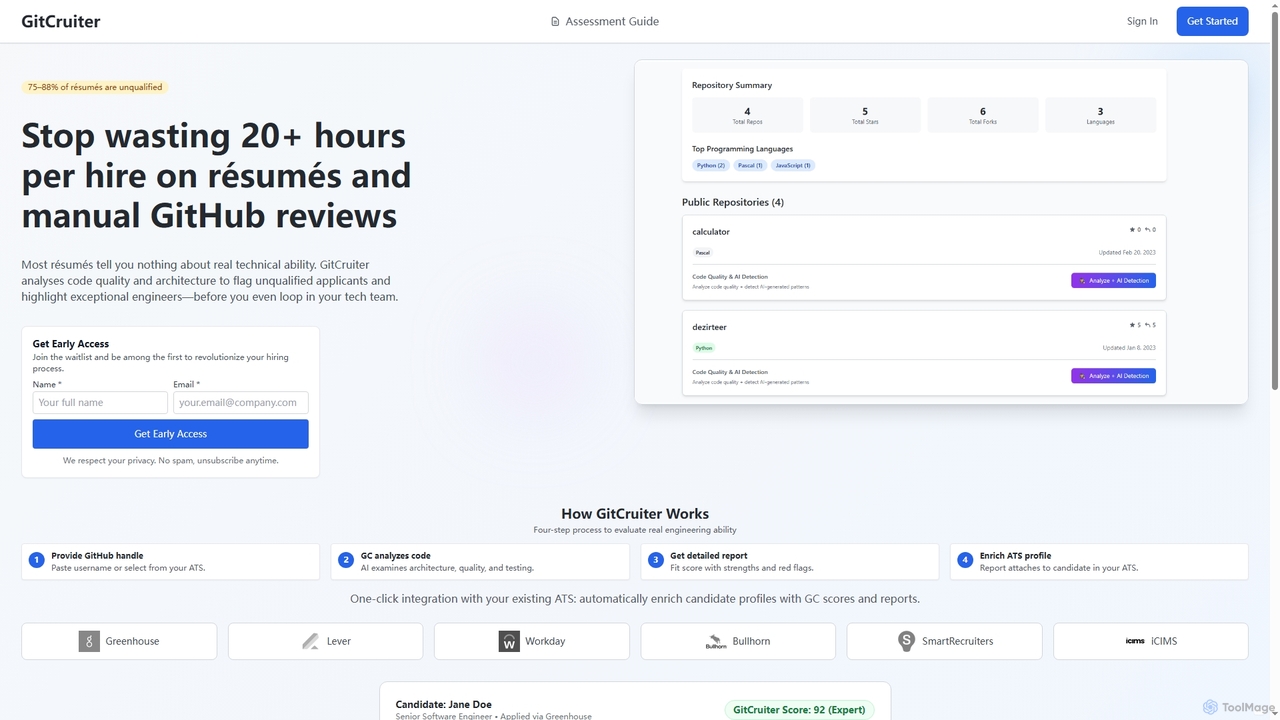
GitCruiter is an AI-powered platform that revolutionizes technical hiring by analyzing candidates' public GitHub repositories. It provides objective scores and detailed reports on code quality, architecture, testing, and problem-solving, helping recruiters and hiring managers identify top engineering talent and reduce time spent on unqualified resumes.

Candidate Screening
Visits 3.5KFavorites 105Likes 98

About Code Analysis

Code Analysis tools are AI-powered solutions that automatically inspect source code to identify potential bugs, security vulnerabilities, and style inconsistencies without executing the program. Leveraging advanced algorithms and machine learning, these tools understand code structure and detect patterns indicative of errors or suboptimal practices. They are essential for enhancing code quality, security, and maintainability, providing developers with critical insights early in the software development lifecycle. This proactive approach helps prevent issues from escalating, leading to more robust and reliable software.

Core Features

  • Bug Detection: Automatically identifies common programming errors, logical flaws, and potential runtime exceptions.
  • Security Vulnerability Scanning: Detects potential security weaknesses like injection flaws, cross-site scripting (XSS), and insecure configurations.
  • Code Style & Quality Enforcement: Ensures adherence to coding standards, identifies complex or redundant code, and suggests refactoring opportunities.
  • Performance Optimization Suggestions: Pinpoints inefficient code segments that could impact application performance and resource usage.
  • Dependency Analysis: Maps out external library usage, identifying outdated or vulnerable third-party components.

Applicable Scenarios

Code analysis tools are widely used by individual developers, development teams, and security auditors. They are integrated into daily coding practices for immediate feedback, within continuous integration pipelines for automated quality checks, and during security audits to ensure compliance and identify critical vulnerabilities across the codebase.

How to Choose

When selecting a code analysis tool, consider its compatibility with your programming languages and frameworks, its integration capabilities with existing IDEs and CI/CD pipelines, and the accuracy of its issue detection with minimal false positives. Also, evaluate the flexibility for customizing analysis rules to align with your team's specific coding standards and security policies.

Featured tool rankings

Code Analysis use cases

1

Automated Code Review for Pull Requests

Development teams integrate AI code analysis tools into their Git workflow. When a developer submits a pull request, the tool automatically scans the new code for bugs, security flaws, and style violations. It then provides immediate feedback directly within the pull request interface, highlighting issues and suggesting fixes, significantly accelerating the code review process and ensuring higher code quality before merging.

2

Proactive Security Vulnerability Identification

Security engineers or DevOps teams deploy code analysis tools to continuously monitor the codebase for emerging security threats. The tool scans for known vulnerabilities (e.g., OWASP Top 10) and potential attack vectors in real-time or on a scheduled basis. This allows teams to identify and patch critical security flaws before they can be exploited, strengthening the application's overall security posture.

3

Enforcing Coding Standards Across Large Teams

Project managers and tech leads utilize code analysis tools to standardize coding practices across diverse development teams. By configuring custom rule sets for style, complexity, and best practices, the tool automatically flags any code that deviates from these standards. This ensures consistency, improves readability, and reduces technical debt, making collaboration smoother and onboarding new developers easier.

4

Refactoring Legacy Codebases for Maintainability

Developers working on older, complex applications use code analysis to identify areas of high complexity, duplication, or poor design. The tool generates reports highlighting "code smells" and suggests specific refactoring opportunities, such as extracting methods, simplifying conditional logic, or removing dead code. This systematic approach helps improve the maintainability and extensibility of legacy systems.

5

Optimizing Application Performance by Identifying Bottlenecks

Performance engineers or senior developers leverage code analysis to pinpoint inefficient algorithms, resource-intensive operations, or suboptimal data structures within the code. The tool provides insights into potential performance bottlenecks, such as N+1 queries or excessive loop iterations. This allows developers to proactively optimize critical sections of the application, leading to faster execution times and improved user experience.

6

Onboarding New Developers with Code Quality Guidance

New team members, especially junior developers, benefit from code analysis tools by receiving instant, actionable feedback on their code. As they write, the tool highlights errors, suggests best practices, and explains why certain patterns are problematic. This serves as an automated mentor, accelerating their learning curve, helping them quickly adapt to team coding standards, and reducing the burden on senior developers for basic code reviews.

Code Analysis FAQ

What are AI Code Analysis tools?

AI Code Analysis tools are software applications that use artificial intelligence, including machine learning and natural language processing, to automatically examine source code. Unlike traditional static analysis, AI-powered tools can often understand context, learn from past code patterns, and provide more intelligent suggestions for identifying bugs, security vulnerabilities, code smells, and performance issues without actually running the code. They aim to improve code quality, security, and developer productivity.

How do AI Code Analysis tools differ from traditional Static Application Security Testing (SAST)?

While both AI Code Analysis and traditional SAST perform static analysis, AI tools leverage machine learning to go beyond predefined rule sets. Traditional SAST relies heavily on fixed patterns and signatures to detect known vulnerabilities and coding errors. AI tools, however, can learn from vast code repositories, identify novel patterns, reduce false positives, and provide more context-aware recommendations. This allows them to detect more subtle or complex issues that might be missed by rule-based systems, offering a more intelligent and adaptive approach to code quality and security.

What types of issues can AI Code Analysis tools detect?

AI Code Analysis tools are capable of detecting a wide range of issues. These include common programming errors (e.g., null pointer dereferences, unhandled exceptions), security vulnerabilities (e.g., injection flaws, insecure deserialization, weak cryptography), code quality issues (e.g., code duplication, high complexity, poor readability), performance bottlenecks (e.g., inefficient database queries, excessive object creation), and adherence to coding standards. They can also identify potential architectural flaws and suggest refactoring opportunities.

Who benefits most from using AI Code Analysis tools?

A wide range of stakeholders in the software development lifecycle benefit from AI Code Analysis tools. Developers gain immediate feedback, helping them write cleaner and more secure code faster. Development teams achieve consistent code quality, reduce technical debt, and streamline code reviews. Security teams can proactively identify and mitigate vulnerabilities, enhancing application security. Project managers benefit from improved project predictability and reduced post-release bug fixing. Ultimately, any organization aiming to deliver high-quality, secure, and maintainable software can benefit.

Can AI Code Analysis tools integrate with existing development workflows?

Yes, most modern AI Code Analysis tools are designed for seamless integration into existing development workflows. They typically offer plugins for popular Integrated Development Environments (IDEs) like VS Code, IntelliJ, and Eclipse, providing real-time feedback. Furthermore, they can be integrated into Continuous Integration/Continuous Delivery (CI/CD) pipelines (e.g., Jenkins, GitLab CI, GitHub Actions) to automate analysis on every commit or pull request. Many also support integration with version control systems (e.g., Git) and project management tools, ensuring a smooth and automated quality assurance process.