ToolMage
Sign in

AI TOOL COMPARISON

BashSenpai vs gptcli

What is the difference, and which fits your workflow? Compare features, usage, pricing models and traffic side by side.

Jump to key differences

Product overview

BashSenpai Product overview

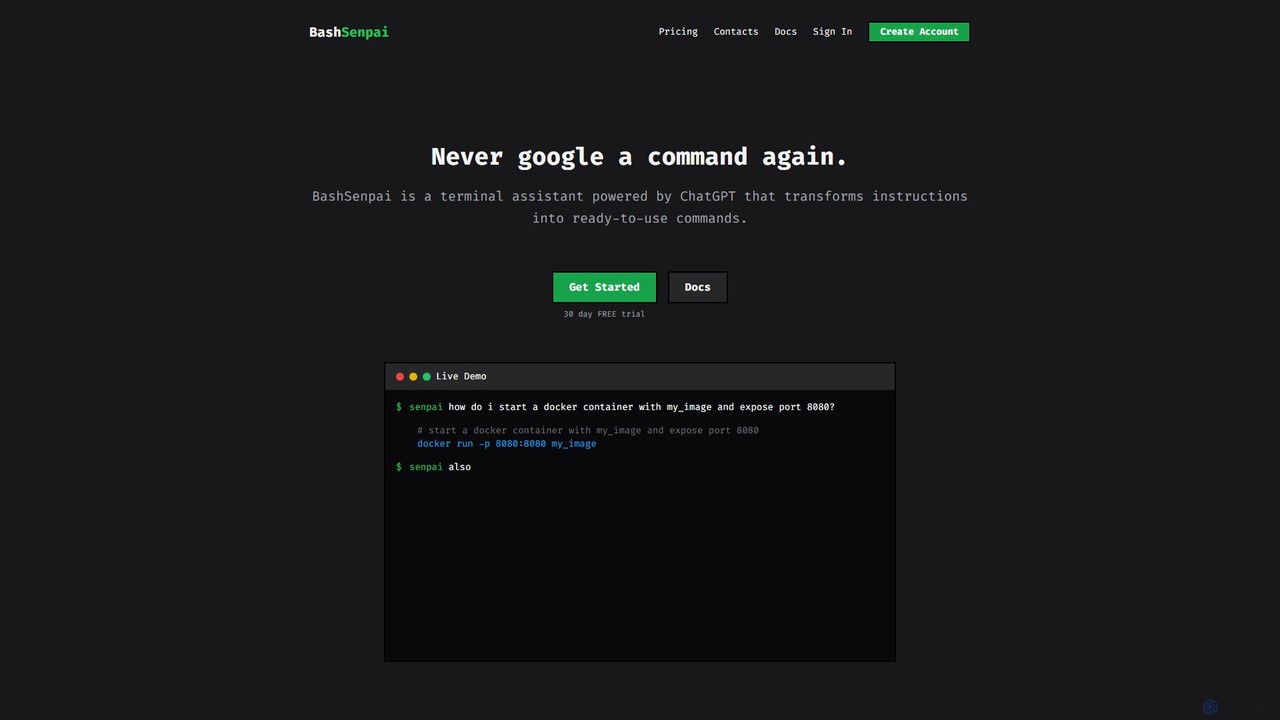
BashSenpai is a ChatGPT-powered terminal assistant that transforms natural language instructions into ready-to-use shell commands. It operates directly within your terminal, providing context-aware, accurate commands for developers and system administrators, eliminating the need to search online.

Preview

gptcli Product overview

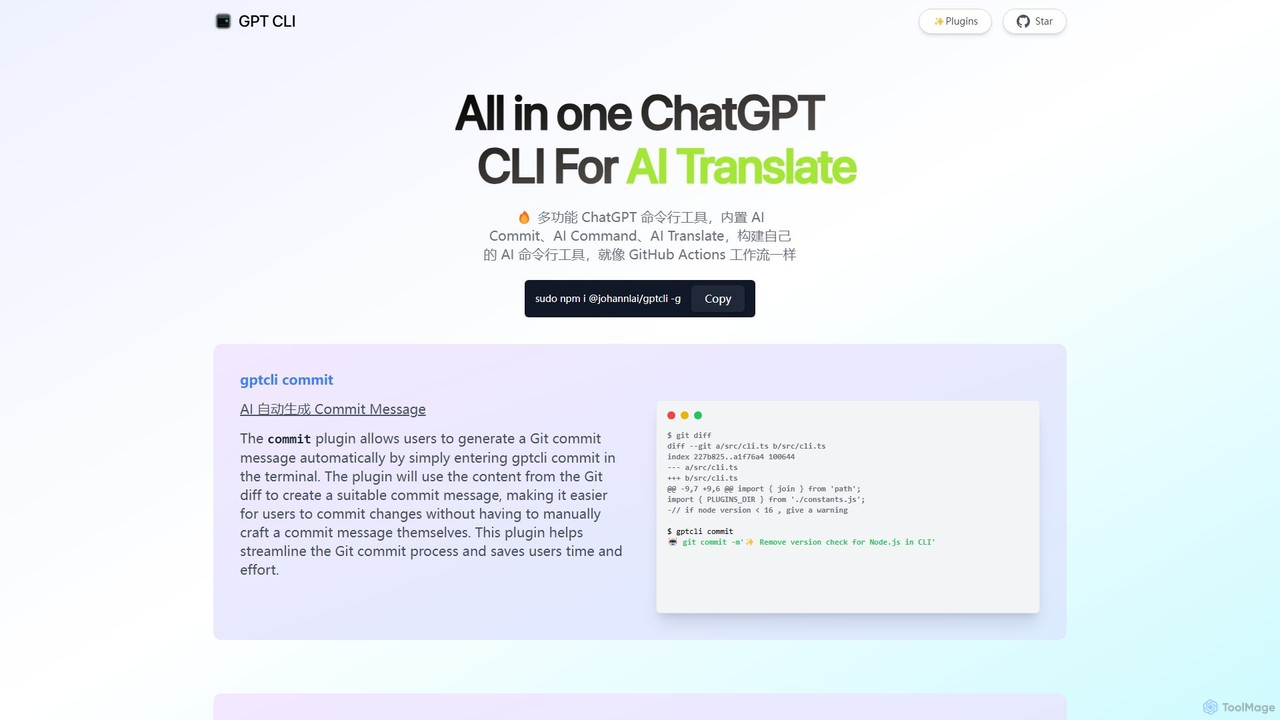
gptcli is a versatile, open-source command-line tool that integrates ChatGPT directly into your terminal. It streamlines developer workflows with features like AI-powered Git commits, natural language to shell command translation, and in-terminal chat. With its extensible plugin system, you can build your own custom AI CLI tools, making it the ultimate productivity enhancer for anyone who works extensively with the command line.

Preview

Quick facts

Compare product focus, pricing models and audiences. Highlighted rows indicate different listed information; unknown pricing does not mean free.

BashSenpai VS gptcli — Quick facts
Quick factsBashSenpaigptcli
Pricing modelFreemiumFree
Product typeAppApp
Primary focusCode AssistantCode Assistant
Audience and rolesNo data availableNo data available
CategoriesCode Assistant · Command Line · AutomationCode Assistant · Command Line · Automation
AddedAug 15, 2025Aug 6, 2025
UpdatedNov 19, 2026Nov 19, 2026

Features, usage and use cases

Explore the listed product descriptions, features and workflows. Taxonomy labels alone are not feature evaluations.

BashSenpai

BashSenpai is an innovative AI-powered command-line tool designed to act as your personal terminal assistant. Powered by ChatGPT, it revolutionizes how developers, system administrators, and even beginners interact with the shell. Instead of memorizing complex commands or constantly searching for the right syntax on Google, you can simply ask BashSenpai in plain English, and it will generate the precise command you need, complete with explanations. This tool is built for convenience and efficiency, integrating seamlessly into your existing workflow without ever needing to leave the terminal window.

The core philosophy behind BashSenpai is to combine the power of large language models with the context of your specific environment. It can consider your operating system, shell type, and even the history of your current session to provide more accurate and relevant commands. This context-awareness, coupled with a unique self-reflection mechanism where the AI reviews and improves its own suggestions, ensures a high degree of accuracy and reliability for both simple and complex tasks.

How to use BashSenpai

Getting started with BashSenpai is a straightforward process designed for developers. It is available for Linux, macOS, and Windows.

  1. Installation: Download and install the appropriate package for your operating system from the official website.
  2. Authentication: After installation, you need to link the CLI tool to your account. Get your personal API token from your BashSenpai dashboard and run the command senpai login in your terminal. You'll be prompted to enter your token.
  3. Usage: To use the tool, simply type senpai followed by your question in natural language. For example: senpai how do i start a docker container with my_image and expose port 8080?
  4. Conversational Context: BashSenpai remembers the context of your conversation. You can ask follow-up questions, like: senpai also mount current folder to /app. If you want to start a fresh conversation, use the -n or --new flag.
  5. Configuration: You can customize the tool's behavior, such as changing the color of commands and comments in the output, or deciding whether to send OS metadata to improve responses. Use senpai --help to see all available options.

Core Features of BashSenpai

  • Natural Language to Command: Translates plain English instructions into accurate shell commands.
  • Context-Awareness: Utilizes conversational history and optional OS metadata (OS type, shell, architecture) to provide tailored answers.
  • Self-Reflection for Accuracy: Implements a multi-step process where the AI model evaluates and refines its own answers before presenting them.
  • Customizable Personalities: Add a fun twist to your terminal by changing the assistant's persona (e.g., 'angry pirate', 'depressed teenager').
  • Cross-Platform Support: Native CLI tool available for Linux, macOS, and Windows.
  • Handles Complex Workflows: Capable of generating multi-step command sequences for tasks like application deployment, server security configuration, and site migrations.
  • Interactive Execution: Can prompt the user to execute each generated command, providing a safe way to run complex operations.

Use Cases for BashSenpai

BashSenpai is versatile for both novice and expert users.

  • Beginner's Guide: A user new to the command line can ask basic questions like senpai where is my cuda folder? or senpai how to list all files including hidden ones? to learn and execute commands safely.
  • Developer Productivity: A developer can quickly generate commands for Docker, Git, or package managers without breaking their focus. For example: senpai deploy a django app inside a virtual environment using gunicorn and caddy2.
  • System Administration: A sysadmin can perform complex server configurations. For instance, they can ask BashSenpai to generate a full script to migrate a WordPress site, including database updates and file transfers, or to secure a new server with UFW and Fail2Ban rules, complete with explanations for each configuration step.

Advantages of BashSenpai

The primary advantage of BashSenpai is the significant boost in productivity and efficiency. By bringing AI assistance directly into the terminal, it eliminates context switching and the time spent on web searches. Its ability to understand context leads to more accurate and useful answers than generic web results. For learners, it serves as an excellent educational tool by not only providing commands but also explaining them. For experts, it acts as a reliable co-pilot for complex, multi-step operations, reducing the chance of manual error.

Pricing and Plans

BashSenpai operates on a transparent, developer-friendly pay-as-you-go pricing model. Users get a 30-day free trial without needing a credit card to get started.

  • Pricing: $0.003 per 1,000 tokens.
  • Tokens: A token is a piece of text, roughly equivalent to 4 characters or 0.75 words in English. The token count depends on your question, the provided context, and the length of the AI's response.
  • Billing: You are billed once per month based on your actual usage. There are no minimum usage requirements, no hidden fees, and no inactivity fees. If you don't use the service, you don't pay.

gptcli

gptcli is a powerful, all-in-one Command Line Interface (CLI) tool designed to bring the intelligence of OpenAI's ChatGPT directly to your terminal. It serves as a multifunctional assistant for developers, system administrators, and anyone who frequently uses the command line. The core philosophy of gptcli is to enhance productivity by automating repetitive tasks, simplifying complex commands, and providing instant AI assistance without ever needing to leave the terminal window. Its architecture is built around a flexible plugin system, allowing users to not only use a rich set of built-in functions but also to create and share their own custom AI-powered CLI tools, much like building a GitHub Actions workflow.

How to use gptcli

Getting started with gptcli is straightforward, especially for those familiar with Node.js environments.

  1. Installation: First, you need to have Node.js and npm installed. Then, install gptcli globally on your system by running the following command in your terminal:
    sudo npm i @johannlai/gptcli -g
  2. API Key Configuration: gptcli requires an OpenAI API key to function. You will need to set up your API key as an environment variable. This is a crucial step for the tool to communicate with the ChatGPT models.
  3. Using Built-in Plugins: Once installed and configured, you can immediately start using its powerful plugins:
    • To automatically generate a Git commit message based on your staged changes, simply run: gptcli commit
    • To translate a natural language query into a shell command, use: gptcli command "your query in plain English" (e.g., gptcli command "list all js files in the folder")
    • For direct conversation with ChatGPT, start an interactive session with: gptcli chat
    • To translate text, use the translate plugin: gptcli translate
  4. Building Custom Plugins: Advanced users can leverage the plugin system to build their own commands tailored to their specific workflows.

Core Features of gptcli

  • AI Commit: Automatically analyzes your `git diff` and generates descriptive, conventional commit messages, saving time and improving repository history clarity.
  • AI Command: Acts as a natural language interpreter for your shell. Describe what you want to do, and it generates the correct command, complete with an execution confirmation prompt.
  • AI Chat: Provides a seamless, interactive chat session with ChatGPT directly in the terminal for coding questions, debugging help, or general queries.
  • AI Translate: Offers quick and convenient in-terminal text translation without needing to switch to a browser or another application.
  • Gitmoji & CZ Support: Specialized plugins for generating commit messages in popular formats like `gitmoji` and `Commitizen (CZ)`, enhancing commit semantics.
  • Whisper Integration: Utilizes OpenAI's Whisper for powerful speech-to-text transcription directly from the command line.
  • Extensible Plugin System: The tool's most powerful feature, allowing developers to build and integrate custom AI functionalities to solve unique problems.
  • Additional Utilities: Includes other handy plugins like `AI Weather` for checking weather using natural language.

Use Cases for gptcli

gptcli is versatile and can be adopted by various professionals:

  • Software Developers: Streamline Git workflows with automated commit messages. Find complex shell commands for build processes or file manipulation without searching online. Debug code or generate boilerplate snippets using the AI Chat.
  • DevOps Engineers & SREs: Generate CLI commands for managing cloud infrastructure (e.g., AWS, GCP, Azure), Kubernetes, or Docker. Automate script creation for deployment and monitoring.
  • System Administrators: Simplify system management tasks by describing them in natural language instead of recalling obscure command syntax and flags.
  • Data Scientists: Quickly write shell commands for data preprocessing, file management, and running analysis scripts.
  • Technical Writers & Content Creators: Use the translate and chat features for quick translations, proofreading, or brainstorming ideas directly within their terminal-based writing environment (e.g., Vim, Emacs).

Advantages of gptcli

The primary advantage of gptcli is its ability to centralize AI-powered tasks within the command line, the native environment for many technical professionals.

  • Increased Efficiency: Reduces context switching between the terminal, browser, and other applications, keeping you focused and in the flow.
  • Enhanced Productivity: Automates mundane tasks like writing commit messages and searching for command syntax, freeing up mental energy for more complex problems.
  • Accessibility: Lowers the barrier to entry for complex command-line operations by allowing natural language input.
  • High Customizability: The open-source and plugin-based nature means you can tailor the tool perfectly to your personal or team's workflow.
  • Seamless Integration: Fits naturally into any terminal-based workflow, complementing existing tools like Git, Docker, and SSH.

Pricing and Plans

gptcli is a free and open-source tool, distributed under the MIT License. You can download, use, and modify it without any cost. However, it relies on the OpenAI API to power its features. Therefore, users are responsible for the costs associated with their own OpenAI API key usage. Pricing is determined by OpenAI's model for API calls (e.g., per-token pricing for GPT-3.5, GPT-4, etc.). There are no subscription fees or hidden charges for the gptcli tool itself.

Positioning

Their taxonomy shows where the products overlap and where each one has a more distinct focus. Unknown fields are shown explicitly and are never filled with assumptions.

Categories

Shared
Command LineAutomation
Only BashSenpai
Code Assistant
Only gptcli
Code Assistant

Tags

Shared
automationchatgptclicommand linedeveloper toolsterminal
Only BashSenpai
code assistantdevopslinuxmacosshell scriptsysadminwindows
Only gptcli
commit messageGitnode.jsopen source

Audience and roles

Shared
No listed items
Only BashSenpai
No listed items
Only gptcli
No listed items

Traffic comparison

Traffic is shown on the same scale so differences in market visibility are not visually understated.

How to interpret the traffic data

Both charts share the same months and vertical scale. Each tool identifies its latest reporting month; missing months are left blank, not counted as zero. Regional and source visit counts are estimates calculated from the reported shares.

BashSenpai

No data available

gptcli monthly traffic:

Latest traffic · 2026-05

Monthly visits
3.2K
Avg. visit duration
0:00
Pages per visit
1.11
Bounce rate
30.83%
Data updated 2026-06-15

Monthly traffic trend

  • 2025-09: 6.6K
  • 2026-01: 0
  • 2026-02: 2.8K
  • 2026-03: 3.2K
  • 2026-04: 2.7K
  • 2026-05: 3.2K

Search keywords

chat gpt clichatgpt clicli chatgptgpt ccligpt cli

Community signals

Ratings, comments, favorites, and likes are community signals—not a substitute for product fit.

BashSenpai

Rating
No data available
Comments
0
Favorites
163
Likes
176

gptcli

Rating
No data available
Comments
0
Favorites
180
Likes
173

BashSenpai vs gptcli · Comparison FAQ

What do BashSenpai and gptcli have in common?
Both tools are listed under Command Line、Automation. These categories indicate overlapping use cases; compare their detailed descriptions for workflows, capabilities and limitations.
Are BashSenpai and gptcli free?
Listed pricing models: BashSenpai — Freemium; gptcli — Free. Missing pricing is not proof of a free plan, and freemium does not mean every feature is free. Check official sites for current plans, limits and trials.
How should I choose between BashSenpai and gptcli?
The primary listed category is Code Assistant for BashSenpai, and Code Assistant for gptcli. Compare features, steps and use cases, then verify pricing, data permissions and deployment needs. This page does not include hands-on testing and does not declare a winner from traffic or tags.

Sources and comparison methodology

This page is assembled from ToolMage product listings, taxonomy, traffic statistics and on-site user feedback. It is not a hands-on test or an independent review.

  • Feature and plan descriptions reflect information in the listings, not real-time guarantees. Verify pricing, quotas, availability and privacy terms on the official sites.
  • Traffic uses the reporting months shown. Missing statistics do not mean zero visits, and different periods do not establish growth or superiority. Regional and source visit counts are estimates based on shares.
  • Different tags indicate differences in the listings, not proof that the other product lacks a capability. Ratings, favorites and visits are not used to declare a winner.

Related comparisons