ToolMage
Sign in

AI TOOL COMPARISON

CopyCoder vs XAML.io

What is the difference, and which fits your workflow? Compare features, usage, pricing models and traffic side by side.

Jump to key differences

Product overview

CopyCoder Product overview

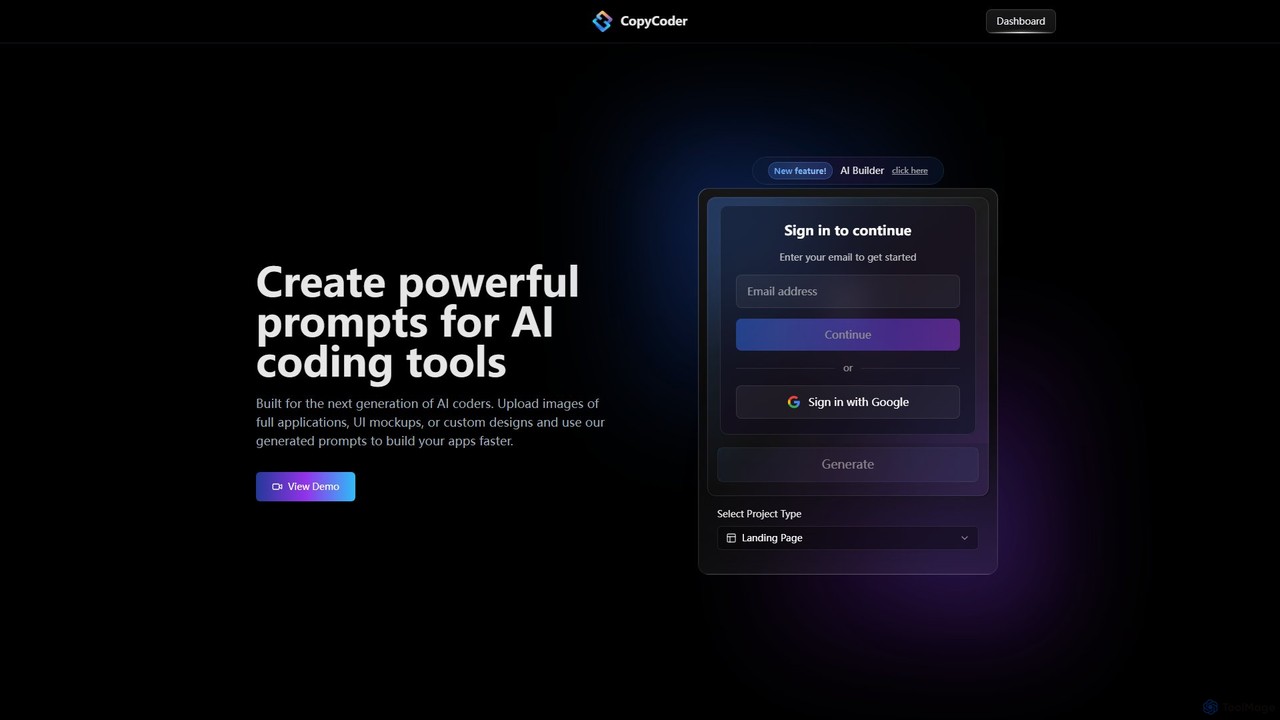
CopyCoder is an AI-powered tool designed for developers that converts UI designs, mockups, and images into powerful, structured prompts for AI coding assistants like Cursor. It streamlines the development process by bridging the gap between visual design and code generation, enabling faster app building.

Preview

XAML.io Product overview

An AI-powered copilot for XAML developers. It accelerates UI development by converting natural language, sketches, and design files into clean, production-ready XAML code for .NET MAUI, WPF, and UWP. It also offers code optimization and debugging assistance.

Preview

Quick facts

Compare product focus, pricing models and audiences. Highlighted rows indicate different listed information; unknown pricing does not mean free.

CopyCoder VS XAML.io — Quick facts
Quick factsCopyCoderXAML.io
Pricing modelPaidFreemium
Product typeWebWeb
Primary focusDesign To CodeDesign To Code
Audience and rolesNo data availableNo data available
CategoriesDesign To Code · Code Assistant · Developer ToolsDesign To Code · Code Assistant · Developer Tools
AddedAug 14, 2025Aug 13, 2025
UpdatedNov 19, 2026Nov 19, 2026

Features, usage and use cases

Explore the listed product descriptions, features and workflows. Taxonomy labels alone are not feature evaluations.

CopyCoder

CopyCoder is a revolutionary AI tool built for the next generation of developers, designed to significantly accelerate the application development workflow. It specializes in translating visual designs into high-quality, structured prompts that can be used with AI coding assistants. By simply uploading an image of a UI mockup, a screenshot of an existing application, or a custom design, developers can generate detailed prompts that guide AI tools like Cursor to write the corresponding code. This process eliminates the tedious and time-consuming task of manually describing UI elements and layouts, allowing developers to focus on logic and functionality.

The platform is praised by the developer community for its impressive ability to convert images to code prompts, creating an incredibly efficient 'getting started' workflow. It's not just about speed; it's about precision. CopyCoder generates prompts that include details about component structure, styling, and layout, leading to more accurate and reliable code generation from the target AI assistant. This makes it an indispensable tool for rapid prototyping, front-end development, and for anyone looking to streamline their design-to-code process.

How to use CopyCoder

Using CopyCoder is a straightforward process designed for maximum efficiency:

  1. Sign Up and Log In: Create an account or sign in using your email or Google account.
  2. Select a Project Type: Start by choosing the type of project you are working on, for example, a 'Landing Page'.
  3. Upload Your Design: Drag and drop an image file of your UI mockup, application screenshot, or design concept into the upload area.
  4. Generate the Prompt: CopyCoder's AI will analyze the image, deconstruct its components, and generate a comprehensive, structured prompt.
  5. Use the Prompt: Copy the generated prompt and paste it into your preferred AI coding tool (e.g., Cursor). The AI assistant will then use this detailed prompt to generate the front-end code for your application.
  6. Build and Iterate: Use the generated code as a foundation for your project, iterating and adding functionality as needed.

Core Features of CopyCoder

  • Image-to-Prompt Generation (Clone UI): The core functionality that analyzes any UI image and converts it into a detailed, actionable prompt for AI coders.
  • AI Builder (Beta): An advanced feature that assists in the building process, likely offering more control over prompt generation and project structure.
  • Complete Template Library: Access a library of pre-designed templates to kickstart projects and provide inspiration.
  • Project Management: Organize your work with dedicated project spaces (1 for the Starter plan, unlimited for the Pro plan).
  • Seamless Integration: Designed to work perfectly with leading AI coding assistants, enhancing their capabilities.

Use Cases for CopyCoder

CopyCoder is versatile and can be used in various development scenarios:

  • Rapid Prototyping: Quickly transform design ideas from tools like Figma or Sketch into interactive web prototypes.
  • Frontend Development: Accelerate the creation of landing pages, dashboards, and complex UI components for web applications.
  • Design Handoff: Streamline the collaboration between designers and developers by providing a clear, machine-readable translation of visual designs.
  • Learning and Training: Helps developers understand how to effectively prompt AI coding tools by showing how visual elements are described textually.
  • Modernizing Legacy UIs: Take screenshots of older applications and use the generated prompts to quickly rebuild them with modern frameworks.

Advantages of CopyCoder

Developers choose CopyCoder for several key benefits:

  • Increased Productivity: Drastically reduces the time spent on writing boilerplate code and translating visual designs into code specifications.
  • Enhanced Accuracy: Generates specific and structured prompts, leading to higher quality and more predictable code output from AI assistants.
  • Simplified Workflow: Offers an intuitive drag-and-drop interface that simplifies the initial stages of development.
  • Empowers AI Assistants: Unlocks the full potential of tools like Cursor by providing them with superior input.
  • Strong Community Trust: Highly regarded and recommended by developers for its effectiveness and innovation.

Pricing and Plans

CopyCoder offers two straightforward subscription plans. There is no free trial available, as the platform incurs costs from AI model providers for every use.

  • Starter Plan: $15/month. Includes 1 project, full access to Clone UI, CopyCoder Builder (Beta), the complete template library, and standard customer support. Ideal for individuals and small projects.
  • Pro Plan: $39/month. Includes unlimited projects, full access to all features including Clone UI and CopyCoder Builder (Beta), the complete template library, and priority customer support. Best for serious developers and professional use.

Users can upgrade, downgrade, or cancel their plan at any time, with changes taking effect in the next billing cycle. Payments are processed securely through Stripe and accept all major credit cards.

XAML.io

XAML.io is a revolutionary AI-powered development assistant designed to streamline the user interface creation process for developers working with XAML-based frameworks. Writing XAML code by hand can often be verbose, complex, and time-consuming, presenting a steep learning curve for newcomers and a tedious task for seasoned professionals. XAML.io addresses these challenges head-on by leveraging advanced artificial intelligence to automate the generation of high-quality, maintainable XAML code. It acts as an intelligent copilot, empowering developers to build beautiful and functional UIs for .NET MAUI, Windows Presentation Foundation (WPF), Universal Windows Platform (UWP), and WinUI 3 applications with unprecedented speed and efficiency.

How to use XAML.io

Getting started with XAML.io is a straightforward process designed for maximum developer productivity:

  1. Sign Up and Integrate: Begin by creating an account on the XAML.io website. Then, integrate the tool directly into your preferred development environment by installing the XAML.io extension for Visual Studio or Visual Studio Code. This provides a seamless workflow without ever leaving your IDE.
  2. Choose Your Generation Method: XAML.io offers multiple flexible inputs to match your workflow. You can use natural language prompts (e.g., "Create a login form with fields for email and password, a 'Remember me' checkbox, and a primary login button"), upload an image of a hand-drawn wireframe or a digital sketch, or directly import a design file from popular tools like Figma, Sketch, or Adobe XD.
  3. Generate and Refine: Once you provide the input, the AI engine processes it and generates the corresponding XAML code in seconds. The generated code appears in your editor, accompanied by a real-time visual preview. You can then refine the UI by issuing further commands to the AI, such as "Change the button color to blue and increase the corner radius" or "Add more padding around the text fields."
  4. Optimize and Debug: Go beyond generation by using XAML.io's analytical capabilities. Point it at your existing XAML files to receive AI-driven suggestions for performance improvements, accessibility enhancements, and best-practice refactoring. It can also help identify and suggest fixes for common issues like broken data bindings or layout conflicts.

Core Features of XAML.io

  • AI-Powered XAML Generation: Effortlessly convert natural language descriptions, whiteboard sketches, wireframe images, and professional design files from Figma or Sketch into clean, well-structured XAML code.
  • Multi-Framework Support: Generate framework-specific code that is optimized for .NET MAUI, WPF, UWP, and WinUI 3, ensuring compatibility and performance across the .NET UI ecosystem.
  • Intelligent Code Refactoring: Analyze existing XAML codebases and receive AI-powered recommendations to improve readability, performance, and maintainability, helping to modernize legacy applications.
  • Real-time UI Preview: Instantly visualize the generated UI components and layouts directly within your IDE, allowing for rapid iteration and design adjustments without compiling the entire application.
  • AI-Assisted Debugging: Quickly identify and resolve common XAML issues, including data binding errors, resource dictionary conflicts, and complex layout problems, saving hours of manual troubleshooting.
  • Style and Theme Generation: Automatically create consistent styling and theming, including support for light and dark modes, based on simple descriptive prompts.
  • Seamless IDE Integration: Enjoy a fully integrated experience with dedicated extensions for Visual Studio and Visual Studio Code, making XAML.io a natural part of your development workflow.

Use Cases for XAML.io

XAML.io is a versatile tool that benefits developers in various scenarios:

  • Rapid Prototyping: Product managers and developers can quickly transform ideas and wireframes into interactive XAML prototypes, facilitating faster feedback loops with stakeholders.
  • Accelerating Development: Senior developers can delegate the creation of boilerplate UI code to the AI, focusing on complex business logic. Junior developers can use it as a learning tool to understand XAML best practices and patterns.
  • Modernizing Legacy Applications: Streamline the process of migrating older Windows Forms or WPF applications to modern platforms like .NET MAUI by automatically refactoring and generating new, clean UI code.
  • Design-to-Code Automation: Bridge the gap between design and development teams by directly converting Figma or Sketch designs into pixel-perfect, functional XAML, ensuring design fidelity.
  • Ensuring Accessibility: Utilize the AI analyzer to scan your UI and ensure that components meet essential accessibility standards (like WCAG), making your applications usable for everyone.

Advantages of XAML.io

Adopting XAML.io provides a significant competitive edge:

  • Massive Productivity Gains: Drastically reduce the time spent writing, testing, and debugging UI code, allowing teams to ship features faster.
  • Improved Code Quality and Consistency: The AI generates code that adheres to industry best practices, ensuring your application's UI is performant, maintainable, and consistent.
  • Lowered Barrier to Entry: Makes XAML development more approachable for developers who are new to the .NET UI stack or come from a web development background.
  • Enhanced Designer-Developer Collaboration: Creates a smoother, more accurate handoff process from design to implementation, reducing friction and rework.

Pricing and Plans

XAML.io offers a flexible pricing structure to suit different needs:

  • Free Plan: Ideal for students, hobbyists, and individual developers. Includes a limited number of AI generations per month and access to basic features.
  • Pro Plan: Designed for professional developers. Offers unlimited AI generations, advanced features like Figma/Sketch integration, and priority support for a monthly subscription fee.
  • Enterprise Plan: A custom solution for teams and large organizations. Includes all Pro features, plus team management, centralized billing, dedicated support, and options for on-premise deployment or private API access.

Positioning

Their taxonomy shows where the products overlap and where each one has a more distinct focus. Unknown fields are shown explicitly and are never filled with assumptions.

Categories

Shared
Design To CodeCode AssistantDeveloper Tools
Only CopyCoder
No listed items
Only XAML.io
No listed items

Tags

Shared
No listed items
Only CopyCoder
ai coding assistantcode generatorCursordeveloper toolsfrontend developmentimage to codeprompt generatorrapid prototypingUI to codeweb development
Only XAML.io
AI copilotc++code generationdeveloper tool.NET MAUIui designUWPVisual StudioWinUIWPFXAML

Audience and roles

Shared
No listed items
Only CopyCoder
No listed items
Only XAML.io
No listed items

Traffic comparison

Traffic is shown on the same scale so differences in market visibility are not visually understated.

How to interpret the traffic data

Both charts share the same months and vertical scale. Each tool identifies its latest reporting month; missing months are left blank, not counted as zero. Regional and source visit counts are estimates calculated from the reported shares.

CopyCoder monthly traffic:

Latest traffic · 2026-05

Monthly visits
693
Avg. visit duration
0:04
Pages per visit
1.09
Bounce rate
82.71%
Data updated 2026-06-15

Monthly traffic trend

  • 2025-09: 18.6K
  • 2026-01: 5.9K
  • 2026-02: 3.4K
  • 2026-03: 1.1K
  • 2026-04: 1.7K
  • 2026-05: 693

Top regions

Top 5 countries/regions
Country/regionPercentageEstimated visits
🇺🇸United States100%693

Search keywords

copycoder.icopy coders

XAML.io monthly traffic:

Latest traffic · 2026-05

Monthly visits
20.7K
Avg. visit duration
0:07
Pages per visit
1.4
Bounce rate
40.75%
Data updated 2026-06-15

Monthly traffic trend

  • 2025-09: 8.5K
  • 2026-01: 11.8K
  • 2026-02: 12.6K
  • 2026-03: 15.5K
  • 2026-04: 14.1K
  • 2026-05: 20.7K

Top regions

Top 5 countries/regions
Country/regionPercentageEstimated visits
🇩🇪Germany22.69%4.7K
🇺🇸United States19.73%4.1K
🇦🇺Australia19.45%4K
🇨🇦Canada19.21%4K
🇷🇺Russia18.92%3.9K

Search keywords

grid xamlxamlxaml-designer. xaml iaxaml viewer online

Community signals

Ratings, comments, favorites, and likes are community signals—not a substitute for product fit.

CopyCoder

Rating
No data available
Comments
0
Favorites
191
Likes
168

XAML.io

Rating
No data available
Comments
0
Favorites
186
Likes
188

CopyCoder vs XAML.io · Comparison FAQ

What do CopyCoder and XAML.io have in common?
Both tools are listed under Design To Code、Code Assistant、Developer Tools. These categories indicate overlapping use cases; compare their detailed descriptions for workflows, capabilities and limitations.
Are CopyCoder and XAML.io free?
Listed pricing models: CopyCoder — Paid; XAML.io — Freemium. Missing pricing is not proof of a free plan, and freemium does not mean every feature is free. Check official sites for current plans, limits and trials.
How should I choose between CopyCoder and XAML.io?
The primary listed category is Design To Code for CopyCoder, and Design To Code for XAML.io. Compare features, steps and use cases, then verify pricing, data permissions and deployment needs. This page does not include hands-on testing and does not declare a winner from traffic or tags.

Sources and comparison methodology

This page is assembled from ToolMage product listings, taxonomy, traffic statistics and on-site user feedback. It is not a hands-on test or an independent review.

  • Feature and plan descriptions reflect information in the listings, not real-time guarantees. Verify pricing, quotas, availability and privacy terms on the official sites.
  • Traffic uses the reporting months shown. Missing statistics do not mean zero visits, and different periods do not establish growth or superiority. Regional and source visit counts are estimates based on shares.
  • Different tags indicate differences in the listings, not proof that the other product lacks a capability. Ratings, favorites and visits are not used to declare a winner.

Related comparisons