ToolMage
Sign in

AI TOOL COMPARISON

FireCMS vs Supabase

What is the difference, and which fits your workflow? Compare features, usage, pricing models and traffic side by side.

Jump to key differences

Product overview

FireCMS Product overview

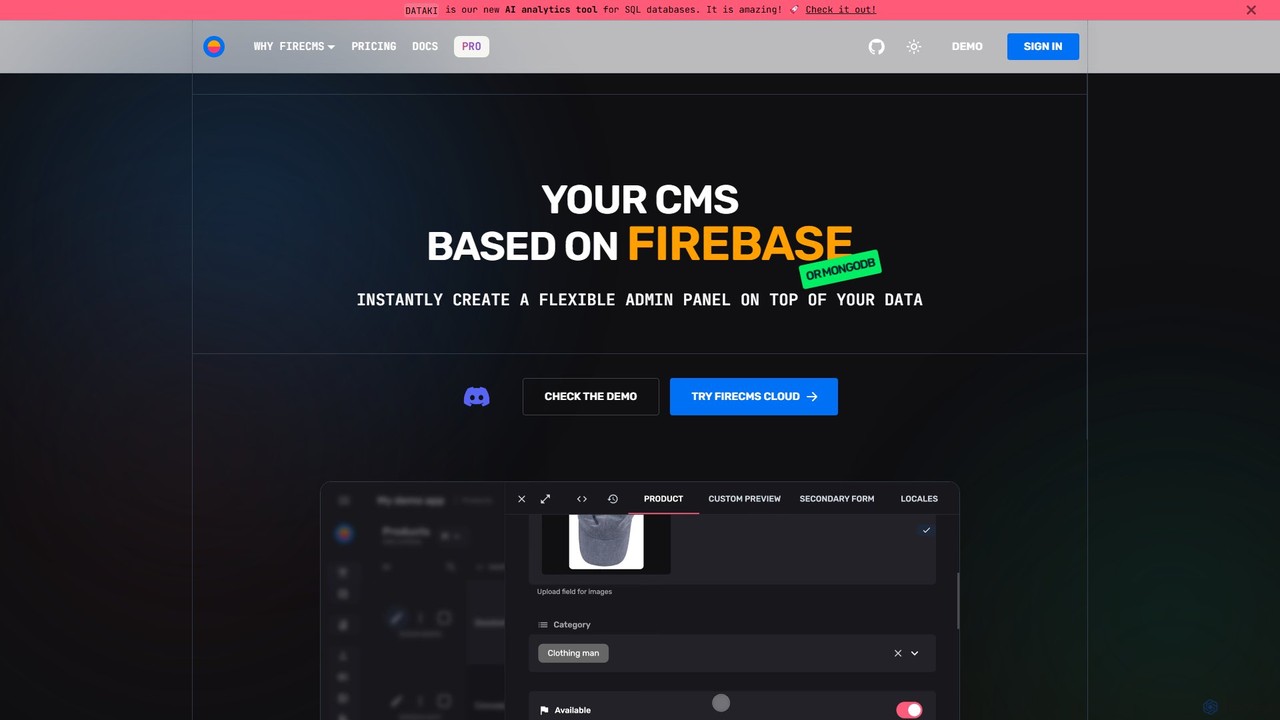
FireCMS is an open-source, headless CMS and admin panel builder for Firebase and MongoDB. It enables developers and startups to instantly create flexible, powerful back-office applications with an intuitive, Airtable-like interface. Featuring AI-powered data queries, automatic schema detection, extensive customization with React, and a rich content editor, FireCMS streamlines development and content management, offering both cloud and self-hosted solutions.

Preview

Supabase Product overview

Supabase is an open-source Firebase alternative, providing a complete backend solution built on Postgres. It offers a suite of tools including a database, authentication, instant APIs, edge functions, real-time subscriptions, storage, and vector embeddings to accelerate application development from prototype to production.

Preview

Quick facts

Compare product focus, pricing models and audiences. Highlighted rows indicate different listed information; unknown pricing does not mean free.

FireCMS VS Supabase — Quick facts
Quick factsFireCMSSupabase
Pricing modelFreemiumFreemium
Product typeWebWeb
Primary focusContent Management SystemBackend
Audience and rolesNo data availableNo data available
CategoriesContent Management System · Database · No Code & Low CodeBackend · Database · Platform As A Service · No Code & Low Code
AddedAug 12, 2025Aug 10, 2025
UpdatedNov 19, 2026Nov 19, 2026

Features, usage and use cases

Explore the listed product descriptions, features and workflows. Taxonomy labels alone are not feature evaluations.

FireCMS

FireCMS is a comprehensive, open-source platform designed to build powerful back-office applications and admin panels on top of Firebase or MongoDB backends. It transcends the traditional definition of a CMS, offering a highly extensible and customizable headless solution for developers, startups, and agencies. By providing an intuitive, Airtable-like user interface with inline editing and real-time updates, FireCMS significantly simplifies data management and content creation, allowing teams to focus on their core application logic rather than building internal tools from scratch.

How to use FireCMS

Getting started with FireCMS is designed to be a swift and straightforward process, whether you opt for the managed cloud service or a self-hosted solution.

  1. Connect Your Project: For the Cloud version, you simply connect your Firebase or MongoDB project. FireCMS can help set up a Service Account to establish a secure connection.
  2. Define Your Data Models: You have two powerful options. Let FireCMS automatically infer your data structure from your existing database, or use the intuitive visual schema editor to manually define collections, fields, and relationships. For developers, schemas can be defined in TypeScript for complete type safety.
  3. Go Live Instantly: Once your models are defined, your fully functional, production-ready admin panel or CMS is immediately accessible. For self-hosted versions, you can initialize a fully customizable project using the command npx create-firecms-app, giving you granular control over components, business logic, and authentication.

Core Features of FireCMS

  • AI-Powered Data Interaction: Engage with your data using natural language. The "DataTalk" feature allows you to ask questions like "Count users who signed up last month," and it generates the necessary code and results instantly. It also offers AI-powered content autofill using GPT models to streamline data entry.
  • Flexible Data Modeling: Features automatic schema detection, an intuitive drag-and-drop schema editor, and the ability to define schemas in TypeScript for robust type safety. It supports over 20 field types and advanced validation options.
  • Advanced Editing Experience: Provides a best-in-class UX with a choice between a spreadsheet-like view for quick edits and powerful, detailed forms. It also includes a Notion-style rich text editor for creating articles, blogs, and documentation.
  • High Extensibility and Customization: Built with React, FireCMS allows you to extend the CMS with your own custom components. Create custom property fields, entity views, or navigation items to perfectly match your project's needs.
  • Seamless Backend Integration: Natively supports Firebase/Firestore and MongoDB Atlas, leveraging their full power and scalability. It does not impose any specific data structure, making it compatible with any existing project.
  • Efficient Data Management: Includes streamlined tools for data import and export. You can easily import data from CSV, JSON, or Excel files, with automatic data type detection and conversion.
  • Comprehensive Change History: Tracks all modifications made to your data, ensuring data integrity and allowing you to revert to previous states if necessary.
  • User and Role Management: Provides tools to manage users and define roles, ensuring secure and granular access control to your data.

Use Cases for FireCMS

FireCMS is versatile and caters to a wide range of users:

  • Developers: Rapidly build internal tools, CRUD interfaces, and complex back-offices without the hassle of frontend development, allowing them to focus on core business logic.
  • Startups: Get an MVP's admin panel or a basic CMS up and running in minutes instead of weeks, enabling fast iteration and efficient data management from day one.
  • Agencies: Deliver custom, reliable, and scalable back-office solutions for clients, built on the robust infrastructure of Google Cloud and MongoDB Atlas.
  • Content Managers: Enjoy a best-in-class user experience for managing application data and rich content through an intuitive and easy-to-use interface.

Advantages of FireCMS

FireCMS stands out for its speed, flexibility, and developer-first approach. Its ability to generate a functional admin panel instantly saves significant development time. The open-source nature provides transparency and freedom, while the high level of customization with React ensures it can be tailored to any specific requirement. Testimonials from users at Microsoft and IKEA highlight its superior user experience compared to competitors and its flexibility in integration.

Pricing and Plans

FireCMS offers a flexible pricing structure to suit different needs:

  • Community (Free): A self-hosted, MIT-licensed plan. It includes the first-class CMS/admin panel, integration with Firebase/MongoDB, access to 40+ components, and full CMS customization. Ideal for individual developers and open-source projects.
  • FireCMS Cloud (€9.99/user/month): A fully managed, no-code/low-code solution with a one-month free trial. It includes everything in the Community plan plus user and role management, data import/export, theme customization, and AI content generation.
  • PRO (€49.99/project/month): The ultimate self-hosted solution for startups, agencies, and enterprises. It unlocks all features, including the visual schema editor, advanced data import/export, custom authentication, priority support, and full access to all FireCMS plugins.

Supabase

Supabase positions itself as the complete Postgres development platform, offering an open-source alternative to proprietary backend-as-a-service (BaaS) solutions like Firebase. It is designed to empower developers to build applications quickly without managing complex server infrastructure. At its core, every Supabase project is powered by a full, dedicated PostgreSQL database, the world's most trusted relational database. This foundation provides robustness, scalability, and the flexibility to export your data at any time, ensuring no vendor lock-in.

The platform integrates a comprehensive set of tools that cover the entire backend development lifecycle. It automatically generates a secure and performant RESTful API for your database, allowing you to interact with your data from any client. This is complemented by a powerful authentication system that supports email/password, social logins (OAuth), and magic links, all secured with Postgres's Row Level Security (RLS) for fine-grained access control. For modern, AI-driven applications, Supabase includes Vector Embeddings, allowing you to store, index, and search vector data from models like OpenAI and Hugging Face, making it ideal for building AI chatbots, recommendation engines, and semantic search features.

How to use Supabase

Getting started with Supabase is designed to be a seamless experience, allowing developers to go from idea to a functional backend in minutes.

  1. Create a Project: Sign up on the Supabase website and create a new project. This automatically provisions a dedicated Postgres database and all associated backend services.
  2. Database Management: Use the intuitive Supabase Dashboard to create and manage your database tables with a spreadsheet-like interface or execute any SQL query directly in the built-in SQL Editor. You can define schemas, relationships with foreign keys, and set up policies.
  3. API Integration: Once your tables are set up, Supabase instantly generates API documentation. You can use the provided client libraries for your favorite framework (e.g., JavaScript, Python, Dart, Swift) to interact with your backend. For example, fetching data is as simple as `supabase.from('your_table').select('*')`.
  4. Implement Authentication: Secure your application by adding user authentication. The client libraries make it easy to implement sign-up, login, and user management flows. You can then define RLS policies to control which data users can access.
  5. Utilize Other Features: Integrate other modules as needed. Use Supabase Storage to handle file uploads, downloads, and serving. Implement real-time features with Realtime Subscriptions to listen for database changes. Deploy server-side logic with Edge Functions for tasks that require more performance or security.
  6. Develop Locally: For team collaboration and a more robust development workflow, use the Supabase CLI to set up a local development environment, manage database migrations, and deploy changes to your production project.

Core Features of Supabase

  • Postgres Database: A full, dedicated PostgreSQL instance for every project, with full privileges and access to thousands of Postgres extensions.
  • Authentication: A complete user management system with email/password, social providers, magic links, and robust security features like RLS and MFA.
  • Storage: A simple and scalable solution for storing and serving large files like images, videos, and documents, with a global CDN for fast delivery.
  • Instant APIs: Auto-generated, secure, and performant RESTful and real-time APIs for your database, which reflect your schema changes instantly.
  • Edge Functions: Globally distributed, serverless functions written in Deno/TypeScript that execute close to your users for low-latency operations.
  • Realtime: A service that allows you to listen to database changes (inserts, updates, deletes) in real-time via websockets, perfect for building collaborative and dynamic applications.
  • Vector Embeddings: Integrated support for storing and querying vector embeddings, enabling the development of AI-powered features like semantic search and chatbots.
  • Open Source: The entire platform is open source, providing transparency, flexibility, and a strong community.

Use Cases for Supabase

Supabase is versatile enough to power a wide range of applications:

  • SaaS Applications: Quickly build multi-tenant SaaS products using starter templates for subscriptions (with Stripe), user management, and more.
  • AI-Powered Tools: Develop applications with AI capabilities, such as AI chatbots, semantic search engines, and recommendation systems, by leveraging the integrated Vector support.
  • Real-time Collaborative Apps: Create applications like chat apps, live dashboards, or collaborative editing tools using the Realtime engine.
  • Mobile and Web App Backends: Serve as a complete backend for cross-platform applications built with frameworks like Flutter, React Native, Next.js, Vue, and native iOS/Android.
  • Internal Tools and Dashboards: Rapidly build internal tools, admin panels, and data dashboards by connecting directly to the Postgres database and its auto-generated API.

Advantages of Supabase

Supabase offers several key advantages that make it a compelling choice for developers:

  • Developer Experience (DX): Highly praised for its ease of use, excellent documentation, and intuitive dashboard, which significantly speeds up development.
  • No Vendor Lock-in: Being built on standard Postgres means you can migrate your database to any other provider at any time.
  • Scalability: The platform is designed to scale from small hobby projects to applications with millions of users, with flexible, usage-based pricing.
  • Cost-Effective: The generous free tier and competitive pricing for paid plans make it an affordable alternative to other BaaS providers.
  • Integrated Ecosystem: All tools are designed to work together seamlessly, providing a unified and cohesive development platform.

Pricing and Plans

Supabase offers a flexible, usage-based pricing model designed to scale with your project's needs.

  • Free Plan ($0/month): Perfect for hobby projects and learning. Includes 2 projects, 500MB database, 1GB file storage, 50,000 monthly active users (MAUs), and community support. Projects are paused after one week of inactivity.
  • Pro Plan (from $25/month): Designed for production applications. Includes everything in Free, plus an 8GB database, 100GB storage, 100,000 MAUs, daily backups, no project pausing, and email support. You can pay for usage beyond the included quotas.
  • Team Plan (from $599/month): For businesses requiring advanced features. Includes everything in Pro, plus SOC2 compliance, SSO for the dashboard, priority email support, and longer log/backup retention.
  • Enterprise Plan (Custom Pricing): For large-scale applications with specific needs, offering custom configurations, uptime SLAs, designated support, and more.

Positioning

Their taxonomy shows where the products overlap and where each one has a more distinct focus. Unknown fields are shown explicitly and are never filled with assumptions.

Categories

Shared
DatabaseNo Code & Low Code
Only FireCMS
Content Management System
Only Supabase
BackendPlatform As A Service

Tags

Shared
developer toolsopen source
Only FireCMS
admin paneldatabase managementFirebasefirestoreheadless CMSlow-codemongodbno-codereacttypescript
Only Supabase
AIauthenticationBaaSbackend as a servicedatabasefirebase alternativepostgresserverlessvector database

Audience and roles

Shared
No listed items
Only FireCMS
No listed items
Only Supabase
No listed items

Traffic comparison

Traffic is shown on the same scale so differences in market visibility are not visually understated.

How to interpret the traffic data

Both charts share the same months and vertical scale. Each tool identifies its latest reporting month; missing months are left blank, not counted as zero. Regional and source visit counts are estimates calculated from the reported shares.

FireCMS monthly traffic:

Latest traffic · 2026-05

Monthly visits
28.4K
Avg. visit duration
1:19
Pages per visit
2.75
Bounce rate
39.17%
Data updated 2026-06-15

Monthly traffic trend

  • 2025-09: 28.6K
  • 2026-01: 17.6K
  • 2026-02: 15.7K
  • 2026-03: 14.8K
  • 2026-04: 21.2K
  • 2026-05: 28.4K

Top regions

Top 5 countries/regions
Country/regionPercentageEstimated visits
🇩🇪Germany39.19%11.1K
🇮🇳India20.68%5.9K
🇷🇺Russia15.93%4.5K
🇺🇸United States13.31%3.8K
🇧🇷Brazil10.89%3.1K

Traffic sources

Source typePercentageEstimated visits
Direct98.93%28.1K
Email1.07%304

Search keywords

firebasefirecmsfirecms docsfriecms playconsole firebasegradient generator

Supabase monthly traffic:

Latest traffic · 2026-05

Monthly visits
29.3M
Avg. visit duration
9:51
Pages per visit
10.22
Bounce rate
25.08%
Data updated 2026-06-15

Monthly traffic trend

  • 2025-09: 13.8M
  • 2026-01: 18.6M
  • 2026-02: 20.1M
  • 2026-03: 25.3M
  • 2026-04: 26.2M
  • 2026-05: 29.3M

Top regions

Top 5 countries/regions
Country/regionPercentageEstimated visits
🇺🇸United States47.42%13.9M
🇮🇳India23%6.7M
🇧🇷Brazil13.44%3.9M
🇬🇧United Kingdom8.16%2.4M
🇵🇰Pakistan7.98%2.3M

Traffic sources

Source typePercentageEstimated visits
Direct94.28%27.6M
Referral3.43%1M
Email2.29%669.9K

Search keywords

supa basesupabasesupabase loginsupabase pricingsuperbase

Community signals

Ratings, comments, favorites, and likes are community signals—not a substitute for product fit.

FireCMS

Rating
No data available
Comments
0
Favorites
156
Likes
156

Supabase

Rating
No data available
Comments
0
Favorites
175
Likes
185

FireCMS vs Supabase · Comparison FAQ

What do FireCMS and Supabase have in common?
Both tools are listed under Database、No Code & Low Code. These categories indicate overlapping use cases; compare their detailed descriptions for workflows, capabilities and limitations.
Are FireCMS and Supabase free?
Listed pricing models: FireCMS — Freemium; Supabase — Freemium. Missing pricing is not proof of a free plan, and freemium does not mean every feature is free. Check official sites for current plans, limits and trials.
How should I choose between FireCMS and Supabase?
The primary listed category is Content Management System for FireCMS, and Backend for Supabase. Compare features, steps and use cases, then verify pricing, data permissions and deployment needs. This page does not include hands-on testing and does not declare a winner from traffic or tags.

Sources and comparison methodology

This page is assembled from ToolMage product listings, taxonomy, traffic statistics and on-site user feedback. It is not a hands-on test or an independent review.

  • Feature and plan descriptions reflect information in the listings, not real-time guarantees. Verify pricing, quotas, availability and privacy terms on the official sites.
  • Traffic uses the reporting months shown. Missing statistics do not mean zero visits, and different periods do not establish growth or superiority. Regional and source visit counts are estimates based on shares.
  • Different tags indicate differences in the listings, not proof that the other product lacks a capability. Ratings, favorites and visits are not used to declare a winner.

Related comparisons