ToolMage
Sign in

AI TOOL COMPARISON

FlowTask vs Morningmate

What is the difference, and which fits your workflow? Compare features, usage, pricing models and traffic side by side.

Jump to key differences

Product overview

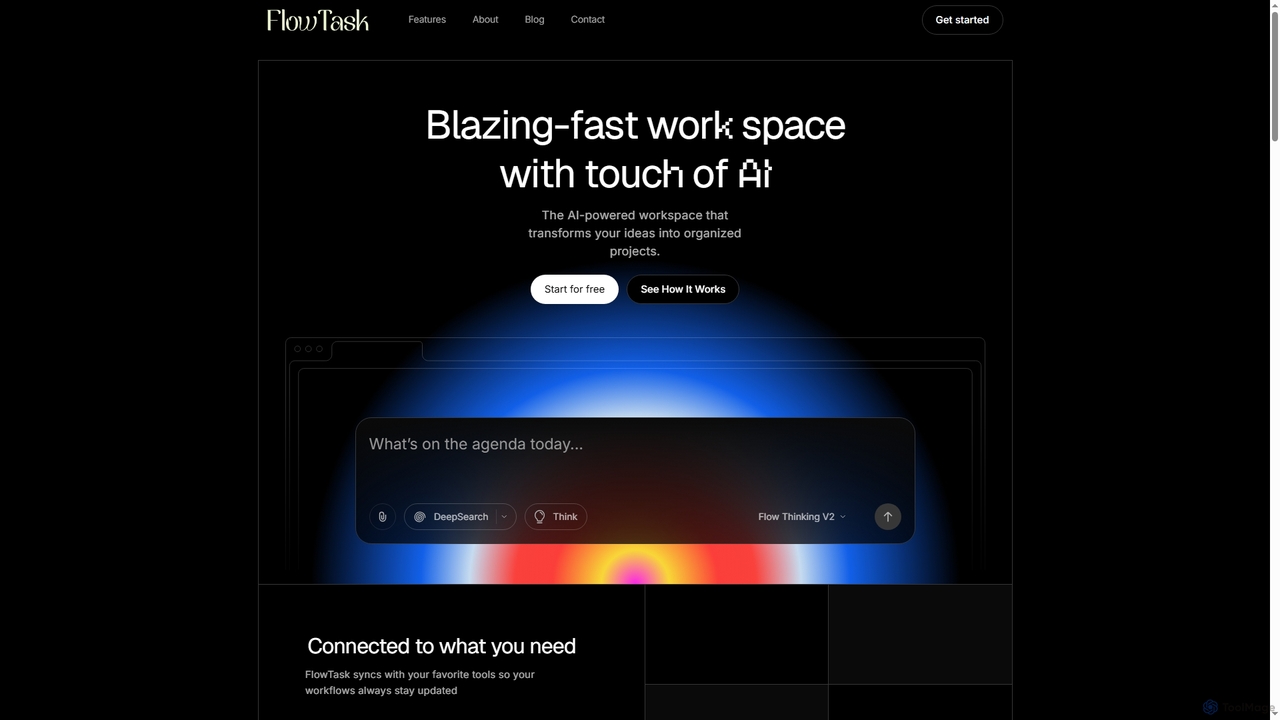
FlowTask Product overview

FlowTask is an AI-powered workspace designed to automatically structure projects, tasks, and documents in real-time. It transforms simple prompts into organized workflows, detects tasks and deadlines as you type, and provides instant summaries and cross-workspace search, streamlining productivity for individuals and teams.

Preview

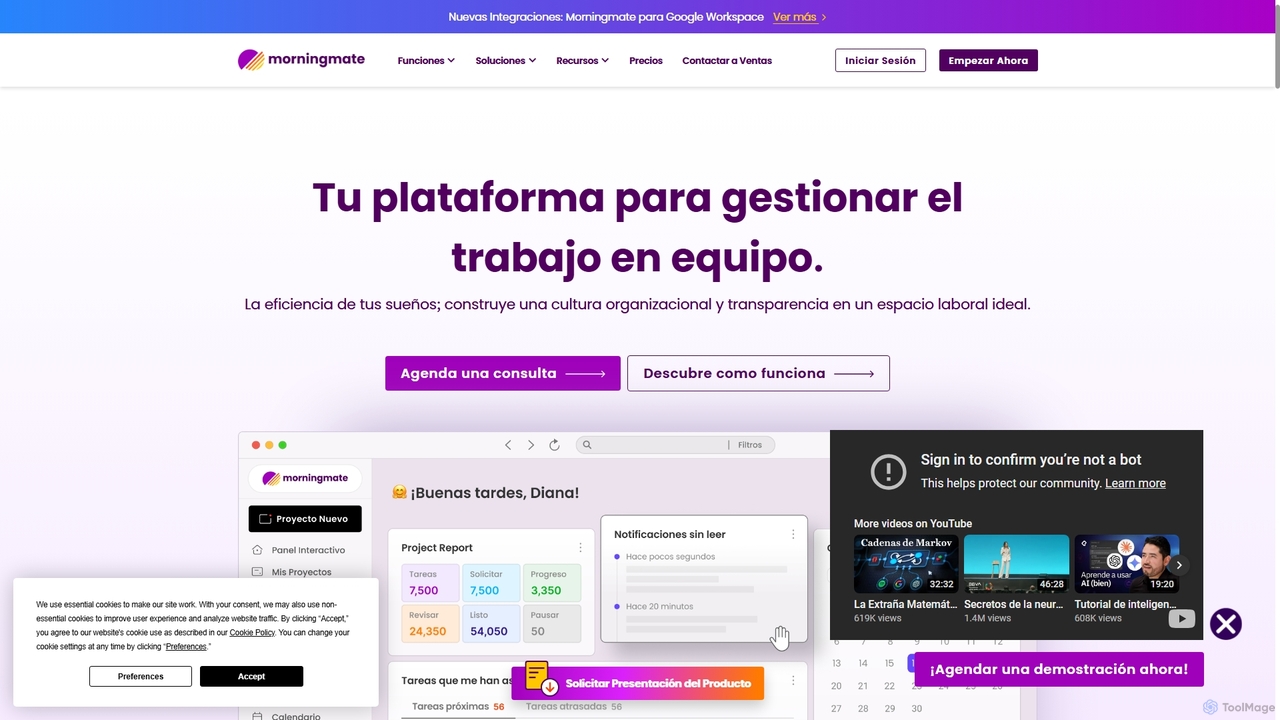
Morningmate Product overview

Morningmate is an all-in-one work management platform designed to enhance team collaboration, transparency, and efficiency. It provides a flexible virtual workspace with tools for project planning, task tracking, seamless communication, and workflow automation. Suitable for diverse industries, it helps teams centralize their work, standardize processes, and achieve their goals with greater synergy.

Preview

Quick facts

Compare product focus, pricing models and audiences. Highlighted rows indicate different listed information; unknown pricing does not mean free.

FlowTask VS Morningmate — Quick facts
Quick factsFlowTaskMorningmate
Pricing modelFreemiumFreemium
Product typeWebWeb
Primary focusDocument GenerationCollaboration
Audience and rolesAdministrator · Business Owner · Content Creator · Knowledge Worker · Marketing Manager · Product Manager · Project Manager · Researcher · Team LeadCreative Director · HR Manager · IT Manager · Marketing Manager · NGO Coordinator · Operations Manager · Product Manager · Project Manager · Small Business Owner · Team Lead
CategoriesDocument Generation · Workflow Automation · Note Taking · Project Management · Task ManagementCollaboration · Project Management · Task Management
AddedJan 8, 2026Sep 17, 2025
UpdatedNov 19, 2026Nov 19, 2026

Features, usage and use cases

Explore the listed product descriptions, features and workflows. Taxonomy labels alone are not feature evaluations.

FlowTask

FlowTask is an innovative AI workspace that goes beyond simple text generation or blank canvas tools. It specializes in building fully organized pages, tasks, and documents in real-time, eliminating the need for manual setup or dragging blocks. By leveraging advanced AI, FlowTask transforms simple prompts into ready-to-use project structures, complete with tasks, forms, documents, timelines, and templates, all generated instantly from a single input.

How to use FlowTask

To use FlowTask, you simply start typing your ideas or project plans. The AI will automatically detect tasks, deadlines, and requirements, adding them to your workspace. You can also input a simple prompt, and FlowTask will convert it into a structured document or project plan. Ideas, links, notes, or tasks can be captured from any page and automatically synced into your workspace. For quick insights, you can generate instant summaries of long documents or project updates with a single click. The platform is accessible via desktop and mobile browsers, ensuring flexibility.

Core Features of FlowTask

  • Structured AI Workflows: Builds fully organized pages, tasks, and documents in real-time.
  • Real-Time Task Detection: Automatically identifies and adds tasks, deadlines, and requirements as you type.
  • Instant Cross-Workspace Search: Quickly finds related documents, pages, tasks, and forms across your workspaces.
  • AI Navigation, No Clutter: Offers a minimal UI for focused work, allowing instant movement between documents and workflow creation.
  • Turn Prompts Into Documents: Converts simple text prompts into clean, structured documents or project plans.
  • Capture Ideas From Anywhere: Saves ideas, links, notes, or tasks from any web page, syncing them automatically.
  • One-Click Summaries: Generates instant summaries of long documents, pages, or project updates.

Use Cases for FlowTask

FlowTask is ideal for a variety of use cases where efficient organization and project structuring are crucial. It excels in project management, allowing teams to quickly set up and manage complex projects without manual configuration. Content creators can use it to transform ideas into structured articles or marketing plans. Knowledge workers benefit from its ability to organize notes and ideas, creating a personal knowledge hub. Teams can leverage its collaboration features, shared workflows, and admin controls for streamlined operations, while individuals can use it for personal task management and idea capture.

Advantages of FlowTask

The primary advantage of FlowTask lies in its ability to automate the creation and organization of entire workspaces, saving significant time compared to traditional manual tools. It offers real-time task detection and intelligent structuring, ensuring nothing is missed and projects stay on track. The platform emphasizes privacy, ensuring that user data, workspaces, and prompts remain secure and are not used for training. Its seamless integration capabilities allow users to connect existing tools and easily import/export content. Furthermore, FlowTask provides a clean, minimal UI that promotes focus, alongside powerful features like cross-workspace search and one-click summaries for enhanced productivity.

Pricing and Plans

FlowTask offers simple, transparent pricing for teams of all sizes, including a free option:

  • Starter: Free forever. Includes 3 projects, Basic AI, 1 user, AI note structuring, personal knowledge hub, and basic integration. Ideal for individuals and trial onboarding.
  • Pro: $19 / Month. Offers unlimited projects, Advanced AI automations, AI note structuring, personal knowledge hub, and basic integrations. Designed as a perfect starting place for individual professionals.
  • Teams: $39 / Month. Provides unlimited workspaces, team collaboration, admin controls, AI note structuring, personal knowledge hub, shared workflows, and priority support. Suited for growing teams.

Morningmate

Morningmate is a comprehensive work management and team collaboration platform built to create a harmonious and highly productive virtual workspace. It empowers teams across various industries—from creative and retail to manufacturing and non-profits—to manage complex projects and daily tasks with ease and transparency. By centralizing communication, workflows, and project data, Morningmate eliminates information silos and fosters a culture of collaboration, allowing teams to thrive whether they are in-office or working remotely.

The platform is designed with flexibility at its core, offering customizable views, powerful automation features, and robust integration capabilities. With its intuitive interface, which mirrors the user experience of social media feeds, teams can quickly adapt and navigate their work. Morningmate also introduces an AI assistant to further streamline operations, making it a forward-thinking solution for modern organizations aiming for digital transformation and operational excellence.

How to use Morningmate

Getting started with Morningmate is a straightforward process designed for quick adoption:

  1. Set Up Your Workspace: Create dedicated workspaces for different projects, departments, or teams. You can organize these workspaces with folders and customize access permissions.
  2. Create and Manage Tasks: Use 'Posts' to create tasks, events, or share information. Assign tasks to team members, set due dates, define priorities, and attach relevant files. Sub-tasks can be added for more granular tracking.
  3. Visualize Your Workflow: Choose how you want to view your work. Morningmate offers multiple views, including List, Feed, Calendar, and an interactive Gantt Chart for timeline management. This allows teams to track progress and manage dependencies effectively.
  4. Collaborate Seamlessly: Communicate directly within tasks using comments, @mentions, and file sharing. Use the dedicated chat windows for 1:1 or group conversations, and leverage voice messages for quick, detailed explanations.
  5. Customize Your Dashboard: Personalize your main dashboard with widgets to get a comprehensive overview of your most important tasks, notifications, and project statuses at a glance.
  6. Leverage Templates: Standardize repetitive processes by creating and sharing templates for tasks, projects, or entire workflows. This saves time and ensures consistency across the team.
  7. Integrate Your Tools: Connect Morningmate with other essential tools like Google Calendar, Zoom, MS Teams, and Zapier to create a unified and automated work ecosystem.

Core Features of Morningmate

  • Comprehensive Work Management: Includes customizable workspaces, task and sub-task management, project timelines with Gantt charts, and a shared calendar.
  • Multiple Workflow Views: Visualize projects as a task list, a social-media-style feed, a calendar, or a Gantt chart to suit different needs.
  • Team Engagement & Communication: Features include 1:1 and group chat windows, voice messaging, comment threads on tasks, polls, and @mentions to keep everyone connected.
  • Customization and Templates: Create reusable templates for projects and tasks, and personalize dashboards with widgets for a tailored user experience.
  • Organizational Management: Structure permissions based on your company's organigram, view detailed activity logs for transparency, and generate progress reports.
  • AI Assistant: An integrated AI assistant helps streamline tasks and provides support within the platform.
  • Robust Security: Built on AWS Cloud with features like data encryption, two-factor authentication (2FA), screenshot blocking (on Android), and ISO/IEC 27001 certification.
  • Seamless Integrations: Native integrations with Zoom, MS Teams, Google Calendar, and extensive automation possibilities through Zapier and an open API.

Use Cases for Morningmate

Morningmate is versatile and adaptable for various industries:

  • Creative & Marketing: Manage campaigns from start to finish, streamline creative approval processes, and sync workflows between creative, marketing, and sales teams.
  • Production & Manufacturing: Plan and execute complex projects, manage agile workflows, track progress against deadlines, and coordinate with internal and external stakeholders.
  • Retail & Franchises: Centralize logistics and communication across multiple locations, manage inventory tasks, and ensure brand consistency with standardized process templates.
  • Academics & Education: Create virtual classrooms for different subjects, centralize course materials and research files, and standardize study methods with templates.
  • NGOs & Non-Profits: Track resources and donations with transparency, manage volunteer onboarding and transitions, and monitor project progress with detailed activity logs.

Advantages of Morningmate

Morningmate offers several key advantages:

  • Complete Visibility: Provides a clear, 360-degree view of all projects and tasks, eliminating blind spots and enabling better decision-making.
  • Unified Collaboration Hub: Centralizes all communication and collaboration, reducing reliance on scattered emails and chat apps and ensuring context is never lost.
  • Enhanced Productivity: Streamlines workflows, automates repetitive tasks, and provides intuitive tools that help teams get more done with less effort.
  • Flexible and Adaptable: The platform can be molded to fit any team's specific needs and processes, from simple task lists to complex, multi-stage projects.
  • Fosters a Strong Team Culture: Encourages feedback, empowers team members with autonomy, and promotes transparency, leading to a more engaged and synergistic workforce.

Pricing and Plans

Morningmate offers a 'Free Trial' to allow teams to experience the platform's capabilities. While specific pricing details are best obtained by scheduling a consultation on their website, the typical structure for such platforms includes several tiers:

  • Free Plan: A basic plan for small teams or individuals just getting started, with limited features and users.
  • Pro Plan: Designed for growing teams, offering a full suite of features, more storage, and advanced integrations.
  • Enterprise Plan: A custom solution for large organizations requiring advanced security, dedicated support, custom onboarding, and unlimited scalability.

It is recommended to contact their sales team for a personalized quote and demonstration.

Positioning

Their taxonomy shows where the products overlap and where each one has a more distinct focus. Unknown fields are shown explicitly and are never filled with assumptions.

Categories

Shared
Project ManagementTask Management
Only FlowTask
Document GenerationWorkflow AutomationNote Taking
Only Morningmate
Collaboration

Tags

Shared
productivity toolteam collaborationworkflow automation
Only FlowTask
AI workspacedocument generationintelligent searchknowledge managementnote organizationproject planningreal-time insightstask automation
Only Morningmate
agile managementcommunication platformGantt chartproject managementremote worktask managementwork os

Audience and roles

Shared
Marketing ManagerProduct ManagerProject ManagerTeam Lead
Only FlowTask
AdministratorBusiness OwnerContent CreatorKnowledge WorkerResearcher
Only Morningmate
Creative DirectorHR ManagerIT ManagerNGO CoordinatorOperations ManagerSmall Business Owner

Traffic comparison

Traffic is shown on the same scale so differences in market visibility are not visually understated.

How to interpret the traffic data

Both charts share the same months and vertical scale. Each tool identifies its latest reporting month; missing months are left blank, not counted as zero. Regional and source visit counts are estimates calculated from the reported shares.

FlowTask monthly traffic:

Latest traffic · 2026-05

Monthly visits
13.3K
Avg. visit duration
0:25
Pages per visit
1.53
Bounce rate
84.11%
Data updated 2026-06-15

Monthly traffic trend

  • 2025-09: No data available
  • 2026-01: 6.9K
  • 2026-02: 2.7K
  • 2026-03: 11.5K
  • 2026-04: 17.9K
  • 2026-05: 13.3K

Traffic sources

Source typePercentageEstimated visits
Direct100%13.3K

Search keywords

flow.taskflowtaskflowtask capterra

Morningmate monthly traffic:

Latest traffic · 2026-05

Monthly visits
28.3K
Avg. visit duration
2:42
Pages per visit
2.41
Bounce rate
39.69%
Data updated 2026-06-15

Monthly traffic trend

  • 2025-09: 9.2K
  • 2026-01: 40.1K
  • 2026-02: 37.9K
  • 2026-03: 36.6K
  • 2026-04: 44.8K
  • 2026-05: 28.3K

Top regions

Top 5 countries/regions
Country/regionPercentageEstimated visits
🇯🇵Japan27.34%7.7K
🇺🇸United States22.26%6.3K
🇳🇱Netherlands22.01%6.2K
🇲🇳Mongolia17.75%5K
🇻🇳Vietnam10.64%3K

Traffic sources

Source typePercentageEstimated visits
Direct100%28.3K

Search keywords

models for collaboration in the workplacemorningmatemorningメイトworkfolioもーにんぐめいと

Community signals

Ratings, comments, favorites, and likes are community signals—not a substitute for product fit.

FlowTask

Rating
No data available
Comments
0
Favorites
69
Likes
87

Morningmate

Rating
No data available
Comments
0
Favorites
173
Likes
182

FlowTask vs Morningmate · Comparison FAQ

What do FlowTask and Morningmate have in common?
Both tools are listed under Project Management、Task Management. These categories indicate overlapping use cases; compare their detailed descriptions for workflows, capabilities and limitations.
Are FlowTask and Morningmate free?
Listed pricing models: FlowTask — Freemium; Morningmate — Freemium. Missing pricing is not proof of a free plan, and freemium does not mean every feature is free. Check official sites for current plans, limits and trials.
How should I choose between FlowTask and Morningmate?
The primary listed category is Document Generation for FlowTask, and Collaboration for Morningmate. Compare features, steps and use cases, then verify pricing, data permissions and deployment needs. This page does not include hands-on testing and does not declare a winner from traffic or tags.

FlowTask · Comparison FAQ

How is FlowTask different from ChatGPT or Notion?

FlowTask distinguishes itself by building entire, ready-to-use project structures like tasks, forms, documents, timelines, and templates from a single prompt. Unlike ChatGPT, which provides answers, or Notion, which offers blank pages, FlowTask gives you a complete, organized workspace without manual setup or dragging blocks.

Can I use FlowTask on mobile and desktop?

Yes, FlowTask is accessible and works on both desktop and mobile browsers. It does not require a separate application download.

Is my data secure and private with FlowTask?

Yes, FlowTask ensures your workspaces, documents, and prompts remain fully private. The platform explicitly states that it does not train on your data, prioritizing your privacy and security.

Does FlowTask integrate with my existing tools?

Yes, FlowTask is designed to integrate easily with your existing workflows. You can import content, export pages, and connect your current tools to enhance your productivity.

What are the pricing plans for FlowTask?

FlowTask offers three plans: Starter (Free forever with basic features), Pro ($19/Month for unlimited projects and advanced AI automations), and Teams ($39/Month for unlimited workspaces, team collaboration, and priority support).

Sources and comparison methodology

This page is assembled from ToolMage product listings, taxonomy, traffic statistics and on-site user feedback. It is not a hands-on test or an independent review.

  • Feature and plan descriptions reflect information in the listings, not real-time guarantees. Verify pricing, quotas, availability and privacy terms on the official sites.
  • Traffic uses the reporting months shown. Missing statistics do not mean zero visits, and different periods do not establish growth or superiority. Regional and source visit counts are estimates based on shares.
  • Different tags indicate differences in the listings, not proof that the other product lacks a capability. Ratings, favorites and visits are not used to declare a winner.

Related comparisons