ToolMage
Sign in

Best 2 Generative Design AI tools for 3D

Popular Generative Design AI tools in 3D include Finch3d and Make-Print, helping you work more efficiently.

Make-Print
Freemium

Make-Print

An AI-powered platform designed for 3D printing and prototyping. It integrates project management with a Kanban board, a 3D file viewer, team collaboration tools, and a revolutionary generative AI that creates professional CAD models from text prompts. Streamline your entire workflow from concept to production.

Generative Design
Visits 7.9KFavorites 177Likes 182
Finch3d
Freemium

Finch3d

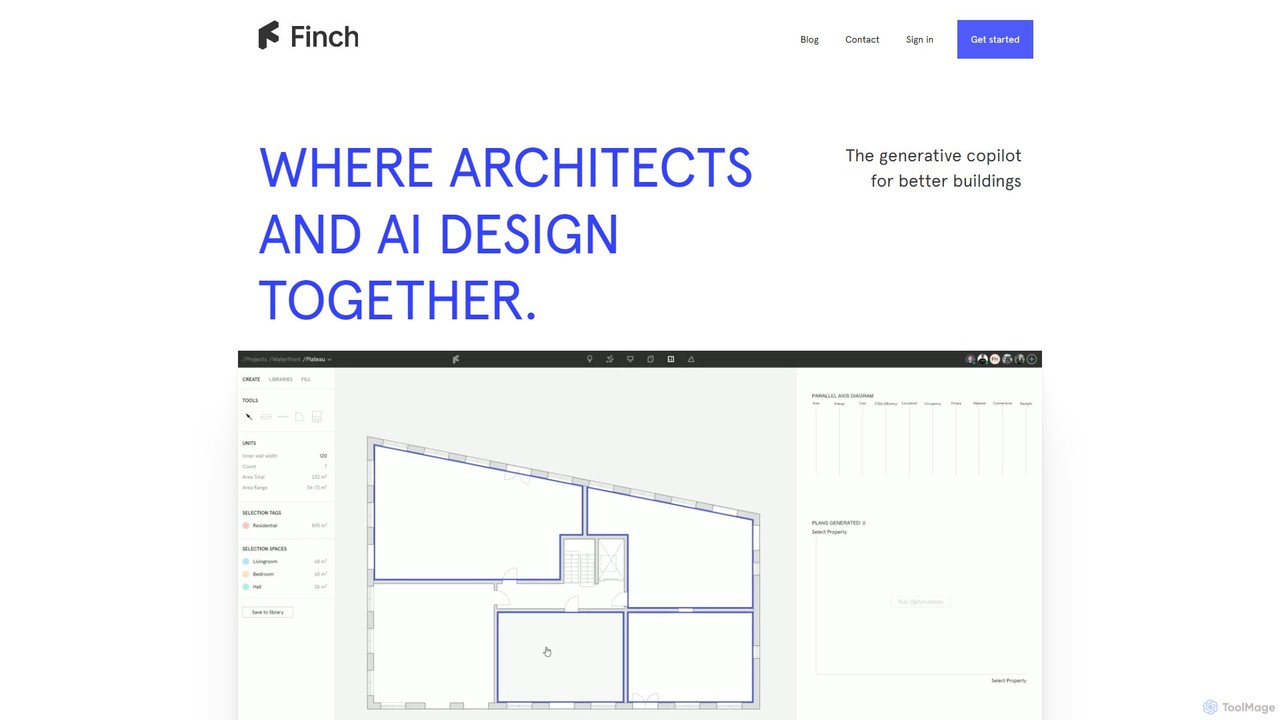
Finch3d is a generative AI copilot for architects, designed to optimize building designs. It integrates with existing tools like Revit and Rhino to automate floor plan generation, enable rapid iteration, and provide instant data-driven feedback, accelerating the architectural design process.

Generative Design
Visits 98.7KFavorites 119Likes 131

About Generative Design

Generative Design tools are a class of AI software that autonomously creates optimized 3D models based on a set of system design requirements. Users define specific constraints such as materials, manufacturing methods, performance goals, and cost limits, and the AI explores thousands of potential design permutations. This process results in high-performance, often organic-looking structures that are lightweight, strong, and resource-efficient. As a specialized discipline within 3D, Generative Design shifts the designer's role from manually creating geometry to intelligently defining the problem for the AI to solve.

Core Features

  • Constraint-Based Problem Definition: Specify functional requirements, loads, boundary conditions, and geometric obstacles.
  • Multi-Objective Optimization: Simultaneously optimize for competing goals like minimizing weight, maximizing stiffness, and reducing cost.
  • Design Space Exploration: Automatically generates and evaluates a vast number of valid design alternatives.
  • Manufacturing Process Awareness: Creates designs tailored for specific production methods, such as 3D printing, CNC machining, or casting.
  • Integrated Performance Analysis: Includes built-in simulation tools to verify the structural integrity and performance of generated designs.

Use Cases

Generative Design is primarily used in engineering-heavy industries like aerospace, automotive, industrial machinery, and medical device manufacturing. Mechanical engineers and product designers use it to create next-generation components, while architects and structural engineers apply it to design complex, efficient building structures.

How to Choose

When selecting a Generative Design tool, consider its integration with your existing CAD software (e.g., Fusion 360, SolidWorks). Evaluate the scope of its physics simulation capabilities (structural, thermal, etc.) and its support for your specific manufacturing constraints. Also, assess the computational model, as many tools rely on cloud computing, which can impact speed and cost.


Generative Design use cases

1

Lightweighting Aerospace Components

An aerospace engineer is tasked with redesigning a standard aircraft bracket to reduce weight while maintaining structural integrity, ultimately saving fuel. Using a generative design tool, they input the component's connection points, expected load conditions, material properties (e.g., titanium alloy), and specify additive manufacturing as the production method. The AI then generates hundreds of design variations, exploring complex, organic lattice structures. The engineer selects the optimal design, which is 40% lighter than the original part but meets all safety and performance requirements, validated through integrated simulation.

2

Optimizing an Automotive Chassis Design

An automotive design team needs to develop a new vehicle chassis that is both lightweight for fuel efficiency and extremely rigid for superior handling and safety. Instead of relying on traditional iterative design, they use a generative design platform. They define key parameters such as suspension mounting points, the engine bay volume, required torsional stiffness, and material constraints. The software explores thousands of topological solutions, presenting a novel frame structure that optimally distributes material to handle stress paths. The resulting design improves rigidity by 15% while reducing mass by 20% compared to the previous model.

3

Creating Custom Medical Implants

A biomedical engineer needs to design a patient-specific hip implant based on a CT scan. The goal is to create an implant that perfectly fits the patient's anatomy and promotes bone integration (osseointegration). Using generative design software, the engineer imports the patient's bone geometry as a 'no-go' zone and defines load-bearing requirements based on the patient's weight and activity level. The AI generates an implant with a complex, porous lattice structure that mimics natural bone, maximizing strength where needed while encouraging bone tissue to grow into the implant, leading to better long-term stability.

4

Designing High-Performance Heat Sinks

A product engineer is designing a cooling system for a new, powerful electronic component that generates significant heat in a compact space. Traditional heat sink designs are insufficient. Using a generative design tool with thermal simulation capabilities, the engineer defines the heat source location, maximum allowable temperature, airflow conditions, and the available volume. The algorithm explores countless complex fin geometries, optimizing for maximum surface area and efficient airflow paths. The result is a highly organic, 3D-printable heat sink that provides 25% better thermal dissipation than the best conventional design, ensuring the component's reliability.

5

Architectural Structural Optimization

An architect and structural engineer are collaborating on a complex, long-span roof for a public stadium. They want a structure that is not only strong and efficient but also aesthetically striking. They use generative design to explore possibilities. They input the roof's boundary, support column locations, and load cases (like snow and wind). The software generates a variety of efficient, nature-inspired truss and support systems. This process allows them to select a design that uses 30% less steel than a conventional truss system, reducing costs and environmental impact while creating a unique architectural landmark.

6

Redesigning Industrial Machinery Parts

A mechanical engineer is tasked with improving a robotic arm's performance by redesigning a key component to be lighter and stronger, allowing for faster movements and higher payloads. Using a generative design tool, they define the existing connection interfaces, the required range of motion, and the load scenarios. They also specify casting as the manufacturing constraint. The AI generates a new component design that consolidates what were previously two separate parts into one. The new, organically shaped part is 25% lighter and 50% stiffer, significantly enhancing the robotic arm's overall efficiency and capabilities.

Generative Design FAQ

What is Generative Design?

Generative Design is a design exploration process where a human designer partners with an AI to generate a wide range of optimized design solutions. Instead of manually creating a model, the designer inputs specific goals and constraints, such as performance requirements, materials, manufacturing methods, and cost. The AI algorithm then explores all possible permutations of a solution, quickly generating hundreds or even thousands of design options that meet the specified criteria.

How is Generative Design different from traditional 3D CAD modeling?

The core difference lies in the workflow and the role of the designer. In traditional 3D CAD, the designer directly models the geometry, making every decision about its shape and features. It's a direct creation process. In Generative Design, the designer defines the problem, not the solution. They set the goals and constraints, and the AI generates the geometry. It shifts the focus from 'how to create this shape' to 'what problem does this design need to solve'.

What are the main benefits of using Generative Design?

The primary benefits of Generative Design focus on performance, innovation, and efficiency. Key advantages include:

  • Performance Optimization: Creates parts that are significantly lighter and stronger than those made with traditional methods.
  • Accelerated Innovation: Explores thousands of design options in a fraction of the time, uncovering novel solutions a human might not consider.
  • Part Consolidation: Can combine multiple components of an assembly into a single, more efficient part, reducing complexity and assembly costs.
  • Reduced Material Usage: Optimizes material distribution, placing it only where needed, which saves costs and reduces environmental impact.
Who is Generative Design for?

Generative Design is primarily for engineers, product designers, and architects who are working on performance-critical applications. It is most valuable in fields where optimizing for factors like weight, strength, cost, or thermal performance is a high priority. This includes industries such as:

  • Aerospace and Defense
  • Automotive and Motorsport
  • Industrial Machinery
  • Medical Devices and Implants
  • Architecture and Construction

It requires a shift in thinking from direct modeling to problem definition, so it suits professionals who can clearly articulate design constraints and objectives.

How do I choose the right Generative Design software?

Choosing the right software depends on your specific needs and workflow. Consider these key factors:

  • CAD Integration: How well does it integrate with your primary CAD software (e.g., as a native feature or a plugin)? A seamless workflow is crucial.
  • Physics and Simulation Capabilities: Does it support the types of analysis you need, such as structural stress, thermal analysis, or fluid dynamics?
  • Manufacturing Constraints: Ensure the tool can create designs optimized for your specific manufacturing processes, like 5-axis CNC, additive manufacturing, or casting.
  • Ease of Use and Learning Curve: Evaluate how intuitive it is to set up problems, define constraints, and interpret the results.
  • Cost Model: Understand the pricing structure. Some tools use a subscription model, while others charge based on cloud computing credits used for each study.