
ToolMage
Sign in

Best 1 Comics AI tools for Art & Design

Popular Comics AI tools in Art & Design include Manga Translate, helping you work more efficiently.

Manga Translate
Freemium

Manga Translate

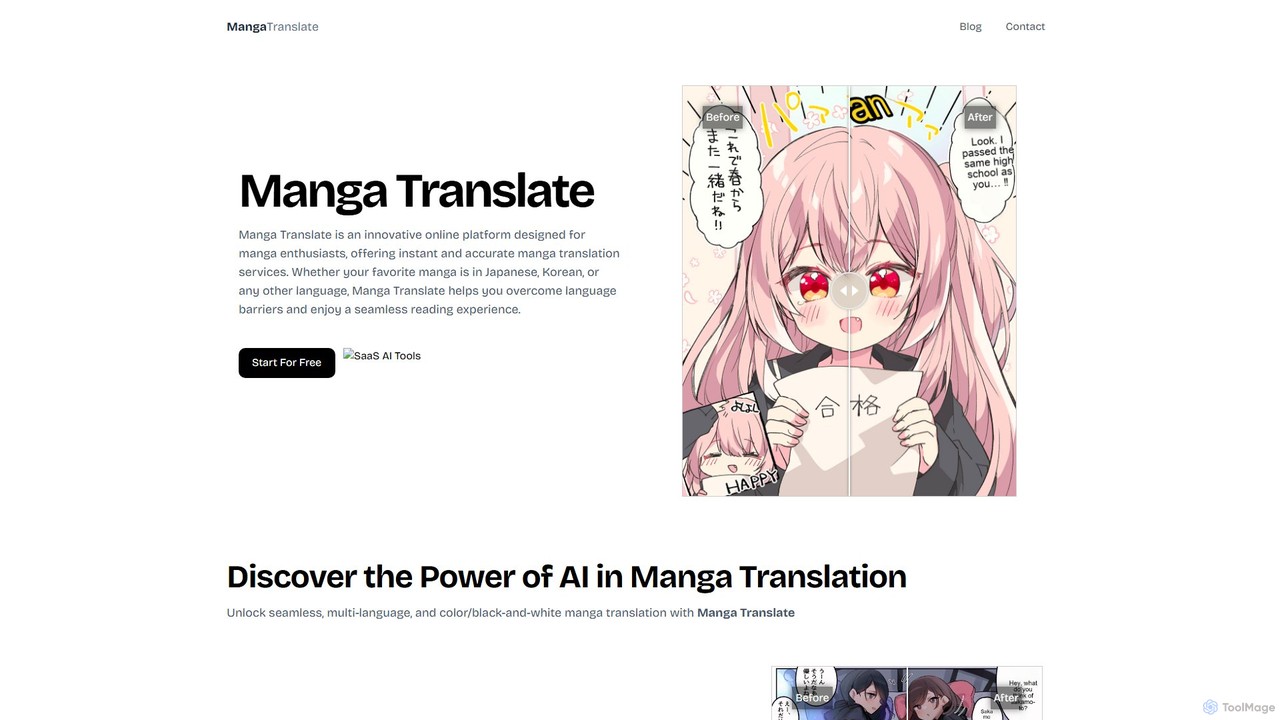
An AI-powered platform for instant and accurate translation of manga, manhua, and manhwa. Supports multiple languages, color and black-and-white images, and preserves the original artwork, making comics accessible to a global audience.

Comics
Visits 5.2KFavorites 92Likes 110

About Comics

AI Comics tools are specialized art generators designed to create sequential visual narratives like comics and manga. They leverage generative AI to transform text prompts or scripts into complete comic panels, including characters, backgrounds, and layouts. These tools streamline the entire comic creation process, from concept to final page, enabling creators to produce visual stories more efficiently. Their key strength lies in maintaining character and style consistency across multiple panels, a crucial element of comic storytelling.

Core Features

  • Character Consistency: Maintains a character's appearance, clothing, and features across different panels and poses.
  • Style Control: Applies specific artistic styles, such as manga, American superhero, or webtoon, to the entire project.
  • Panel Generation: Creates individual comic panels from detailed text descriptions of scenes and actions.
  • Automated Layouts: Arranges generated panels into standard comic book page or vertical scroll formats.
  • Text Integration: Facilitates the addition and formatting of speech bubbles, captions, and sound effects.

Use Cases

These tools are ideal for independent comic artists, webtoon creators, and writers seeking to visualize their stories without advanced drawing skills. Marketing teams use them to quickly generate storyboards or social media comics for campaigns. They are also valuable for educators creating engaging visual learning materials and authors adapting novels into graphic novel formats.

How to Choose

When selecting an AI Comics tool, evaluate its ability to maintain strong character consistency. Consider the variety of available art styles and the flexibility of panel layout options. Assess the user interface for ease of editing poses, expressions, and dialogue. Finally, review the pricing model and the usage rights for the generated images, especially for commercial projects.

Comics use cases

1

Rapid Prototyping for Indie Comic Creators

An independent comic artist has a compelling story but limited time and resources. They use an AI Comics tool to quickly generate character concepts and key story panels based on their script. This allows them to create a full-issue visual prototype in a matter of days instead of weeks. This prototype serves as a powerful pitch document to show publishers or to launch a crowdfunding campaign, effectively communicating the story's tone, style, and potential without a massive upfront investment in manual illustration.

2

Creating Serialized Webtoons for Social Media

A content creator wants to launch a weekly webtoon series to grow their online audience. Using an AI Comics tool, they can establish a consistent art style and character design from the start. For each episode, they input the script, and the AI generates panels in the vertical scroll format suitable for mobile viewing. This dramatically reduces the production time per episode, allowing the creator to maintain a regular posting schedule, engage with their audience consistently, and build a loyal following without being an expert illustrator.

3

Visualizing Scripts for Screenwriters and Authors

A screenwriter or novelist wants to create a visual pitch deck or adapt their work into a graphic novel. They can input key scenes and character descriptions from their manuscript into an AI Comics tool. The tool generates comic-style interpretations of these moments, providing a tangible visual reference. This helps them to better pitch their story to producers or publishers and serves as a foundational storyboard that a professional comic artist can later refine, saving significant time and cost in the initial visualization phase.

4

Creating Engaging Marketing and Ad Content

A marketing team needs to create a social media campaign that stands out. Instead of static images, they use an AI Comics tool to produce a short comic strip featuring a brand mascot or relatable characters. They input a simple narrative about a customer's problem and how their product solves it. The resulting comic is more engaging and shareable than a standard ad, effectively communicating the brand's message in a story-driven format that captures audience attention and improves campaign performance.

5

Developing Educational and Training Materials

An educator or corporate trainer needs to explain a complex process or historical event in an easy-to-digest format. They use an AI Comics tool to create a visual narrative that breaks down the information into a sequence of simple, illustrated steps. For example, a history teacher could create a comic about a key battle, or a trainer could illustrate a new company workflow. This visual storytelling approach makes the learning material more engaging and memorable for students or employees compared to text-heavy documents.

6

Personalized Storybook and Gift Creation

An individual wants to create a unique, personalized gift, such as a comic book for a friend's birthday or a storybook for a child. They can use an AI Comics tool to bring their story to life. By providing prompts that include their friend's name, inside jokes, or a child's favorite themes, they can generate a one-of-a-kind comic. This allows people without artistic skills to create deeply personal and creative visual stories, turning a simple idea into a memorable and custom-made present.

Comics FAQ

What are AI Comics tools?

AI Comics tools are specialized software that use generative artificial intelligence to create comic strips, manga, or webtoons from text prompts. Unlike general image generators, they are designed for sequential storytelling. Key features often include maintaining character consistency across multiple panels, applying specific art styles, and automatically arranging panels into a comic layout. They empower writers, marketers, and individuals without drawing skills to produce visual narratives quickly.

How to choose the right AI Comics tool?

To choose the right tool, consider these factors:

  • Character Consistency: Check how well the tool maintains a character's appearance across different scenes. This is the most critical feature for comics.
  • Style Variety: Ensure the tool offers a range of art styles (e.g., manga, anime, cartoon) that match your vision.
  • Layout and Panel Control: Look for flexibility in creating and arranging panels, whether for traditional pages or vertical webtoons.
  • Ease of Use: A user-friendly interface for editing details like character poses, expressions, and text bubbles is important.
  • Usage Rights: Verify the terms of service regarding commercial use of the generated comics.
What's the difference between an AI Comics tool and a standard AI Image Generator?

The main difference is their purpose. A standard AI Image Generator creates single, standalone images based on a prompt. An AI Comics tool is built for sequential art. It prioritizes features crucial for storytelling, such as:

  • Consistency: Maintaining the same character and style across multiple images (panels).
  • Layout: Tools specifically for arranging panels on a page or in a vertical strip.
  • Narrative Focus: The entire workflow is designed to support the creation of a story, not just a single picture.

While you could try to make a comic with a standard image generator, it would be very difficult to keep characters and backgrounds consistent from one panel to the next.

Can I use AI-generated comics for commercial purposes?

The ability to use AI-generated comics commercially depends entirely on the specific tool's terms of service. Many platforms have different rules for free and paid subscription tiers. Before using a tool for a commercial project, it is essential to:

  • Read the Terms of Service: Look for sections on copyright, ownership, and commercial use.
  • Check Subscription Tiers: Often, commercial rights are only granted to users on paid plans.
  • Understand Attribution Requirements: Some tools may require you to credit them when you publish the work.

Always verify the licensing agreement of the specific AI Comics tool you are using to avoid potential legal issues.

Do I need drawing skills to use AI Comics tools?

No, you do not need drawing skills to use AI Comics tools. These platforms are specifically designed to empower users who may not be artists. The primary skill required is the ability to write clear and descriptive text prompts. By describing the characters, actions, and settings you want, you can guide the AI to generate the visuals for you. While some tools offer advanced editing features that might benefit from an artistic eye, the core functionality is accessible to everyone, making visual storytelling more democratized.