ToolMage
Sign in

Best 1 Photography AI tools for Art & Design

Popular Photography AI tools in Art & Design include Spectre, helping you work more efficiently.

Spectre
Paid

Spectre

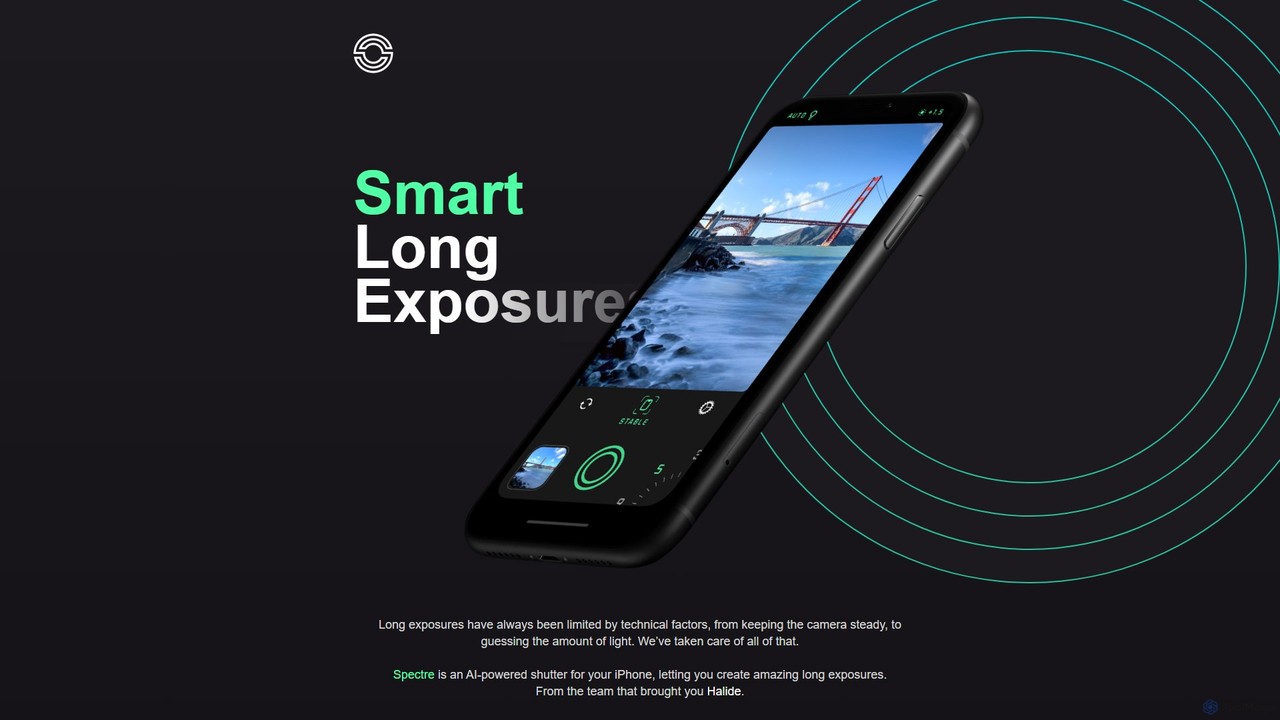
Spectre is an AI-powered camera app for iPhone that leverages computational photography to create stunning long exposure effects. Easily remove crowds, draw light trails, and smooth water with advanced features like AI scene detection and image stabilization, all from the creators of Halide.

Photography
Visits 7.5KFavorites 167Likes 150

About Photography

Photography AI tools are a specialized category within Art & Design that leverage artificial intelligence to transform, enhance, and generate photographic images. These tools utilize advanced machine learning algorithms, including computer vision and generative adversarial networks, to automate complex editing tasks, improve image quality, and unlock new creative possibilities. They empower photographers, designers, and content creators to achieve professional-grade results with unprecedented speed and efficiency, streamlining workflows from post-processing to conceptualization.

Core Features

  • Image Enhancement: Automatically corrects colors, reduces noise, sharpens details, and upscales resolution for superior image quality.
  • Object Removal & Replacement: Intelligently removes unwanted elements or seamlessly integrates new objects into photos.
  • Background Generation & Editing: Replaces or generates realistic backgrounds, ideal for product photography or creative composites.
  • Portrait Retouching: Applies subtle skin smoothing, eye enhancement, and facial adjustments while maintaining natural appearance.
  • Style Transfer & Effects: Transforms photos into various artistic styles or applies unique visual effects with a single click.

Applicable Scenarios

Professional photographers use these tools for efficient post-production, such as batch editing portraits or landscapes. E-commerce businesses leverage AI for consistent product photography, including background removal and standardized lighting. Content creators utilize them for quickly generating unique visuals for social media or blog posts, enhancing engagement and brand consistency.

How to Choose

When selecting Photography AI tools, consider the specific features required, such as advanced retouching or background manipulation. Evaluate the output quality and resolution capabilities, ensuring they meet professional standards. Assess integration options with your existing editing software and compare pricing models based on usage volume and feature sets.

Photography use cases

1

Automating Product Photo Background Removal

E-commerce businesses and online sellers frequently need clean, consistent product images. Photography AI tools allow them to automatically remove backgrounds from hundreds of product photos in minutes, replacing them with white, transparent, or custom backdrops. This significantly reduces manual editing time, ensures brand consistency across listings, and accelerates product launch cycles.

2

Enhancing Real Estate Property Images

Real estate agents and property managers can use AI photography tools to enhance listing photos, making properties more appealing. Features like automatic sky replacement, lighting correction, and object removal (e.g., clutter) can transform ordinary photos into professional-grade visuals. This helps attract more potential buyers and renters, leading to faster sales and leases.

3

Creative Portrait Retouching for Photographers

Professional portrait photographers often spend hours on post-processing. AI tools can automate tasks like skin smoothing, blemish removal, teeth whitening, and eye enhancement, providing a natural yet polished look. This frees up photographers to focus on shooting and client interaction, while maintaining high-quality, consistent results across their portfolio.

4

Generating Unique Social Media Visuals

Social media managers and content creators constantly need fresh, engaging visuals. Photography AI tools enable them to quickly generate unique images from text prompts, apply artistic filters to existing photos, or create dynamic collages. This helps maintain a vibrant online presence, saves time on graphic design, and keeps content calendars full with diverse media.

5

Restoring Old or Damaged Photographs

Individuals and archivists can utilize AI photography tools to breathe new life into old or damaged photos. AI can automatically de-noise, sharpen blurry images, colorize black and white photos, and even repair scratches or tears. This preserves precious memories, makes historical images more accessible, and offers a cost-effective alternative to manual restoration.

6

Designing Conceptual Art and Marketing Campaigns

Graphic designers and marketing teams can leverage AI photography for conceptual design and campaign visuals. By generating images from descriptive text or combining elements from various sources, AI tools facilitate rapid prototyping of visual ideas. This accelerates the creative process, allows for exploration of diverse concepts, and helps visualize complex marketing messages effectively.

Photography FAQ

What are Photography AI tools?

Photography AI tools are software applications that use artificial intelligence to automate and enhance various aspects of image creation and editing. They leverage machine learning to perform tasks like intelligent photo enhancement, object manipulation, background generation, and advanced retouching. These tools aim to streamline workflows, improve image quality, and unlock new creative possibilities for users ranging from hobbyists to professional photographers and designers.

How do Photography AI tools differ from traditional photo editing software?

While traditional photo editing software (like Photoshop) offers extensive manual control, Photography AI tools introduce automation and intelligence. AI tools can perform complex tasks with a single click (e.g., one-click background removal, automatic skin retouching) that would take significant manual effort in traditional software. They often learn from vast datasets to make intelligent suggestions or generate content, whereas traditional tools rely solely on user input and skill. AI tools excel in efficiency and accessibility for specific tasks, complementing the granular control of traditional editors.

What are the key benefits of using AI in photography?

The primary benefits of using AI in photography include significant time savings through automation of repetitive tasks like batch editing and background removal. AI enhances image quality by intelligently correcting flaws, upscaling resolution, and improving colors. It also unlocks new creative avenues, allowing users to generate unique visuals, apply complex artistic styles, and easily manipulate image elements. Ultimately, AI makes professional-grade results more accessible and efficient for a wider range of users.

Can Photography AI tools generate images from text descriptions?

Yes, many advanced Photography AI tools, especially those with generative capabilities, can create images from text descriptions (text-to-image generation). Users can input detailed prompts describing a scene, object, or style, and the AI will generate a corresponding visual. While this capability often overlaps with general AI image generators, it's increasingly integrated into photography-focused tools for conceptualizing scenes, adding specific elements, or creating entirely new photographic compositions.

What should I consider when choosing a Photography AI tool for professional use?

For professional use, consider the tool's specific feature set and its relevance to your workflow (e.g., portrait retouching, product photo editing). Evaluate the output quality, ensuring it meets high-resolution and detail standards. Check for integration capabilities with your existing professional software (e.g., plugins). Assess the learning curve and user interface for efficiency, and compare pricing models, including subscription costs and usage limits, to ensure it aligns with your budget and volume needs.