
ToolMage
Sign in

Best 1 Audio Editing AI tools for Audio & Video

Popular Audio Editing AI tools in Audio & Video include Tingwu, helping you work more efficiently.

Tingwu
Freemium

Tingwu

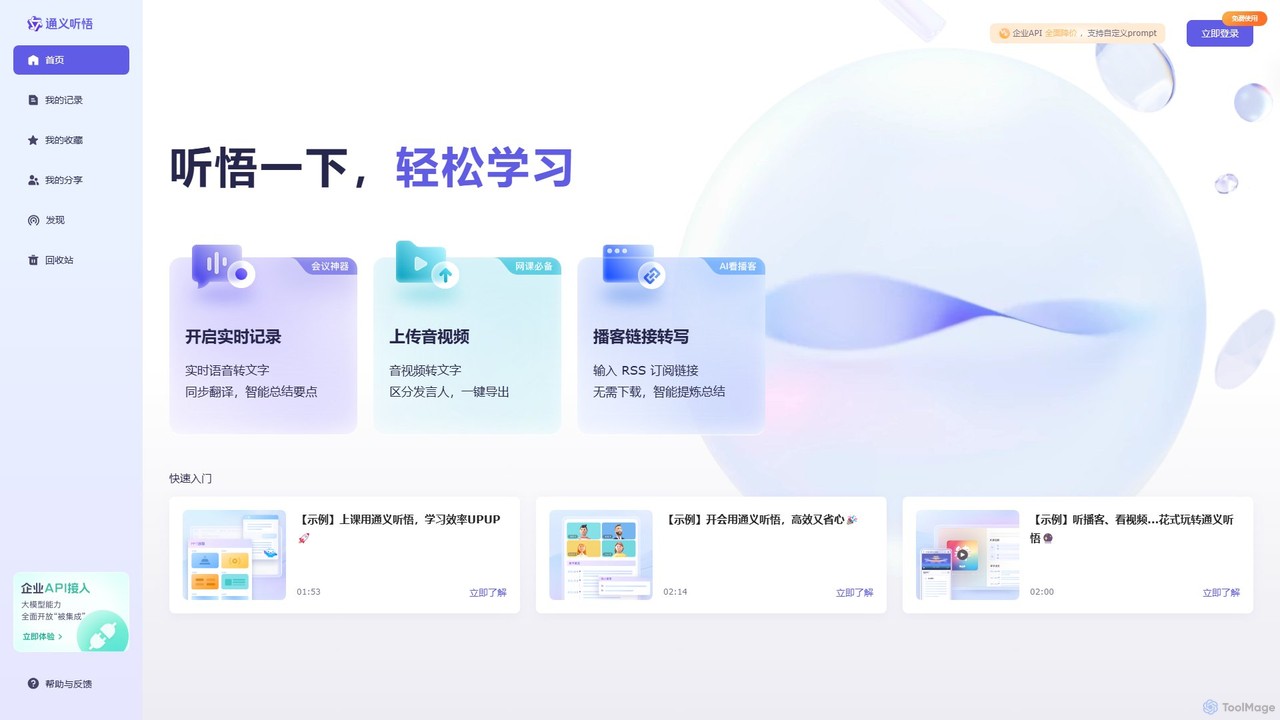
Tingwu is an AI-powered transcription and meeting analysis tool by Alibaba Cloud. It offers real-time speech-to-text, audio/video file transcription, and intelligent summarization. Features include speaker identification, keyword extraction, and simultaneous translation, designed to boost productivity for meetings, lectures, and content creation.

Audio Editing
Visits 451.7KFavorites 109Likes 110

About Audio Editing

AI Audio Editing tools are a class of software that use artificial intelligence to automate and enhance the process of refining sound recordings. They leverage machine learning models to perform complex tasks like noise removal, speech clarification, and filler word detection with minimal manual intervention. This technology empowers creators of all skill levels—from podcasters to filmmakers—to achieve professional-grade audio quality quickly and efficiently. AI-driven features can intelligently identify and separate distinct audio elements, such as dialogue from background noise or individual instruments in a music track.

Core Features

  • Intelligent Noise & Reverb Removal: Automatically identifies and eliminates unwanted background noise, hiss, hum, and echo from recordings.
  • Speech Enhancement: Improves vocal clarity, balances volume levels, and can automatically remove filler words (e.g., "um," "ah") and long pauses.
  • Text-Based Audio Editing: Transcribes audio to text, allowing users to edit the audio recording simply by editing the text document.
  • Stem Separation: Isolates specific elements from a mixed audio track, such as separating vocals, drums, bass, and other instruments.
  • Voice Cloning & Synthesis: Creates a digital replica of a voice to correct misspoken words or generate entirely new voiceovers in a consistent tone.

Use Cases

These tools are widely used by podcasters for cleaning up interview audio, video creators for enhancing dialogue in films and online content, and musicians for remixing or sampling tracks. Journalists and researchers also use them to transcribe and edit interviews, while audio engineers leverage them for restoration of old or damaged recordings.

How to Choose

When selecting an AI Audio Editing tool, consider the specific features you need, such as advanced speech repair versus music stem separation. Evaluate its integration capabilities with your existing Digital Audio Workstation (DAW) or video editor. Also, compare pricing models (subscription vs. perpetual license) and assess whether the tool operates locally on your machine or requires cloud processing, which can impact speed and privacy.

Audio Editing use cases

1

Podcast Post-Production Cleanup

A podcast host records an interview in a location with unpredictable background noise, like a café or a room with an air conditioner. Using an AI audio editing tool, they can apply an intelligent noise reduction filter that removes the distracting sounds while preserving the clarity of the speakers' voices. The tool can also automatically identify and cut filler words like "ums" and "ahs," saving hours of manual editing. The final result is a clean, professional-sounding episode that is more engaging for listeners, achieved in a fraction of the time it would take with traditional methods.

2

Enhancing Dialogue for Video Content

A documentary filmmaker captures crucial dialogue on location, but the audio is marred by wind noise and inconsistent microphone placement. Instead of scheduling costly reshoots or extensive manual audio repair (ADR), the editor uses an AI tool. The software's speech enhancement algorithm isolates the dialogue, reduces the wind noise, and automatically balances the volume levels between different speakers. This process salvages otherwise unusable audio, ensuring the narrative remains clear and impactful, and significantly speeds up the post-production workflow.

3

Music Remixing with Stem Separation

A music producer or DJ wants to create a remix of a popular song but doesn't have access to the original multi-track recordings. They use an AI audio editing tool with stem separation capabilities. By uploading the final stereo track, the AI algorithm intelligently isolates the vocals, drums, bass, and melodic instruments into separate audio files. This allows the producer to creatively reuse the vocal track over a new beat or sample the drum loop for their own production, opening up new creative possibilities that were previously difficult or impossible to achieve.

4

Correcting Narration for Audiobooks

An audiobook narrator discovers a few mispronounced words or small errors after a long recording session. Re-recording the entire section could be time-consuming and might not match the original performance's tone and energy. With an AI voice cloning feature, the narrator can simply type the correct word or phrase. The tool then generates the correction in a synthesized voice that perfectly matches the narrator's own, allowing for seamless insertion into the original recording. This saves significant studio time and ensures a consistent, high-quality final product.

5

Transcribing and Editing Interviews for Broadcast

A journalist needs to create a short audio segment for a radio broadcast from a 30-minute interview recording. An AI audio editing tool first provides a highly accurate, time-stamped transcription of the entire conversation. The journalist can then read through the text, highlight the most compelling quotes, and delete the rest. The tool's text-based editing feature automatically trims the audio file to match the edited text, creating a concise and powerful audio clip ready for broadcast. This workflow transforms audio editing into a familiar word-processing task, dramatically accelerating the content creation process.

6

Restoring Archival Audio Recordings

An archivist is tasked with digitizing and preserving historical audio tapes that have degraded over time, suffering from hiss, crackles, and low fidelity. Traditional restoration is a meticulous, expert-driven process. By using an AI audio restoration tool, the archivist can apply specialized models trained to identify and remove these specific types of artifacts. The AI can also enhance the intelligibility of speech in the recording, making the historical content accessible to a modern audience. This automates a significant portion of the restoration work, preserving cultural heritage more effectively.

Audio Editing FAQ

What is AI Audio Editing?

AI Audio Editing refers to software that uses artificial intelligence and machine learning algorithms to automate and improve audio post-production tasks. Unlike traditional tools that require manual adjustments, AI-powered editors can automatically perform complex operations like removing background noise, enhancing speech clarity, eliminating filler words, and even separating a song into its individual instrument tracks (stems). They are designed to help users achieve professional-quality results with greater speed and less technical expertise.

How does AI Audio Editing differ from traditional audio software?

The primary difference lies in automation and intelligence. Traditional audio software, like a Digital Audio Workstation (DAW), provides a suite of manual tools such as equalizers, compressors, and gates that require significant skill and time to use effectively. AI Audio Editing tools automate these complex processes. For example:

  • Noise Reduction: Traditional tools use noise profiles and gates, while AI tools can identify and remove dynamic, changing noises like traffic or chatter in real-time.
  • Editing Workflow: Traditional editing involves manually cutting and splicing waveforms, whereas some AI tools offer text-based editing by first transcribing the audio.
  • Source Separation: Separating mixed tracks (e.g., vocals from a song) is nearly impossible with traditional tools but is a core feature of many AI editors.
What are the key features to look for in an AI Audio Editing tool?

When evaluating AI Audio Editing tools, look for several key features. Intelligent noise reduction is fundamental for cleaning up recordings. Speech enhancement, which improves vocal clarity and can remove filler words ("ums," "ahs"), is crucial for podcasts and video dialogue. Text-based editing, which allows you to edit audio by editing its transcript, can dramatically speed up workflows. For musicians, stem separation (or "demixing") is a powerful feature for isolating vocals and instruments. Finally, advanced tools may offer voice cloning for correcting errors or generating new speech.

Who should use AI Audio Editing tools?

A wide range of creators and professionals can benefit from AI Audio Editing tools. Podcasters use them to ensure clean, professional-sounding episodes. Video creators and filmmakers rely on them to repair and enhance on-location dialogue. Musicians and producers leverage them for sampling and remixing. Journalists and researchers find them invaluable for transcribing and editing interviews quickly. Even business professionals can use them to clean up recordings of meetings or presentations for clearer communication.

Can AI completely replace a professional audio engineer?

While AI Audio Editing tools are incredibly powerful for automating time-consuming and technical tasks, they are best viewed as an assistant rather than a complete replacement for a professional audio engineer. AI excels at specific, well-defined problems like noise removal or filler word detection. However, a skilled engineer brings creative judgment, critical listening skills, and a holistic understanding of mixing and mastering that AI cannot yet replicate. For high-stakes projects, the ideal workflow often involves using AI tools to handle the heavy lifting, followed by a final polish from an experienced engineer.