ToolMage
Sign in

Best 1 Chat Management AI tools for Browser Extension

Popular Chat Management AI tools in Browser Extension include ChatMod, helping you work more efficiently.

ChatMod
Free

ChatMod

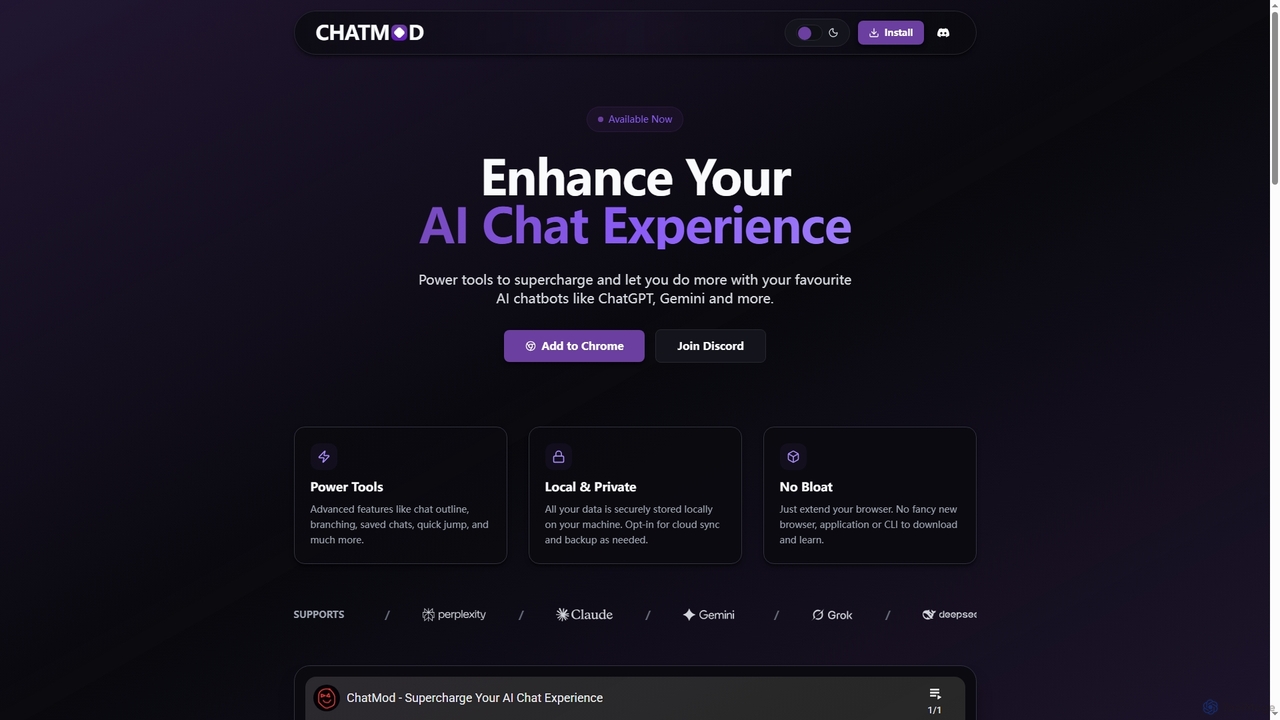
ChatMod is a powerful browser extension designed to supercharge your AI chat experience across platforms like ChatGPT, Gemini, Perplexity, and more. It offers advanced features for chat organization, navigation, and productivity, all while keeping your data local and private.

Chat Management
Visits 5.4KFavorites 130Likes 123

About Chat Management

Chat Management browser extensions are AI-powered tools designed to enhance and streamline your interactions with various online chat platforms directly within your web browser. These extensions leverage AI to offer features like conversation organization, quick prompt access, summarization, and translation, significantly improving efficiency and user experience across AI chatbots, social media DMs, and customer support interfaces. They provide a centralized way to control and optimize your digital conversations without leaving your current tab.

Core Features

  • Conversation History & Search: Automatically save, categorize, and search through past chat interactions across different platforms.
  • Prompt Management: Store, organize, and quickly insert frequently used prompts or canned responses into any chat interface.
  • AI Summarization & Translation: Utilize AI to condense long conversations or translate messages in real-time within the chat window.
  • Multi-Platform Integration: Seamlessly work across popular AI chatbots (e.g., ChatGPT, Gemini), social media messaging, and web-based customer support chats.
  • Customization & Automation: Personalize chat interfaces, set up automated responses, or schedule messages for improved workflow.

Use Cases

Content creators can manage prompts for AI writing tools, customer service agents can quickly access response templates, and researchers can organize AI-generated insights. These tools are widely used by individuals and teams who need to efficiently manage and optimize their online conversations.

How to Choose

When selecting a Chat Management extension, consider its compatibility with your primary chat platforms, the range of AI-powered features (e.g., summarization, translation), ease of prompt organization, data privacy policies, and overall user interface design. Look for extensions that offer robust search capabilities and seamless integration into your daily workflow.

Chat Management use cases

1

Streamlining Customer Support Responses

Customer service representatives often face repetitive queries. A Chat Management browser extension allows them to quickly access and deploy AI-generated, context-specific responses, reducing response times and ensuring consistent service quality across various chat platforms. This helps manage higher inquiry volumes without increasing staff.

2

Automating Customer Support Responses

Customer service agents use chat management extensions to instantly provide accurate answers to frequently asked questions across multiple chat widgets on e-commerce sites. This reduces response times and allows agents to focus on complex issues, significantly improving customer satisfaction and operational efficiency by handling routine inquiries with AI-powered quick replies.

3

Streamline AI Chatbot Interactions

For researchers or content creators who frequently use AI chatbots like ChatGPT, these extensions allow saving, categorizing, and quickly recalling complex prompts or entire conversation threads. This prevents retyping common queries and ensures consistency in AI-generated content, saving significant time and maintaining a structured knowledge base directly within the browser.

4

Efficient Customer Support Response

Customer service agents handling multiple chat inquiries can use these extensions to store and instantly deploy pre-approved response templates, FAQs, or product information. This drastically reduces response times, ensures brand consistency, and frees up agents to focus on more complex issues, all while operating within their browser-based CRM or chat system.

5

Streamlining Sales Outreach on Social Media

Sales professionals leverage these tools to manage prospecting conversations on platforms like LinkedIn or Twitter. They can use quick reply templates for initial greetings and AI-assisted drafting for personalized follow-ups, ensuring consistent messaging and increasing the volume of outreach without sacrificing quality, ultimately boosting lead generation efforts.

6

Accelerating Sales Lead Engagement

Sales professionals engaging with potential leads via web chats or social media can use these extensions to draft personalized follow-up messages or answer common product questions instantly. The AI can analyze the conversation context to suggest relevant information, enabling faster lead qualification and nurturing, ultimately shortening the sales cycle.

7

Organize Social Media DMs

Social media managers or influencers can leverage chat management extensions to categorize direct messages, schedule replies, or quickly access common responses for fan interactions or brand collaborations. This helps maintain an organized inbox, ensures timely engagement, and streamlines communication workflows across various social platforms without switching tabs.

8

Efficiently Managing Online Communities

Community managers overseeing large online forums or social media groups can utilize Chat Management tools to monitor discussions, identify key topics, and generate appropriate responses to common member queries. This helps maintain a positive community environment, ensures timely engagement, and reduces the manual effort required for moderation.

9

Enhancing Team Collaboration in Project Chats

Project managers and team members utilize chat management extensions to organize discussions within platforms like Slack or Microsoft Teams. Features like conversation summarization help new members quickly catch up, while message tagging ensures action items are easily identifiable and trackable, improving project coordination and reducing communication overhead.

10

Managing Personal Communications Across Platforms

Individuals with active social lives or diverse professional networks use these extensions to consolidate messages from WhatsApp, Messenger, and email. They can quickly draft replies, schedule follow-ups, and keep track of important conversations, preventing communication overload and missed connections, thereby maintaining strong personal and professional relationships.

11

Personalized Learning & Research

Students or lifelong learners interacting with AI for study assistance can use these tools to save, tag, and summarize key takeaways from AI-generated explanations or research discussions. This creates a personalized, searchable knowledge base directly linked to their browser, making revision and information retrieval much more efficient.

12

Summarizing Lengthy Project Discussions

Project managers or team leads involved in extensive chat-based project discussions can use these extensions to automatically summarize long conversation threads. This feature provides a quick overview of decisions made, action items, and key updates, saving valuable time that would otherwise be spent manually sifting through messages.

13

Personalizing Outreach for Content Creators

Content creators interacting with their audience on platforms like YouTube, Twitch, or Discord can employ Chat Management extensions to personalize replies and manage fan interactions more effectively. The AI can help craft unique responses based on previous interactions, fostering stronger community bonds and improving audience engagement.

14

Multi-Language Communication

For individuals or businesses engaging in international communication, these extensions can provide real-time translation of chat messages. This breaks down language barriers in customer support, sales, or personal conversations, allowing seamless interaction with diverse audiences directly within any web-based chat application.

15

Content Creation and Idea Generation in Chat

Content creators or marketers employ AI-powered chat management tools to brainstorm ideas or draft social media captions directly within their chat interfaces. By prompting the AI, they can generate multiple content variations, saving time on initial drafting and fostering creative flow during collaborative discussions, leading to more diverse and engaging content.

16

Efficiently Handling Recruitment Inquiries

Recruiters use chat management extensions to manage candidate communications across various job platforms and professional networks. They can automate initial screening questions, provide quick answers to common queries about roles, and organize candidate conversations for streamlined follow-up, enhancing the candidate experience and accelerating the hiring process.

17

Content Idea Generation & Iteration

Content creators can use these extensions to manage and iterate on AI-generated content ideas. By saving different versions of prompts and their outputs, they can easily compare, refine, and reuse successful frameworks for articles, social media posts, or marketing copy, accelerating the creative process and maintaining a consistent style.

18

Organizing Academic Research Chats

Researchers collaborating on projects often communicate through various chat applications. A Chat Management browser extension can help organize these conversations by tagging key discussions, summarizing research findings exchanged, and easily retrieving specific information, ensuring that valuable insights are not lost in extensive chat histories.

Chat Management FAQ

What are Chat Management browser extensions?

Chat Management browser extensions are AI-powered tools that integrate directly into your web browser to enhance and automate various aspects of your online chat interactions. They streamline communication by offering features like automated responses, conversation summarization, and efficient chat history organization across different messaging platforms.

What are Chat Management browser extensions?

Chat Management browser extensions are specialized AI-powered tools that integrate directly into your web browser to enhance and organize your online chat experiences. They provide functionalities like saving conversation histories, managing prompts, summarizing chats, and offering quick response options across various chat platforms, from AI chatbots to social media DMs.

What are Chat Management browser extensions?

Chat Management browser extensions are AI-enhanced tools that integrate directly into your web browser to help you organize, automate, and optimize your online chat interactions. They provide features like AI drafting, quick replies, and multi-platform integration to streamline communication across various messaging applications, boosting productivity and ensuring efficient message handling for both personal and professional use.

How do Chat Management extensions improve productivity?

These extensions boost productivity by centralizing chat data, automating repetitive tasks, and providing quick access to essential information. Users can save time by not retyping prompts, quickly finding past conversations, and utilizing AI for summarization or translation, allowing for more efficient and organized digital communication.

How do Chat Management extensions improve productivity?

These extensions significantly improve productivity by automating repetitive tasks, such as drafting common responses or summarizing long conversations. They centralize message handling across different platforms, reduce the time spent switching between apps, and help users quickly find important information through advanced organization and tagging features, allowing more focus on critical tasks and strategic communication.

How do Chat Management tools differ from general browser extensions?

While both are browser extensions, Chat Management tools are specifically designed with AI capabilities to interact with and optimize chat interfaces. General browser extensions might offer broad utility (e.g., ad blockers, password managers), but Chat Management tools focus narrowly on improving chat-specific workflows, leveraging AI for context understanding and response generation.

What's the difference between a Chat Management extension and a standalone chat app?

A Chat Management extension integrates directly into your browser, enhancing existing chat platforms without requiring a separate application. It focuses on augmenting your current chat experience with AI and organizational tools. Standalone chat apps, conversely, are independent applications designed for specific platforms or to consolidate multiple platforms, often offering broader features but requiring a separate interface and potentially more system resources.

What are the key benefits of using a Chat Management extension?

The primary benefits include significant time savings through automated responses and summarization, improved communication consistency, better organization of chat histories, and enhanced productivity. They help users manage high volumes of messages more effectively, reduce mental load, and ensure important information is easily accessible.

What features should I look for in a Chat Management extension?

Key features to consider include robust conversation history and search, intuitive prompt management, AI-powered summarization and translation, broad compatibility with your frequently used chat platforms, and strong data privacy measures. Customization options and automation capabilities are also valuable.

Can Chat Management extensions integrate with all chat platforms?

Most Chat Management extensions aim for broad compatibility with popular web-based chat applications and social media platforms. However, the extent of integration can vary. It's crucial to check if a specific extension supports the chat platforms you frequently use, as some might offer deeper integration with certain services than others.

Are Chat Management extensions secure for sensitive conversations?

Security varies by extension. It's crucial to choose extensions from reputable developers that clearly outline their data privacy policies, encryption methods, and how they handle your chat data. Always review permissions requested by the extension and avoid using them for highly sensitive or confidential information unless explicitly verified for security.

What core features should I look for in a Chat Management extension?

Key features to consider include robust AI-powered drafting for intelligent response generation, comprehensive multi-platform integration for all your essential chat services, and efficient quick reply templates. Additionally, look for advanced message organization (tagging, archiving), conversation summarization, and strong data privacy measures to ensure secure, effective, and personalized communication management.

Are Chat Management tools secure and private?

Security and privacy are critical concerns. Reputable Chat Management tools employ encryption and adhere to strict data privacy policies (e.g., GDPR, CCPA). Users should always review the extension's privacy policy to understand how their chat data is processed, stored, and protected, ensuring it aligns with their personal or organizational security requirements.

How do Chat Management extensions differ from general browser productivity tools?

While general browser productivity tools might offer tab management or note-taking, Chat Management extensions are specifically tailored to optimize chat interactions. They focus on features like prompt organization, conversation history, and AI-driven chat enhancements, which are unique to managing dialogue-based content within the browser, unlike broader productivity tools.

Who can benefit most from using Chat Management tools?

Professionals who handle a high volume of online communication, such as customer support agents, sales representatives, project managers, and content creators, benefit greatly. Individuals managing multiple personal and professional chats can also find these tools invaluable for staying organized, reducing communication overload, and ensuring timely responses. Essentially, anyone looking to streamline their digital conversations and enhance communication efficiency will find value.