ToolMage
Sign in

Best 1 Invoicing AI tools for Business

Popular Invoicing AI tools in Business include Taskavel, helping you work more efficiently.

Taskavel
Freemium

Taskavel

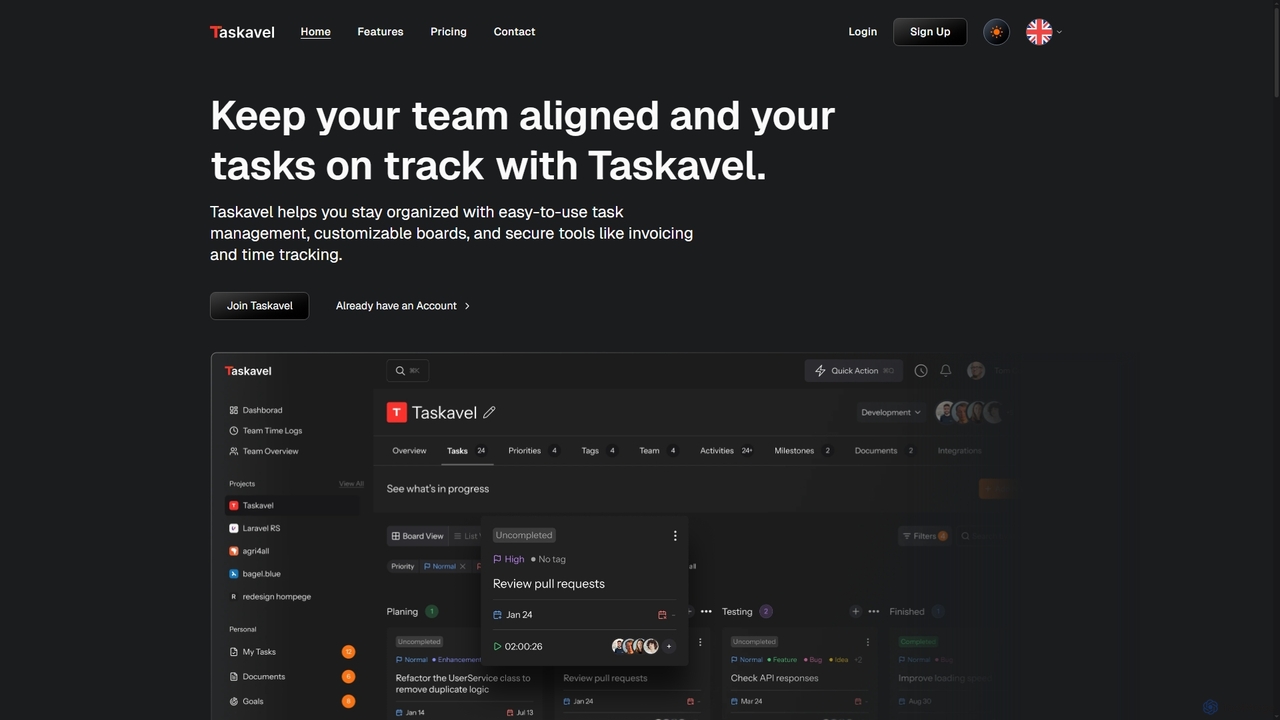
Taskavel is a comprehensive task and project management platform designed to keep teams aligned and tasks on track. It offers intuitive tools like customizable Kanban boards, integrated time tracking, invoicing, and robust collaboration features, especially tailored for developers and agile teams.

Workflow Automation
Visits 5.7KFavorites 100Likes 116

About Invoicing

Invoicing tools are AI-powered solutions designed to automate and streamline the creation, sending, and tracking of invoices. Leveraging intelligent algorithms, these tools can efficiently process payment details, apply tax rules, and manage client information. They significantly reduce manual effort, accelerate payment cycles, and improve financial record-keeping for businesses of all sizes, making them a crucial part of modern business operations.

Core Features

  • Automated Invoice Generation: Automatically create professional invoices from sales data or project hours, including line items, taxes, and discounts.
  • Customizable Templates: Offer a range of professional templates that can be branded with company logos and colors for a consistent look.
  • Payment Tracking & Reminders: Monitor invoice statuses (sent, viewed, paid, overdue) and send automated, polite payment reminders to clients.
  • Multi-currency & Tax Support: Handle transactions in various currencies and accurately apply complex local and international tax regulations.
  • Integration with Accounting Software: Seamlessly connect with popular accounting and CRM systems for unified financial management and data synchronization.

Applicable Scenarios

Freelancers and small businesses utilize these tools to quickly generate and send invoices to clients, ensuring timely payments without needing dedicated accounting staff. Service-based companies, such as marketing agencies or consulting firms, leverage them to bill clients based on project milestones or hourly rates, maintaining clear and auditable financial records for every project.

How to Choose

When selecting an AI invoicing tool, consider its integration capabilities with existing accounting or CRM software to avoid data silos and ensure smooth workflows. Evaluate the level of automation offered, such as recurring invoice generation and automated reminders, to match your operational needs and reduce manual tasks. Assess the customization options for invoice templates and ensure it supports your specific tax and multi-currency requirements. Finally, review the pricing structure and scalability to accommodate future business growth and evolving demands.

Invoicing use cases

1

Automating Recurring Client Billing

For subscription-based businesses or service providers with retainer clients, manually generating monthly invoices is time-consuming. AI invoicing tools automate this process by setting up recurring invoices with predefined services, amounts, and billing cycles. The system automatically sends invoices on schedule and tracks payments, freeing up administrative staff to focus on core business activities and ensuring consistent cash flow.

2

Streamlining Freelancer Project Invoicing

Freelancers often juggle multiple projects and clients, making timely and accurate invoicing crucial yet challenging. AI invoicing tools allow freelancers to quickly create professional invoices based on logged hours or project milestones. They can easily add detailed service descriptions, apply discounts, and send invoices directly via email, significantly reducing administrative overhead and accelerating payment collection from diverse clients.

3

Managing Multi-currency Invoices for Global Clients

Businesses operating internationally face complexities with different currencies and tax regulations. AI invoicing tools simplify this by supporting multiple currencies and automatically applying relevant exchange rates and local tax laws. This ensures compliance and accuracy when billing clients in various countries, reducing errors and the need for manual currency conversions or tax calculations, thus facilitating smoother global transactions and financial reporting.

4

Integrating Invoicing with Project Management

For project-based teams, linking project progress to billing is essential for accurate revenue recognition. AI invoicing tools can integrate with project management software, allowing project managers to convert completed tasks or milestones directly into invoices. This ensures that all billable work is captured accurately and promptly, eliminating discrepancies between project delivery and financial billing, and providing a transparent audit trail for both clients and internal teams.

5

Enhancing Customer Payment Experience

A smooth payment process improves customer satisfaction and encourages timely payments. AI invoicing tools often include features like secure online payment gateways, allowing clients to pay directly from the invoice with various methods (credit card, bank transfer, etc.). Automated, polite payment reminders can be customized and sent, reducing the need for manual follow-ups and providing a convenient, professional experience for clients, ultimately strengthening client relationships.

6

Generating Detailed Financial Reports for Analysis

Beyond just sending bills, AI invoicing tools provide robust reporting capabilities crucial for strategic financial planning. Business owners and financial managers can generate detailed reports on outstanding invoices, payment trends, client payment history, and revenue forecasts. These insights are invaluable for cash flow management, identifying slow-paying clients, optimizing billing strategies, and making informed financial decisions to support business growth and stability.

Invoicing FAQ

What are AI Invoicing tools?

AI Invoicing tools are software solutions that use artificial intelligence to automate and optimize the entire invoicing process. They go beyond basic billing by intelligently generating invoices, tracking payment statuses, sending automated reminders, and often integrating with other financial systems to streamline financial operations and improve cash flow management for businesses.

How do AI Invoicing tools differ from traditional invoicing software?

Traditional invoicing software primarily focuses on manual data entry and basic template generation. AI Invoicing tools, however, leverage AI for advanced automation, such as intelligent data extraction from contracts, dynamic tax calculation based on jurisdiction, predictive analytics for payment trends, and smart reminders. This reduces human error, saves significant time, and provides deeper financial insights compared to their traditional counterparts.

Who can benefit most from using AI Invoicing tools?

AI Invoicing tools are highly beneficial for freelancers, small to medium-sized businesses (SMBs), and service-based companies that handle a high volume of invoices or recurring billing. They are particularly useful for businesses looking to reduce administrative burden, accelerate payment collection, improve accuracy in financial records, and gain better visibility into their cash flow without hiring additional accounting staff.

What are the key features to look for in an AI Invoicing tool?

When choosing an AI Invoicing tool, prioritize features like automated invoice generation from various data sources, customizable professional templates, robust payment tracking with automated reminders, multi-currency and complex tax support, and seamless integration with your existing accounting or CRM software. Additionally, look for strong reporting capabilities and secure online payment options for clients to enhance their experience.

Can AI Invoicing tools help with tax compliance?

Yes, many AI Invoicing tools are designed to assist with tax compliance. They can automatically apply the correct tax rates based on the client's location and the services provided, generate tax-compliant invoices, and often produce reports that simplify tax filing. This significantly reduces the risk of errors and ensures that businesses adhere to local and international tax regulations, saving time and potential penalties.