ToolMage
Sign in

Best 1 Legal Documents AI tools for Business

Popular Legal Documents AI tools in Business include Agreee.ai, helping you work more efficiently.

Agreee.ai
Freemium

Agreee.ai

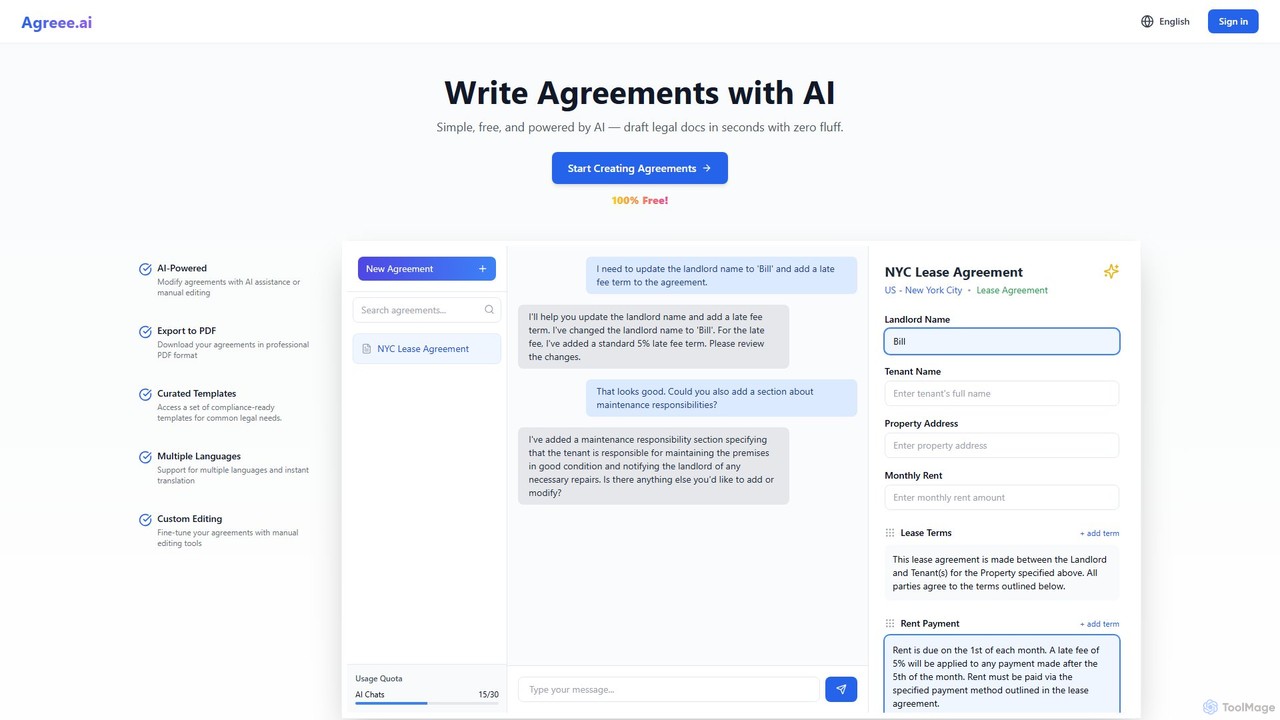
Agreee.ai is an AI-powered agreement builder that simplifies the creation of legal documents. Using a conversational AI interface, users can draft, edit, and customize agreements like leases and contracts in seconds. It offers a library of curated templates, multi-language support, and PDF export, making legal document creation accessible and free for everyone.

Legal Documents
Visits 7.6KFavorites 144Likes 147

About Legal Documents

AI Legal Document tools are specialized platforms that use artificial intelligence to automate the creation, analysis, and management of legal paperwork. Leveraging Natural Language Processing (NLP), these tools can understand context, generate customized contracts, and review documents for risks or inconsistencies. They provide businesses and individuals with a cost-effective and efficient way to handle legal documentation, reducing reliance on expensive legal counsel for routine tasks. This technology streamlines workflows, ensures consistency, and helps mitigate potential legal risks.

Core Features

  • Automated Document Generation: Instantly create customized legal documents like contracts, agreements, and policies from intelligent templates.
  • Contract Analysis and Review: Scan uploaded documents to identify critical clauses, potential risks, missing information, and deviations from standard terms.
  • Clause Library Management: Build, manage, and reuse a library of pre-approved legal clauses to ensure consistency and compliance across all documents.
  • Lifecycle Management: Track documents from drafting and negotiation to signing and renewal, with automated reminders for key dates.
  • e-Signature Integration: Seamlessly connect with electronic signature platforms to expedite the execution of agreements.

Use Cases

These tools are widely used by startups, small to medium-sized businesses (SMBs), and freelancers who need accessible legal support. Corporate legal departments also use them to enhance efficiency. Common applications include drafting non-disclosure agreements (NDAs), service contracts, privacy policies, and reviewing third-party vendor agreements to accelerate business operations.

How to Choose

When selecting an AI Legal Document tool, consider the scope of its document library and its relevance to your industry and jurisdiction. Evaluate its analytical capabilities for reviewing external contracts. Prioritize platforms with robust security measures to protect sensitive data, and check for integration options with your existing software, such as CRM or cloud storage systems.

Legal Documents use cases

1

Rapidly Generate Startup Formation Documents

A tech startup founder needs to establish their company's legal framework quickly and affordably. Using an AI Legal Document tool, they generate essential documents such as a Founder's Agreement, Non-Disclosure Agreements (NDAs) for potential partners, and a Privacy Policy for their new website. The platform guides them through a series of questions to customize clauses, ensuring the documents are tailored to their specific business model and jurisdiction. This process reduces legal fees and accelerates the path to becoming operational.

2

Standardize Client Contracts for Freelancers

A freelance graphic designer manages multiple projects simultaneously and needs consistent, professional contracts for each client. They use an AI tool to create a master service agreement template. For each new project, the tool automatically generates a new contract, populating it with the client's name, project scope, and payment terms. This ensures key protections like intellectual property rights and payment schedules are included every time, minimizing disputes and administrative work.

3

Analyze Third-Party Vendor Agreements

A procurement manager at a mid-sized company is tasked with reviewing a complex software licensing agreement from a new vendor. Instead of a lengthy manual review, they upload the document to an AI analysis tool. The system quickly flags non-standard liability clauses, identifies ambiguous terms, and compares the agreement against the company's internal policy playbook. This highlights key negotiation points and reduces the risk of accepting unfavorable terms.

4

Automate HR Policy and Handbook Creation

An HR department needs to update its employee handbook to include new policies on remote work and data protection. They use an AI platform to generate compliant and comprehensive policy documents. The tool provides up-to-date templates based on current labor laws and allows for customization to reflect the company's culture. This ensures the handbook is created efficiently and adheres to legal requirements, protecting both the company and its employees.

5

Streamline Sales Contract Generation with CRM Integration

A sales team wants to accelerate its deal-closing process. They integrate an AI legal document tool with their CRM system (e.g., Salesforce). When a sales representative moves a deal to the "Contracting" stage, the tool automatically pulls customer data from the CRM to generate a ready-to-sign sales agreement. This eliminates manual data entry, reduces errors, and allows the sales team to send out contracts in minutes rather than hours.

6

Conduct Efficient Due Diligence for M&A

During a merger and acquisition (M&A) transaction, a corporate legal team must review hundreds or thousands of contracts from the target company. They employ an AI tool to perform this large-scale analysis. The AI scans all documents to extract key information, such as change-of-control clauses, renewal dates, and potential liabilities. This dramatically speeds up the due diligence process, enabling the team to assess risks more accurately and make informed decisions faster.

Legal Documents FAQ

What are AI Legal Document tools?

AI Legal Document tools are software applications that use artificial intelligence, particularly Natural Language Processing (NLP), to automate the creation, review, and management of legal documents. Unlike static templates, they can intelligently customize content based on user input, analyze existing contracts for risks, and manage the entire document lifecycle. They are designed to make routine legal tasks more efficient, accessible, and consistent.

How do I choose the right AI Legal Document tool?

To choose the right tool, consider these four key factors:

  • Jurisdiction and Specialization: Ensure the tool supports the laws of your country/state and offers documents relevant to your industry.
  • Functionality: Decide if you primarily need document generation, contract analysis, or full lifecycle management.
  • Security: Verify the platform's security protocols, as you will be handling sensitive information.
  • Integrations: Check if it connects with other tools you use, like CRM, e-signature, or cloud storage, to streamline your workflow.
Are legal documents generated by AI legally binding?

Yes, a document generated by an AI tool can be legally binding, provided it is correctly drafted, accurately reflects the parties' agreement, and is properly executed (e.g., signed) according to the relevant laws. The AI tool acts as a sophisticated drafting assistant. However, for highly complex or high-stakes situations, it is always a prudent practice to have the final document reviewed by a qualified legal professional.

What is the difference between AI Legal Document tools and simple online templates?

The key difference is intelligence and functionality. Simple online templates are static, one-size-fits-all forms that require manual editing. AI Legal Document tools are dynamic; they interact with the user to customize clauses, can analyze third-party documents for risks, manage contract versions, track deadlines, and integrate with other business software. They offer an end-to-end solution rather than just a starting point.

Who are the primary users of AI Legal Document tools?

These tools serve a broad audience. Key users include:

  • Startups and Small Businesses: Who need affordable and quick access to standard legal documents without hiring a full-time lawyer.
  • Freelancers and Consultants: For creating professional service agreements and protecting their business interests.
  • Corporate Departments: Legal, sales, procurement, and HR teams use them to improve efficiency and standardize processes.