
ToolMage
Sign in

Best 1 Scheduling Automation AI tools for Business

Popular Scheduling Automation AI tools in Business include Beesly, helping you work more efficiently.

Beesly
Freemium

Beesly

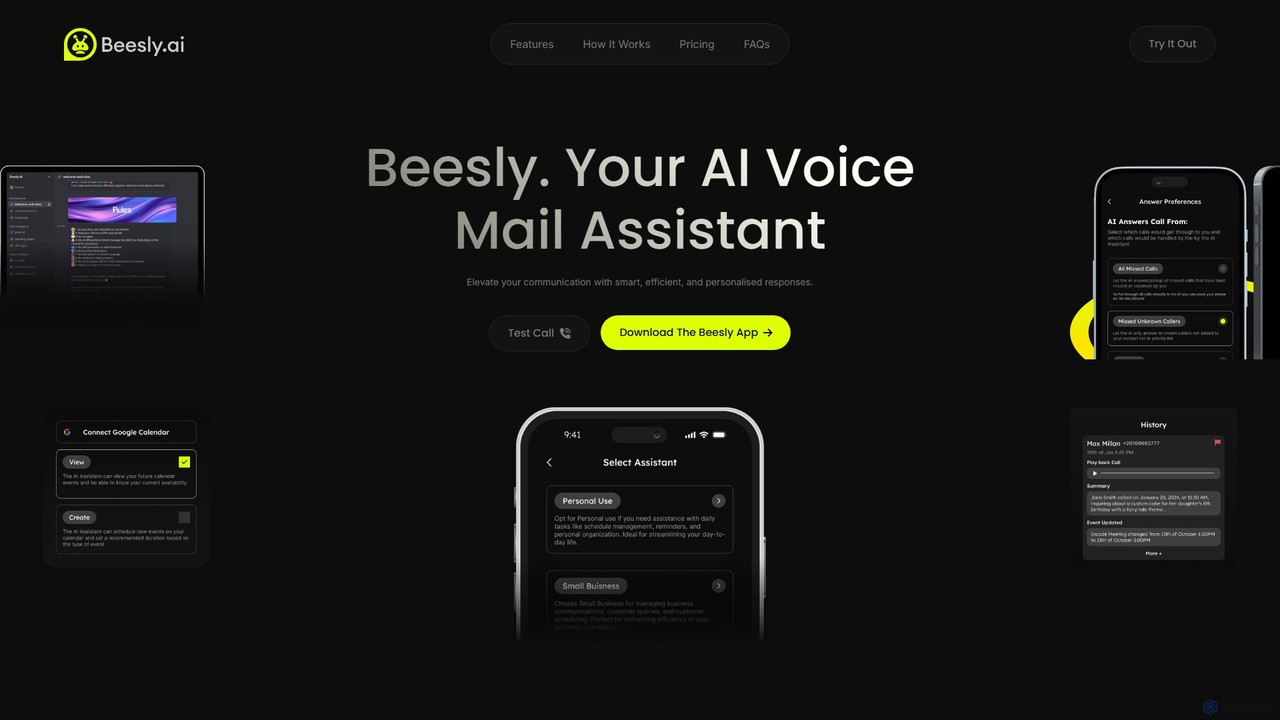
Beesly is an AI-powered voicemail assistant that revolutionizes communication. It provides smart call summaries, automated calendar management, and 24/7 availability, ensuring you never miss an important call. Ideal for busy professionals and small businesses looking to enhance efficiency and professionalism.

Scheduling Automation
Visits 5.7KFavorites 164Likes 157

About Scheduling Automation

Scheduling Automation tools are AI-powered platforms that streamline the process of booking meetings and appointments. They intelligently analyze multiple calendars to find mutual availability, eliminating the back-and-forth emails typically required for coordination. This automation saves significant time, reduces scheduling errors, and improves the booking experience for clients, candidates, and colleagues. These tools often integrate with existing calendars, CRMs, and video conferencing software to create a seamless workflow.

Core Features

  • Intelligent Availability Sync: Automatically scans and syncs with multiple calendars (e.g., Google, Outlook) to present only true, conflict-free availability.
  • Automated Reminders & Follow-ups: Sends customizable email or SMS reminders to all participants to reduce no-shows and late arrivals.
  • Customizable Booking Pages: Create professional, branded booking links with custom questions, meeting types, and availability rules.
  • Time Zone Detection: Automatically detects the invitee's time zone and displays available slots accordingly, preventing confusion.
  • Workflow Integration: Connects with tools like Salesforce, Zoom, and Stripe to automate tasks like updating CRM records or processing payments upon booking.

Use Cases

These tools are widely used by sales teams for booking demos, recruiters for coordinating interviews, consultants for client sessions, and customer success teams for scheduling support calls. Any professional or business that relies on frequent appointment setting can benefit from automating the process.

How to Choose

When selecting a tool, consider its integration capabilities with your existing software stack (calendar, CRM). Evaluate the level of customization for booking pages and notifications. For teams, check for features like round-robin or collective scheduling. Finally, assess the user experience for both the scheduler and the person booking the appointment.

Scheduling Automation use cases

1

Automate Sales Demo Bookings

For sales development representatives (SDRs), manually scheduling demos with qualified leads is time-consuming. A Scheduling Automation tool provides a personal booking link to include in outreach emails. When a lead clicks the link, they see the SDR's real-time availability and can book a slot in seconds. The tool automatically creates the calendar event, adds a video conference link (e.g., Zoom), and sends confirmations to both parties, reducing lead drop-off and accelerating the sales cycle.

2

Streamline Candidate Interview Coordination

Recruiters and hiring managers often struggle to coordinate interview schedules across multiple stakeholders. These tools allow candidates to self-schedule based on the combined availability of the interview panel. The system can handle multi-stage interviews, automatically sending the next scheduling link after a stage is completed. This improves the candidate experience, reduces administrative overhead, and helps secure top talent faster.

3

Manage Client Appointments for Consultants

Independent consultants, coaches, and therapists can use Scheduling Automation to manage their client bookings efficiently. They can set up different appointment types (e.g., 30-min intro call, 60-min session), define their working hours, and even integrate payment gateways like Stripe or PayPal to require payment upon booking. This professionalizes their practice and eliminates the need for manual invoicing and scheduling.

4

Simplify Customer Support Call Scheduling

Customer support teams can resolve complex issues more effectively by scheduling dedicated technical support calls. Instead of emailing back and forth, a support agent can share a booking link in a ticket or chat. The customer chooses a time that works for them, and the tool assigns the meeting to an available support specialist based on round-robin rules. This leads to faster issue resolution and higher customer satisfaction.

5

Organize Internal Cross-Functional Meetings

Finding a suitable meeting time for a project team with members from different departments can be challenging. Scheduling Automation tools can poll attendees for their preferred times or analyze their connected calendars to suggest the best slots. This is particularly useful for recurring project check-ins, workshops, or one-on-one meetings, ensuring that internal collaboration happens smoothly without endless email chains.

6

Enable Self-Service Booking for Service Businesses

Local service businesses like yoga studios, tutoring centers, or repair shops can embed a booking widget directly on their website. Customers can view available class times or service slots and book and pay for their appointments online, 24/7. The system automatically updates the business's calendar, sends confirmations, and can manage waitlists or recurring bookings, freeing up staff to focus on providing the service itself.

Scheduling Automation FAQ

What is Scheduling Automation?

Scheduling Automation refers to software that uses AI to automate the entire process of booking appointments. Instead of manual email exchanges, these tools sync with your calendar, present your real-time availability via a shareable link, and allow others to book a time that works for everyone. Key features include automatic time zone conversion, buffer time management, and sending reminders to reduce no-shows.

How do I choose the right Scheduling Automation tool?

To choose the right tool, first assess your core needs. Consider these factors:

  • Integrations: Does it connect seamlessly with your primary calendar (Google, Outlook), video conferencing tools (Zoom, Teams), and CRM (Salesforce)?
  • Team Features: Do you need round-robin assignment for sales leads or collective availability for panel interviews?
  • Customization: Can you brand your booking page and customize email notifications?
  • Ease of Use: Is the interface intuitive for both you and the person booking the meeting?

What's the difference between Scheduling Automation and a basic calendar app?

A basic calendar app (like Google Calendar or Apple Calendar) is a digital planner for you to manually create and manage your own events. Scheduling Automation is a layer on top of your calendar that automates the process of finding a time with others. It handles the negotiation of times, time zone differences, and communication (confirmations, reminders) so you don't have to. It's about external collaboration, whereas a calendar app is primarily for personal organization.

Who benefits most from Scheduling Automation tools?

Professionals and teams who frequently schedule meetings with external parties see the most benefit. This includes:

  • Sales Teams: For booking demos and sales calls with prospects.
  • Recruiters: For coordinating interviews with candidates and hiring managers.
  • Consultants & Coaches: For allowing clients to book sessions.
  • Customer Success & Support: For scheduling onboarding or technical support calls.
Essentially, anyone looking to eliminate the administrative burden of scheduling can benefit.

How does AI improve the scheduling process?

AI enhances scheduling in several ways. It intelligently scans multiple participants' calendars to identify optimal meeting slots, far beyond simple availability checks. Some tools use Natural Language Processing (NLP) to allow you to schedule meetings by writing a simple command in an email. AI can also analyze scheduling patterns to suggest the best times to propose meetings for higher acceptance rates and help manage complex rules like meeting distribution across a team.