Pixelmator Pro
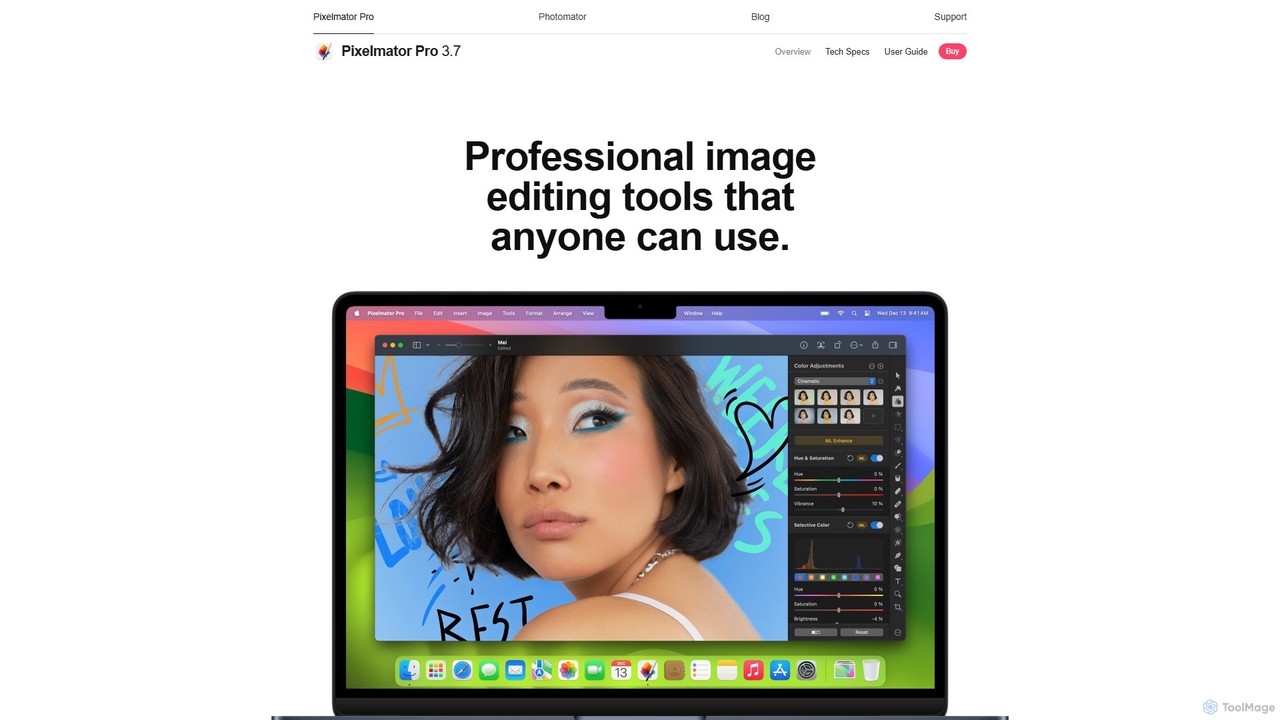
Pixelmator Pro is a powerful, beautiful, and easy-to-use image editor exclusively for Mac. It leverages advanced AI and …
Pixelmator Pro is a powerful, beautiful, and easy-to-use image editor exclusively for Mac. It leverages advanced AI and machine learning to offer professional-grade photo editing, graphic design, and vector tools. Features include one-click photo enhancement, automatic background removal, advanced color adjustments, RAW editing, video layer support, and a vast library of templates and mockups, making it ideal for both beginners and seasoned professionals.
Upscayl
Upscayl is a free and open-source AI image upscaler that enhances low-resolution images into high-quality, sharp visuals. It …
Upscayl is a free and open-source AI image upscaler that enhances low-resolution images into high-quality, sharp visuals. It offers both a cross-platform desktop application for local processing and a powerful cloud version with advanced features like batch upscaling and commercial use.
About Image Editing
AI Image Editing tools are applications that use artificial intelligence to automate and enhance the modification of digital photos and graphics. These tools leverage deep learning algorithms for tasks like object recognition and generative infilling, allowing for complex edits through simple user commands. This technology empowers users to quickly remove backgrounds, erase unwanted objects, restore old photos, and improve overall image quality without needing extensive manual skills. Unlike traditional software, AI image editors significantly accelerate post-production workflows, making professional-grade results accessible to everyone.
Core Features
- Object Removal & Inpainting: Erase unwanted people, text, or blemishes, and the AI intelligently reconstructs the background.
- Background Removal & Replacement: Automatically isolate subjects from their background to create transparent images or place them in new scenes.
- AI Image Enhancement: Instantly improve brightness, contrast, color balance, and sharpness with a single click for better visual appeal.
- Photo Restoration & Colorization: Repair scratches, reduce noise in old photos, and add realistic color to black-and-white images.
- Smart Upscaling: Enlarge images to a higher resolution without the typical loss of quality or pixelation.
Use Cases
AI Image Editing tools are widely used in e-commerce for creating clean product photos, in social media marketing for producing engaging visuals quickly, and by photographers to speed up their retouching process. They are also valuable for graphic designers in mockup creation and for personal use in restoring cherished family photos.
How to Choose
When selecting an AI Image Editing tool, consider its primary function—whether you need a specialized tool (e.g., for background removal) or a comprehensive suite. Evaluate the quality of the output to ensure it's free of artifacts. Also, consider the pricing model (subscription vs. pay-per-use) and whether it offers integrations or an API for your existing workflow.
Image EditingUse Cases
E-commerce Product Photo Optimization
An e-commerce manager needs to prepare hundreds of new product photos for an online store, all requiring a consistent, clean white background. Instead of spending hours manually tracing each product in Photoshop, they use an AI background removal tool. They can batch-upload all images, and the AI automatically detects the product edges and removes the background in seconds. The result is a complete set of professional, market-ready product images with transparent backgrounds, achieved in a fraction of the time, ensuring brand consistency and improving the customer's shopping experience.
Quickly Create Social Media Visuals
A social media manager needs to create a compelling visual for a new campaign but the best stock photo has a distracting object in the background. Using an AI object removal tool, they simply highlight the unwanted element. The AI analyzes the surrounding pixels and intelligently fills in the space, making it seem as if the object was never there. This process takes less than a minute, allowing the manager to quickly produce a clean, focused image for their post, increasing engagement without needing to find a new photo or wait for a designer.
Restoring Old and Damaged Family Photos
An individual discovers a box of old family photographs that are faded, scratched, and torn. To preserve these memories, they scan the photos and upload them to an AI photo restoration tool. The tool automatically detects and repairs imperfections like cracks and scratches. It then uses another AI model to enhance faded colors and improve sharpness. For black-and-white photos, it can even generate a realistic colorized version. The result is a digitally restored collection of family history, bringing cherished moments back to life with clarity and vibrancy for future generations to enjoy.
Enhancing Real Estate Photography
A real estate agent has photos of a property, but the lighting is poor and the colors look dull, making the listing unattractive. They use an AI image enhancement tool to instantly correct these issues. With one click, the AI adjusts exposure, brightens shadows, and boosts color saturation to make the rooms look more inviting. They can also use an object removal feature to declutter a room by erasing distracting items. This quick editing process transforms mediocre photos into professional-looking images that attract more online views and potential buyers, without the cost of a professional reshoot.
Upscaling Low-Resolution Graphics for Print
A graphic designer receives a client's logo, but it's a small, low-resolution JPEG file unsuitable for printing on a large banner. Instead of recreating the logo from scratch, the designer uses an AI image upscaler. The tool analyzes the image and intelligently adds new pixels that match the existing patterns, colors, and textures. It can increase the image resolution by 4x or more while maintaining sharp edges and avoiding blurriness. This allows the designer to produce a high-quality, print-ready version of the logo in minutes, saving significant time and effort.
Streamlining Portrait Retouching Workflow
A professional photographer has a large batch of portraits to edit from a recent photoshoot. Manually retouching each photo to remove blemishes, smooth skin, and whiten teeth is a time-consuming process. By using an AI portrait editor, they can apply intelligent enhancements to the entire batch at once. The AI automatically detects faces and applies natural-looking adjustments, preserving skin texture and avoiding an over-edited look. This reduces the editing time per photo from several minutes to just a few seconds, dramatically increasing the photographer's productivity and allowing for faster delivery to clients.