Wanderlog
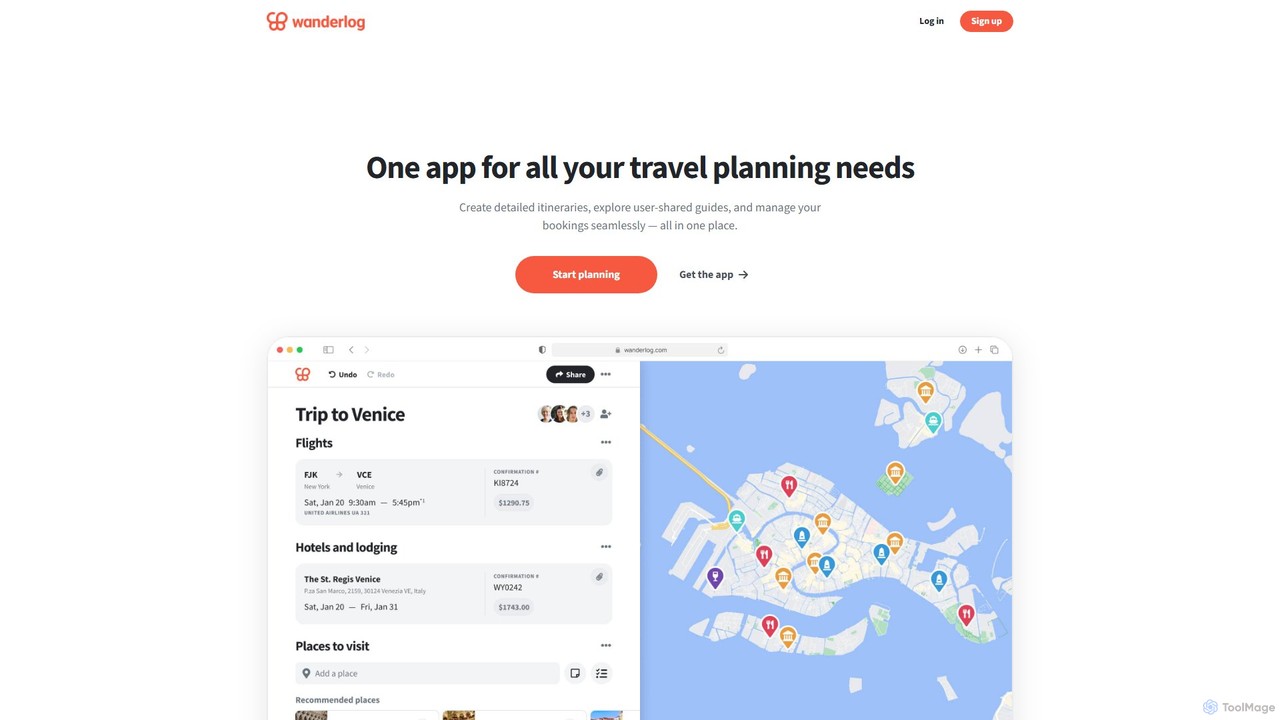
Wanderlog is an AI-powered, all-in-one travel planner that simplifies trip organization. It allows users to build detailed itineraries, …
Wanderlog is an AI-powered, all-in-one travel planner that simplifies trip organization. It allows users to build detailed itineraries, collaborate with friends in real-time, manage budgets, and discover new places. With its intelligent assistant and map-based interface, Wanderlog streamlines the entire vacation planning process, from initial ideas to on-the-go adjustments.
About Trip Management
Trip Management tools are AI-powered platforms designed to automate and streamline the entire process of planning, booking, and managing travel. These tools leverage artificial intelligence to create optimized itineraries, monitor real-time travel changes, and manage expenses. Their primary value lies in saving significant time, reducing the stress associated with travel logistics, and providing personalized experiences for both leisure and business travelers. They act as a central hub for all travel-related information, from tickets to reservations.
Core Features
- Intelligent Itinerary Creation: Automatically generates efficient, personalized travel plans based on user preferences, calendars, and budget constraints.
- Real-Time Alerts & Updates: Proactively monitors flights for delays, cancellations, or gate changes and sends instant notifications.
- Automated Expense Tracking: Uses OCR to scan receipts, categorize spending, and generate expense reports with minimal manual entry.
- Centralized Document Management: Securely stores all travel documents, such as tickets, booking confirmations, and passports, in one accessible place.
- Personalized Recommendations: Suggests restaurants, activities, and local attractions based on user interests and location.
Use Cases
These tools are particularly useful for frequent business travelers managing complex schedules, corporate travel managers overseeing team travel, and individuals or families planning multi-destination vacations. They help ensure compliance with corporate travel policies and simplify the coordination of group trips by providing a single source of truth for all participants.
How to Choose
When selecting a Trip Management tool, consider its integration capabilities with your calendar and expense software. Evaluate the mobile app's user experience and its offline functionality, which is crucial during travel. For business use, check for features supporting corporate policy enforcement and approval workflows. Finally, assess the level of personalization and automation to ensure it meets your specific travel planning needs.
Trip ManagementUse Cases
Automating Business Trip Planning
A sales manager needs to plan a multi-city trip to meet clients. Instead of manually searching for flights and hotels, they input the meeting locations and times into an AI Trip Management tool. The AI instantly generates an optimized itinerary, finding the most cost-effective flights that align with corporate policy and booking hotels conveniently located near each meeting. The entire itinerary, including travel times and confirmation numbers, is automatically synced to their calendar, saving hours of planning.
Creating a Personalized Family Vacation Itinerary
A family is planning a 10-day trip to Japan with diverse interests: history for the parents, anime for the teenager, and parks for the youngest child. They use an AI trip planner, inputting everyone's interests, budget, and preferred pace. The tool generates a detailed day-by-day itinerary that balances activities for everyone. It suggests a visit to the Ghibli Museum, a historical tour in Kyoto, and a relaxing day at Ueno Park, complete with travel times between locations and pre-booked ticket options to avoid queues.
Managing Group Travel Logistics
A university professor is organizing a study trip for 15 students. Using a group trip management tool, they can book flights and accommodations in bulk. The platform creates a master itinerary accessible to all students via a mobile app. The professor can send real-time updates, such as a change in meeting point, to the entire group simultaneously. The tool also provides a central place for sharing important documents like visa information and emergency contacts, ensuring everyone is informed and coordinated.
Real-time Travel Disruption Management
A consultant is at the airport when their flight gets canceled due to bad weather. Their AI trip management app sends an immediate alert, often before the airline's official announcement. Simultaneously, the app's AI assistant searches for all available alternative flights on multiple airlines, presenting the best options based on arrival time and cost. With a few taps, the consultant can rebook a new flight directly within the app, minimizing downtime and stress.
Streamlining Travel Expense Reporting
After returning from a business trip, an employee faces the task of filing an expense report. Instead of manually entering data from a pile of receipts, they use their trip management app. They simply take photos of each receipt, and the app's OCR technology automatically extracts the vendor, date, and amount. The AI categorizes each expense (e.g., meals, transport, lodging) and compiles a pre-filled report that is compliant with company policy, reducing the reporting process from hours to minutes.
Discovering Local Experiences On-the-Go
A solo traveler arrives in a new city with no fixed plans. They open their trip management app, which uses their location and stated interests (e.g., 'art' and 'coffee') to provide real-time suggestions. The AI recommends a highly-rated independent coffee shop nearby, notes a small art gallery with a new exhibition just a few blocks away, and suggests a walking tour starting in an hour. This allows for spontaneous discovery while still leveraging intelligent recommendations to enhance the travel experience.