
ToolMage
Sign in

Best 1 Time Management AI tools for Personal

Popular Time Management AI tools in Personal include TOQI, helping you work more efficiently.

TOQI
Freemium

TOQI

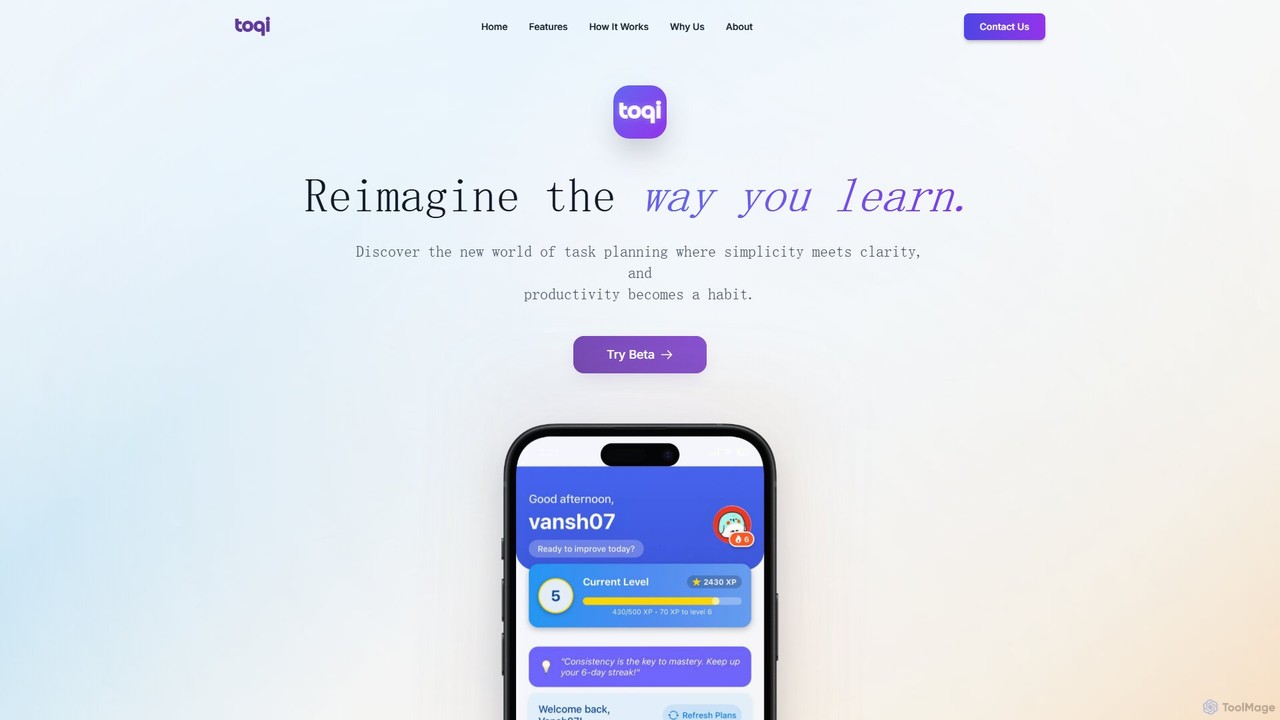
TOQI is an AI-powered adaptive study planner designed to help students learn smarter. It creates personalized, dynamic daily schedules based on your subjects and exam goals. Using techniques like the Pomodoro method and gamification elements such as points and streaks, TOQI transforms studying into an engaging and consistent habit. The intelligent system adapts to your performance, ensuring your study plan is always optimized for maximum focus and efficiency.

Study Planner
Visits 6.9KFavorites 109Likes 99

About Time Management

AI Time Management tools are intelligent applications that automate and optimize how you schedule tasks and manage your day. They leverage machine learning algorithms to analyze your work patterns, prioritize activities, and automatically organize your calendar. This proactive approach helps you focus on high-impact work by reducing the mental load of manual planning. These tools can even predict task durations and suggest the best times to tackle specific activities based on your productivity patterns.

Core Features

  • Intelligent Scheduling: Automatically finds and books available time slots for tasks and meetings.
  • AI-Powered Prioritization: Ranks your to-do list based on deadlines, importance, and custom goals.
  • Productivity Analytics: Provides data-driven insights into your work habits and focus patterns.
  • Automated Time Blocking: Creates a structured daily plan by allocating specific time blocks to tasks.
  • Predictive Task Estimation: Learns from your past performance to more accurately estimate task durations.

Use Cases

These tools are valuable for freelancers managing multiple clients, project managers optimizing team workflows, and executives seeking to protect their focus time. They help individuals and teams move from reactive task-juggling to a proactive, goal-oriented scheduling system, ensuring important work is consistently prioritized.

How to Choose

When selecting a tool, consider its integration capabilities with your existing calendar and apps, the sophistication of its prioritization algorithm, the detail of its analytics reports, and whether its pricing model aligns with your individual or team needs. Also, evaluate the user interface for ease of use in daily planning.

Time Management use cases

1

Automate Scheduling for Freelancers

A freelance designer juggling three client projects uses an AI Time Management tool to manage their complex schedule. The tool syncs with their email and calendar, automatically proposing meeting times to clients based on real-time availability. It also intelligently blocks out 'deep work' sessions for creative tasks, ensuring project deadlines are met without constant manual calendar adjustments. This reduces administrative overhead and prevents double-booking.

2

Optimize Team Workflows for Project Managers

A project manager for a software development team uses an AI tool to plan sprints. The system analyzes each team member's workload, historical task completion times, and current calendar. It then suggests an optimal task distribution and schedule to meet the sprint goal. If a task is delayed, the AI can automatically suggest rescheduling dependent tasks, providing the manager with an early warning and a revised plan.

3

Plan Academic Schedules for Students

A university student uses an AI time manager to balance coursework, exam preparation, and a part-time job. They input all their deadlines and class schedules, and the AI generates a dynamic weekly study plan. It identifies their most productive hours from past study sessions and schedules challenging subjects during those times, helping improve retention and reduce pre-exam cramming.

4

Protect Focus Time for Executives

A busy CEO connects their AI time management assistant to their work calendar. The tool automatically analyzes incoming meeting requests, declining non-essential ones and suggesting alternative times for others to protect large, uninterrupted blocks for strategic work. It also automatically schedules short breaks between back-to-back meetings to prevent burnout, ensuring peak performance throughout the day.

5

Structure a Content Creation Calendar

A content creator plans their weekly video production schedule. The AI tool helps them break down the process into smaller tasks: scripting, filming, editing, and promotion. It then automatically blocks time for each task in their calendar, learning from past projects to estimate durations more accurately. This ensures a consistent publishing schedule and prevents creative burnout by structuring the workflow.

6

Enhance Productivity for Sales Teams

A sales representative uses an AI time management tool to maximize client-facing activities. The tool analyzes their CRM data and automatically schedules follow-up calls and emails at optimal times. It also blocks out time for prospecting and administrative work, ensuring a balanced schedule. By automating the planning process, the representative spends more time selling and less time managing their calendar.

Time Management FAQ

What are AI Time Management tools?

AI Time Management tools are applications that use artificial intelligence to automate scheduling, prioritize tasks, and analyze your productivity. Unlike traditional calendars, they proactively organize your time by learning your work habits, predicting task durations, and intelligently fitting tasks into your schedule to help you achieve your goals more efficiently.

How do I choose the right AI Time Management tool?

To choose the right tool, evaluate these factors:

  • Integrations: Ensure it connects seamlessly with your existing calendar, email, and project management apps.
  • AI Features: Assess the intelligence of its scheduling and prioritization algorithms.
  • Analytics: Check the depth of the productivity reports it provides.
  • User Interface: The tool should be intuitive and easy to use, reducing friction in your daily planning.

What's the difference between an AI Time Management tool and a standard calendar app?

A standard calendar app is a passive tool where you manually input events and tasks. An AI Time Management tool is an active assistant. It automatically schedules tasks from your to-do list, reorganizes your day when conflicts arise, and provides insights to improve your work patterns. Essentially, a calendar records your plan; an AI tool helps create and optimize it.

What are the key features of AI Time Management software?

Key features typically include automated scheduling that finds open slots for tasks, AI-driven task prioritization based on importance and deadlines, time blocking to structure your day, and productivity analytics that offer insights into how you spend your time. Many also offer predictive task duration estimates based on your past performance.

Who can benefit most from using AI Time Management tools?

Professionals with complex schedules, such as freelancers, project managers, executives, and consultants, benefit greatly. They are also highly effective for students managing academic deadlines and anyone looking to move beyond a simple to-do list to a more structured, data-driven approach to personal productivity and achieving long-term goals.