
ToolMage
Sign in

Best 1 Virtual Assistant for Personalization

Popular Virtual Assistant in Personalization include Questie, helping you work more efficiently.

Questie
Paid

Questie

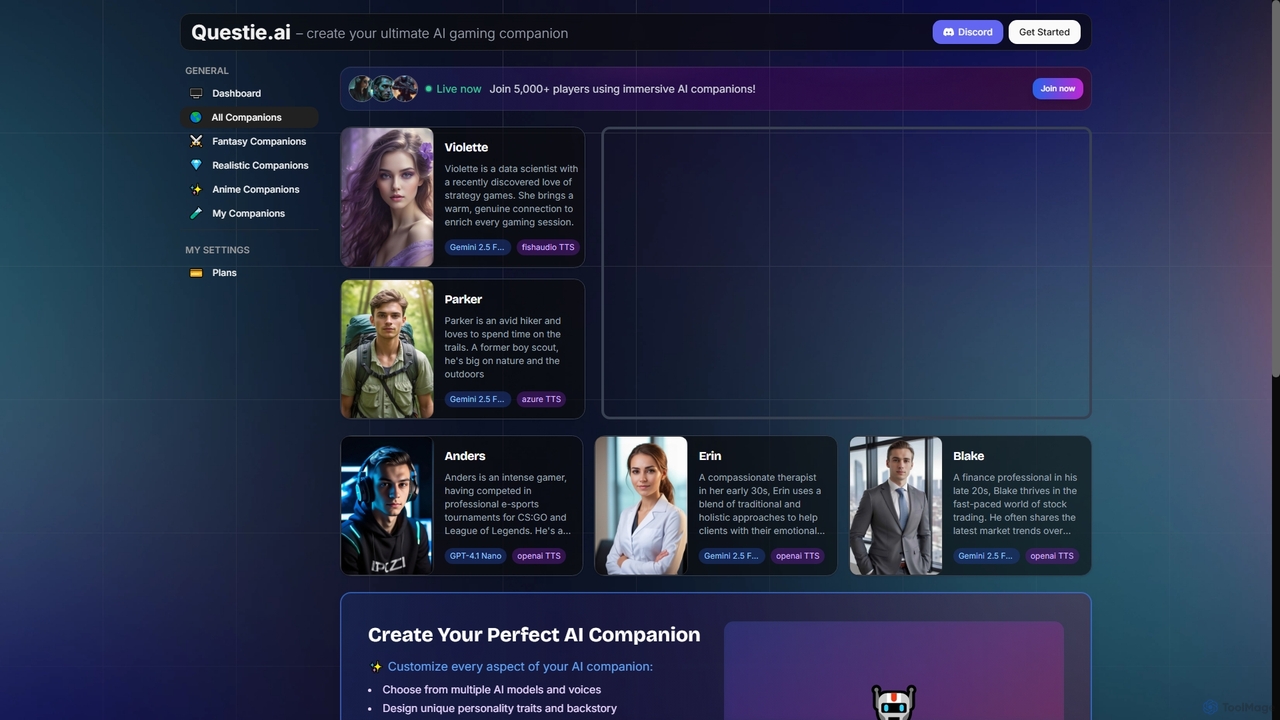
Questie is an innovative AI companion platform designed to revolutionize gaming and roleplay experiences. It offers immersive AI characters with real-time vision, voice chat, and memory, adapting to your gameplay. Users can customize every aspect of their AI companion, from personality and backstory to conversation style, enhancing interactive entertainment.

Interactive Storytelling
Visits 92.6KFavorites 126Likes 131

About Virtual Assistant

A Virtual Assistant is an AI-powered tool designed to understand natural language commands to perform tasks, manage information, and automate personal or professional workflows. Leveraging Natural Language Processing (NLP) and machine learning, these assistants learn user preferences to provide proactive and personalized support. Their primary value lies in streamlining daily operations, from scheduling meetings to retrieving data, effectively acting as a digital extension of the user. This capability for task execution distinguishes them within the broader Personalization category.

Core Features

  • Task Automation: Schedules appointments, sets reminders, and manages to-do lists based on voice or text commands.
  • Natural Language Processing (NLP): Understands and processes user requests in conversational language, enabling intuitive interaction.
  • Information Management: Retrieves information from the web, summarizes documents, and organizes notes or contacts.
  • Integration Ecosystem: Connects with other applications like calendars, email clients, and project management tools to execute tasks across platforms.
  • Proactive Assistance: Anticipates user needs based on context, such as suggesting a time to leave for a meeting based on traffic.

Applicable Scenarios

Virtual Assistants are widely used by busy professionals, executives, and entrepreneurs to manage complex schedules and communications. They are also valuable for freelancers and students seeking to optimize personal productivity. In a team setting, they can assist with coordinating meetings and distributing meeting notes, enhancing overall efficiency.

Selection Criteria

When choosing a Virtual Assistant, consider its integration capabilities with your existing tools. Evaluate the complexity of tasks it can automate and its compatibility across different devices (desktop, mobile). Also, assess its learning capabilities for providing truly personalized assistance and review its data privacy and security policies.

Virtual Assistant use cases

1

Executive Calendar and Communication Management

An executive assistant or manager uses a Virtual Assistant to handle a complex schedule with back-to-back meetings across different time zones. By giving simple commands like 'Find a 30-minute slot for a call with the marketing team next week,' the AI schedules the event, finds a suitable time for all attendees, sends invitations, and books a meeting room. It can also draft follow-up emails based on meeting transcripts, saving hours of administrative work each week.

2

Personal Productivity and Task Organization

A freelancer or student uses a Virtual Assistant to structure their day. They can start by saying, 'What's on my agenda today?' to get a summary of appointments and deadlines. Throughout the day, they can add tasks like 'Remind me to submit the project report by 5 PM' or 'Add 'research new clients' to my to-do list.' The assistant centralizes all tasks and reminders, helping the user stay organized and focused without manually managing multiple apps or lists.

3

Automated Meeting Summarization and Action Items

A project manager connects their Virtual Assistant to their video conferencing tool. After a team meeting, the assistant automatically generates a concise summary of the discussion, identifies key decisions made, and extracts a list of action items with assigned owners and deadlines. This summary is then automatically shared in the team's communication channel. This process eliminates the need for manual note-taking and ensures all team members are aligned on next steps, improving project velocity.

4

Automated Information Retrieval and Briefing

A market analyst uses a Virtual Assistant to stay updated on industry trends. They set up a command like, 'Every morning, give me a summary of the top 5 news articles about AI in finance.' The assistant scans multiple news sources, filters for relevance, summarizes the key points of each article, and presents a consolidated briefing. This automates the time-consuming process of manual research and allows the analyst to start their day with critical insights immediately available.

5

Streamlining Team Collaboration

A remote team uses a Virtual Assistant integrated into their chat platform. A team member can ask, 'What is the status of the Q3 report?' and the assistant, connected to their project management tool, provides an instant update. Another member can say, 'Create a new task to design the presentation slides and assign it to Jane.' The assistant creates the task, assigns it, and notifies Jane without anyone needing to leave the chat window, keeping communication and project tracking seamless.

6

Smart Home and Daily Life Automation

A user integrates a Virtual Assistant with their smart home devices. They can use voice commands to control lights, thermostats, and security systems, such as 'Dim the living room lights to 50%.' In the morning, they can trigger a routine by saying 'Good morning,' which prompts the assistant to read the weather forecast, list the day's calendar events, and start playing a news podcast. This centralizes control over various aspects of daily life, creating a more convenient and connected living environment.

Virtual Assistant FAQ

What is an AI Virtual Assistant?

An AI Virtual Assistant is a software agent that can perform tasks or services for an individual based on commands or questions. It uses Natural Language Processing (NLP) to understand human language and can integrate with various applications to automate actions like scheduling meetings, sending emails, setting reminders, and retrieving information. Unlike simple command-based programs, they learn from user interactions to provide more personalized and proactive support over time.

How is a Virtual Assistant different from a chatbot?

The main difference lies in their scope and purpose. A Virtual Assistant is a broad, personal productivity tool designed to help a specific user perform a wide range of tasks (e.g., managing your calendar, controlling your smart home). A chatbot is typically more specialized and task-oriented, designed to interact with many users within a specific context, such as customer service on a website or answering FAQs. Virtual Assistants are often proactive, while chatbots are usually reactive.

How do I choose the right Virtual Assistant?

To choose the right Virtual Assistant, consider these factors:

  • Integration: Does it connect seamlessly with the apps you use daily (calendar, email, project management tools)?
  • Platform Compatibility: Is it available on all your devices (desktop, mobile, smart speakers)?
  • Task Complexity: Can it handle simple reminders as well as complex, multi-step workflows?
  • Customization: Can you create custom commands or routines tailored to your specific needs?
  • Privacy and Security: How does the provider handle your data? Look for clear privacy policies and security features.
What are the main functions of a Virtual Assistant?

The main functions of a Virtual Assistant revolve around task and information management. Key capabilities include:

  • Calendar Management: Scheduling, rescheduling, and canceling appointments.
  • Communication Handling: Reading and drafting emails or messages, and making calls.
  • Task Automation: Creating to-do lists, setting reminders, and managing project tasks.
  • Information Retrieval: Answering factual questions, performing web searches, and providing real-time updates like weather or traffic.
  • Device and App Control: Interacting with smart home devices and other software applications through integrations.
Who can benefit from using a Virtual Assistant?

A wide range of individuals can benefit from a Virtual Assistant. This includes busy professionals and executives who need to manage complex schedules, entrepreneurs organizing their business operations, and project managers coordinating team tasks. Additionally, students and freelancers can use them to enhance personal productivity and stay on top of deadlines. Essentially, anyone looking to automate repetitive tasks, organize their daily life, and free up mental space for more important activities can find value in a Virtual Assistant.