ToolMage
Sign in

Best 1 Starter Kits AI tools for Saas

Popular Starter Kits AI tools in Saas include StartKit.AI, helping you work more efficiently.

StartKit.AI
Paid

StartKit.AI

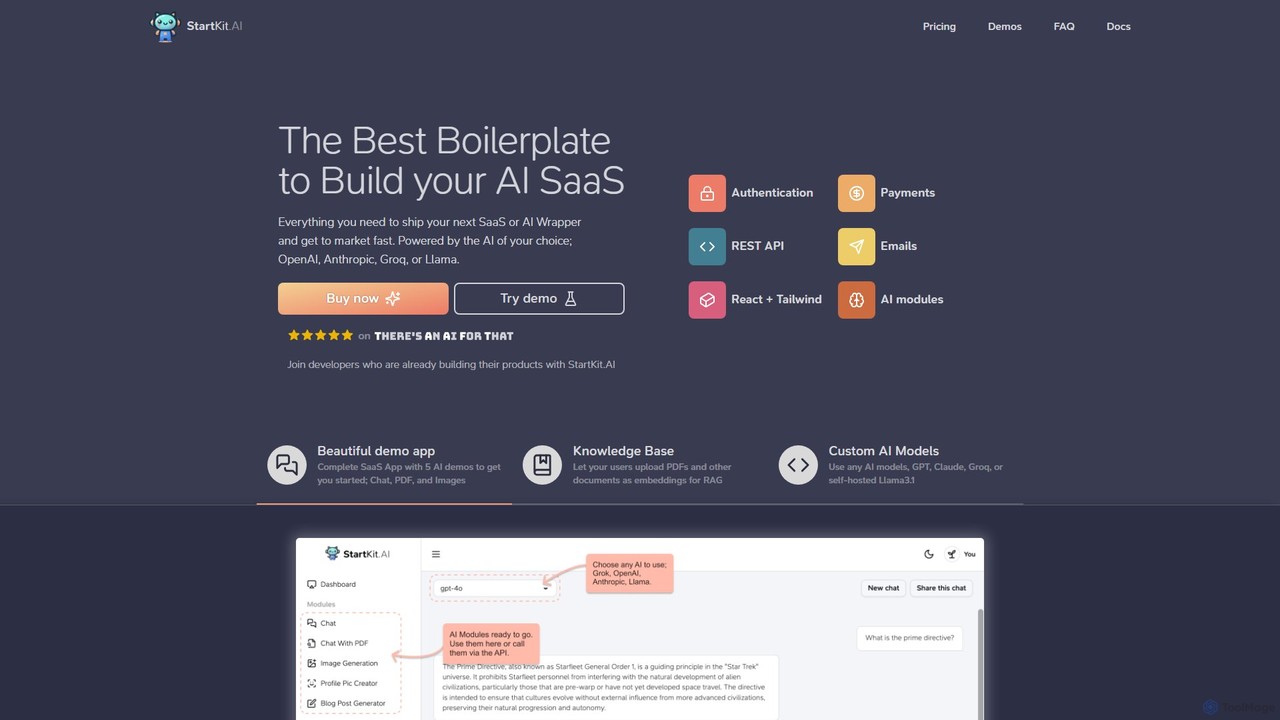
StartKit.AI is a comprehensive boilerplate for developers and entrepreneurs to rapidly build and launch AI-powered SaaS applications. It provides a complete codebase with pre-built modules for user authentication, payments, AI model integration (OpenAI, Anthropic, Groq, Llama), and more. With ready-to-use demo apps and detailed documentation, it significantly reduces development time, allowing you to get your AI product to market faster.

Boilerplate
Visits 5.1KFavorites 103Likes 110

About Starter Kits

Starter Kits are pre-built codebases that provide a foundational structure for developing new applications, particularly SaaS products. They bundle essential, non-core features like user authentication, subscription management, and database setup into a ready-to-deploy package. This allows developers to bypass repetitive setup tasks and focus directly on building the unique features of their product. These kits significantly accelerate the development lifecycle, reduce initial setup costs, and enforce best practices from the start.

Core Features

  • Pre-built Authentication: Includes ready-to-use user registration, login, password reset, and social login functionalities.
  • Subscription & Billing Integration: Pre-configured integration with payment gateways like Stripe or Lemon Squeezy for managing user subscriptions.
  • Database & ORM Setup: Comes with a pre-defined database schema and an Object-Relational Mapper (ORM) for efficient data management.
  • Component Library & UI: Offers a set of styled, reusable UI components for building a consistent user interface quickly.
  • Deployment Configuration: Contains scripts and settings for streamlined deployment to cloud platforms like Vercel, Netlify, or AWS.

Applicable Scenarios

Starter Kits are primarily used by software developers, tech startups, and indie hackers. They are ideal for rapidly building a Minimum Viable Product (MVP) to test a business idea, creating internal tools for a company, or kickstarting freelance projects with a solid, scalable foundation. Agencies also use them to standardize their development process and deliver projects to clients faster.

Selection Criteria

When choosing a Starter Kit, consider the technology stack (e.g., Next.js, Laravel, Django) to ensure it matches your team's expertise. Evaluate the scope of included features against your project's requirements. Also, assess the quality of documentation, the level of community or paid support available, and the licensing model (open-source vs. commercial) to ensure it aligns with your budget and legal needs.

Starter Kits use cases

1

Launch a New SaaS MVP in Weeks

An entrepreneur with a new SaaS idea uses a starter kit to build their Minimum Viable Product (MVP). Instead of spending months building user authentication, payment processing, and a database schema from scratch, they leverage the kit's pre-built components. This allows them to focus 90% of their development time on the core, value-adding feature of their application. As a result, they can launch a functional product to gather user feedback and validate their business model in a fraction of the time it would normally take.

2

Rapid Prototyping for an AI Application

A developer wants to build a specialized AI tool that leverages a third-party API, like OpenAI's GPT. They use a starter kit as the foundation. The kit already handles user accounts, API key management, and a responsive UI. The developer can immediately start working on the core logic: creating the prompt engineering interface, handling the API calls to the AI model, and displaying the results. This approach allows for rapid prototyping and iteration, enabling them to build and test a functional AI-powered application much faster than starting from a blank slate.

3

Building a Custom Internal Tool for a Company

A development team within a large corporation is tasked with building an internal dashboard to track sales data. Instead of starting from scratch, they choose a starter kit. The kit provides a secure authentication layer, ensuring only authorized employees can access the tool. It also offers a pre-built UI component library, which they can customize to match the company's branding. This accelerates the development process, reduces security risks, and allows the team to deliver a polished, functional internal tool in weeks, not months.

4

Accelerating Client Projects for Agencies

A web development agency uses a standardized starter kit for all their new client projects. This ensures a consistent level of quality, security, and performance across their portfolio. When a new project begins, the team doesn't waste time on basic setup. They can immediately begin implementing the client's specific requirements and custom design. This practice not only allows the agency to deliver projects faster and more reliably but also simplifies long-term maintenance, as all projects share a common, well-understood foundation.

5

Learning Full-Stack Development Practices

A junior developer or a student wants to transition from frontend or backend development to a full-stack role. They use a starter kit as a learning tool. By examining the codebase, they can see how a production-ready application connects a frontend framework (like React) with a backend (like Node.js), a database, and an authentication service. It serves as a practical, real-world example of best practices in project structure, security, and deployment, providing a valuable educational resource that goes beyond theoretical tutorials.

6

Validating a Business Idea with a Prototype

A non-technical founder partners with a freelance developer to quickly build a prototype for a new app idea. They use a starter kit to minimize development costs and time. The kit provides the essential user management and a basic UI, allowing the developer to focus solely on implementing the one or two core features that demonstrate the app's value. This functional prototype can then be used to pitch to investors, conduct user testing, and gather crucial feedback to validate the business idea before committing to a larger development budget.

Starter Kits FAQ

What are Starter Kits in software development?

Starter Kits are pre-built, foundational codebases designed to accelerate the development of new applications. They bundle common features like user authentication, payment integrations, and UI components, allowing developers to skip repetitive setup and focus on building the unique aspects of their software. They essentially provide a head start, enforcing best practices and reducing time-to-market.

How do I choose the right Starter Kit for my project?

To choose the right Starter Kit, consider these factors:

  • Technology Stack: Ensure the kit's language and framework (e.g., Next.js, Python/Django, Laravel) match your team's skills.
  • Feature Set: Check if it includes the specific features you need, such as multi-tenancy, social logins, or specific payment gateway support.
  • Documentation & Support: Look for comprehensive documentation and an active community (e.g., on Discord or GitHub) or paid support options.
  • Licensing: Understand the license (e.g., MIT, GPL, Commercial) to ensure it aligns with your project's commercial or open-source goals.
What's the difference between a Starter Kit and a framework (like Next.js or Rails)?

A framework provides the rules, structure, and tools to build an application (like an engine and chassis for a car). A Starter Kit is a nearly complete application built *on top of* a framework. It takes the framework and adds common features like authentication, billing, and a user dashboard, so you start with a functional car that just needs your unique features added, rather than building the car from parts.

Are Starter Kits only for building SaaS applications?

While many Starter Kits are optimized for SaaS (Software as a Service) products by including features like subscription billing, they are not exclusively for SaaS. The foundational elements—such as user authentication, database setup, and a component library—are useful for a wide range of web applications, including internal tools, community platforms, e-commerce sites, or backends for mobile apps. You can often just ignore or remove the SaaS-specific features if they are not needed.

Who should use a Starter Kit?

Starter Kits are ideal for a variety of users:

  • Startups & Entrepreneurs: To quickly launch an MVP and validate a business idea with minimal upfront investment.
  • Indie Developers & Freelancers: To accelerate project delivery and build robust applications without reinventing the wheel.
  • Development Agencies: To standardize their tech stack and deliver high-quality projects to clients more efficiently.
  • In-house Corporate Teams: To rapidly build internal tools and applications with a secure and consistent foundation.