PassGenZ
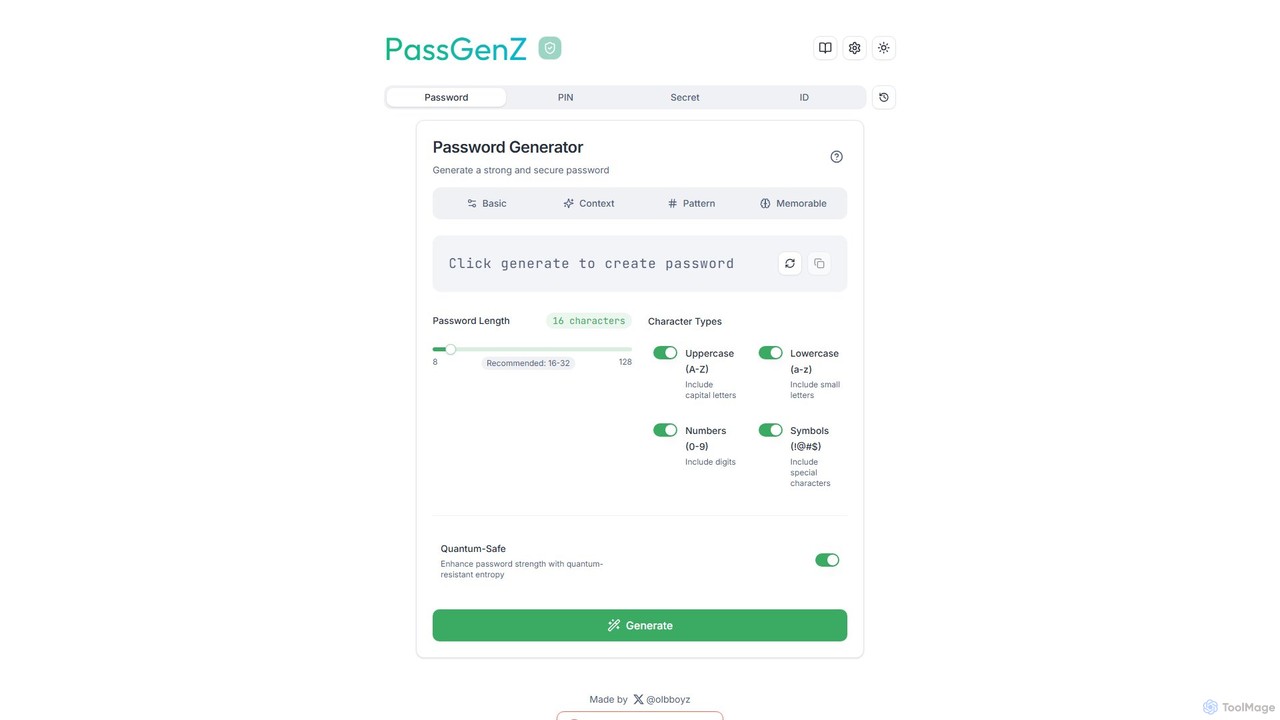
PassGenZ is a free, advanced online password generator that creates strong, secure, and customizable passwords. It features multiple …
PassGenZ is a free, advanced online password generator that creates strong, secure, and customizable passwords. It features multiple generation modes, including memorable passphrases and a unique quantum-safe option for future-proof security. Generate passwords, PINs, and secret IDs instantly in your browser with a focus on privacy and security.
About Password Generator
Password Generators are specialized tools designed to create strong, unique, and random passwords, significantly enhancing digital security. These tools leverage advanced algorithms to generate complex character strings that are difficult for humans or brute-force attacks to guess. By automating the creation of robust credentials, password generators help users protect their online accounts, sensitive data, and digital identities from various cyber threats.
Core Features
- Customizable Parameters: Allows users to define password length, character types (uppercase, lowercase, numbers, symbols), and exclusion rules.
- High Entropy Generation: Employs cryptographic randomness to ensure generated passwords are truly unpredictable and have high entropy.
- Passphrase Generation: Some tools can create memorable yet secure passphrases by combining multiple random words.
- Bulk Generation: Enables the creation of multiple unique passwords simultaneously for various accounts or users.
- Security Auditing: May include features to check the strength and uniqueness of generated passwords against common vulnerabilities.
Use Cases
Password generators are essential for individuals and organizations needing to establish robust security practices. They are widely used when setting up new online accounts, updating compromised or weak passwords, and securing sensitive systems like servers or databases. These tools ensure that every credential is a unique, strong barrier against unauthorized access, reducing the risk of data breaches and identity theft.
How to Choose
When selecting a password generator, consider its customization options for length and character sets, ensuring it meets your specific security policies. Evaluate the randomness source and cryptographic strength to guarantee truly unpredictable outputs. Look for integration capabilities with existing password managers for seamless workflow, and assess whether it offers offline generation for enhanced security. Finally, check for any additional features like passphrase generation or security auditing.
Password GeneratorUse Cases
Creating New Online Accounts
For individuals signing up for new websites or services, a password generator ensures that each new account is secured with a unique, strong password. This practice prevents credential stuffing attacks, where attackers try leaked passwords from one service on others, significantly enhancing overall online security and protecting personal data.
Updating Weak or Compromised Passwords
When a security breach is announced or an old password is identified as weak, users can quickly generate a new, complex password for critical accounts. This proactive measure helps mitigate risks, preventing attackers from exploiting known vulnerabilities and ensuring continued protection of sensitive information across various platforms.
Securing Wi-Fi Networks and Routers
Home and office users can generate highly secure, random Wi-Fi network keys (WPA2/WPA3) to prevent unauthorized access to their networks. A strong, unique password for the router's administrative interface is also crucial, safeguarding network settings from malicious changes and ensuring robust perimeter security.
Protecting Sensitive Documents and Archives
When encrypting confidential files, folders, or backup archives, a password generator creates robust passwords that are nearly impossible to crack. This ensures that even if the encrypted data falls into the wrong hands, the information remains inaccessible without the extremely strong, randomly generated key, thus maintaining data privacy and integrity.
Administering Server and Database Access
IT professionals rely on password generators to create unique and strong credentials for server logins, database access, and other critical infrastructure. This practice minimizes the risk of unauthorized access to vital systems, ensuring that administrative accounts are protected by highly complex and unpredictable passwords, crucial for enterprise-level security.
Generating Temporary Passwords for Guest Users
Organizations often need to provide temporary access to guest users or contractors. Password generators can quickly create secure, time-limited passwords that are unique for each user, ensuring that access is granted only for the necessary duration and purpose, thereby maintaining strict access control and minimizing potential security exposures.