
ToolMage
Sign in

Best 1 Video Repurposing AI tools for Video

Popular Video Repurposing AI tools in Video include InsightVideoIA, helping you work more efficiently.

InsightVideoIA
Freemium

InsightVideoIA

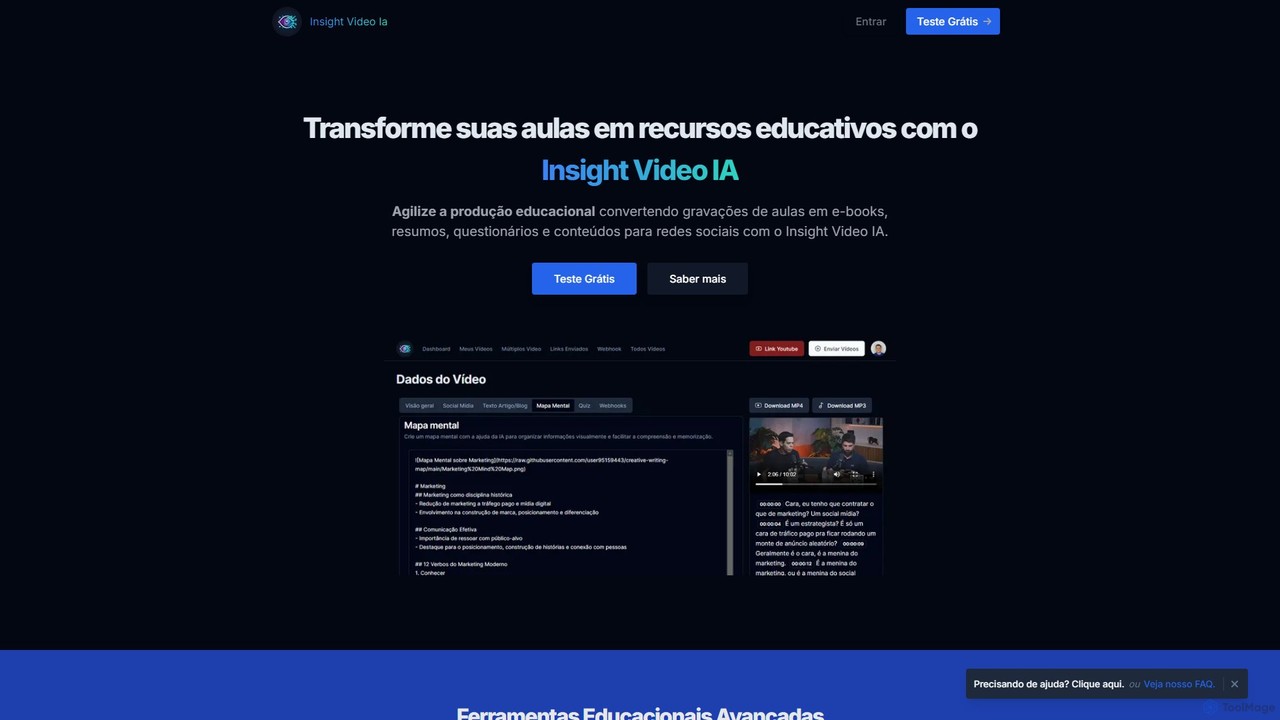
InsightVideoIA is an AI-powered platform designed for educators and content creators to transform video lessons into a variety of educational materials. It automatically converts video content into e-books, summaries, interactive quizzes, mind maps, and social media posts, streamlining the creation of learning resources and enhancing student engagement.

Writing
Visits 7.9KFavorites 120Likes 135

About Video Repurposing

AI Video Repurposing tools are a specialized category of video software that automates the transformation of long-form videos into multiple short, engaging clips. These tools leverage AI to analyze video content, identifying key moments, speakers, and topics to generate shareable snippets automatically. This allows content creators and marketers to maximize the reach of a single piece of content, saving significant time and effort compared to manual editing. The core value lies in efficiently creating a high volume of platform-native content from existing video assets.

Core Features

  • AI Smart Clipping: Automatically identifies and extracts the most engaging or viral-worthy segments from long videos based on content analysis.
  • Auto-Transcription & Captions: Generates accurate, time-synced subtitles and provides a full transcript for content analysis and accessibility.
  • Multi-Format Reframing: Intelligently reformats horizontal videos into vertical (9:16) or square (1:1) aspect ratios, keeping the main subject in focus.
  • Branded Templates: Applies consistent branding elements like logos, custom fonts, progress bars, and color schemes to all generated clips.

Use Cases

These tools are widely used by podcasters, marketers, online course creators, and social media managers. For example, a marketing team can convert a one-hour webinar into dozens of short educational clips for LinkedIn and TikTok, while a podcaster can turn an audio interview into visually appealing video snippets for Instagram Reels and YouTube Shorts.

How to Choose

When selecting a tool, consider the accuracy of its AI clipping and transcription. Evaluate the variety and customization options for templates and branding. Also, check for integration capabilities with social media platforms for direct publishing and review the supported input video lengths and output formats to ensure they meet your needs.

Video Repurposing use cases

1

Turn Podcasts into Viral Social Media Clips

A podcast host records a one-hour interview with an industry expert. Instead of manually scrubbing through the footage to find good quotes, they upload the video to an AI repurposing tool. The AI analyzes the transcript, identifies key questions and impactful statements, and automatically generates 15 short, vertical video clips. Each clip is auto-captioned and branded with the podcast's logo, ready to be scheduled across TikTok, Instagram Reels, and YouTube Shorts, dramatically increasing the podcast's discoverability.

2

Convert Webinars into Educational Micro-Content

A B2B marketing team hosts a 60-minute product demo webinar. To extend its value, they use a video repurposing tool to break it down. The AI identifies distinct feature explanations and Q&A segments, creating a series of 20-30 bite-sized educational videos. These clips are then used in email marketing campaigns, as LinkedIn posts, and on the company's help center, providing ongoing value to potential and existing customers long after the live event has ended.

3

Generate Highlights from Live Streams Automatically

A gaming streamer completes a four-hour live session on Twitch. Manually creating a highlight reel would take hours. By feeding the stream recording into a repurposing tool, the AI automatically detects high-action moments, funny reactions, and key wins. Within minutes, it produces a 'best of' compilation video for YouTube and several individual clips of top moments for Twitter and TikTok, keeping their community engaged even when they are not live.

4

Create Bite-Sized Corporate Training Modules

An HR department has a comprehensive two-hour onboarding video for new employees. To improve knowledge retention, they use an AI tool to segment the video into logical micro-learning modules. The AI breaks the content down by topic, such as 'Company Culture,' 'IT Security Policies,' and 'Benefit Enrollment.' Each segment becomes a standalone 3-5 minute video, making it easier for new hires to digest information and revisit specific topics as needed.

5

Extract Powerful Customer Testimonial Snippets

A marketing agency films a 15-minute video testimonial with a satisfied client. To maximize its impact, they use a repurposing tool to scan the transcript for positive keywords and emotionally resonant phrases. The tool extracts the most powerful 30-second quotes and formats them into branded video snippets. These are then used across the company website, in social media ads, and in sales presentations to provide compelling social proof.

6

Repurpose YouTube Vlogs for Multi-Platform Promotion

A travel vlogger publishes a 20-minute video on YouTube. To drive traffic to the full video, they use an AI tool to create promotional assets. The AI generates a fast-paced 60-second trailer for Instagram Reels and a few 15-second clips of the most scenic shots for Instagram Stories. It also identifies key talking points that can be shared as text quotes on Twitter, creating a cohesive cross-platform promotional campaign from a single source video.

Video Repurposing FAQ

What are AI Video Repurposing tools?

AI Video Repurposing tools are applications that use artificial intelligence to automatically analyze long-form video content and break it down into numerous shorter, shareable clips. Their primary function is to identify the most engaging parts of a video, such as key topics or speaker moments, and reformat them for platforms like TikTok, Instagram, and LinkedIn. This automates a traditionally time-consuming manual editing process, enabling creators to maximize their content's reach with minimal effort.

How do I choose the right AI Video Repurposing tool?

To choose the right tool, evaluate these four key areas:

  • AI Accuracy: How well does the tool identify interesting moments (smart clipping) and how accurate is its transcription for captions?
  • Customization: Does it offer flexible branding options, such as custom logos, fonts, colors, and templates?
  • Workflow Integration: Can it connect to your social media accounts for direct scheduling, or integrate with other tools you use?
  • Pricing and Limits: Consider the pricing model (subscription vs. pay-per-use) and check for limits on video upload length or the number of clips you can export per month.

What's the difference between Video Repurposing tools and standard Video Editors?

The main difference is automation and purpose. A standard video editor (like Adobe Premiere Pro) is a manual tool that gives you precise control over every aspect of editing, requiring significant skill and time. In contrast, an AI Video Repurposing tool is built for speed and efficiency. It automates the clip discovery and creation process. Use a standard editor for a single, highly polished final video; use a repurposing tool to quickly generate dozens of social media clips from that one video.

What are the main benefits of using AI for video repurposing?

The primary benefits are massive time savings and increased content output. AI automates the tedious task of finding and cutting clips, reducing hours of work to minutes. This allows you to consistently publish more content across more platforms, increasing your brand's visibility and engagement. It also ensures your content is formatted correctly for each platform (e.g., vertical video for TikTok), which can improve performance. Finally, it helps you get the maximum return on investment from your long-form content production.

Who should use Video Repurposing tools?

These tools are ideal for anyone who creates long-form video or audio content and wants to promote it on social media. This includes:

  • Content Creators: Podcasters, YouTubers, and streamers who want to share highlights.
  • Marketers: Teams that want to turn webinars, interviews, and events into social media content.
  • Coaches and Educators: Professionals who want to break down courses or training sessions into smaller, digestible lessons.
  • Businesses: Companies looking to create marketing snippets from customer testimonials or town hall meetings.