ToolMage
Sign in

AI TOOL COMPARISON

PyBrain vs TensorFlow

What is the difference, and which fits your workflow? Compare features, usage, pricing models and traffic side by side.

Jump to key differences

Product overview

PyBrain Product overview

PyBrain is a modular and flexible open-source Machine Learning Library for Python. It provides powerful, easy-to-use algorithms for machine learning tasks, with a particular focus on neural networks, reinforcement learning, and unsupervised learning. It is designed to be accessible for beginners while remaining powerful enough for research purposes.

Preview

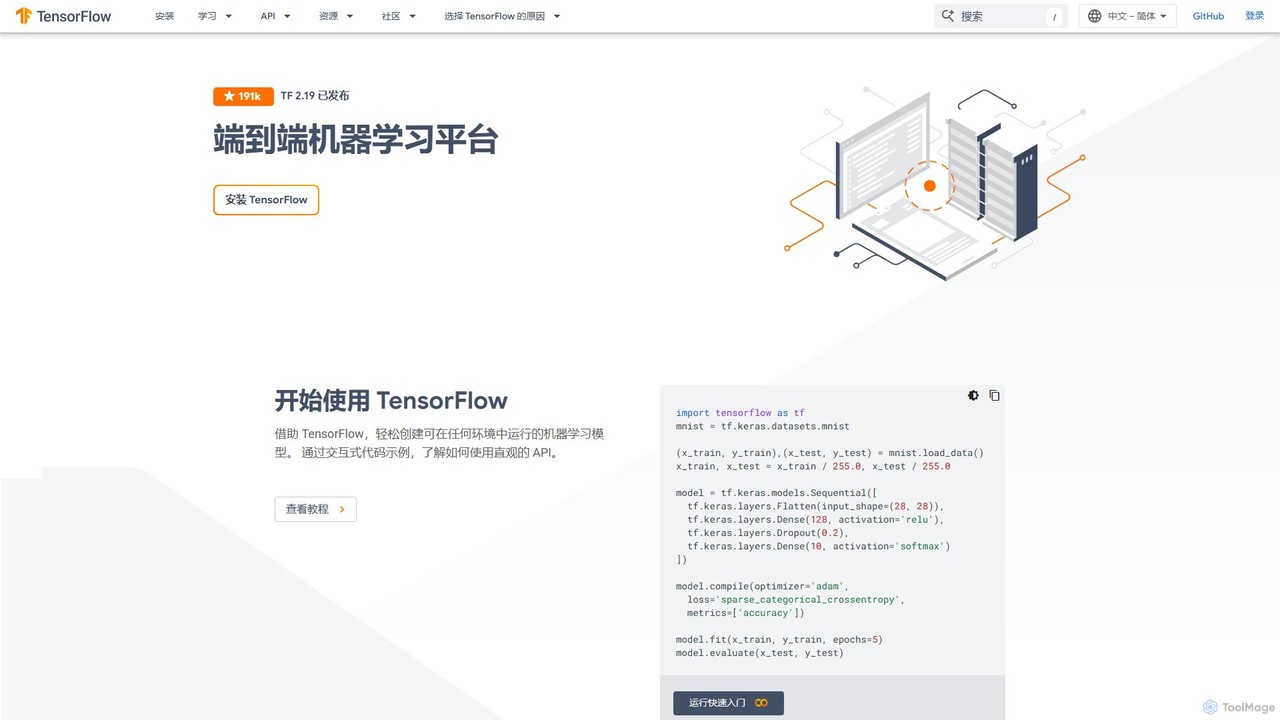
TensorFlow Product overview

TensorFlow is an end-to-end open-source platform for machine learning developed by Google. It provides a comprehensive, flexible ecosystem of tools, libraries, and community resources that lets researchers and developers build and deploy ML-powered applications. From beginners to experts, TensorFlow offers intuitive high-level APIs for easy model building and powerful low-level APIs for advanced research, enabling deployment across servers, edge devices, and browsers.

Preview

Quick facts

Compare product focus, pricing models and audiences. Highlighted rows indicate different listed information; unknown pricing does not mean free.

PyBrain VS TensorFlow — Quick facts
Quick factsPyBrainTensorFlow
Pricing modelFreeFree
Product typeWebWeb
Primary focusLibraries & FrameworksFrameworks
Audience and rolesNo data availableNo data available
CategoriesLibraries & Frameworks · Machine Learning · ResearchFrameworks · Machine Learning · Developer Tools
AddedAug 14, 2025Aug 11, 2025
UpdatedNov 19, 2026Nov 19, 2026

Features, usage and use cases

Explore the listed product descriptions, features and workflows. Taxonomy labels alone are not feature evaluations.

PyBrain

PyBrain (Python-Based Reinforcement Learning, Artificial Intelligence, and Neural Network Library) is a versatile and powerful open-source library for machine learning in Python. Although it is an older library compared to modern frameworks like TensorFlow or PyTorch, it remains a valuable tool for educational purposes and for researchers who need a simple, transparent, and flexible environment for prototyping algorithms, especially in the realms of neural networks and reinforcement learning.

The core philosophy of PyBrain is modularity. It allows users to build complex neural network architectures and training scenarios by connecting simple, reusable components. This makes it an excellent tool for learning the fundamental concepts of machine learning, as users can see how different parts (datasets, networks, trainers) interact. It supports a wide range of network types, including feed-forward networks, recurrent networks, and even Long Short-Term Memory (LSTM) networks, which were a significant feature at the time of its development.

How to use PyBrain

Using PyBrain is straightforward for anyone familiar with Python. The typical workflow involves these steps:

  1. Installation: PyBrain can be easily installed using pip: pip install pybrain.
  2. Import Modules: Import the necessary components from the library, such as buildNetwork for creating networks, SupervisedDataSet for data, and BackpropTrainer for training.
  3. Define Network Architecture: Create a neural network. You can use the buildNetwork shortcut for standard feed-forward networks or manually construct more complex, custom architectures, including recurrent connections.
  4. Create a Dataset: Structure your data into a PyBrain-compatible format. For supervised learning, this is typically the SupervisedDataSet, which holds input and target pairs.
  5. Initialize a Trainer: Choose a training algorithm, such as backpropagation, and create a trainer instance. The trainer connects the network, the dataset, and the learning algorithm.
  6. Train the Model: Call the trainer's train() or trainUntilConvergence() method to start the learning process. The trainer will iteratively adjust the network's weights to minimize the error on the dataset.
  7. Activate and Test: Once trained, use the network's activate() method to make predictions on new, unseen data.

Core Features of PyBrain

  • Neural Networks: Comprehensive support for various network types, including Feed-Forward Networks (FFN), Recurrent Neural Networks (RNN), and Long Short-Term Memory (LSTM).
  • Learning Algorithms: Implements a variety of learning paradigms, including supervised, unsupervised, and reinforcement learning. This includes algorithms like backpropagation, Q-learning, and SARSA.
  • Modularity and Flexibility: Networks, datasets, trainers, and experiments are all distinct objects, allowing for high flexibility in designing and testing custom models and learning scenarios.
  • Python-Native: Written purely in Python, making it easy to read, understand, and extend without needing to compile external code.
  • Educational Focus: Its clear and explicit structure makes it an excellent tool for teaching and learning the underlying principles of neural networks and machine learning.

Use Cases for PyBrain

PyBrain is well-suited for a range of applications, particularly in academic and prototyping contexts:

  • Academic Research: Researchers can quickly implement and test novel network architectures or variations of learning algorithms.
  • Educational Tool: It is widely used in university courses and by individuals to learn the fundamentals of neural networks, backpropagation, and reinforcement learning.
  • Prototyping Simple Models: Developers can use it to build and validate simple models for tasks like time-series prediction, classification, and regression before moving to more complex, production-level frameworks.
  • Reinforcement Learning Experiments: Its built-in support for agents, environments, and RL algorithms makes it ideal for experimenting with tasks like pole-balancing, simple mazes, or other classic control problems.

Advantages of PyBrain

Despite the emergence of newer frameworks, PyBrain holds several key advantages:

  • Simplicity and Intuitiveness: The API is straightforward and easy to grasp, lowering the barrier to entry for beginners in machine learning.
  • Transparency: As a pure Python library, the source code is highly readable, allowing users to delve into the implementation details of algorithms.
  • Open Source: It is completely free to use, modify, and distribute, fostering a collaborative and open environment for learning and research.
  • Lightweight: It has minimal dependencies and is less resource-intensive than larger frameworks, making it suitable for smaller-scale projects and learning environments.

Pricing and Plans

PyBrain is an open-source project distributed under the BSD license. It is completely free for academic, personal, and commercial use. There are no pricing plans, subscriptions, or hidden costs. Development and maintenance are driven by community contributions.

TensorFlow

TensorFlow is a free and open-source software library for machine learning and artificial intelligence. Developed by the Google Brain team, it has become one of the most popular and widely used platforms for building and training neural networks. TensorFlow provides an end-to-end ecosystem that allows developers to easily build, train, and deploy ML models across a wide range of platforms, from large server farms to small edge devices and even web browsers.

The core of TensorFlow is a system for defining and running computations involving tensors, which are multi-dimensional arrays. This dataflow graph-based model allows for immense flexibility and scalability. It is designed to facilitate everything from large-scale research experiments to robust, production-ready applications, powering many of Google's own products like Search, Gmail, and Photos.

How to use TensorFlow

The typical workflow for using TensorFlow involves several key steps:

  1. Installation: TensorFlow can be easily installed using Python's package manager: pip install tensorflow.
  2. Data Loading and Preprocessing: Use the powerful tf.data API to build efficient and complex input pipelines. This allows you to load data from various sources, transform it, and feed it into your model seamlessly.
  3. Model Building: For most use cases, the high-level Keras API (tf.keras) is the recommended way to build models. You can create a simple sequential model or use the more flexible Functional API or Model Subclassing for complex architectures. A basic model might look like this:
    model = tf.keras.models.Sequential([...layers...])
  4. Model Compilation: Before training, you need to configure the learning process using the model.compile() method. Here, you specify the optimizer (e.g., 'adam'), the loss function (e.g., 'sparse_categorical_crossentropy'), and metrics to monitor (e.g., 'accuracy').
  5. Training: Train the model by calling the model.fit() method, passing your training data, number of epochs, and validation data.
  6. Evaluation and Prediction: After training, evaluate your model's performance on a test set with model.evaluate() or make predictions on new data with model.predict().
  7. Deployment: Save your trained model and deploy it using tools from the TensorFlow ecosystem like TensorFlow Serving for production servers, TensorFlow Lite for mobile and embedded devices, or TensorFlow.js for running models in the browser.

Core Features of TensorFlow

  • Flexible Model Building: Offers both the simple and intuitive Keras API for rapid prototyping and low-level APIs for complete control and advanced research.
  • Robust MLOps - Production Ready: TensorFlow Extended (TFX) provides a complete platform for deploying production ML pipelines, managing the entire lifecycle from data ingestion to model deployment and management.
  • Multi-Platform Deployment: Train a model once and deploy it anywhere. TensorFlow Lite optimizes models for on-device inference on mobile (Android/iOS) and embedded systems, while TensorFlow.js enables ML applications to run directly in the browser or on Node.js.
  • Powerful Experimentation Tools: TensorBoard provides a suite of web-based visualization tools to understand, debug, and optimize your TensorFlow programs. Track metrics like loss and accuracy, visualize the model graph, and view histograms of weights and biases.
  • Comprehensive Ecosystem: Includes TensorFlow Hub for a vast repository of pre-trained models, TensorFlow Datasets for easy access to standard datasets, and specialized libraries like TF-Agents for reinforcement learning and TensorFlow GNN for graph neural networks.

Use Cases for TensorFlow

TensorFlow's versatility makes it suitable for a wide array of applications across industries:

  • Computer Vision: Image classification, object detection, image segmentation, and facial recognition.
  • Natural Language Processing (NLP): Sentiment analysis, text generation, machine translation, and chatbots.
  • Reinforcement Learning: Training agents for games, robotics, and optimization problems like Spotify's playlist generation.
  • Audio Processing: Speech recognition, voice synthesis, and music generation with projects like Magenta.
  • Predictive Analytics: Time-series forecasting for finance, demand forecasting for retail, and traffic prediction.
  • Medical Discovery: Analyzing medical images, predicting disease outbreaks, and aiding in drug discovery.

Advantages of TensorFlow

TensorFlow stands out due to its numerous advantages:

  • Scalability: It is designed to run on a wide range of hardware, from single CPU/GPU systems to large, distributed clusters of servers and specialized hardware like TPUs (Tensor Processing Units).
  • Maturity and Reliability: Backed by Google, it is a mature, well-tested framework that powers countless real-world, large-scale applications.
  • Strong Community and Support: It boasts a massive global community of developers and researchers, extensive documentation, tutorials, and professional support.
  • End-to-End Platform: It provides a cohesive and comprehensive set of tools that covers the entire machine learning workflow, reducing the need for multiple disparate tools.

Pricing and Plans

TensorFlow is a completely free and open-source project, distributed under the Apache 2.0 License. There are no fees, subscriptions, or paid tiers for using the software itself. Users are free to download, modify, and distribute it for both research and commercial purposes. Costs associated with using TensorFlow are typically related to the underlying hardware (e.g., purchasing GPUs) or cloud computing resources (e.g., using Google Cloud AI Platform, AWS, or Azure for training and deployment).

Positioning

Their taxonomy shows where the products overlap and where each one has a more distinct focus. Unknown fields are shown explicitly and are never filled with assumptions.

Categories

Shared
Machine Learning
Only PyBrain
Libraries & FrameworksResearch
Only TensorFlow
FrameworksDeveloper Tools

Tags

Shared
data sciencedeep learningmachine learningopen sourcepython
Only PyBrain
educationlibraryneural networkreinforcement learning
Only TensorFlow
computer visiondeploymentgooglemodel trainingneural networksNLP

Audience and roles

Shared
No listed items
Only PyBrain
No listed items
Only TensorFlow
No listed items

Traffic comparison

Traffic is shown on the same scale so differences in market visibility are not visually understated.

How to interpret the traffic data

Both charts share the same months and vertical scale. Each tool identifies its latest reporting month; missing months are left blank, not counted as zero. Regional and source visit counts are estimates calculated from the reported shares.

PyBrain

No data available

TensorFlow monthly traffic:

Latest traffic · 2026-05

Monthly visits
688.6K
Avg. visit duration
1:55
Pages per visit
7.28
Bounce rate
50.17%
Data updated 2026-06-15

Monthly traffic trend

  • 2025-09: 894.8K
  • 2026-01: 811K
  • 2026-02: 769.2K
  • 2026-03: 803.4K
  • 2026-04: 735.1K
  • 2026-05: 688.6K

Top regions

Top 5 countries/regions
Country/regionPercentageEstimated visits
🇺🇸United States40.89%281.6K
🇮🇳India36.17%249.1K
🇩🇪Germany9.26%63.8K
🇳🇬Nigeria6.94%47.8K
🇨🇳China6.74%46.4K

Traffic sources

Source typePercentageEstimated visits
Direct63.62%438.1K
Referral33.53%230.9K
Email2.85%19.6K

Search keywords

tensorboardtensor flowtensorflowtensorflow playgroundword2vec

Community signals

Ratings, comments, favorites, and likes are community signals—not a substitute for product fit.

PyBrain

Rating
No data available
Comments
0
Favorites
164
Likes
163

TensorFlow

Rating
No data available
Comments
0
Favorites
149
Likes
138

PyBrain vs TensorFlow · Comparison FAQ

What do PyBrain and TensorFlow have in common?
Both tools are listed under Machine Learning. These categories indicate overlapping use cases; compare their detailed descriptions for workflows, capabilities and limitations.
Are PyBrain and TensorFlow free?
Listed pricing models: PyBrain — Free; TensorFlow — Free. Missing pricing is not proof of a free plan, and freemium does not mean every feature is free. Check official sites for current plans, limits and trials.
How should I choose between PyBrain and TensorFlow?
The primary listed category is Libraries & Frameworks for PyBrain, and Frameworks for TensorFlow. Compare features, steps and use cases, then verify pricing, data permissions and deployment needs. This page does not include hands-on testing and does not declare a winner from traffic or tags.

Sources and comparison methodology

This page is assembled from ToolMage product listings, taxonomy, traffic statistics and on-site user feedback. It is not a hands-on test or an independent review.

  • Feature and plan descriptions reflect information in the listings, not real-time guarantees. Verify pricing, quotas, availability and privacy terms on the official sites.
  • Traffic uses the reporting months shown. Missing statistics do not mean zero visits, and different periods do not establish growth or superiority. Regional and source visit counts are estimates based on shares.
  • Different tags indicate differences in the listings, not proof that the other product lacks a capability. Ratings, favorites and visits are not used to declare a winner.

Related comparisons