ToolMage
Sign in

Best 1 Animation AI tools for 3D & Design

Popular Animation AI tools in 3D & Design include Turbo Play, helping you work more efficiently.

Turbo Play
Freemium

Turbo Play

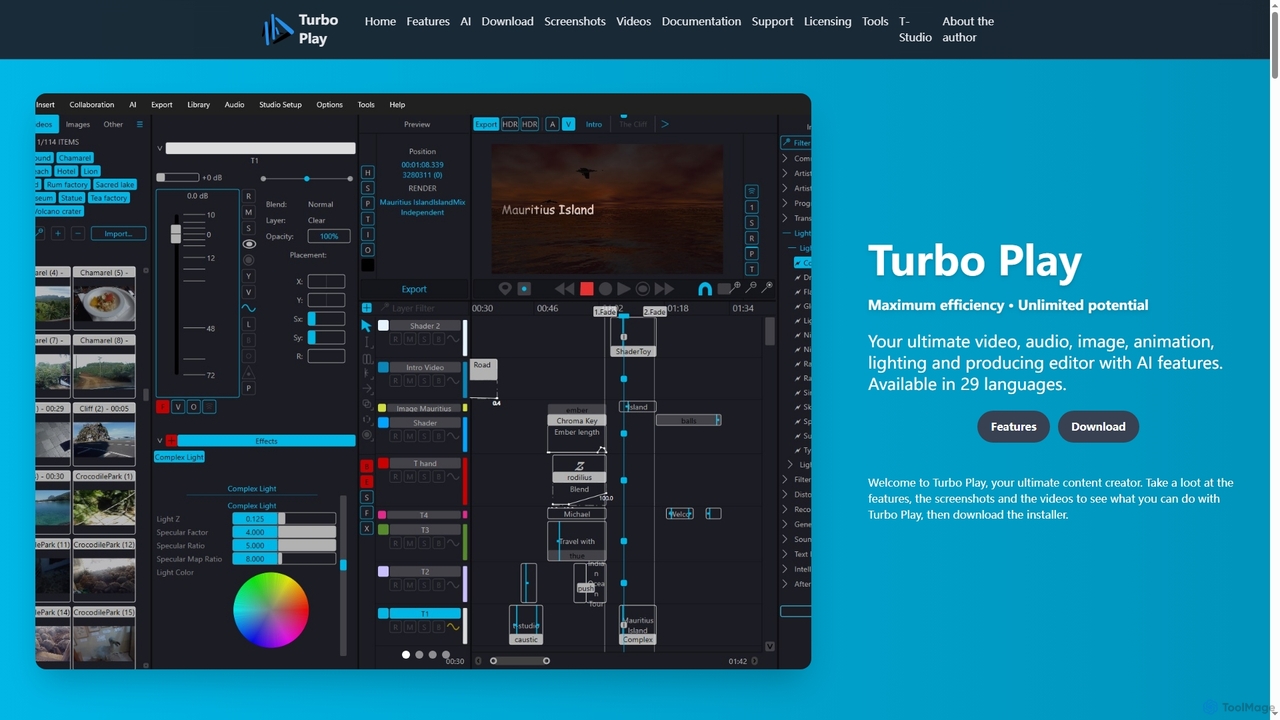
Turbo Play is an all-in-one AI-powered video, audio, image, and animation editor designed for maximum efficiency and unlimited creative potential. It offers a comprehensive suite of tools for content creation, including advanced AI features for background removal, face swapping, speech separation, and text-to-image generation, catering to both casual and professional users across 29 languages.

3D
Visits 4.8KFavorites 132Likes 141

About Animation

AI Animation tools are a category of artificial intelligence-powered software designed to streamline and automate various aspects of the animation production pipeline. These tools leverage advanced machine learning algorithms to generate, modify, and enhance animated content, significantly reducing the time and effort traditionally required. They empower creators, from novices to seasoned professionals, to produce high-quality 2D and 3D animations more efficiently, making complex motion graphics and character movements accessible within the broader 3D & Design landscape.

Core Features

  • Automated Character Rigging: AI can automatically create skeletal structures and controls for 3D models, simplifying the setup for character movement.
  • Motion Generation & Transfer: Generate realistic or stylized character movements from text descriptions, audio, or even transfer motion from video footage onto 3D models.
  • Lip-Sync Automation: Automatically synchronize character mouth movements with spoken dialogue, ensuring natural and expressive speech animation.
  • Style Transfer & Generation: Apply specific artistic styles to existing animations or generate new animated sequences in a desired aesthetic.
  • Scene & Environment Generation: AI assists in quickly creating animated backgrounds, props, and environmental elements based on prompts or existing assets.

Use Cases

AI animation tools are invaluable across various creative industries. Game developers utilize them for rapid prototyping of character animations and environmental effects. Marketing teams create engaging explainer videos and social media content with dynamic motion graphics. Educational content creators produce interactive and visually appealing learning materials, while independent artists can bring their stories to life without extensive manual animation skills.

How to Choose

When selecting an AI animation tool, consider its compatibility with your existing workflow and software (e.g., Blender, Unity). Evaluate the quality and flexibility of its AI-generated outputs, especially for character movements and facial expressions. Assess the range of animation types supported (2D, 3D, stop-motion style) and the level of customization offered. Finally, factor in the learning curve, pricing model, and the community support available for the tool.

Animation use cases

1

Automated Game Character Animation

Game developers can use AI animation tools to rapidly generate diverse character movements, idle animations, and combat sequences. By inputting simple commands or motion capture data, the AI can create smooth, realistic animations for hundreds of characters, drastically cutting down on manual rigging and keyframing time, accelerating game development cycles and allowing for more dynamic in-game experiences.

2

Generating Marketing Explainer Videos

Marketing professionals and small businesses can leverage AI animation to produce compelling explainer videos for products or services. These tools enable quick creation of animated scenes, character interactions, and motion graphics from scripts, making it possible to convey complex ideas visually without needing a dedicated animation studio, thereby saving costs and speeding up content delivery.

3

Creating Engaging Social Media Motion Graphics

Content creators and social media managers can utilize AI animation to design eye-catching motion graphics and short animated clips for platforms like Instagram, TikTok, and YouTube. AI can automate logo reveals, text animations, and dynamic transitions, helping to produce a consistent stream of high-quality, engaging visual content that captures audience attention and boosts brand presence.

4

Rapid Pre-visualization for Film & TV

Filmmakers and production studios can employ AI animation for quick pre-visualization (pre-vis) of scenes, camera movements, and character blocking. This allows directors to experiment with different shots and sequences in a virtual environment before actual filming, providing a cost-effective way to iterate on creative ideas and refine storytelling without committing to expensive production resources.

5

Developing Interactive Educational Content

Educators and e-learning platforms can use AI animation to create dynamic and interactive educational materials. Animated characters can explain complex concepts, illustrate historical events, or demonstrate scientific processes in an engaging manner. This enhances student comprehension and retention, making learning more accessible and enjoyable across various subjects and age groups.

6

Personalized Animated Avatars & Greetings

Individuals and businesses can use AI animation to create personalized animated avatars or custom greeting cards and messages. By uploading a photo or selecting a template, AI can animate facial expressions, body movements, and lip-sync to a custom audio message, offering a unique and memorable way to communicate with friends, family, or customers.

Animation FAQ

What are AI animation tools?

AI animation tools are software applications that use artificial intelligence, particularly machine learning and deep learning, to automate and assist in the creation of animated content. They can generate character movements, synchronize lip-sync, apply artistic styles, and even create entire scenes, significantly simplifying and accelerating the animation workflow for both 2D and 3D projects.

How do AI animation tools differ from traditional animation software?

Traditional animation software relies heavily on manual keyframing, rigging, and frame-by-frame adjustments by human animators. AI animation tools, while often integrated with traditional software, automate many of these labor-intensive tasks. They use algorithms to predict and generate movements, styles, or even entire sequences based on input data, offering speed and efficiency that traditional methods cannot match, especially for repetitive or complex tasks.

What are the key features to look for in AI animation tools?

Key features include automated character rigging for quick setup, advanced motion generation (from text, audio, or video), precise lip-sync capabilities, and robust style transfer options. Look for tools that offer intuitive interfaces, compatibility with industry-standard formats (e.g., FBX, OBJ), and sufficient customization controls to fine-tune AI-generated outputs to your specific creative vision.

Who can benefit from using AI animation tools?

A wide range of users can benefit. Independent content creators and YouTubers can produce professional-looking animations without extensive training. Marketing teams can quickly generate engaging video ads. Game developers can accelerate asset creation. Educators can create dynamic learning materials. Even professional animators can use AI tools to handle tedious tasks, freeing them to focus on creative direction and refinement.

Can AI animation tools create 3D animations, or are they limited to 2D?

AI animation tools are capable of creating both 2D and 3D animations. Many advanced tools specialize in 3D, offering features like automated 3D character rigging, motion capture data transfer onto 3D models, and generative 3D scene creation. However, there are also powerful AI tools designed specifically for 2D animation, assisting with character sprite generation, frame interpolation, and style application for traditional cel animation or motion graphics.