
ToolMage
Sign in

Best 1 Desktop Assistant for Ai Assistant

Popular Desktop Assistant in Ai Assistant include Waylight, helping you work more efficiently.

Waylight

Waylight

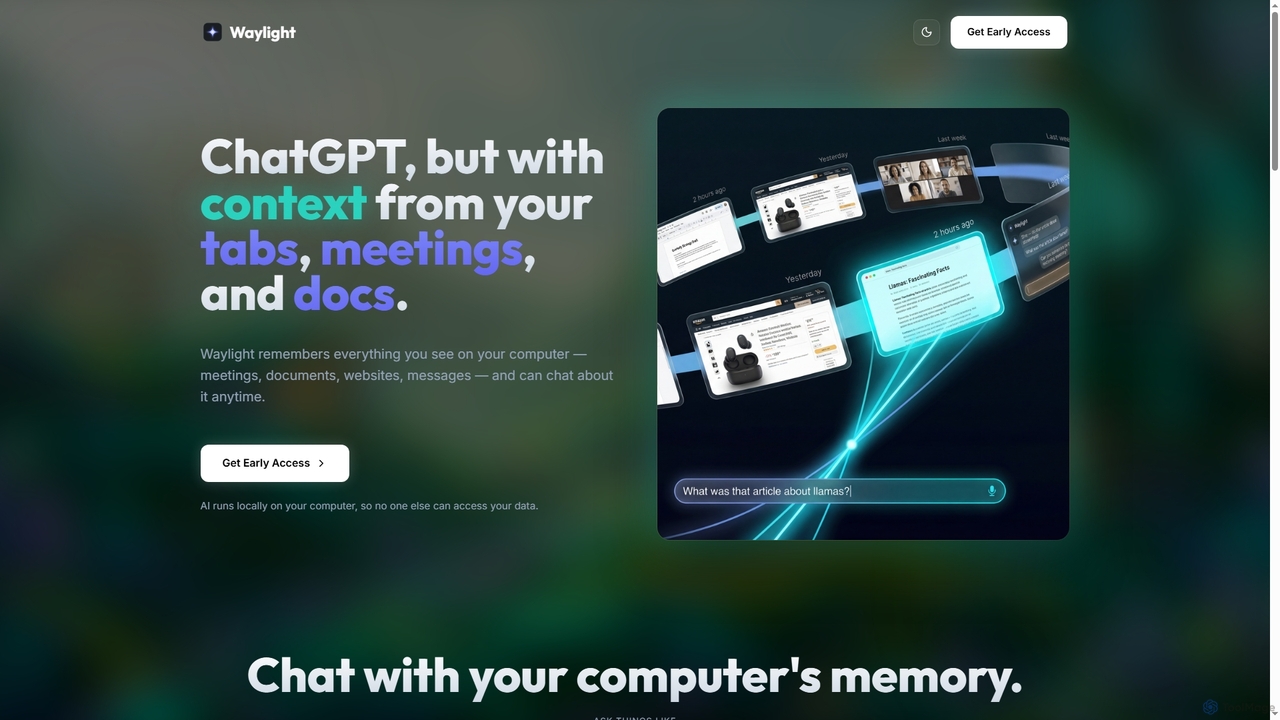
Waylight is a privacy-first AI assistant that runs locally on your computer. It remembers everything you see—meetings, documents, and websites—creating a searchable memory you can chat with, without ever uploading your data to the cloud.

Desktop Assistant
Visits 5.9KFavorites 86Likes 83

About Desktop Assistant

Desktop Assistants are AI-powered tools that integrate directly into your computer's operating system or desktop environment, acting as an always-on digital helper. As a specialized form of AI assistant, they leverage advanced natural language processing and machine learning to provide real-time support, automate routine tasks, and retrieve information without requiring a separate browser or application. This deep integration allows for seamless interaction with local files, applications, and system functions, significantly enhancing personal and professional productivity.

Core Features

  • Real-time Information Retrieval: Instantly access data, answer questions, and summarize content from local files or the web.
  • Task Automation: Automate repetitive desktop actions like file organization, application launching, or data entry.
  • Contextual Assistance: Understand user's current activity to offer relevant suggestions or complete tasks proactively.
  • System Integration: Interact directly with operating system functions, applications, and local documents.
  • Personalized Learning: Adapt to user preferences and work habits over time for more tailored assistance.

Use Cases

Desktop Assistants are invaluable for professionals seeking to streamline their daily workflows and reduce context switching. They are utilized by knowledge workers for quick information lookup, by developers for code snippets and command execution, and by content creators for managing files and research. Their ability to operate in the background makes them ideal for enhancing focus and efficiency across various desktop-centric tasks.

How to Choose

When selecting a Desktop Assistant, consider its integration depth with your operating system and frequently used applications. Evaluate the range of automation capabilities, from simple commands to complex workflows. Prioritize tools with robust data privacy and security features, especially if handling sensitive information. Finally, assess the ease of customization and the assistant's ability to learn and adapt to your specific needs.

Desktop Assistant use cases

1

Automating File Organization

For busy professionals, a Desktop Assistant can automatically sort downloaded files into predefined folders based on file type, source, or keywords in the filename. For instance, all PDF invoices from a specific vendor can be moved to a "Finance/Invoices" folder, saving significant manual effort and ensuring a tidy digital workspace. This frees up time for more critical tasks and reduces the frustration of searching for misplaced documents.

2

Quick Information Retrieval from Local Documents

Researchers or legal professionals often need to quickly find specific information across a vast collection of local documents, emails, and notes. A Desktop Assistant can index these local files and, upon a natural language query, instantly pull relevant paragraphs, summaries, or data points, presenting them directly on the desktop. This eliminates the need to manually open and search through multiple applications or folders.

3

Streamlining Application Workflows

Content creators or developers frequently switch between multiple applications for their projects. A Desktop Assistant can learn these patterns and, with a simple voice command or hotkey, launch a specific set of applications, open relevant project files, and even arrange windows on the screen. This significantly reduces setup time at the start of a work session and maintains focus.

4

Contextual Reminders and Notifications

For individuals managing multiple projects or deadlines, a Desktop Assistant can provide intelligent, context-aware reminders. For example, if you open a specific project folder, the assistant might remind you of an upcoming deadline related to that project or suggest relevant tasks from your to-do list, ensuring important items are not overlooked during focused work.

5

Automating Data Entry and Form Filling

Administrative staff or sales professionals often spend considerable time on repetitive data entry into web forms or spreadsheets. A Desktop Assistant, integrated with the system, can observe these actions and, with user permission, automate the filling of common fields or transfer data between applications, drastically reducing manual input errors and saving hours of repetitive work.

6

Personalized System Optimization

For users who want to maintain optimal system performance without constant manual intervention, a Desktop Assistant can monitor resource usage, suggest closing inactive applications, or even automate routine maintenance tasks like clearing temporary files. It learns user habits to offer personalized recommendations, ensuring the computer runs smoothly and efficiently throughout the day.

Desktop Assistant FAQ

What are Desktop Assistants?

Desktop Assistants are AI-powered software tools designed to integrate deeply with your computer's operating system, providing real-time assistance and automation directly on your desktop. Unlike web-based AI tools, they operate locally, offering quick access to information, automating routine tasks, and interacting with your applications and files without needing a browser. They aim to enhance productivity by acting as a personalized, always-on digital helper.

How do Desktop Assistants differ from general AI Assistants?

While Desktop Assistants are a type of AI Assistant, their key differentiator is deep integration with the desktop environment. General AI Assistants (like voice assistants or chatbots) might be cloud-based or operate within specific apps. Desktop Assistants, however, focus on interacting with local files, applications, and system functions, offering context-aware help directly where you work, minimizing context switching and maximizing local workflow efficiency.

What are the core capabilities of a Desktop Assistant?

Desktop Assistants typically offer capabilities such as real-time information retrieval from local and web sources, automation of repetitive desktop tasks (e.g., file management, application launching), contextual suggestions based on current activity, and direct interaction with operating system features. Many also include personalized learning to adapt to user habits and preferences, making assistance more tailored and proactive over time.

How can a Desktop Assistant improve my daily workflow?

A Desktop Assistant can significantly improve your workflow by automating mundane tasks, freeing up mental space for more complex work. It can help you quickly find information across your local files, manage your digital workspace efficiently, streamline multi-application workflows, and provide intelligent reminders. By reducing manual effort and context switching, it allows you to focus more on creative and strategic tasks, boosting overall productivity.

What should I consider when choosing a Desktop Assistant?

When selecting a Desktop Assistant, prioritize its compatibility with your operating system and essential applications. Evaluate its automation breadth, from simple commands to complex scripting. Consider data privacy and security, especially for sensitive information. Look for customization options, ease of use, and the ability to learn your habits. Finally, check for community support or developer resources if you plan to extend its functionalities.