ToolMage
Sign in

Best 1 3D AI tools for Art & Design

Popular 3D AI tools in Art & Design include EDGE, helping you work more efficiently.

EDGE
Free

EDGE

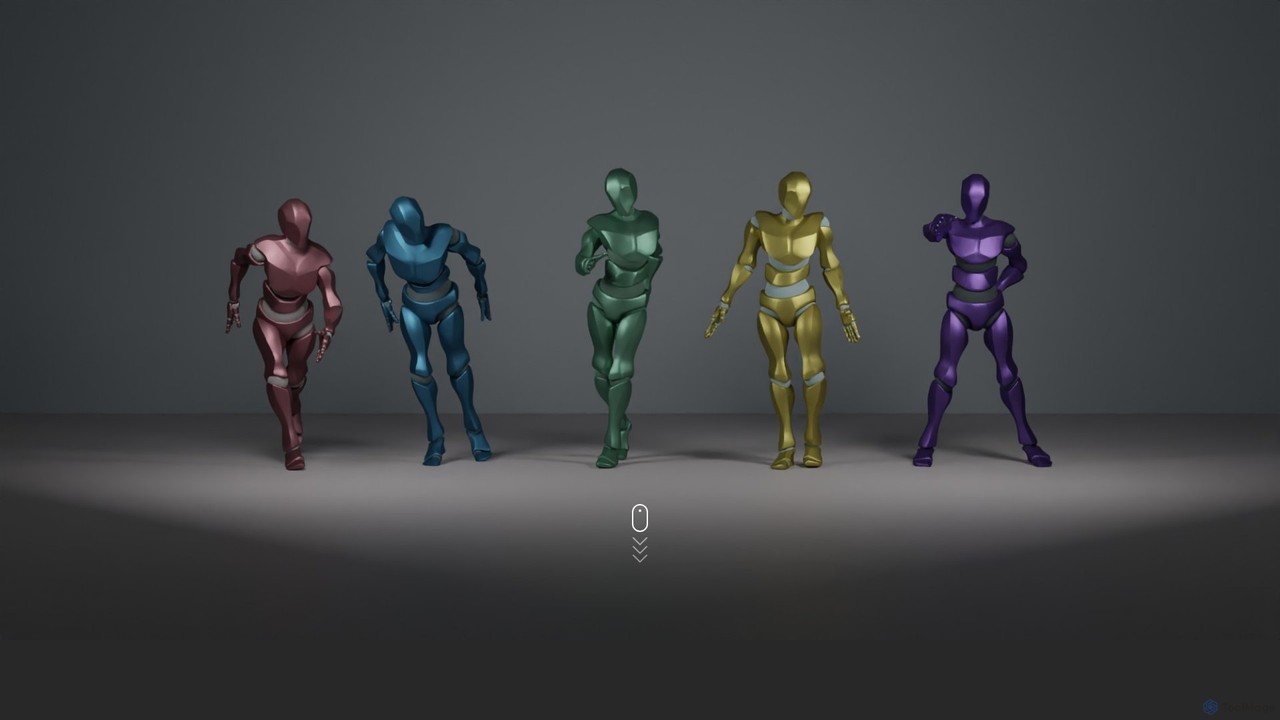
EDGE (Editable Dance Generation from Music) is a powerful AI model that creates realistic, physically-plausible, and editable 3D dance animations from any music track. It uses a transformer-based diffusion model to ensure high-fidelity motion that is perfectly synchronized with the audio.

3D
Visits 6.6KFavorites 188Likes 167

About 3D

3D tools are AI-powered applications designed to create, manipulate, and render three-dimensional digital content. Leveraging advanced algorithms, these tools streamline complex modeling, texturing, animation, and rendering processes. They empower artists, designers, and engineers to visualize and produce immersive digital assets for various industries, significantly accelerating creative workflows within the broader Art & Design domain.

Core Features

  • AI-Powered Modeling: Automatically generates 3D models from 2D images, text prompts, or sketches, reducing manual sculpting time.
  • Smart Texturing & Material Generation: Applies realistic textures and materials with AI, often from simple descriptions or reference images, enhancing visual fidelity.
  • Automated Rigging & Animation: Simplifies character rigging and generates animations based on motion capture data or descriptive inputs, speeding up character development.
  • Optimized Rendering: Utilizes AI to accelerate rendering times and improve output quality, producing photorealistic visuals more efficiently.
  • Scene Reconstruction: Reconstructs 3D environments from multiple photographs or sensor data, enabling digital twins and virtual tours.

Use Cases

AI-powered 3D tools are indispensable across various sectors. Game developers use them to rapidly prototype environments and characters, while product designers leverage them for quick visualization of new concepts. Architects and urban planners employ these tools for creating detailed building models and cityscapes, enhancing their ability to present complex designs.

How to Choose

When selecting an AI 3D tool, consider its primary function (modeling, texturing, animation, rendering), compatibility with existing software workflows, and the level of automation desired. Evaluate the quality of AI-generated outputs, ease of use, and the availability of pre-built assets or templates. Pricing models and community support are also crucial factors for long-term usability.

3D use cases

1

Rapid Prototyping for Product Design

Product designers can use AI 3D tools to quickly generate multiple design iterations from basic sketches or text descriptions. This allows for faster visualization of concepts, material application, and form exploration, significantly reducing the time spent in the initial design phase and accelerating product development cycles.

2

Automated Game Asset Creation

Game developers and 3D artists utilize AI 3D tools to automate the creation of environmental props, character variations, and texture maps. By inputting simple prompts or reference images, they can generate high-quality, game-ready assets, freeing up time for more complex artistic tasks and accelerating game production.

3

Architectural Visualization & Planning

Architects and urban planners employ AI 3D tools to transform 2D blueprints or site photos into detailed 3D building models and urban landscapes. This facilitates immersive client presentations, allows for better spatial analysis, and helps identify design flaws early, enhancing project communication and efficiency.

4

Virtual Reality (VR) & Augmented Reality (AR) Content Generation

Content creators for VR/AR platforms leverage AI 3D tools to efficiently produce immersive 3D environments and interactive objects. These tools can generate complex scenes and assets with optimized polygon counts and textures, ensuring smooth performance and rich visual experiences in real-time applications.

5

Medical Imaging & Simulation

Researchers and medical professionals use AI 3D tools to reconstruct detailed 3D models of organs, bones, or tissues from medical scans (MRI, CT). This aids in surgical planning, anatomical study, and the development of patient-specific prosthetics, providing precise visual data for critical applications.

6

E-commerce Product Photography & Marketing

E-commerce businesses can use AI 3D tools to generate photorealistic 3D models of products from minimal input, eliminating the need for traditional photography. These models can then be used for interactive product viewers, virtual try-ons, and high-quality marketing visuals, enhancing customer engagement and reducing marketing costs.

3D FAQ

What are AI 3D tools?

AI 3D tools are software applications that integrate artificial intelligence to assist in the creation, manipulation, and rendering of three-dimensional digital content. They leverage machine learning algorithms to automate complex tasks such as modeling, texturing, rigging, and animation, making 3D content generation more accessible and efficient for various users, from artists to engineers.

How do AI 3D tools differ from traditional 3D software?

Traditional 3D software relies heavily on manual input and skilled artists for every step of the 3D pipeline. AI 3D tools, however, automate many of these processes. For instance, AI can generate models from text prompts, apply textures intelligently, or even animate characters with minimal user intervention, significantly speeding up workflows and lowering the technical barrier compared to purely manual methods.

What are the main benefits of using AI in 3D content creation?

The primary benefits include significant time savings by automating repetitive tasks like modeling and texturing, increased efficiency in generating multiple design iterations, and enhanced accessibility for users without extensive 3D expertise. AI also enables the creation of highly realistic details and complex animations that would be challenging or time-consuming to achieve manually, boosting overall productivity and creative output.

Who can benefit from using AI 3D tools?

A wide range of professionals can benefit, including game developers, product designers, architects, animators, VFX artists, and marketing professionals. Individuals and small businesses looking to create high-quality 3D content without extensive training or resources will find these tools particularly valuable. They are also useful for educators and students exploring new frontiers in digital art and design.

What should I consider when choosing an AI 3D tool for my projects?

When selecting an AI 3D tool, evaluate its specific capabilities (e.g., strong in modeling, texturing, or animation), its integration with your existing software ecosystem, and the learning curve involved. Consider the quality and realism of its AI-generated outputs, the pricing structure, and the availability of community support or tutorials. Ensure it aligns with your project's scale and specific creative needs.