ToolMage
Sign in

Best 1 Horror Art AI tools for Art

Popular Horror Art AI tools in Art include Screamai, helping you work more efficiently.

Screamai
Freemium

Screamai

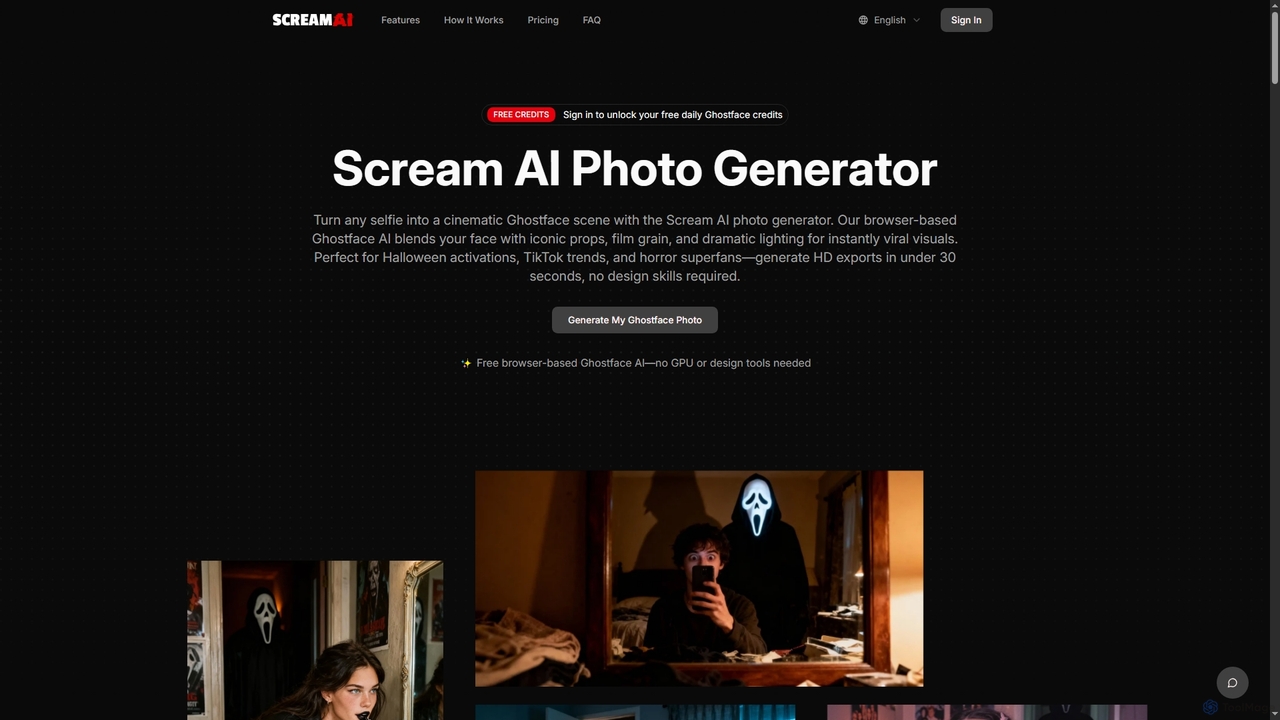
Screamai is an AI-powered photo generator that transforms any selfie into a cinematic horror scene featuring the iconic Ghostface character. It uses a specialized diffusion model to apply dramatic lighting, 90s VHS grain, and eerie atmospheres, allowing users to create viral, high-definition horror portraits in seconds without any design skills.

Horror Art
Visits 5.4KFavorites 125Likes 124

About Horror Art

AI Horror Art generators are specialized tools that use artificial intelligence to create unsettling, macabre, and terrifying imagery. They operate on generative models trained specifically on datasets of dark fantasy, gothic aesthetics, and classic horror tropes to interpret prompts with a sinister twist. These tools empower artists, writers, and developers to rapidly visualize nightmarish concepts, design unique monsters, and craft atmospheric scenes for horror-themed projects. Their key advantage lies in their ability to produce genre-specific visuals that general-purpose image generators may struggle to capture accurately.

Core Features

  • Genre-Specific Models: Access AI models fine-tuned for styles like Lovecraftian, body horror, gothic, or cosmic horror.
  • Atmospheric Controls: Fine-tune elements like ominous lighting, dense fog, and decay textures to create a sense of dread.
  • Creature Design Prompts: Enhanced understanding of monstrous descriptors to generate unique and terrifying creatures.
  • Unsettling Effects: Apply digital distortions, glitch effects, and film grain to add a layer of psychological horror to visuals.

Use Cases

These tools are invaluable for indie game developers creating monster assets, horror authors visualizing book covers, and filmmakers storyboarding scary sequences. They are also widely used by tabletop RPG masters to generate custom visuals for horror campaigns and by musicians in dark genres for creating evocative album art.

How to Choose

When selecting an AI Horror Art tool, evaluate the diversity of its horror-specific styles and models. Assess its ability to interpret complex, nuanced horror prompts and the level of control it offers over atmospheric elements. Also, consider the output resolution and any content restrictions, as horror themes can sometimes border on sensitive material.

Horror Art use cases

1

Designing Creatures for an Indie Horror Game

A solo indie game developer needs to populate their survival horror game with a variety of unique, terrifying monsters. Instead of spending weeks sketching concepts, they use an AI Horror Art generator. By inputting detailed prompts like 'amalgamation of deep-sea life and insectoid limbs, bioluminescent, body horror,' they generate dozens of creature variations in minutes. They can then refine the best designs, create sprite sheets, and quickly build a diverse bestiary, significantly accelerating the pre-production and asset creation phases.

2

Creating a Book Cover for a Gothic Novel

A self-publishing author wants a compelling cover for their new gothic horror novel. They use an AI Horror Art tool to bring their vision to life. They craft a prompt such as 'haunted Victorian mansion on a cliff, ghostly figure in a window, eerie moonlight, detailed oil painting style.' The AI produces several high-resolution options, allowing the author to choose one that perfectly captures the novel's chilling atmosphere without the high cost of hiring a specialist illustrator. This provides a professional-quality cover that attracts readers in the genre.

3

Visualizing Scenes for a TTRPG Campaign

A Game Master (GM) running a Call of Cthulhu campaign wants to immerse their players with custom visuals. Before each session, the GM uses an AI Horror Art generator to create key assets. They generate portraits of unsettling NPCs, depictions of sanity-bending cosmic entities, and atmospheric art for haunted locations described in the story. Showing these unique, AI-generated images during gameplay enhances player immersion and helps convey the specific tone of cosmic dread central to the campaign.

4

Storyboarding a Short Horror Film

A filmmaker is in the pre-production stage of a short horror film and needs to visualize key scenes for the crew. Using an AI Horror Art generator, they input descriptions from the script, like 'first-person view, running down a dark, narrow hospital corridor, flickering lights, shadowy figure at the end.' The tool generates a series of storyboard panels that establish the mood, composition, and lighting. This process allows for rapid iteration of visual ideas and provides a clear visual guide for the cinematographer and production designer.

5

Generating Album Art for a Metal Band

A death metal band needs striking artwork for their upcoming album that reflects their aggressive and dark musical style. They turn to an AI Horror Art tool to explore visual concepts. Using prompts like 'macabre skeletal deity on a throne of bones, baroque style, high contrast, dark fantasy,' they generate a range of powerful images. The band can then select the most fitting artwork and use it for their album cover, merchandise, and promotional materials, ensuring a consistent and professional visual identity.

6

Crafting Themed Social Media Content

A marketing manager for a horror-themed subscription box needs to create engaging content for their social media channels, especially around Halloween. They use an AI Horror Art generator to produce a steady stream of spooky, on-brand images. Prompts like 'a creepy jack-o'-lantern with a sinister grin, dark forest background, cinematic lighting' create eye-catching visuals for posts and stories. This saves time and resources compared to stock photography or custom graphics, while maintaining a unique and cohesive aesthetic.

Horror Art FAQ

What is an AI Horror Art generator?

An AI Horror Art generator is a type of artificial intelligence tool specifically designed to create dark, unsettling, and macabre images from text or image prompts. Unlike general-purpose AI art tools, these generators are trained on datasets rich with horror-related themes, such as gothic architecture, creature designs, and classic horror cinema. This specialization allows them to produce visuals with a genuinely terrifying or eerie atmosphere that accurately captures the nuances of the horror genre.

How do AI Horror Art generators differ from general AI image generators?

The primary difference lies in their training data and model fine-tuning. While a general AI image generator can create horror images, a specialized AI Horror Art tool is explicitly optimized for it. This results in several key advantages:

  • Better Style Adherence: More accurately produces specific horror sub-genres like cosmic horror, body horror, or slasher aesthetics.
  • Enhanced Vocabulary: Better understands horror-specific terminology and concepts in prompts.
  • Consistent Atmosphere: More reliably generates a sense of dread, suspense, or terror in its outputs.

In short, a specialized tool provides more control and consistency for creators working specifically within the horror genre.

How can I write effective prompts for AI Horror Art?

To write effective prompts, be specific and evocative. Start with the core subject, then add details about the atmosphere, style, and composition. Use strong, descriptive adjectives associated with fear and unease, such as 'decrepit,' 'skeletal,' 'shadowy,' 'grotesque,' or 'otherworldly.' Mentioning specific horror sub-genres (e.g., 'Lovecraftian,' 'gothic') or artistic influences (e.g., 'in the style of Zdzisław Beksiński') can guide the AI effectively. Experiment with camera angles ('low-angle shot,' 'found footage style') and lighting ('flickering candlelight,' 'ominous backlighting') to enhance the mood.

Who are AI Horror Art tools best suited for?

These tools are ideal for a range of creators and professionals involved in horror-themed projects. This includes:

  • Indie Game Developers: For creating monster concepts, environmental art, and promotional materials.
  • Authors and Publishers: For designing chilling book covers and interior illustrations.
  • Filmmakers and Storyboard Artists: For visualizing scenes and creature designs.
  • Tabletop RPG Game Masters: For creating custom art for horror campaigns.
  • Musicians: For producing album art for genres like metal, industrial, or dark ambient.
What should I look for when choosing an AI Horror Art tool?

When selecting a tool, consider these four key factors. First, evaluate the range and quality of its pre-trained horror models and styles. Second, test its ability to understand and execute nuanced, complex prompts related to horror concepts. Third, check the available controls for fine-tuning elements like lighting, texture, and color to achieve a specific mood. Finally, review the tool's content policy, as some platforms may have stricter limitations on generating graphic or disturbing imagery.