ToolMage
Sign in

Best 1 Mockup Generation AI tools for Art

Popular Mockup Generation AI tools in Art include Artadum, helping you work more efficiently.

Artadum
Freemium

Artadum

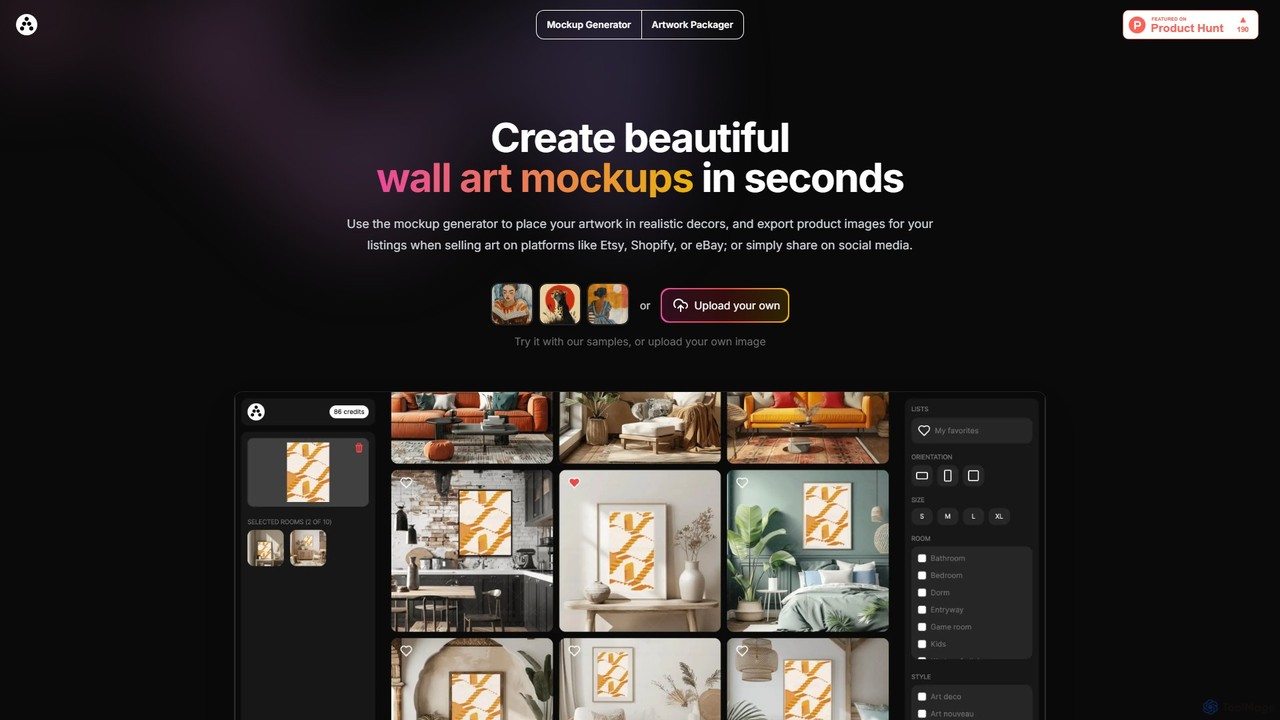
Artadum is an AI-powered mockup generator designed for artists and photographers. It allows users to instantly create beautiful, realistic wall art mockups by placing their artwork in hundreds of diverse room settings. Ideal for creating professional product listings for e-commerce platforms like Etsy, Shopify, and eBay, or for crafting engaging content for social media. The tool offers bulk generation, a wide variety of decor styles, and flexible pricing options to streamline the art promotion process.

Mockup Generation
Visits 7.5KFavorites 121Likes 119

About Mockup Generation

Mockup Generation tools are AI-powered platforms that automatically create realistic visual representations of designs, such as websites, apps, or products, within various contextual scenes. These tools leverage advanced image processing and machine learning to seamlessly integrate user-provided designs into pre-designed templates, simulating real-world usage. They enable designers, marketers, and businesses to quickly visualize and present their concepts in a professional and engaging manner, significantly streamlining the presentation workflow in the broader field of digital art and design.

Core Features

  • Automated Placement: Automatically inserts user designs (e.g., screenshots, images) into selected device or product templates.
  • Contextual Scenes: Offers a wide library of realistic backgrounds, environments, and usage scenarios for diverse presentations.
  • Customization Options: Allows adjustment of angles, lighting, shadows, reflections, and background elements to match design aesthetics.
  • Batch Processing: Generates multiple mockups simultaneously from a single design or applies a design across various templates efficiently.
  • High-Resolution Output: Produces professional-grade images suitable for marketing, portfolios, and client presentations.

Use Cases

Designers use them to showcase app interfaces on various devices, while marketers create compelling product visuals for campaigns. Businesses leverage them for consistent branding across diverse promotional materials.

How to Choose

When selecting a mockup generation tool, consider the variety and quality of available templates, ensuring they align with your specific design needs. Evaluate the customization flexibility, such as control over lighting, angles, and background elements, for tailored presentations. Assess the output resolution and file formats to meet professional standards, and check for batch processing capabilities if you require high-volume generation. Finally, compare pricing models and integration options with your existing design workflow.

Mockup Generation use cases

1

Presenting App UI on Diverse Devices

UI/UX designers can upload their app interface screenshots to an AI mockup generator. The tool then automatically places these designs onto various smartphone, tablet, and desktop mockups, showcasing how the app looks and functions across different screen sizes and operating systems. This helps in client presentations, portfolio building, and internal design reviews, providing a realistic context for the digital product.

2

Creating Product Packaging Visuals

Product designers and marketing teams can use these tools to visualize new packaging designs. By uploading flat artwork, the AI integrates it onto 3D mockups of boxes, bottles, or bags. This allows for quick iteration and realistic previews of how the product will appear on shelves or in advertisements, saving time and cost compared to physical prototyping.

3

Showcasing Website Designs in Context

Web developers and agencies utilize mockup generators to display website layouts within realistic browser windows or on various desktop and laptop screens. This helps clients envision the live site, demonstrating responsiveness and overall aesthetic appeal in a professional setting. It's particularly useful for proposals and portfolio showcases, making abstract designs tangible.

4

Generating Social Media Marketing Assets

Social media managers and content creators can rapidly produce engaging visuals for campaigns. They can take a marketing graphic or ad copy and place it into mockups of social media feeds, digital billboards, or magazine pages. This allows for quick A/B testing of visual concepts and ensures brand consistency across diverse platforms, enhancing campaign effectiveness.

5

Visualizing Brand Identity on Merchandise

Branding agencies and small businesses can apply their logos and brand elements onto mockups of t-shirts, mugs, business cards, or stationery. This helps clients visualize their brand identity in real-world applications, making the branding concept more tangible and impactful. It's an efficient way to present brand guidelines and merchandise designs without physical production.

6

Developing E-commerce Product Previews

E-commerce businesses can generate high-quality product images for online stores without expensive photoshoots. By uploading a product design or a simple image, the AI places it onto realistic mockups of models wearing apparel, products in lifestyle settings, or items on a clean background. This provides diverse visual options for product listings, improving customer engagement and conversion rates.

Mockup Generation FAQ

What are AI Mockup Generation tools?

AI Mockup Generation tools are software applications that use artificial intelligence to automatically create realistic visual representations (mockups) of designs. They take your flat designs, like app screenshots or product labels, and integrate them into pre-designed scenes featuring devices, products, or environments. This process simulates how your design would look in a real-world context, significantly simplifying the visualization and presentation stages for creative professionals.

How do AI Mockup Generators differ from traditional graphic design software?

Traditional graphic design software (like Photoshop) requires manual manipulation, perspective adjustments, and layering to create mockups, demanding significant time and skill. AI Mockup Generators, conversely, automate this process. You simply upload your design, select a template, and the AI handles the complex integration, perspective, and lighting adjustments, producing a realistic mockup in seconds. They focus on speed and ease of use for presentation, rather than detailed design creation.

Who benefits most from using Mockup Generation tools?

A wide range of professionals benefit, including UI/UX designers who need to showcase app interfaces on various devices, product designers visualizing packaging, web developers presenting website layouts, and marketers creating compelling ad visuals. Small businesses and e-commerce entrepreneurs also find them invaluable for generating professional product images and branding materials without the need for expensive photography or advanced design skills.

What features should I look for in an AI Mockup Generator?

Key features to consider include a diverse and high-quality template library that matches your industry needs, robust customization options for adjusting angles, lighting, and backgrounds, and the ability to output high-resolution images in various formats. Look for tools that offer batch processing for efficiency, intuitive user interfaces for ease of use, and integration capabilities with your existing design workflow or cloud storage.

Can AI Mockup Generation tools create custom scenes or only use templates?

Most AI Mockup Generation tools primarily rely on a library of pre-designed templates and scenes, which they use to integrate your designs. However, some advanced platforms offer limited customization within these templates, allowing you to adjust elements like background colors, textures, or even add simple props. While they excel at placing designs into existing contexts, creating entirely custom, from-scratch scenes with unique objects is typically beyond their current scope and remains the domain of 3D rendering software or advanced graphic design tools.