Audio Editing Best in category 1 results Text To Speech AI Tool

Popular AI tools in the Text To Speech field of Audio Editing include AIDubbing, etc., helping you quickly improve efficiency.

Free
AIDubbing

AIDubbing

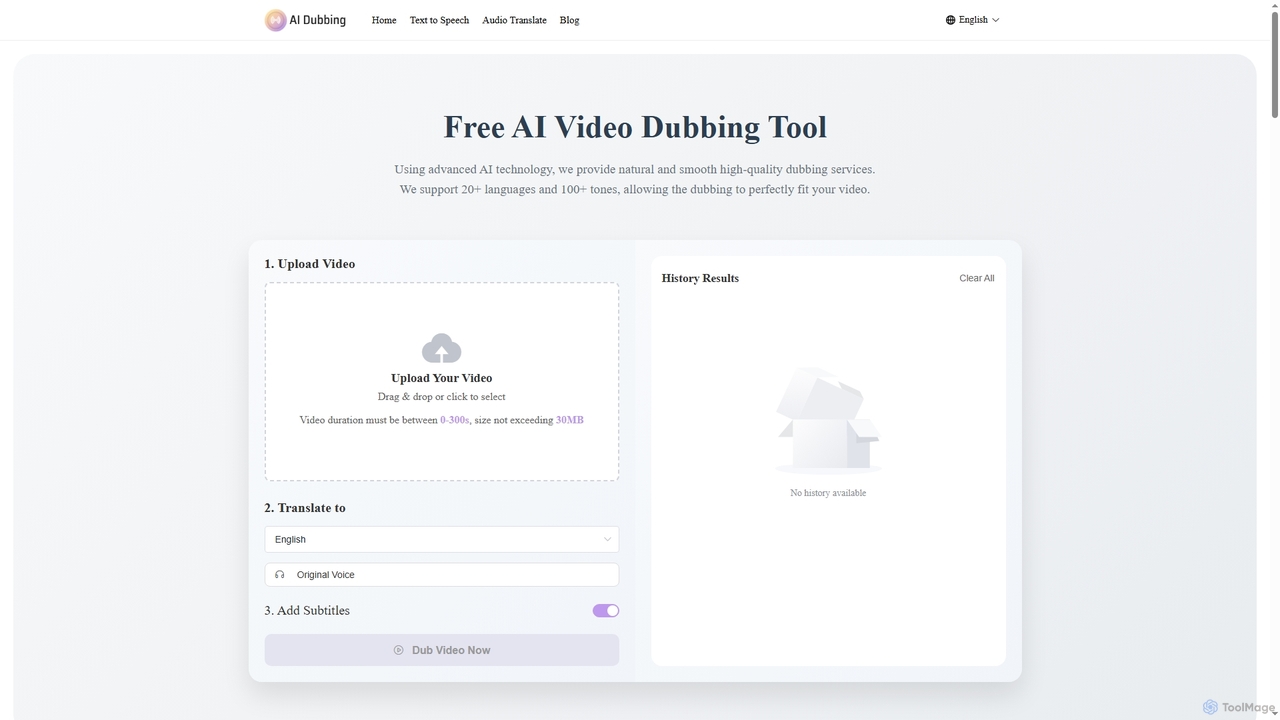
AIDubbing is a free online AI tool for high-quality video dubbing, text-to-speech, and audio translation. It supports over …

202.1K

About Text To Speech

Text To Speech (TTS) tools are a class of AI applications that convert written text into natural-sounding spoken audio. These tools utilize advanced neural networks and deep learning models to synthesize human-like voices, capable of conveying various emotions and intonations. They serve a critical role in making digital content more accessible, automating voiceover production for media, and creating interactive voice experiences. Modern TTS platforms offer a wide selection of voices, languages, and accents, providing high-quality audio output for diverse applications.

Core Features

  • Multiple Voices & Languages: Access a vast library of natural-sounding male, female, and child voices across numerous languages and accents.
  • Voice Customization: Adjust parameters such as pitch, speed, volume, and pauses to fine-tune the audio output.
  • SSML Support: Use Speech Synthesis Markup Language (SSML) for advanced control over pronunciation, emphasis, and intonation.
  • Voice Cloning: Create a digital replica of a specific voice from a short audio sample for personalized narration.
  • Audio Format Export: Download the generated speech in standard formats like MP3 and WAV for easy integration into projects.

Use Cases

Text To Speech tools are widely used by content creators for generating voiceovers for YouTube videos, podcasts, and e-learning materials. In business, they power automated customer service systems (IVR), public announcements, and corporate training modules. Developers integrate TTS APIs to build applications with voice feedback, while publishers use them to efficiently create audiobooks from digital texts, significantly expanding content accessibility.

How to Choose

When selecting a Text To Speech tool, evaluate the naturalness and quality of the voices offered. Consider the breadth of language and accent support required for your target audience. For developers, the availability of a robust API and clear documentation is crucial. Also, assess the pricing model—whether it's based on character count, subscription, or a one-time purchase—and ensure it aligns with your usage volume and budget.

Text To SpeechUse Cases

1

Creating Voiceovers for Video Content

Content creators and marketers often need high-quality narration for their YouTube videos, promotional materials, or online courses. Instead of hiring voice actors or using their own voice, they can use a Text To Speech tool. By simply pasting their script into the application, they can select a suitable voice, adjust the speed and tone, and generate a clean, professional audio file in minutes. This process significantly reduces production time and costs, allowing for faster content creation and ensuring a consistent audio brand across all videos.

2

Developing Audio for E-Learning and Training

Instructional designers and corporate trainers are tasked with creating engaging and accessible learning materials. Text To Speech tools enable them to convert written course content, quizzes, and instructions into audio format. This caters to auditory learners and employees with visual impairments or reading difficulties. They can produce consistent audio across multiple modules and languages without the logistical challenges of scheduling recording sessions with different voice talents, making the development of multilingual training programs more efficient and scalable.

3

Enhancing Accessibility of Digital Content

Web developers and content publishers use Text To Speech technology to make their websites, blogs, and news articles accessible to a wider audience. By integrating a TTS feature, users with visual impairments or those who prefer listening over reading can have the content read aloud to them. This not only improves user experience but also helps organizations comply with accessibility standards like WCAG. It transforms static text into a dynamic, consumable format, increasing engagement and time spent on the page for all users.

4

Automating IVR and Customer Service Voice Prompts

Businesses and call centers need clear and professional voice prompts for their Interactive Voice Response (IVR) systems. Using a TTS tool, a telecom administrator can generate and update these prompts on-demand without hiring a voice actor for every minor change. They can type the new message, such as 'Our holiday hours are from 9 AM to 3 PM,' choose a consistent brand voice, and deploy the new audio file instantly. This provides agility, reduces operational costs, and ensures a consistent and high-quality customer experience across all automated phone interactions.

5

Prototyping Voice User Interfaces (VUI)

Developers and UX designers building applications with voice commands, such as smart assistants or in-car navigation systems, need to test dialogue flows quickly. A Text To Speech API allows them to rapidly prototype and iterate on voice interactions without recording placeholder audio. They can programmatically generate responses, test different voices for their application's persona, and evaluate the user experience in real-time. This accelerates the development cycle and helps in crafting more natural and intuitive voice-based interactions before committing to final voice production.

6

Producing Audiobooks at Scale

Authors and publishing houses can tap into the growing audiobook market without the significant investment required for traditional studio production. By using a high-quality Text To Speech tool, they can convert an entire manuscript into an audiobook. Advanced tools offer multiple narrator voices, allowing for differentiation between characters or sections. This approach provides a cost-effective and rapid way to create an audio version of a book, opening up new revenue streams and making the content accessible to a broader audience, including commuters and those with reading disabilities.

Text To SpeechFrequently Asked Questions