ToolMage
Sign in

Best 1 Multimodal Chat AI tools for Chatbot

Popular Multimodal Chat AI tools in Chatbot include GPT-4o.so, helping you work more efficiently.

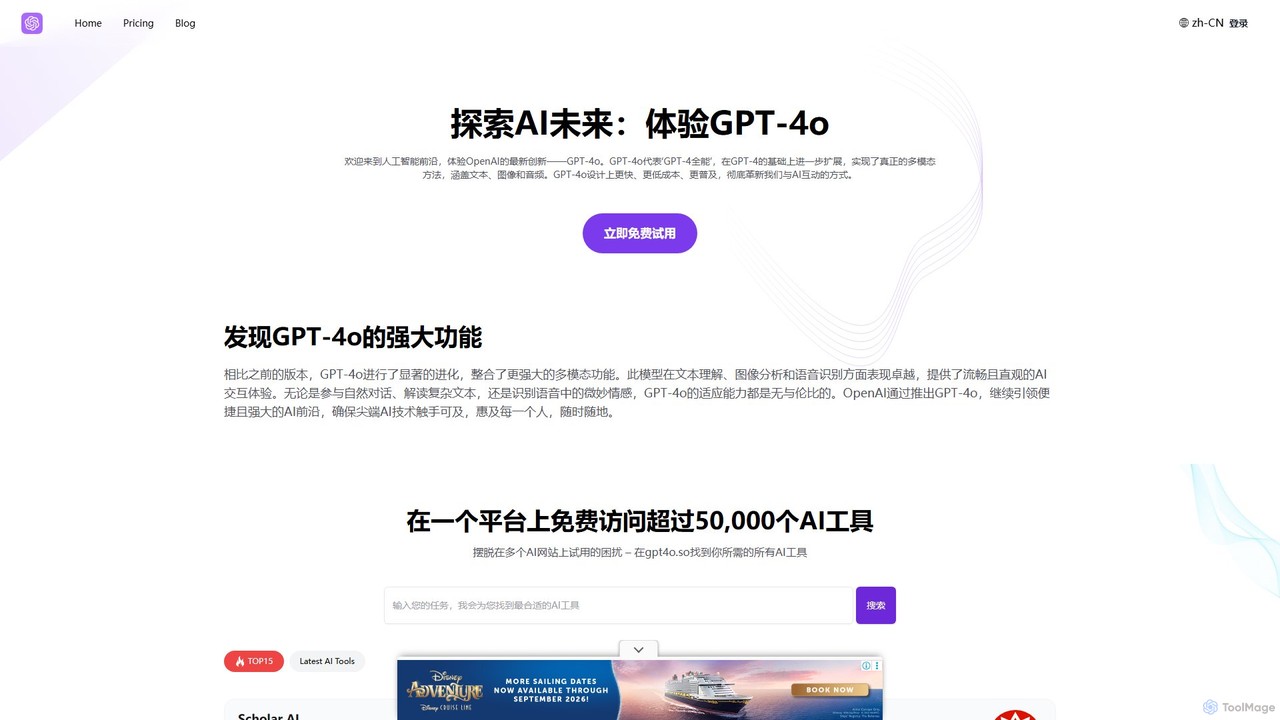
GPT-4o.so
Freemium

GPT-4o.so

GPT-4o.so is a comprehensive AI platform offering free access to OpenAI's advanced multimodal model, GPT-4o. It allows users to interact with AI through text, image, and audio. Beyond a simple chat interface, the platform aggregates over 50,000 other AI tools and provides specialized utilities like citation generators. It operates on a freemium model, providing a gateway for both casual users and professionals to leverage cutting-edge AI.

Multimodal Chat
Visits 7.7KFavorites 97Likes 106

About Multimodal Chat

Multimodal Chat tools are advanced conversational AIs that understand, process, and generate information across multiple formats like text, images, audio, and data files within a single interface. Unlike traditional text-only chatbots, these tools leverage sophisticated models to interpret visual and auditory inputs, allowing for richer, more context-aware interactions. This capability enables users to solve complex problems, such as analyzing a data chart, debugging code from a screenshot, or generating an image from a spoken description. The fusion of different data types makes Multimodal Chat a powerful assistant for creative, analytical, and technical tasks.

Core Features

  • Image Understanding & Generation: Analyze uploaded images or create new visuals based on text or voice prompts.
  • Voice & Audio Processing: Accept voice commands and respond with synthesized speech, or transcribe audio files.
  • Data File Interaction: Upload and analyze data from files like CSVs or PDFs to generate summaries and visualizations.
  • Code Interpretation: Execute code snippets provided by the user and display the output directly in the chat.
  • Document Analysis: Extract and discuss information from uploaded documents, combining text with visual elements.

Use Cases

These tools are widely used by developers for collaborative debugging, by data analysts for interactive data exploration, and by content creators for brainstorming visual concepts. For example, a marketing professional can upload a product photo and ask for ad copy variations, while a student can submit a picture of a diagram for a detailed explanation.

How to Choose

When selecting a Multimodal Chat tool, evaluate the range of supported file types and modalities (e.g., video, audio, specific document formats). Assess the accuracy of its interpretation across different inputs and its ability to integrate with other software via APIs. Also, consider the user interface's ease of use for managing diverse inputs and the platform's privacy policy for handling sensitive data.

Featured tool rankings

Multimodal Chat use cases

1

Interactive Data Analysis and Visualization

A business analyst uploads a CSV file containing quarterly sales data. Instead of writing complex queries, they simply ask the Multimodal Chat, "Show me the sales trend for Product X in Q3 as a bar chart." The AI processes the file, understands the request, and generates a visual chart directly in the conversation, allowing for immediate follow-up questions like "Now, compare this with Product Y." This streamlines data exploration, making it accessible without specialized software.

2

Visual Brainstorming for Creative Projects

A graphic designer is working on a new logo concept. They upload a rough sketch and type, "Generate three variations of this logo in a minimalist style with a blue and gold color palette." The AI analyzes the sketch's structure and generates three distinct logo options. The designer can then refine the results by providing further text or image-based feedback, accelerating the creative iteration process significantly.

3

Code Debugging with Screenshots

A software developer encounters a bug in their application's user interface. They take a screenshot of the error message and the buggy UI element, then upload it along with the relevant code snippet. They ask, "Why is this button not aligning correctly based on this code and screenshot?" The AI analyzes both the visual layout in the image and the logic in the code to identify the potential CSS or JavaScript conflict, providing a targeted solution.

4

Educational Tutoring with Multimedia

A student struggling with a geometry problem takes a photo of the diagram and question from their textbook. They upload the image to the Multimodal Chat and ask for a step-by-step explanation. The AI interprets the shapes and text in the image, breaks down the problem, and provides a detailed solution, even generating new diagrams to illustrate key steps. This creates a highly interactive and visual learning experience.

5

Creating Social Media Content from a Single Prompt

A social media manager needs to create a post for a new product launch. They use a voice command: "Create an Instagram post about our new eco-friendly water bottle. Generate an image of the bottle in a nature setting and write a catchy caption with three relevant hashtags." The AI processes the voice input, generates a suitable image, and writes the accompanying text, delivering a complete, ready-to-publish content package in seconds.

6

Accessibility Assistance for Visually Impaired Users

A visually impaired user receives an image from a friend without a description. They upload the picture to the Multimodal Chat and ask, "Can you describe what's in this image for me?" The AI analyzes the visual content and provides a detailed, descriptive audio response, for instance: "The image shows two people smiling and sitting at a cafe table outdoors, with a city street in the background." This empowers users to understand visual content independently.

Multimodal Chat FAQ

What is Multimodal Chat?

Multimodal Chat is a type of AI conversational tool that can process and respond using various data types, not just text. It can understand inputs like images, voice commands, and data files, and can generate outputs such as pictures, charts, and spoken audio within a single, unified chat interface. Its core strength is combining information from different formats to provide more comprehensive and context-aware answers.

How is Multimodal Chat different from a standard chatbot?

The key difference is the variety of data types they handle. A standard chatbot is primarily text-based, understanding and generating written language. A Multimodal Chat tool expands on this by integrating other "modes" of communication. For example, you can show it a picture and ask a question about it, something a standard chatbot cannot do. This makes multimodal tools more versatile for tasks requiring visual or data context.

What are the main capabilities of Multimodal Chat tools?

Core capabilities typically include:

  • Image Analysis: Understanding the content of uploaded images.
  • Image Generation: Creating new images from text or voice descriptions.
  • Data Interpretation: Reading files like CSVs or PDFs to answer questions or create visualizations.
  • Voice Interaction: Accepting spoken commands and providing audio responses.
  • Code Execution: Running code snippets and showing the results.
How do I choose the best Multimodal Chat tool for my needs?

When choosing a tool, consider the following:

  • Supported Modalities: Ensure it handles the specific file types you work with (e.g., images, audio, PDFs, code).
  • Task Accuracy: Test its performance on tasks relevant to you, such as data analysis accuracy or image generation quality.
  • Integration: Check if it offers APIs to connect with your existing software and workflows.
  • Ease of Use: The interface should make it simple to upload different file types and combine them in your prompts.
Who benefits most from using Multimodal Chat?

A wide range of users can benefit. Developers use it for debugging with code and screenshots. Data analysts use it for quick data visualization without coding. Content creators use it for brainstorming and generating visual and text content simultaneously. Students and researchers use it for interactive learning and data analysis. Essentially, anyone whose work involves switching between text, visuals, and data can find significant value.