
ToolMage
Sign in

Best 1 Automation AI tools for Communication

Popular Automation AI tools in Communication include snazzysend, helping you work more efficiently.

snazzysend
Paid

snazzysend

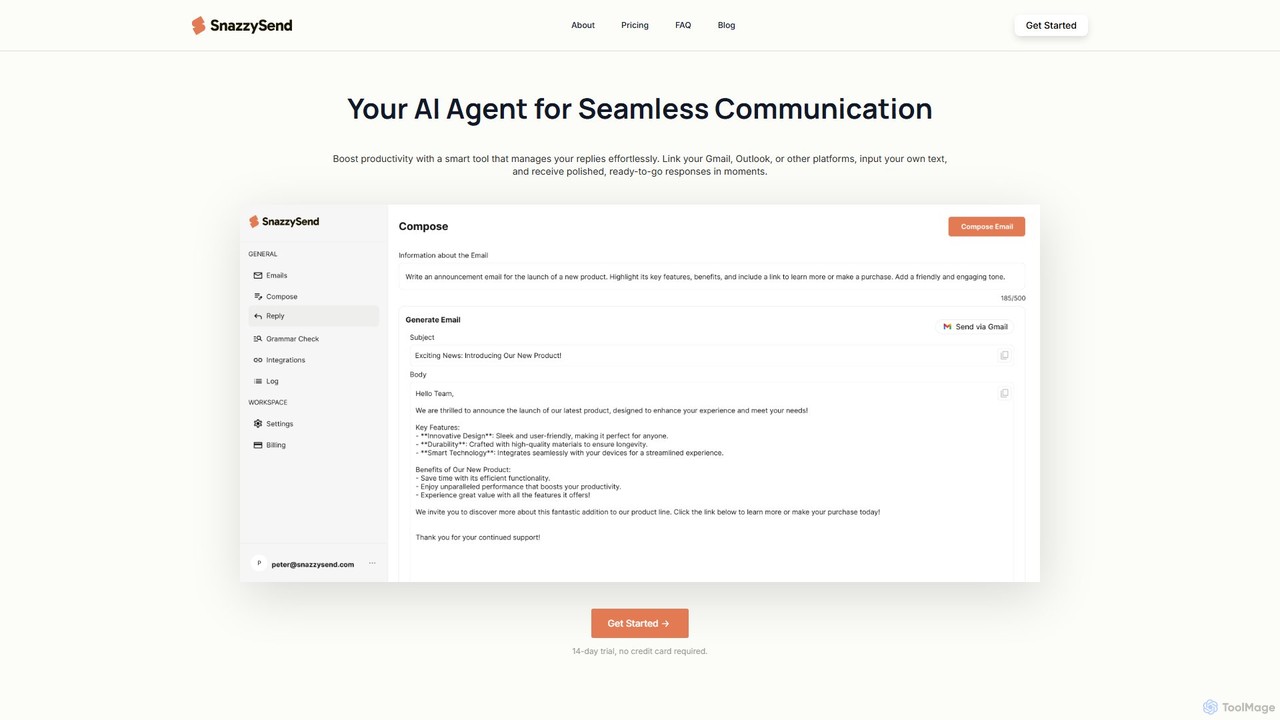
snazzysend is an AI-powered communication assistant designed to streamline your email workflow. It connects with Gmail and Outlook to help you craft polished, human-like replies instantly. By providing simple prompts, you can generate tailored responses, manage communications from a single app, and significantly boost your productivity.

Automation
Visits 4.2KFavorites 103Likes 115

About Automation

Automation AI tools are designed to streamline and execute repetitive or complex tasks within communication workflows. These tools leverage artificial intelligence to understand context, process information, and trigger actions automatically, significantly reducing manual effort and improving response times. They are invaluable for enhancing efficiency across various communication channels, from customer service to internal team coordination.

Core Features

  • Intelligent Task Orchestration: Automatically sequences and executes multi-step communication processes based on predefined rules and AI insights.
  • Natural Language Understanding (NLU): Interprets user intent from text or speech to route inquiries, categorize messages, or generate appropriate responses.
  • Automated Content Distribution: Schedules and publishes content across multiple platforms, adapting formats and timing for optimal engagement.
  • Personalized Outreach at Scale: Generates and sends tailored messages to large audiences based on individual profiles and interaction history.
  • Integration with Communication Platforms: Seamlessly connects with email, CRM, chat, and social media tools to unify workflows.

Applicable Scenarios

Businesses use AI automation to manage high volumes of customer inquiries by automatically routing tickets, providing instant answers to FAQs, and escalating complex issues to human agents. Marketing teams automate personalized email campaigns and social media scheduling, ensuring consistent brand presence and targeted messaging. HR departments streamline onboarding communications and internal announcements, freeing up administrative time.

How to Choose

When selecting an AI automation tool, evaluate its integration capabilities with your existing communication platforms and CRM systems. Consider the complexity of tasks it can handle, from simple rule-based actions to advanced AI-driven decision-making. Assess its scalability to grow with your needs and review its data privacy and security features, especially for sensitive communication data. Finally, compare pricing models and the level of technical expertise required for setup and maintenance.

Featured tool rankings

Automation use cases

1

Automating Customer Support Triage

Customer service teams can deploy AI automation to analyze incoming support tickets or chat messages, identify keywords and intent, and automatically categorize, prioritize, and route them to the most appropriate department or agent. This reduces response times, ensures issues are handled by specialists, and frees up agents to focus on complex problems, leading to higher customer satisfaction.

2

Personalized Email Marketing Campaigns

Marketing professionals utilize AI automation to segment customer lists based on behavior, preferences, and past interactions. The tools then automatically generate and send personalized email sequences, including welcome series, product recommendations, or re-engagement campaigns, at optimal times. This significantly boosts open rates, click-through rates, and conversion metrics compared to generic blasts.

3

Streamlining Meeting Scheduling and Management

Busy professionals and teams can use AI automation to manage their calendars and meeting logistics. The AI can find mutually available times for participants, send invitations, manage RSVPs, and even send reminders or follow-up summaries. This eliminates the back-and-forth of manual scheduling, saving considerable time and reducing scheduling conflicts for all involved parties.

4

Automating Social Media Content Publishing

Social media managers leverage AI automation to schedule posts across various platforms, optimize posting times for maximum audience engagement, and even adapt content formats for different channels. Some advanced tools can also monitor trends and automatically suggest relevant content or adjust the publishing schedule, ensuring a consistent and effective online presence without constant manual oversight.

5

Internal Communication Workflow Automation

Organizations implement AI automation to streamline internal announcements, policy updates, and information dissemination. For instance, new employee onboarding communications can be automatically triggered, or critical alerts can be sent to specific teams based on predefined events. This ensures timely and consistent information flow, reducing miscommunication and improving operational efficiency within the company.

6

Automated Data Entry from Communication Channels

Sales and operations teams use AI automation to extract key information from emails, chat logs, or voice transcripts and automatically update CRM systems, project management tools, or databases. This eliminates manual data entry, reduces errors, and ensures that all relevant customer interactions and details are accurately recorded and accessible, improving data integrity and operational efficiency.

Automation FAQ

What are AI Automation tools in the context of communication?

AI Automation tools in communication are software solutions that use artificial intelligence to perform repetitive, rule-based, or data-driven tasks involved in various communication processes. They go beyond simple scheduling by understanding context and intent to automate actions like responding to emails, routing customer inquiries, scheduling meetings, or publishing social media content, thereby enhancing efficiency and personalization.

How do AI Automation tools differ from traditional automation software?

Traditional automation software often relies on rigid, rule-based scripts that require explicit programming for every scenario. AI Automation tools, however, leverage machine learning and natural language processing to understand nuances, adapt to new data, and make more intelligent decisions without constant human intervention. This allows them to handle more complex, variable, and context-dependent communication tasks more effectively than their traditional counterparts.

What specific communication tasks can AI Automation tools automate?

AI Automation tools can automate a wide range of communication tasks. This includes:

  • Customer Support: Automatically triaging tickets, providing instant FAQ answers, and routing complex queries.
  • Marketing: Personalizing email campaigns, scheduling social media posts, and segmenting audiences.
  • Internal Communications: Distributing announcements, managing onboarding flows, and scheduling team meetings.
  • Data Management: Extracting information from messages to update CRM or project management systems.

How can AI Automation improve communication efficiency for businesses?

AI Automation significantly boosts communication efficiency by reducing manual workload, accelerating response times, and ensuring consistency. It frees up human staff from repetitive tasks, allowing them to focus on strategic initiatives and complex problem-solving. By automating personalized outreach and timely information delivery, businesses can improve customer engagement, streamline internal operations, and maintain a strong, consistent brand voice across all channels.

What should I consider when choosing an AI Automation tool for communication?

When selecting an AI Automation tool, consider its integration capabilities with your existing communication platforms (e.g., email, CRM, chat apps). Evaluate its AI capabilities, such as natural language understanding and machine learning, to ensure it can handle the complexity of your communication tasks. Assess its scalability, ease of use, and the level of customization it offers. Finally, review its security protocols and data privacy policies, especially for sensitive customer information.