ToolMage
Sign in

Best 1 Creative Communities AI tools for Community

Popular Creative Communities AI tools in Community include Civitai, helping you work more efficiently.

Civitai
Freemium

Civitai

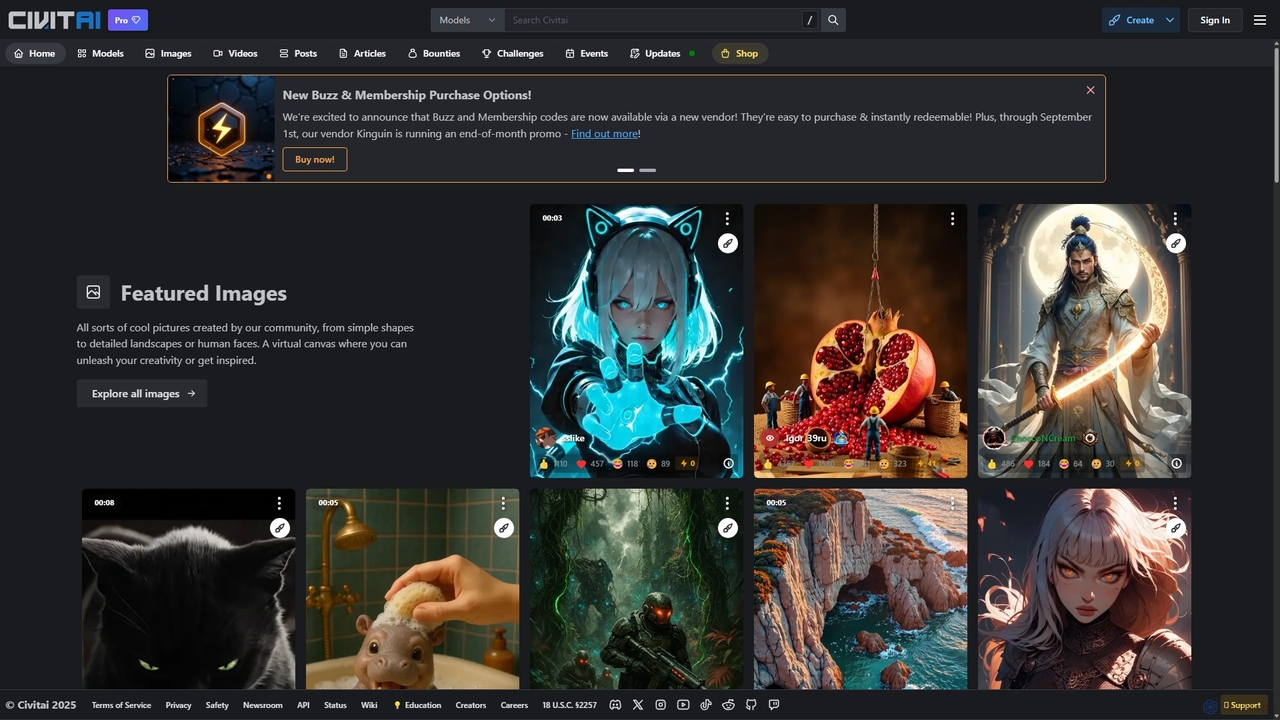
Civitai is the leading hub for the open-source generative AI community. It serves as a massive repository for discovering, sharing, and downloading AI models like Stable Diffusion checkpoints and LoRAs. The platform also features an integrated AI image and video generator, allowing users to create content directly on the site, fostering a vibrant ecosystem for AI artists, developers, and enthusiasts.

Creative Communities
Visits 7.6MFavorites 118Likes 123

About Creative Communities

Creative Communities are online platforms where creators, artists, and developers share their work, exchange feedback, and collaborate on projects. Unlike general forums, these communities are centered around the creation and critique of specific artifacts, such as AI-generated art, design mockups, or code snippets. They serve as vibrant hubs for inspiration, skill development, and discovering emerging trends in creative fields. These platforms often integrate tools for showcasing high-resolution assets and participating in themed challenges.

Core Features

  • Portfolio Showcase: A dedicated space to display creative work in a visually appealing gallery format.
  • Peer Feedback & Critique: Tools for commenting, annotating, and providing constructive criticism on shared projects.
  • Discovery Feeds & Trends: Algorithmic or curated feeds to explore popular work, new styles, and trending creators.
  • Challenges & Contests: Organized events that encourage members to create work based on specific themes or prompts.
  • Resource Sharing: A central place for members to share assets, tutorials, AI prompts, or custom models.

Use Cases

These platforms are essential for digital artists, UI/UX designers, AI art creators, and developers. For instance, an AI artist might use a creative community to test and refine prompts based on peer suggestions, while a web designer could showcase a portfolio to attract freelance clients. They are also valuable for hobbyists seeking inspiration and a sense of community.

How to Choose

When selecting a community, consider its primary focus (e.g., AI art, graphic design, 3D modeling), the quality of moderation, and the activity level of its members. Evaluate the platform's tools for protecting intellectual property and the overall community culture—whether it is more collaborative or competitive—to find the best fit for your goals.

Featured tool rankings

Creative Communities use cases

1

AI Art Prompt Refinement and Discovery

An AI artist posts an image generated with a specific prompt to a creative community. Other members provide feedback on the prompt's structure, suggesting negative prompts or alternative keywords. The artist uses this feedback to iterate and generate improved visuals, while also discovering new prompting techniques from others' work. This collaborative process accelerates skill development and artistic exploration within the niche of AI art.

2

Building a Professional Design Portfolio

A UI/UX designer regularly uploads their latest projects, from wireframes to high-fidelity mockups. They organize their work into a professional portfolio on the platform, which serves as a live resume. Recruiters and potential clients can browse their work, see their design process through project descriptions, and contact them directly for job opportunities, leveraging the community's reputation and visibility.

3

Participating in Themed Creative Contests

A digital illustrator joins a weekly art challenge with a theme like "Cyberpunk Metropolis." They create and submit their artwork, competing with hundreds of other artists. This not only provides a creative spark and a deadline to work towards but also offers significant visibility within the community, as winning or featured entries are promoted on the platform, helping them gain followers and recognition.

4

Sharing and Monetizing Custom AI Models

An AI enthusiast trains a custom Stable Diffusion model (e.g., a LoRA or Checkpoint) for a specific art style. They upload the model to a creative community, providing sample images and usage instructions. Other users can then download and use the model, leaving reviews and sharing their own creations. This builds a reputation for the model creator, who may also receive donations or sell premium versions through the platform.

5

Sourcing Talent for Collaborative Projects

A game developer needs a concept artist for a new indie game. They browse a creative community, filtering by style (e.g., "pixel art," "fantasy"). They review portfolios, assess the quality and consistency of artists' work, and reach out to promising candidates directly through the platform's messaging system to propose a collaboration or freelance contract, streamlining the talent discovery process.

6

Learning New Skills Through Peer Tutorials

A beginner 3D artist wants to learn a specific texturing technique in Blender. Instead of generic video courses, they search within a creative community. They find a detailed project breakdown posted by an experienced artist, complete with node setups, texture maps, and step-by-step explanations, allowing them to learn a practical, industry-relevant skill directly from a peer's shared workflow.

Creative Communities FAQ

What are Creative Communities?

Creative Communities are specialized online platforms for creators to showcase their work, receive feedback, and connect with peers. Unlike general social networks, their primary focus is on the creative artifact itself—be it a piece of AI art, a design, or a piece of code. They function as interactive portfolios, inspiration hubs, and collaborative spaces tailored to the needs of artists and developers.

How do Creative Communities differ from platforms like Instagram or Pinterest?

The key difference lies in intent and functionality. While Instagram and Pinterest are for broad content sharing, Creative Communities are built for deep, constructive interaction around creative work. They offer features like high-resolution image hosting, detailed project descriptions, and focused critique tools that are absent on general social media. The audience is also self-selected for creative professionals and enthusiasts, leading to higher quality feedback.

How do I choose the right Creative Community for my work?

To choose the right community, consider these factors:

  • Niche Focus: Does the community specialize in your field (e.g., AI art, UI/UX, 3D modeling)?
  • Community Culture: Is it supportive and collaborative, or more competitive?
  • Audience: Are the members peers, potential employers, or clients?
  • Platform Tools: Does it offer the features you need, like portfolio building, contest hosting, or asset sharing?

What are the main benefits of joining an AI-focused Creative Community?

Joining an AI-focused creative community offers several unique benefits. You can discover cutting-edge prompting techniques, share and download custom models (like LoRAs or embeddings), get feedback on generations from experienced users, and stay updated on the latest AI models and tools. It provides a dedicated space for the specific challenges and workflows of AI creation, which might be misunderstood in a general art community.

Can I find job opportunities or freelance work on Creative Communities?

Yes, many Creative Communities are active hubs for recruitment and freelance work. Recruiters, art directors, and project managers frequently browse these platforms to find talent. By maintaining a high-quality, up-to-date portfolio and actively participating in the community, you can significantly increase your visibility to potential employers and clients who are specifically looking for creative skills.