ToolMage
Sign in

Best 1 Question & Answer AI tools for Community

Popular Question & Answer AI tools in Community include peeranha, helping you work more efficiently.

peeranha
Free

peeranha

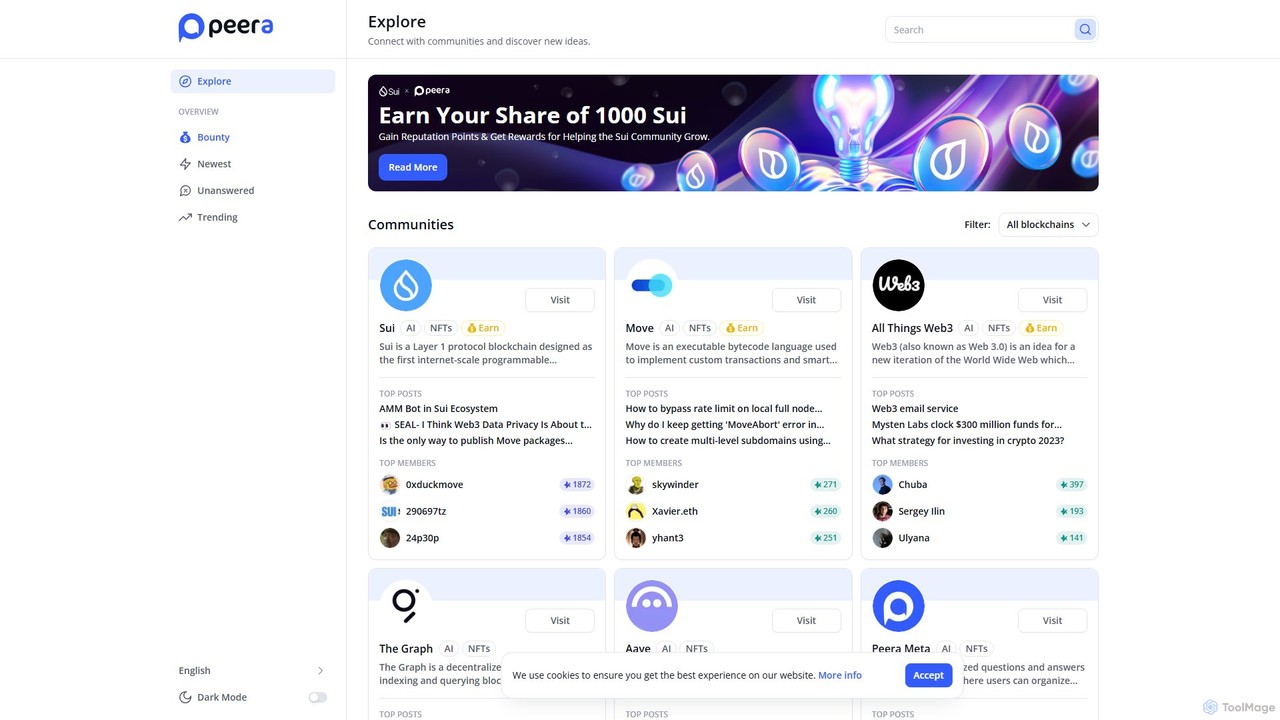
peeranha is a decentralized question-and-answer protocol for the Web3 ecosystem. It connects developers, users, and enthusiasts across various blockchain communities like Sui, Polygon, and The Graph. Users can ask technical questions, share knowledge, and earn cryptocurrency rewards and reputation points for their valuable contributions, fostering a collaborative and incentivized learning environment.

Question & Answer
Visits 3.5KFavorites 134Likes 136

About Question & Answer

AI Question & Answer tools are specialized community platforms that use artificial intelligence to manage, answer, and organize user queries. These tools leverage Natural Language Processing (NLP) to understand the semantic intent behind questions, enabling them to surface relevant existing answers or generate new ones. Their primary value lies in creating a structured, searchable knowledge base from user interactions, which significantly reduces repetitive support inquiries and empowers users to find solutions independently. Unlike traditional forums, they are optimized for a clear question-to-resolution workflow.

Core Features

  • Semantic Search: Understands the meaning behind a query to find the most relevant answers, not just keyword matches.
  • Duplicate Question Detection: Identifies and merges similar questions to create a single, authoritative source of truth.
  • Automated Answer Suggestion: Proposes relevant answers from the knowledge base as a user is typing their question.
  • Expert Routing: Automatically directs new, unanswered questions to the most suitable subject matter expert within the organization.
  • Gamification & Reputation: Encourages participation through points, badges, and leaderboards for users who provide helpful answers.

Use Cases

These tools are widely adopted in customer support to build self-service communities, reducing the load on support agents. Internally, companies use them for knowledge management, creating centralized hubs for HR, IT, or departmental questions. They are also fundamental for developer communities, enabling engineers to share solutions and troubleshoot technical issues effectively.

How to Choose

When selecting a Question & Answer tool, evaluate the accuracy of its search and matching algorithms. Assess its integration capabilities with existing systems like CRM, helpdesks, or communication platforms (e.g., Slack). Consider the robustness of its moderation tools to manage content quality and user behavior. Finally, analyze its analytics features to gain insights into knowledge gaps and community engagement.

Featured tool rankings

Question & Answer use cases

1

Building a Public Customer Support Community

A SaaS company's support team is overwhelmed with repetitive tickets about common product features. By implementing an AI Q&A platform, they create a public community where users can ask questions and answer each other. The tool's AI automatically suggests existing answers as users type, deflecting many potential tickets. It also identifies duplicate questions, merging them to build a clean, canonical knowledge base. As a result, the company sees a 40% reduction in common support tickets within three months, freeing up agents to focus on complex issues and improving overall customer satisfaction.

2

Internal Knowledge Sharing for HR and IT

A large enterprise struggles with employees constantly asking HR and IT the same questions about benefits, policies, and software access. They deploy an internal Q&A platform integrated with their intranet. Employees can now search for answers or ask new questions. The platform's AI routes technical questions to IT and policy questions to HR. Over time, it becomes the single source of truth for internal queries. This reduces internal emails and support tickets by over 50% and significantly speeds up the onboarding process for new hires, who can find most of their initial questions answered on the platform.

3

Powering a Developer Community for an API

A technology company releases a new API and needs to support a growing community of developers. They use an AI Q&A tool to create a dedicated developer hub. Developers can post technical questions, share code snippets, and report issues. The platform's semantic search helps users find solutions to similar problems encountered by others, preventing duplicate support requests. The gamification system, with reputation points and badges for top contributors, encourages expert users to help their peers. This fosters a vibrant, self-sustaining community and establishes the platform as the primary resource for API documentation and support.

4

Managing Student Questions in Online Courses

An e-learning platform hosts thousands of students who frequently ask similar questions about course content and assignments. To manage this, they integrate an AI Q&A tool into each course page. When a student starts typing a question, the tool surfaces existing answers from instructors and fellow students. This provides immediate help and prevents instructors from answering the same query multiple times. The platform also allows students to upvote helpful answers, pushing the best solutions to the top. This creates a dynamic, peer-supported learning environment and saves instructors significant time on administrative tasks.

5

Aggregating Product Feedback and Feature Requests

A product management team uses a Q&A platform as a primary channel for user feedback. Instead of a simple suggestion box, users post their ideas as questions, such as "Have you considered adding a dark mode?" Other users can upvote these questions, providing the product team with clear, quantitative data on which features are most in demand. The team can then mark questions with statuses like 'Planned' or 'In Development', keeping the community informed of the product roadmap. This structured approach turns a chaotic feedback stream into an organized and actionable resource for product planning.

6

Facilitating Pre-Sales Technical Inquiries

A company selling a complex technical product finds its sales team spending too much time answering repetitive pre-sales questions. They set up a public-facing Q&A community where prospects can ask technical questions. The platform allows sales engineers to answer a question once, creating a public resource for all future prospects. The AI search ensures that potential customers can easily find answers to common questions about integration, security, and compatibility. This not only saves the sales team's time but also builds trust and demonstrates the company's expertise, helping to shorten the sales cycle.

Question & Answer FAQ

What are AI Question & Answer tools?

AI Question & Answer (Q&A) tools are software platforms designed to create structured, searchable knowledge bases from user-generated queries. They use Natural Language Processing (NLP) to understand the intent of a question and match it with the most relevant existing answer. Unlike simple forums, their primary goal is to resolve queries efficiently by preventing duplicate questions and highlighting the single best answer. They are commonly used to build self-service customer support communities, internal knowledge hubs, and developer forums.

What is the difference between a Q&A platform and a traditional forum?

The primary difference lies in their structure and purpose. A Q&A platform is optimized for finding the single best answer to a specific question, creating a structured knowledge base. A traditional forum is designed for open-ended discussions and conversations, where multiple opinions and ongoing dialogue are encouraged. Key differences include:

  • Goal: Q&A platforms aim for resolution and knowledge capture. Forums aim for discussion and community engagement.
  • Structure: Q&A sites have a clear question-and-answers format, often with a system to mark a 'best' or 'accepted' answer. Forums use threaded conversations that can branch off in many directions.
  • Content Discovery: Q&A platforms use semantic search to help users find existing answers, while forums are typically navigated chronologically or by topic threads.
How do I choose the right AI Q&A tool?

Choosing the right tool depends on your specific needs. Consider these key factors:

  • Search & AI Quality: Evaluate how well the tool's semantic search understands user queries and how accurately it detects duplicate questions. This is crucial for user experience.
  • Integration Capabilities: Check if it can integrate with your existing workflow tools, such as Slack for notifications, Zendesk for ticket creation, or a CRM for user data.
  • Moderation and Content Management: Assess the tools available for community managers to moderate content, manage users, and maintain the quality of the knowledge base.
  • Analytics and Reporting: Look for a platform that provides insights into search trends, unanswered questions, and community engagement levels to help you identify knowledge gaps.
What are the key features of modern Q&A tools?

Modern AI Q&A tools go beyond simple question posting. Key features often include:

  • Semantic Search: Uses AI to understand the context and intent of a query, delivering more accurate results than keyword-based search.
  • Duplicate Detection: Automatically identifies when a user is asking a question that has already been answered and directs them to the existing thread.
  • Gamification: Incorporates points, badges, and leaderboards to incentivize user participation and reward helpful contributions.
  • Expert Identification and Routing: Analyzes content to identify subject matter experts within the community and can route new questions to them.
  • Analytics Dashboard: Provides data on popular topics, unanswered questions, and user engagement to help improve the knowledge base.
Who can benefit from using an AI Q&A tool?

A wide range of roles and departments can benefit from these tools. Customer Support Teams use them to build self-service communities and reduce ticket volume. Community Managers leverage them to foster engagement and identify key contributors. Product Managers use them to gather structured feedback and prioritize feature requests. Internal Communications and HR Teams deploy them to create centralized knowledge bases for employee questions, streamlining internal support and onboarding processes.