ToolMage
Sign in

Best 1 Machine Learning AI tools for Computer Vision

Popular Machine Learning AI tools in Computer Vision include Unitlab, helping you work more efficiently.

Unitlab
Paid

Unitlab

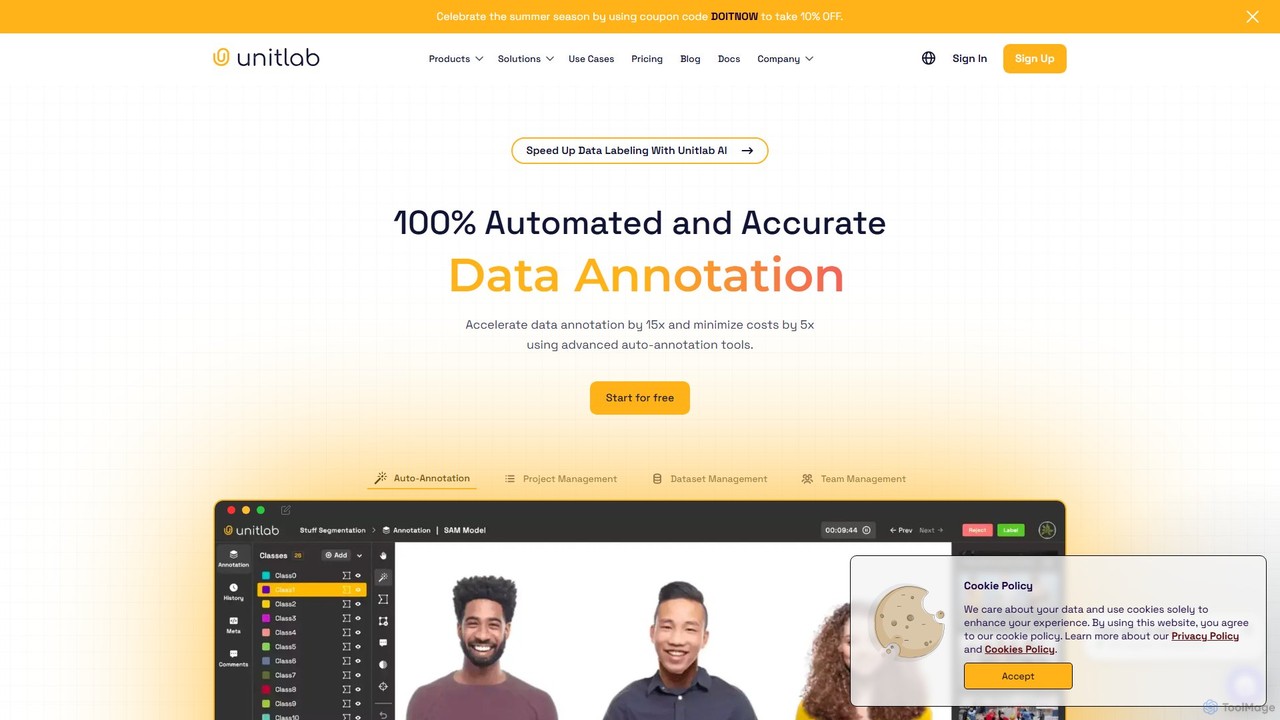
Unitlab is a streamlined data annotation platform designed for computer vision projects. It provides a comprehensive suite of tools for data annotation, dataset management, and model management. The platform supports various annotation types and offers AI-assisted labeling to accelerate workflows, making it ideal for industries like healthcare, agriculture, robotics, and autonomous driving.

Dataset Management
Visits 11KFavorites 148Likes 139

About Machine Learning

Machine Learning tools for computer vision are specialized platforms and frameworks for building, training, and deploying models that enable computers to interpret and understand visual information. These tools utilize algorithms like deep neural networks to learn patterns from large image and video datasets, automating the creation of sophisticated vision capabilities. They empower developers and data scientists to move beyond pre-built APIs and create custom solutions for unique visual recognition tasks, such as object detection, image segmentation, and facial analysis. This approach offers greater flexibility and higher accuracy for specific business needs.

Core Features

  • Model Training & Fine-Tuning: Provides environments to train custom models from scratch or adapt pre-trained models to new data.
  • Data Annotation & Management: Includes tools for labeling images and videos (e.g., bounding boxes, polygons) to create training datasets.
  • Hyperparameter Optimization: Automates the process of finding the best model configurations to maximize performance.
  • Model Deployment & Management: Facilitates the packaging and deployment of trained models as scalable APIs or for edge devices.
  • Experiment Tracking: Logs and compares different training runs, models, and results to ensure reproducibility.

Use Cases

These tools are essential for organizations in sectors like manufacturing for automated quality control, healthcare for medical image analysis (e.g., detecting anomalies in X-rays), retail for inventory management via object detection, and automotive for developing perception systems for autonomous vehicles. They are used by machine learning engineers and data scientists to build proprietary vision systems tailored to specific operational requirements.

How to Choose

When selecting a Machine Learning tool for computer vision, consider the supported frameworks (e.g., TensorFlow, PyTorch), the ease of data annotation and preprocessing, and the scalability of the training infrastructure. Evaluate the options for model deployment, such as cloud-based APIs, edge computing support, and integration with MLOps pipelines. Also, assess the technical expertise required and the platform's pricing model, whether it's based on compute hours or a subscription fee.

Machine Learning use cases

1

Automating Quality Control in Manufacturing

A manufacturing engineer needs to identify defective products on a high-speed assembly line. Using a machine learning platform, they collect images of both good and defective items to create a labeled dataset. They then train a custom image classification model to distinguish between the two categories with high accuracy. The trained model is deployed on an edge device with a camera positioned over the conveyor belt. This system automatically flags or removes defective products in real-time, reducing manual inspection costs by over 90% and significantly improving product quality consistency.

2

Developing a Custom Medical Image Analysis Model

A data scientist at a healthcare research institute is tasked with creating a model to detect early signs of a specific disease from MRI scans. Off-the-shelf tools lack the required specificity. Using a machine learning platform, the team annotates a large dataset of anonymized scans, marking regions of interest. They experiment with various deep learning architectures, like U-Net, tracking each experiment's performance. The final, highly accurate segmentation model is integrated into the radiologists' workflow as a diagnostic aid, helping to identify subtle patterns missed by the human eye and potentially leading to earlier patient diagnosis.

3

Building a Perception System for an Autonomous Robot

An robotics engineer is developing a warehouse robot that needs to navigate aisles and identify pallets. They use a machine learning platform to train an object detection model. The process involves annotating thousands of images of the warehouse environment with bounding boxes around pallets, shelves, and obstacles. They fine-tune a pre-trained model like YOLO on this custom dataset to achieve real-time performance. The model is then deployed to the robot's onboard computer, allowing it to perceive its surroundings, locate target pallets, and navigate safely, thereby automating a critical part of the logistics workflow.

4

Analyzing Customer Behavior in Retail Stores

A retail analyst wants to understand in-store customer traffic patterns to optimize store layout. Using a machine learning platform and footage from existing security cameras, they train a model to detect people and track their movements. The platform helps manage the large video dataset and track experiments for different tracking algorithms. The resulting model generates anonymized heatmaps and pathing data, revealing high-traffic areas and common customer journeys. This data-driven insight allows store managers to strategically place high-margin products and improve the overall shopping experience without intrusive tracking hardware.

5

Creating Semantic Segmentation for Satellite Imagery

A GIS analyst is working for an environmental agency to monitor deforestation. Manually analyzing satellite images is slow and inefficient. They use a machine learning platform to build a semantic segmentation model. The team meticulously labels various land cover types (forest, water, urban areas) in satellite photos. They train a model that can automatically classify every pixel in a new satellite image. This automated process allows the agency to analyze vast geographical areas quickly, track changes in forest cover over time with high precision, and generate accurate reports for policy-making.

6

Fine-Tuning a Model for Niche Product Recognition

A startup is developing a mobile app to identify specific brands of sneakers from a photo. General-purpose image recognition APIs fail to distinguish between similar models. The development team uses a machine learning platform to fine-tune a powerful, pre-trained vision model. They collect and label a dataset of thousands of sneaker images. The platform's tools simplify the process of retraining the model's final layers on this specific data. The resulting specialized model achieves over 95% accuracy on their target products, providing a core competitive advantage for their app.

Machine Learning FAQ

What are Machine Learning tools in the context of Computer Vision?

Machine Learning tools for Computer Vision are platforms that provide the end-to-end infrastructure to build custom vision models. Unlike simple APIs that offer pre-built functions, these tools give you control over the entire model lifecycle. This includes data annotation, selecting model architectures (like CNNs or Vision Transformers), training the model on your specific data, and deploying it for your application. They are used when you need higher accuracy or a capability not available in standard computer vision services.

How do I choose the right ML platform for my computer vision project?

Choosing the right platform depends on several factors. Consider the following:

  • Technical Skill: Some platforms offer low-code/no-code interfaces for simpler tasks, while others require strong programming and ML knowledge.
  • Project Complexity: For standard tasks like classification, a simpler platform may suffice. For complex tasks like semantic segmentation or 3D vision, you'll need a more powerful and flexible tool.
  • Data Needs: Evaluate the platform's data annotation, augmentation, and management capabilities.
  • Deployment Target: Ensure the platform supports deployment to your target environment, whether it's the cloud, a mobile app, or an edge device.
  • Cost: Compare pricing models, which can be based on usage (GPU hours), number of users, or features.
What's the difference between using a pre-built Computer Vision API and a Machine Learning platform?

The key difference is customization and control. A pre-built Computer Vision API (e.g., for general object detection) is a ready-to-use service that works well for common tasks but offers limited flexibility. A Machine Learning platform, on the other hand, is a toolkit. It allows you to build a highly specialized model trained on your own data. Use an API for speed and convenience on standard problems. Use an ML platform when you need to solve a unique visual problem, require higher accuracy than a general model can provide, or need to own the resulting model IP.

Do I need to be a data scientist to use these machine learning tools?

Not necessarily, but it depends on the tool. The field is evolving with more user-friendly platforms featuring automated machine learning (AutoML) capabilities. These low-code or no-code tools can automate tasks like model selection and hyperparameter tuning, making them accessible to developers or domain experts with less ML experience. However, for building highly complex, state-of-the-art models or for deep customization, a strong background in machine learning, programming (like Python), and deep learning frameworks is typically required.

What are the key stages of building a CV model with these tools?

Building a custom computer vision model typically involves a clear, iterative process supported by these platforms:

  1. Data Collection & Preparation: Gathering and organizing your images or videos.
  2. Data Annotation: Labeling your data accurately (e.g., drawing bounding boxes around objects). This is one of the most critical steps.
  3. Model Training: Choosing a model architecture and training it on your labeled dataset. This involves setting parameters and letting the algorithm learn.
  4. Evaluation: Testing the trained model's performance on a separate set of data to see how well it performs.
  5. Deployment: Making the trained model available for use in your application, either through an API or on a device.
  6. Monitoring & Retraining: Continuously monitoring the model's performance in the real world and retraining it with new data to maintain accuracy.