ToolMage
Sign in

Best 1 Image Resources AI tools for Design

Popular Image Resources AI tools in Design include Background, helping you work more efficiently.

Background
Paid

Background

Background is a premium library of AI-generated backgrounds created with Midjourney. It offers stunning 6K resolution images across various themed collections, updated monthly. With a one-time purchase, users get lifetime access to the entire collection, the exact Midjourney prompts used, and a limitless license for both personal and commercial projects.

Generative Art
Visits 6.5KFavorites 146Likes 137

About Image Resources

AI Image Resources are platforms providing vast, searchable libraries of high-quality images, icons, and vectors, often enhanced or generated by artificial intelligence. These tools utilize AI for advanced semantic search, automatic tagging, and intelligent curation, allowing users to find visual assets without relying on precise keywords. They are essential for content creators, marketers, and designers needing quick access to unique and relevant visuals for websites, social media, and marketing materials. Unlike traditional stock photo sites, AI Image Resources often feature exclusive, AI-generated content and predictive search functions to streamline the creative workflow.

Core Features

  • AI-Powered Semantic Search: Find images based on concepts, emotions, or complex descriptions, not just keywords.
  • Automatic Tagging & Categorization: AI analyzes and organizes images, making large libraries easily navigable.
  • Unique AI-Generated Content: Access exclusive stock photos and themed collections created by AI models.
  • Visual Similarity Search: Upload an image to find visually similar assets within the library.
  • Predictive Recommendations: The system suggests relevant images based on your project context and past searches.

Use Cases

These tools are widely used by marketing teams for creating ad campaigns, social media managers for sourcing daily content, and web designers for populating sites with cohesive visuals. They are also valuable for bloggers, presentation creators, and any professional who needs to communicate ideas visually without requiring custom design work.

How to Choose

When selecting an AI Image Resource, evaluate the library's size, diversity, and style. Test the effectiveness of the AI search with complex, natural language queries. Carefully review the licensing model to ensure it covers your intended commercial or editorial use. Also, consider integrations with design software like Figma or content management systems to optimize your workflow.

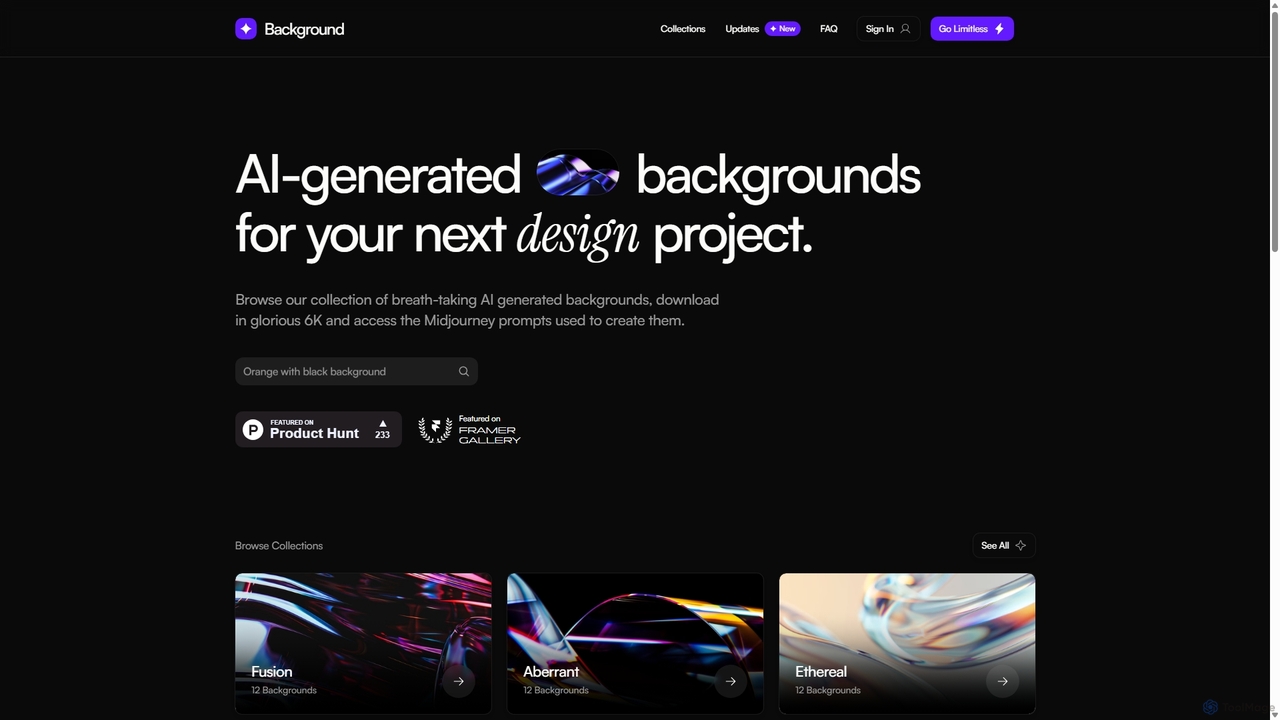
Image Resources use cases

1

Sourcing Unique Visuals for Marketing Campaigns

A marketing manager needs compelling images for a new product launch across social media, ads, and the website. Instead of generic stock photos, they use an AI Image Resource platform. They search for 'futuristic minimalist product background in blue tones' and get unique, AI-generated options. This ensures brand consistency and avoids using the same images as competitors, leading to a more distinctive and impactful campaign.

2

Finding Relevant Illustrations for Blog Content

A content writer for a tech blog needs to illustrate a complex article about machine learning. They use an AI Image Resource tool's semantic search to find abstract illustrations representing 'neural networks' or 'data processing'. The AI understands the concept and provides stylistically consistent visuals, enhancing the article's readability and professional appeal without requiring custom design work.

3

Populating a New Website with Cohesive Imagery

A web designer is building a website for a wellness brand and needs a large set of images with a consistent, calming aesthetic. Using an AI Image Resource, they find one perfect image and use the 'visual similarity' feature to instantly discover dozens of other photos with similar color palettes, lighting, and mood. This process populates the entire site with a cohesive visual identity in a fraction of the time.

4

Streamlining Social Media Content Creation

A social media manager plans a month's worth of content and needs diverse images for daily posts. They use an AI platform that suggests images based on upcoming holidays, trending topics, or the text of their planned captions. This predictive recommendation feature helps them quickly find relevant, high-engagement visuals, saving hours of manual searching each week and ensuring the content calendar is always fresh and appealing.

5

Enhancing Business Presentations and Reports

A business analyst is preparing a quarterly report for stakeholders. To make the data-heavy presentation more engaging, they need professional icons and charts. They use an AI Image Resource to search for 'financial growth icon' or 'data analysis vector'. The platform provides clean, modern graphics that can be easily customized and inserted into their slides, improving clarity and visual impact without needing a graphic designer.

6

Rapid Mood Boarding for Creative Projects

A creative director is in the early stages of a branding project and needs to create a mood board to define the visual direction. They use an AI Image Resource to quickly gather images based on abstract concepts like 'serene innovation' or 'bold tradition'. The AI's ability to interpret these nuanced queries provides a rich collection of inspirational images, accelerating the conceptual phase of the project and facilitating clearer communication with the client.

Image Resources FAQ

What are AI Image Resources?

AI Image Resources are platforms that use artificial intelligence to help users discover and access vast libraries of images, illustrations, and vectors. Their key feature is an AI-powered search that understands concepts and context, going beyond simple keyword matching. This makes it faster for creators and marketers to find unique and highly relevant visuals for their projects.

How do I choose the right AI Image Resource tool?

When choosing a tool, consider these key factors:

  • Content Library: Does it have the style and volume of images you need (e.g., photos, AI-generated, vectors)?
  • Search Quality: How well does the AI understand your natural language or conceptual queries? Test it with specific prompts.
  • Licensing Terms: Ensure the license (e.g., royalty-free, commercial use) fits your needs and is clearly defined.
  • Pricing Model: Compare subscription plans, credit packs, or free tiers based on your expected usage volume.
What's the difference between AI Image Resources and traditional stock photo sites?

The main difference is the technology used for discovery and the type of content offered. Traditional sites rely heavily on manual tagging and keyword search. AI Image Resources use semantic search to understand user intent and context. Additionally, many AI platforms offer exclusive, AI-generated images that you won't find on traditional stock sites, providing more unique visual options for your creative projects.

What are the key features of AI Image Resource platforms?

Core features typically include:

  • Semantic Search: Searching with full sentences or abstract ideas instead of just keywords.
  • Visual Similarity Search: Finding images that look like one you've uploaded or selected.
  • AI-Generated Content: Access to libraries of unique images created by generative AI models.
  • Smart Tagging: Automatic and accurate keyword tagging for easy filtering and discovery.
  • Curated Collections: Themed galleries often created by AI based on current trends, styles, or concepts.
Who should use AI Image Resources?

These tools are ideal for anyone who regularly needs high-quality visual content. This includes marketers creating ads, social media managers, content creators writing blog posts, web designers building sites, and business professionals preparing presentations. They are particularly useful for users who want to save time searching for images and access more unique content than what's available on standard stock platforms.